1. Introduktion
Thank you for choosing the Fuzion Digital Shipping Scale UD-180. This heavy-duty digital scale is designed for accurate weighing of packages, parcels, and other items up to 330 pounds (150 kg). Featuring a durable stainless steel platform and a separate LCD display, it offers precision and convenience for various applications, including postal services, commercial businesses, and home use. This manual provides essential instructions for setup, operation, maintenance, and troubleshooting to ensure optimal performance and longevity of your scale.
2. Pakkens indhold
Kontroller venligst, at alle komponenter er til stede i din pakke:
- Fuzion Digital Shipping Scale Platform
- LCD Display Unit with Coiled Cord
- AC strømadapter
- 3 x AAA-batterier (forinstalleret eller medfølger separat)
- Instruktionsmanual (dette dokument)
3. Sikkerhedsoplysninger
To ensure safe and proper use of your Fuzion Digital Shipping Scale, please observe the following precautions:
- This scale is intended for weighing packages and objects, not for human medical diagnosis.
- Avoid placing the scale in direct sunlight, near heat sources, or in areas with extreme temperature fluctuations.
- Do not expose the scale to moisture or immerse it in water. Clean with a damp kun klud.
- Placer vægten på en stabil, plan overflade for at sikre nøjagtige aflæsninger.
- Do not overload the scale beyond its maximum capacity of 330lb (150kg).
- Opbevares utilgængeligt for børn.
4. Opsætning
4.1 Strømforsyning
The Fuzion Digital Shipping Scale can be powered by either the included AC adapter or AAA batteries.
- Brug af AC-adapteren: Plug the AC adapter into the power port on the display unit, then plug the adapter into a standard electrical outlet.
- Brug af batterier: Open the battery compartment on the underside of the display unit. Insert 3 AAA batteries, ensuring correct polarity (+/-). Close the compartment securely.

Image: The display unit connected to an AC adapter and a view of the battery compartment for AAA batteries.
4.2 Placering af displayenhed
The separate LCD display unit offers flexible placement options:
- Skrivebordsstativ: The display unit includes a built-in stand for convenient placement on a desk or table.
- Vægmontering: The display unit can be mounted on a wall using the integrated mounting holes. Secure it with appropriate screws (not included) for your wall type.

Image: Diagram illustrating the display unit's stand and wall-mounting capabilities, with examples of packages on the scale.
4.3 Indledende placering
Place the scale platform on a firm, flat, and stable surface. Ensure there are no obstructions or vibrations that could affect weighing accuracy.
5. Betjening
5.1 Tænd/sluk
- Tryk på ON/OFF knappen for at tænde for vægten.
- Tryk på ON/OFF button again to turn the scale off.
5.2 Changing Weighing Modes
The scale supports three weighing units: pounds (lb), ounces (oz), and kilograms (kg).
- Tryk på knappen med vægten tændt MODE button to cycle through the available units (lb → oz → kg → lb).
- Den valgte enhed vises på LCD-skærmen.

Image: Close-up of the display unit showing the three weighing modes (lb, oz, kg) and how to switch between them.
5.3 Tara funktion
The Tare function allows you to subtract the weight of a container, providing only the net weight of the contents.
- Place an empty container on the scale platform.
- Vent på at vægten stabiliserer sig.
- Tryk på TARA button. The display will reset to zero.
- Now, place the items to be weighed inside the container. The display will show only the weight of the items.
- To clear the Tare, remove all items from the scale and press TARA igen.
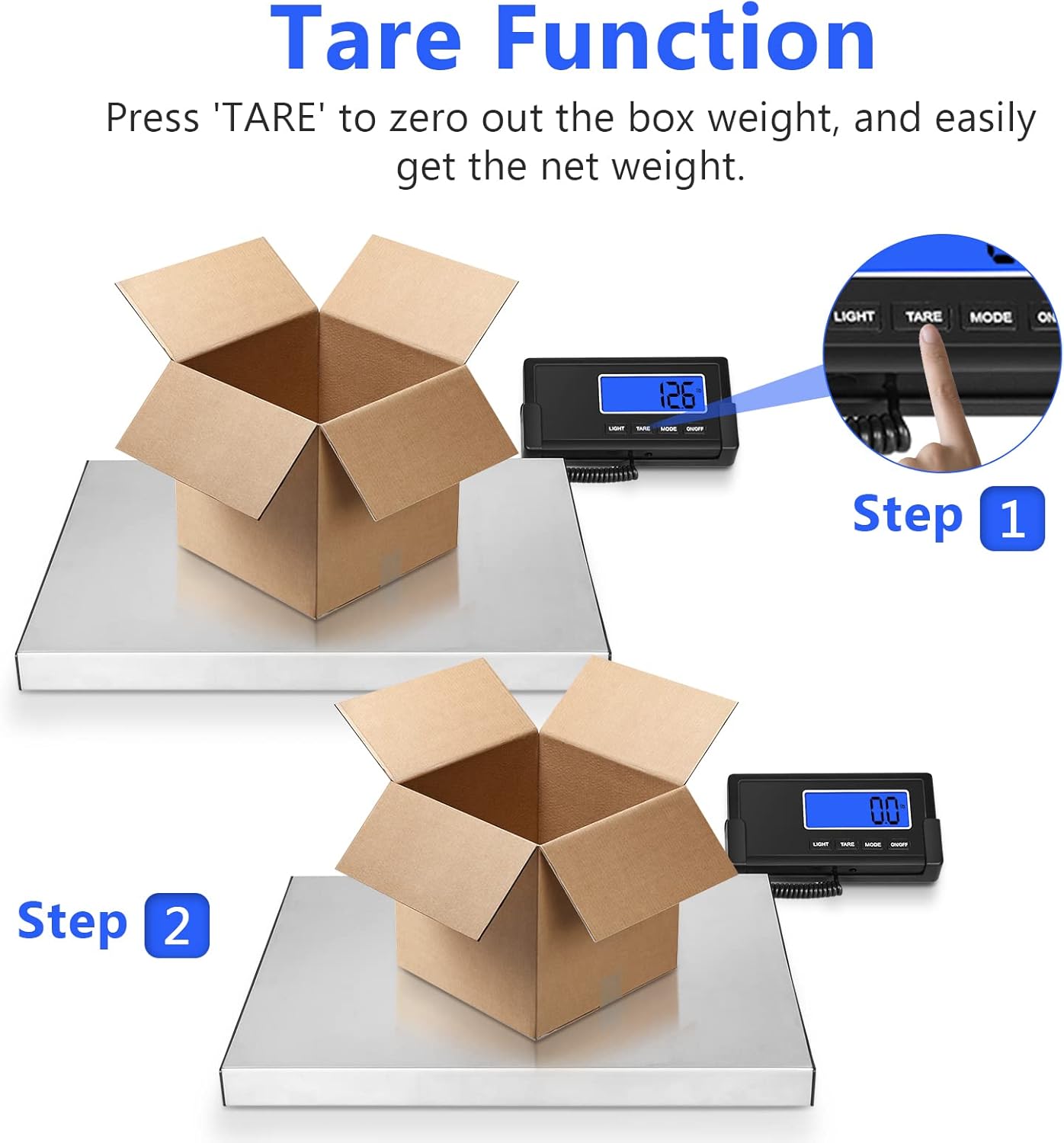
Image: Two-step illustration of the Tare function, showing an empty box being zeroed out, then items added for net weight measurement.
5.4 Vejning af genstande
Sådan vejer du en vare:
- Ensure the scale is on and displaying '0.0' (or '0.00' depending on the unit).
- Carefully place the item in the center of the scale platform.
- Vent til aflæsningen stabiliserer sig på LCD-displayet.
5.5 Baggrundsbelysningsfunktion
Tryk på LYS button to turn the LCD backlight on or off for improved visibility in various lighting conditions.
6. Vedligeholdelse
Proper maintenance ensures the longevity and accuracy of your scale.
- Rensning: Tør vægtplatformen og displayenheden af med en blød klud.amp cloth. Do not use abrasive cleaners, solvents, or harsh chemicals, as these can damage the finish and internal components.
- Opbevaring: When not in use, store the scale in a clean, dry environment away from extreme temperatures and direct sunlight.
- Udskiftning af batteri: If using batteries, replace them when the low battery indicator appears on the display or if the scale fails to power on.
7. Fejlfinding
If you encounter issues with your Fuzion Digital Shipping Scale, refer to the following table for common problems and solutions:
| Problem | Mulig årsag | Løsning |
|---|---|---|
| Skalaen tænder ikke | No power; dead batteries or AC adapter not connected. | Kontroller strømadapterens tilslutning, eller udskift batterierne. |
| Unøjagtige eller inkonsistente aflæsninger | Scale not on a stable surface; overloaded; drafts; item not centered. | Place scale on a firm, level surface. Ensure weight is within capacity. Avoid drafts. Center item on platform. |
| Display shows "EEEE" or "O_Ld" | Overbelastningsfejl. | Remove item immediately. Ensure weight does not exceed 330lb (150kg). |
| Displayet viser "Lo" | Indikator for lavt batteri. | Replace batteries or use AC adapter. |
| Skærmen er svag eller flimrer | Problem med lavt batteri eller strøm. | Replace batteries or ensure AC adapter is providing stable power. |
8. Specifikationer
Key technical specifications for the Fuzion Digital Shipping Scale UD-180:
| Feature | Specifikation |
|---|---|
| Modelnummer | UD-180 |
| Maksimal kapacitet | 330 lb / 150 kg |
| Nøjagtighed | 0.1 lb / 50 g |
| Minimum Readability | 150 g / 5 oz |
| Platformens dimensioner | 15 tommer x 12 tommer |
| Materiale | Stainless Steel (Platform) |
| Display Type | LCD med baggrundsbelysning |
| Vejetilstande | lb, oz, kg |
| Strømkilde | AC Adapter or 3 x AAA Batteries |
| Særlige funktioner | Tare Function, Dual Power Supply, Large Platform |
| Varens vægt | 7.56 pund (3.44 kg) |
| UPC | 628719230541 |

Image: The Fuzion Digital Shipping Scale platform with dimensions (15in x 12in) and capacity (150kg/330lb) indicated.
9. Garanti og support
Fuzion is committed to 100% customer satisfaction. Your Fuzion Digital Shipping Scale UD-180 comes with a 3 års garanti mod fabrikationsfejl.
We also offer livslang støtte for our customers. If you have any questions, concerns, or require assistance with your product, please do not hesitate to contact our dedicated service team. We are always glad to help.
Kontaktoplysninger:
For support, please visit the Fuzion webwebstedet eller se din købsdokumentation for kontaktoplysninger.


