Introduction to AiPaper Mini
The AiPaper Mini is an 8.2-inch AI E Ink Tablet designed for enhanced productivity and a comfortable reading and writing experience. Featuring a 292PPI display with adjustable light, 128GB of internal storage, and an octa-core 2.0 GHz processor, it offers a paper-like feel for note-taking and seamless integration with AI functionalities.

Figure 1: The AiPaper Mini E Ink Tablet, shown with its accompanying stylus and folio case.
This manual provides comprehensive instructions for setting up, operating, maintaining, and troubleshooting your AiPaper Mini tablet. Please read it thoroughly to ensure optimal performance and longevity of your device.
Hvad er der i æsken
Upon unboxing your AiPaper Mini, please ensure all the following items are present:
- AiPaper mini tablet
- PU leather cover
- Generation 2.5 EMR Stylus
- Spare tips (11 total)
- A-to-C Adapter
- Hurtig guide

Figure 2: All components included in the AiPaper Mini retail package.
Indledende opsætning
Follow these steps to set up your AiPaper Mini for the first time:
- Tænd: Press and hold the power button located on the top right edge of the device until the screen illuminates.
- Sprogvalg: Choose your preferred language from the initial setup screen.
- Wi-Fi-forbindelse: Connect to a Wi-Fi network to enable online features and software updates. Select your network and enter the password.
- Stylus-parring: The Generation 2.5 EMR Stylus does not require charging or complex pairing. It is ready for use immediately upon contact with the screen.
- Softwareopdateringer: It is recommended to check for and install any available software updates to ensure optimal performance and access to the latest features. Navigate to 'Settings' > 'Update'.
Video 1: An unboxing and initial setup guide for the AiPaper Mini tablet.
Operating Your AiPaper Mini
Justerbart læselys
The AiPaper Mini features a soft reading light with 20 adjustable brightness levels (0-20). This allows for comfortable reading and note-taking in any lighting condition, day or night.

Figure 3: Adjust the screen brightness from 0 to 20 levels for optimal viewing.
Note-Taking and AI Features
Experience ultimate paper-like writing with the soft nibs of the stylus, providing realistic texture and resistance. The device organizes drafts into categories like Paper, Meeting, Daily, Learning, and Picking for easy navigation.

Figure 4: The AiPaper Mini offers an exceptional paper-writing experience.
Harness cutting-edge AI technology to enhance your productivity. The AI features allow you to compose and enhance emails, organize meeting notes, summarize articles, and customize AI commands to adapt to your needs.
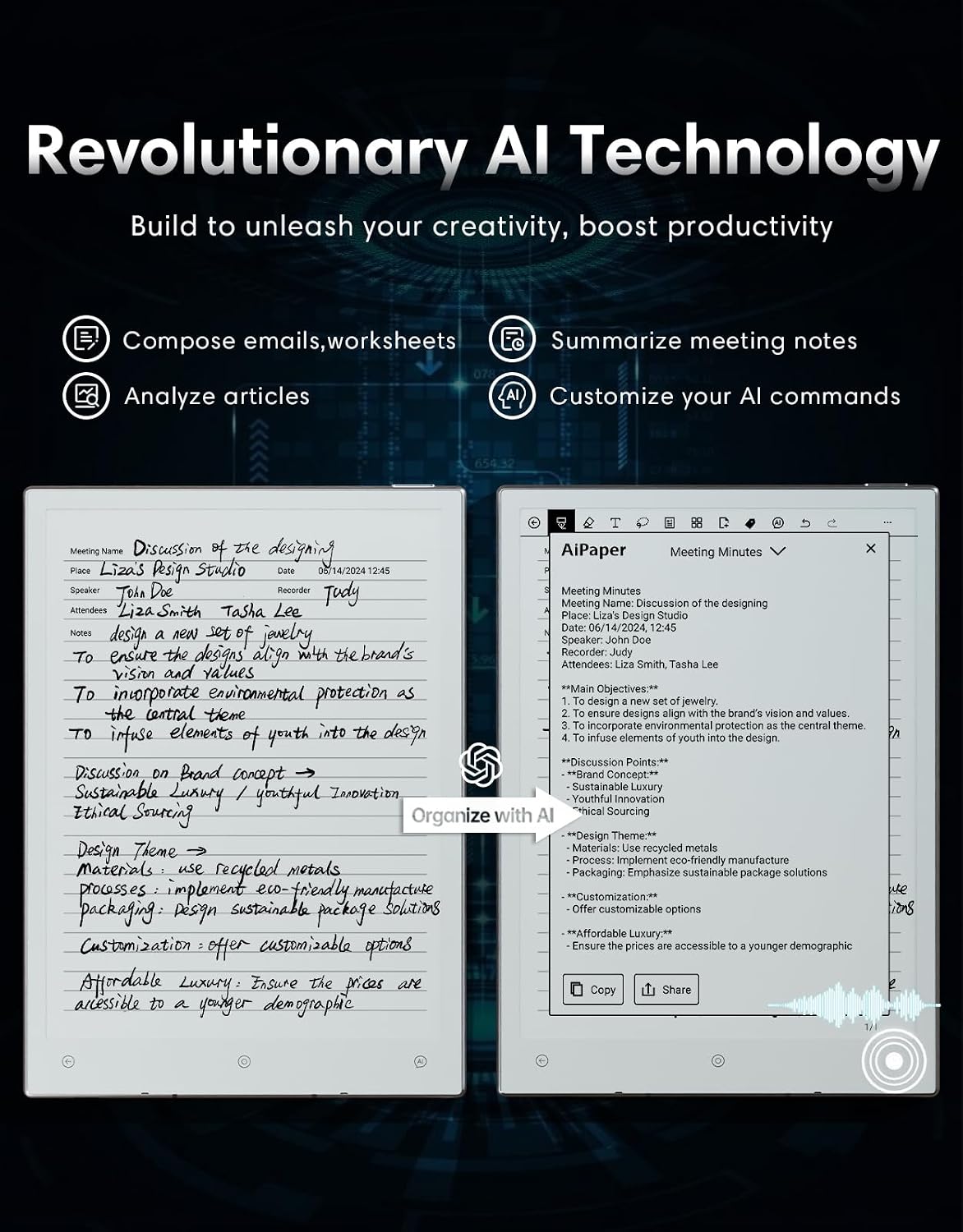
Figure 5: Revolutionary AI technology built into the AiPaper Mini.
- Compose & Enhance Emails: Leverage AI to refine and optimize handwritten messages.
- Transform Meeting Notes: Effortlessly organize and summarize notes using AI.
- Elevate Reading: Customize AI commands to summarize articles, translate text, and look up definitions.
- Instant Answers: Long press the AI Assistant button to ask questions or input queries.
- Håndskrift til tekst: Instantly transform handwritten notes into printed text in 9 languages.
Video 2: An introduction to the Daily feature on AiPaper and AiPaper Mini, showcasing its robust calendar and organization capabilities.
Fremskreden File Overførsel
The AiPaper Mini allows for effortless sharing of notes and documents across devices through various methods:
- QR-koder
- Bluetooth
- E-mails
- ViTransfer App
- Cloud services like OneDrive, Dropbox, and Google Drive

Figure 6: Multiple convenient options for file overførsel.
Storage and Security
The AiPaper Mini offers 128GB of internal storage, capable of storing up to 20,000 books or 2,400,000 pages of notes, with no subscription fees. Prioritizing privacy, Viwoods does not store user data in the cloud.
Secure your device and documents with file encryption via fingerprint or passcode. The power button doubles as a fingerprint reader for quick and secure access.

Figure 7: Enhanced privacy protection with fingerprint and password options.
Display Clarity and Portability
Enjoy an eye-friendly reading experience with 292PPI and 1920x1440 resolution. Sharp, clear text and images provide a paper-like reading experience, even when zooming in.

Figure 8: The 292PPI display offers great clarity for reading and writing.
Weighing just 230g with an 8.2-inch screen, the AiPaper Mini is ultra-light and portable, making it an ideal companion for work, study, or travel.

Figure 9: The ultra-light and portable design of the AiPaper Mini.
Stylus-funktioner
The included Generation 2.5 EMR Stylus features a built-in eraser, magnetic attachment, tilt and pressure sensitivity, 480 higher report rate, 2.5ms reduced latency, 0.3mm enhanced coordinate accuracy, and 60° improved tilt sensitivity. It comes with 2 long-lasting tips and 3 smooth-writing tips.

Figure 10: Key features of the Generation 2.5 EMR Stylus.
Vedligeholdelse og softwareopdateringer
To ensure your AiPaper Mini operates smoothly, regularly check for and install software updates. Updates often include performance improvements, new features, and bug fixes.
- Søger efter opdateringer: Navigate to 'Settings' > 'Update' on your device.
- Installation: Follow the on-screen prompts to download and install updates. Ensure your device has at least 30% battery remaining before starting an update.
Video 3: En detaljeret oversigtview of the Version 3.5.2 software update, highlighting new features and improvements.
Fejlfinding
If you encounter any issues with your AiPaper Mini, refer to the common problems and solutions below:
- Ghosting Issues: Some users may experience screen ghosting, where remnants of previous images remain. This can often resolve itself or be mitigated by performing a full screen refresh (usually found in display settings or by a specific gesture).
- No Volume Control: The tablet may lack hardware or software volume buttons. Volume control might rely on connected Bluetooth earbuds. Ensure your earbuds have their own volume controls or use an external audio device with volume adjustment.
- No Auto-Rotate: The device may not support automatic screen rotation. Manual rotation options might also be limited. Check for software updates that may introduce this functionality or adjust your content to fit the default orientation.
- Slow Software Updates: Updates may take a long time to download and install. Ensure a stable Wi-Fi connection and sufficient battery. Patience is key during this process.
- Screen Unresponsive to Fingers: Occasionally, the screen might not respond to finger touches. Try using the stylus for navigation or perform a soft reset of the device.
Tekniske specifikationer
| Feature | Specifikation |
|---|---|
| Produktdimensioner | 7.5 x 5.3 x 0.2 tommer |
| Varens vægt | 1.43 pund |
| Varemodelnummer | SE05 |
| Batterier | 1 Lithium Ion batterier påkrævet (medfølger) |
| Mærke | VIWOODS |
| Modelnavn | AiPaper Mini |
| Displayteknologi | Elektronisk blæk |
| Forbindelsesteknologi | USB |
| Skærmstørrelse | 8.2 tommer |
| Hukommelseslagringskapacitet | 128 GB |
| Skærmopløsning | 1920 x 1440 pixels |
| Farve | Hvid |
Garanti og support
VIWOODS is committed to customer satisfaction. Your AiPaper Mini comes with comprehensive support and coverage:
- 14-måneders dækning: For manufacturing defects and hardware issues.
- Monthly Software Updates: Continuous improvements and new features delivered regularly.
- 24/7 kundeservice: Assistance available around the clock for any queries or issues.
- Livsvarig teknisk support: Dedicated technical assistance for the lifespan of your device.

Figure 11: VIWOODS' commitment to quality and user experience.
For further assistance, please visit the official VIWOODS store or contact customer support through the provided channels in your quick guide.


