Indledning
Welcome to the world of paperless productivity with your new VIWOODS AiPaper Carta 1300 AI E Ink Tablet. This device is designed to redefine your reading and writing experience, offering a natural, paper-like feel combined with advanced AI capabilities and seamless digital integration. This manual provides essential information to help you get started, operate, maintain, and troubleshoot your device.
Hvad er der i æsken
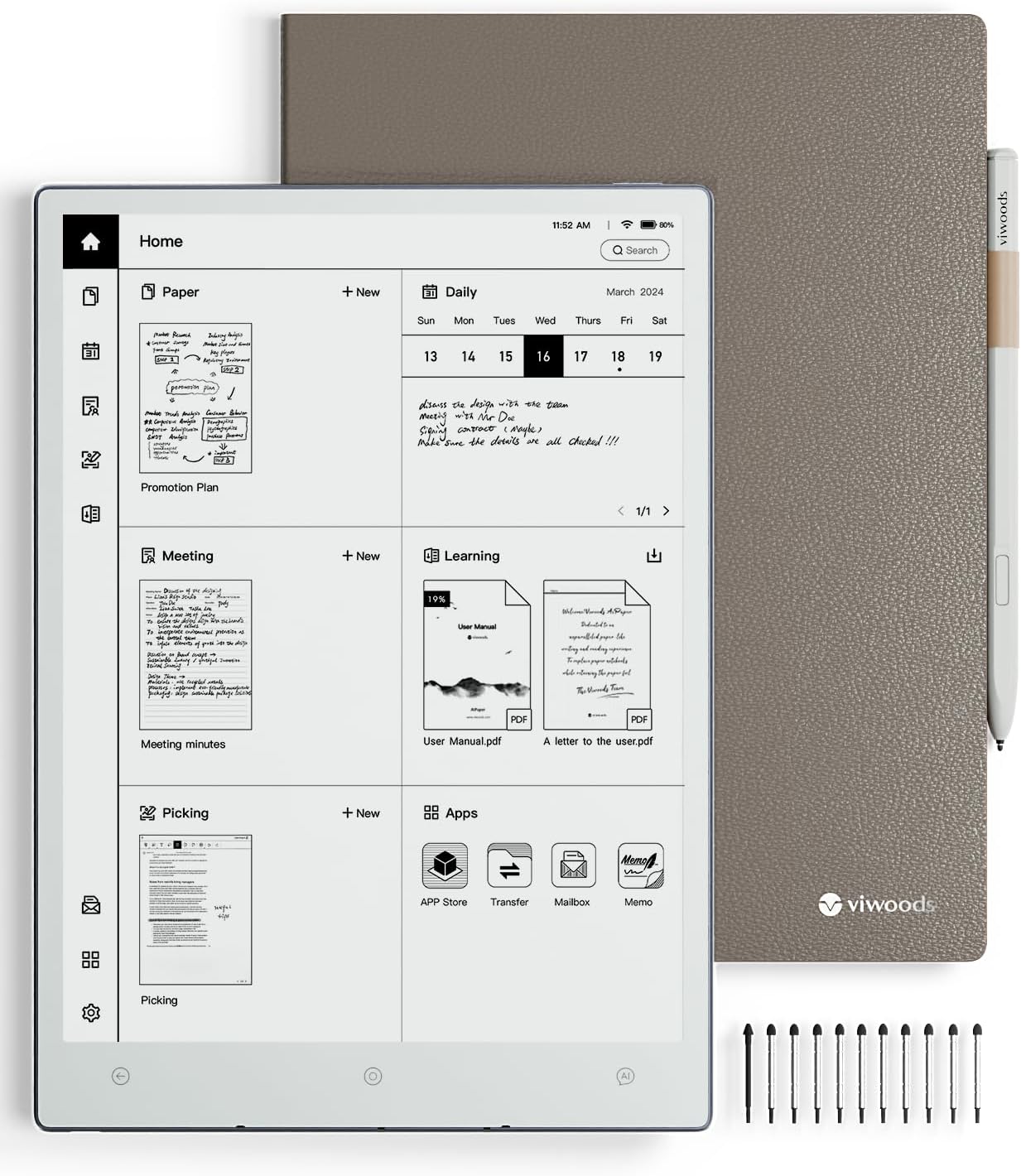
The complete AiPaper Carta 1300 AI E Ink Tablet bundle, including the device, its protective cover, stylus, and replacement tips.
- AiPaper Tablet x 1
- PU leather cover x 1
- Generation 2.5 EMR stylus with eraser x 1
- Spare tips x 11 (1 long-lasting, 10 smooth-writing)
- A-to-C Adapter x 1
Opsætning
Første opstart og opladning
Before first use, ensure your AiPaper tablet is fully charged. Connect the provided A-to-C adapter to the tablet and a power source. The device will indicate charging status on the screen. A full charge supports up to one week of daily use (2 hours per day) or 4 weeks on standby.

The AiPaper tablet features a 4100mAh battery, providing extended usage time.
Stylus Connection
The Generation 2.5 EMR stylus requires no charging or complex setup. It is ready to use immediately upon contact with the screen, offering a responsive and accurate writing experience.

The Generation 2.5 EMR Stylus offers a built-in eraser, magnetic attachment, and comes with multiple tips for varied writing preferences.
Google Play Store Activation
To access third-party applications from the Google Play Store, you may need to enable Google Service in the device settings. Follow the on-screen prompts for activation. This process can sometimes require a second attempt for successful completion.
Betjeningsvejledning
General Navigation and Interface
The AiPaper tablet features an intuitive interface designed for ease of use. Navigate through menus and applications using touch gestures or the stylus. The home screen provides quick access to your notes, daily planner, and installed applications.

The AiPaper home screen provides quick access to different note types and applications, emphasizing privacy protection with local storage and fingerprint unlock.
Note-Taking and Writing Features
Experience unparalleled paper-like writing with the AiPaper's 750 µm pen-to-ink distance, providing a minimal barrier between the stylus and the screen. The realistic textured feel mimics traditional pen and paper.

The 750µm pen-to-ink distance provides a natural, paper-like writing experience without a front light.
Choose from 7 types of strokes and 5 levels of stroke thickness to customize your writing and drawing. The device supports both flat and tilt drawing for varied artistic expression.

Customize your notes and drawings with 7 stroke types, 5 thickness levels, and support for both flat and tilt drawing.
Instantly transform your handwritten notes into printed text in 9 languages, including English, German, Spanish, French, Italian, Portuguese, Japanese, Russian, and Chinese. Custom AI commands can be added for even more languages.

Effortlessly convert handwritten notes into editable text in multiple languages.
Reading and Display Features
The AiPaper features an advanced Carta 1300 Mobius Screen, offering improved contrast and exceptional clarity. Enjoy an eye-friendly reading experience with 300PPI and 2560x1920 resolution, allowing comfortable reading for hours without backlight, glare, or eye strain.

The Carta 1300 Mobius Screen provides improved contrast, greater clarity, quicker response, and lower power consumption.

Enjoy crisp, clear text and images with 300PPI clarity, providing a paper-like reading experience.
The device supports seamless note-taking on third-party apps. Powered by Android 13, it allows for effortless note-taking with the Picking feature. Simply swipe from the top-right corner to capture the page and jot down your thoughts while reading.

Seamlessly read and take notes within third-party applications using the Picking feature.

Read with third-party apps and capture ideas with the Picking feature for seamless note-taking.
Daily Planner Feature
The AiPaper's Daily feature helps you stay organized and productive by combining task management, document tracking, and calendar integration. Plan your day with ease, automatically sort notes and activities by date, and sync with Google or Outlook calendars for a streamlined schedule.

Master your day with the Daily Planner, streamlining tasks, notes, and file tracking with seamless Google and Outlook calendar integration.

Stay organized with the Daily feature, integrating seamlessly with Google and Outlook calendars.
AI funktioner
Elevate your work with integrated AI. The AiPaper is designed to unleash creativity and boost productivity through various AI-powered functions.

Revolutionary AI technology allows you to summarize, organize, and analyze notes, and customize AI commands.
- Compose and Enhance Emails: Leverage advanced AI to refine and optimize your handwritten messages for clear and professional communication.
- Transform Meeting Notes: Effortlessly organize and summarize meeting notes using AI, enhancing productivity and collaboration.
- Elevate Your Reading: Customize AI commands to summarize articles, translate text, look up definitions, and more.
- AI-assistent: Long press the AI Assistant button to ask questions or input queries, making information access seamless and effortless.

Compose and enhance emails using AI technology for professional communication.

Transform meeting notes with AI to effortlessly organize and summarize content.

Elevate your reading experience by customizing AI commands to summarize articles, translate text, and look up definitions.
File Management and Storage
The AiPaper electronic notebook integrates with popular cloud platforms including OneDrive, Google Drive, and Dropbox, enabling effortless file syncing and sharing. Transfer files securely via WLAN Transfer, Bluetooth, USB, or ViTransfer.

Bekvem file transfer and syncing with cloud services like OneDrive, Dropbox, and Google Drive, plus WLAN Transfer.

Ubesværet file syncing and secure sharing across devices and cloud platforms.
With 128GB of encrypted storage, AiPaper can hold up to 20,000 books or 2,400,000 pages of notes without any subscription fees.

Benefit from 128GB of large storage, capable of holding thousands of books and millions of notes without subscription fees.
Præstation
AiPaper features a powerful octa-core 2.0 GHz MT8788 processor, ensuring quick response times and minimal lag when flipping pages, loading large documents, or switching tools.

The powerful Octa-Core 2.0 GHz processor ensures smooth writing and reading with 4GB RAM LPDDR4X and Android 13.
Mediegalleri
Officielle produktvideoer
Viwoods AiPaper AI-Integrated E Ink Tablet: En overview of the tablet's AI integration and E Ink technology. (Duration: 2:47)
Brief introduction of Viwoods AiPaper: A concise introduction to the key features of the AiPaper tablet. (Duration: 1:44)
Version 3.4.1 Update: Details on the latest software updates and new functionalities. (Duration: 2:54)
How do AI boost productivity: Demonstrates how AI features enhance user productivity. (Duration: 0:31)
Unboxing of Viwoods AiPaper: A detailed unboxing experience of the AiPaper tablet. (Duration: 1:01)
Introduction of Daily feature on AiPaper & AiPaper Mini: Explores the Daily planner feature on the AiPaper. (Duration: 2:31)
Version 3.3.0 Update: Information on previous software updates and improvements. (Duration: 2:47)
File Kryptering: A short demonstration of the file encryption feature. (Duration: 0:33)
Opretholdelse
Skærmpleje
To maintain the clarity and responsiveness of your E Ink screen, gently wipe it with a soft, lint-free cloth. Avoid using abrasive materials or chemical cleaners, which can damage the screen surface. Keep the device away from direct sunlight and extreme temperatures.
Batterilevetid
While the AiPaper boasts excellent battery life, optimal performance is achieved by avoiding complete discharge. Charge the device regularly, especially if it will be stored for an extended period.
Fejlfinding
Screen Ghosting
E Ink displays may occasionally exhibit a faint residual image from previous content, known as ghosting. This is normal for E Ink technology. A quick swipe down from the left side of the screen with your finger will typically clear the ghosting instantly by performing a full screen refresh.
Stylus Nib Issues
If you experience inconsistent writing or the stylus nib feels loose, check the nib for wear. The 'Paper-like' nibs may be thinner and prone to some movement. The 'Extended life' nibs are generally more robust. Replace worn nibs with one of the 11 spare tips provided in the box. Ensure the nib is securely seated in the stylus.
Google Play Store Access
If you encounter difficulties activating or accessing the Google Play Store, ensure your device is connected to a stable Wi-Fi network. Try enabling Google Service in the settings again. Sometimes, a restart of the device after enabling the service can resolve the issue.
Specifikationer
| Feature | Detalje |
|---|---|
| Produktdimensioner | 9.72 x 7 x 0.18 tommer |
| Varens vægt | 1.94 pund (370 g) |
| Varemodelnummer | SE03 |
| Batterier | 1 Lithium Ion batteri påkrævet (medfølger) |
| Mærke | VIWOODS |
| Forbindelsesteknologi | Bluetooth, WiFi |
| Operativsystem | Android 13 |
| Særlige funktioner | 300PPI, 10.65 inch, 4.5mm thickness, Carta 1300 Mobius Screen, AI Integrated |
| Modelnavn | AiPaper |
| Fabrikant | VIWOODS |
| Oprindelsesland | Kina |
Garanti og support
VIWOODS is committed to your satisfaction and provides comprehensive support for your AiPaper tablet.
14-måneders dækning
Your device is covered by a 14-month warranty from the date of purchase.
Monthly Software Updates
Benefit from continuous improvements and new features with regular monthly software updates.
24/7 kundeservice
Access customer support around the clock for any queries or assistance you may need.
Livsvarig teknisk support
Receive ongoing technical support for the lifetime of your AiPaper device.


