1. Introduktion
This manual provides detailed instructions for the setup, operation, maintenance, and troubleshooting of your Deli ET521 Digital Safe Box. Please read this manual thoroughly before using the safe to ensure proper function and security. Keep this manual for future reference.
2. Sikkerhedsoplysninger
- Do not store the emergency override keys inside the safe. Keep them in a secure location outside the safe.
- Keep your personal access code confidential and do not share it with unauthorized individuals.
- Ensure the safe is securely mounted or placed to prevent unauthorized removal.
- Replace batteries promptly when the 'LO-BAT' indicator appears to avoid being locked out.
- This safe is designed for security and fire resistance. However, it is not completely fireproof or waterproof.
3. Pakkens indhold
Bekræft at alle varer er til stede i pakken:
- 1 x Deli ET521 Digital Safe Box
- 2 x Emergency Override Keys
- 1 x brugermanual
- Mounting Hardware (bolts)
4. Produktet er slutview
The Deli ET521 Digital Safe Box offers secure storage with a digital keypad and emergency key access. It features a reinforced solid steel body, felt interior, and LED lighting for convenience.

Figur 4.1: Forside view of the Deli ET521 Digital Safe Box, showcasing the keypad and overall design.
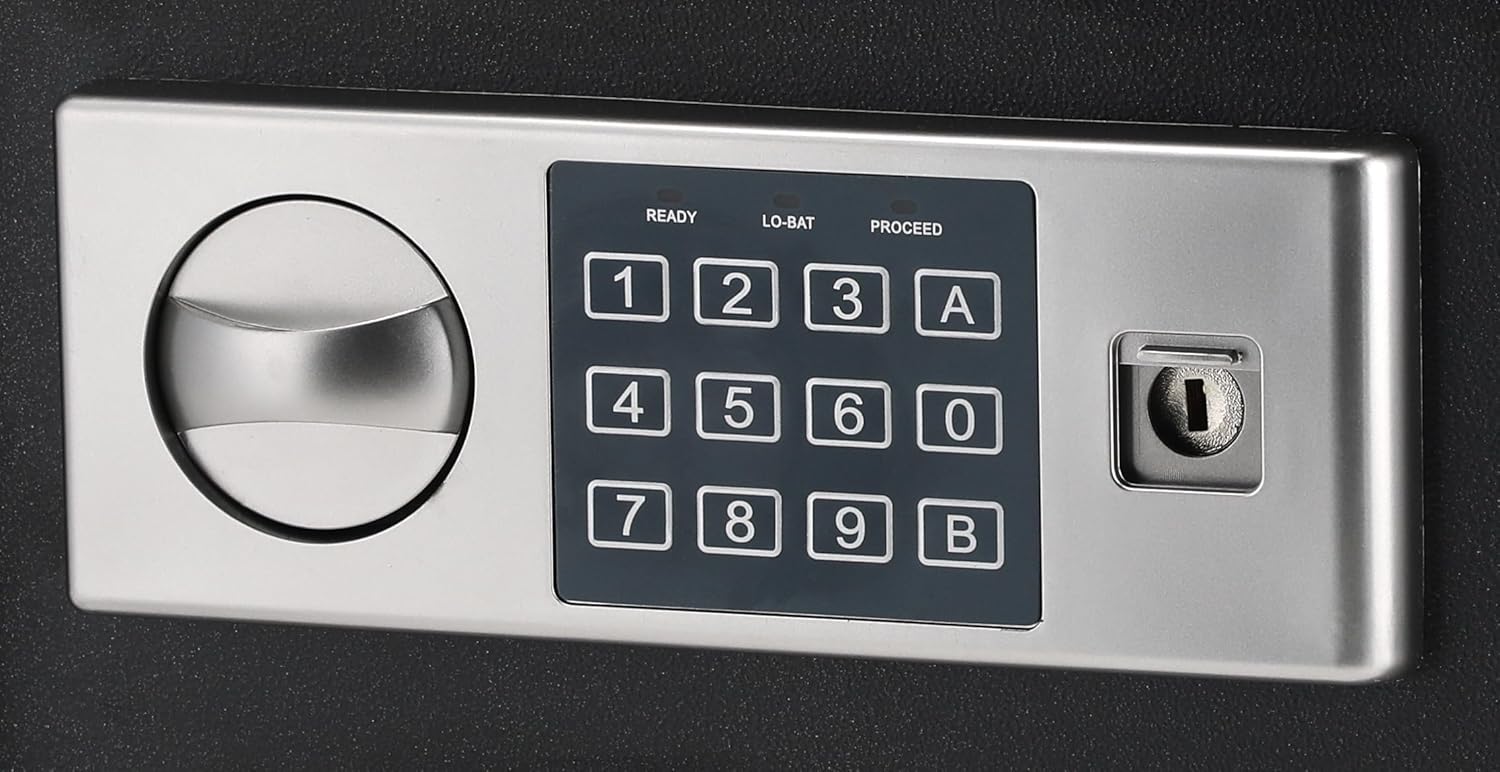
Figure 4.2: Close-up of the digital keypad with number buttons, 'A' and 'B' buttons, and the emergency keyhole.

Figur 4.3: Interiør view of the safe, showing the felt lining and internal space.
5. Opsætning
5.1 Batteriinstallation
The digital keypad requires 4 AA batteries (not included) for operation. The battery compartment is typically located on the inside of the safe door.
- Open the safe using the emergency override key (refer to Section 6.3 if needed).
- Find batteridækslet på indersiden af døren.
- Fjern dækslet, og isæt 4 nye AA-batterier, og sørg for at polerne vender korrekt (+/-).
- Sæt batterirummets dæksel på igen.
5.2 Initial Code Setting
Ved første brug skal du indstille din personlige adgangskode.
- With the safe door open, press the red reset button located on the inside of the door (usually near the hinge). You will hear a beep.
- Within 5 seconds, enter a new 3-8 digit code on the keypad.
- Press the 'A' or 'B' button to confirm. The safe will beep twice, indicating the code is set.
- Test den nye kode med døren åben, før du lukker den.
5.3 Montering af pengeskabet
The Deli ET521 is designed for floor-standing mounting. Securely mounting the safe is recommended to prevent theft.
- Vælg et passende sted, helst på en fast overflade.
- Marker borepunkterne gennem de forborede huller i bunden eller bagsiden af pengeskabet.
- Drill pilot holes into the floor or wall using an appropriate drill bit.
- Position the safe and secure it using the provided mounting bolts.
6. Betjeningsvejledning
6.1 Opening the Safe with Your Code
- Enter your 3-8 digit personal access code on the keypad.
- Press the 'A' or 'B' button.
- If the code is correct, the 'PROCEED' light will illuminate, and you will hear a beep.
- Drej knappen med uret inden for 5 sekunder for at åbne døren.
6.2 Locking the Safe
To lock the safe, simply close the door and turn the knob counter-clockwise. The safe will automatically lock.
6.3 Using the Emergency Override Key
In case of forgotten code or dead batteries, the emergency override key can be used.
- Locate the keyhole cover on the keypad panel.
- Fjern dækslet.
- Insert the emergency override key and turn it clockwise while simultaneously turning the knob clockwise to open the door.
- Once open, you can replace batteries or reset the code.
6.4 Changing Your Access Code
You can change your access code at any time with the door open.
- Åbn pengeskabsdøren.
- Tryk på den røde nulstillingsknap på indersiden af døren. Du vil høre et bip.
- Within 5 seconds, enter your new 3-8 digit code.
- Press the 'A' or 'B' button to confirm. The safe will beep twice.
- Test den nye kode med døren åben, før du lukker den.
7. Vedligeholdelse
7.1 Rengøring
Tør ydersiden af pengeskabet af med en blød, tør klud.amp klud. Undgå at bruge slibende rengøringsmidler eller opløsningsmidler, der kan beskadige overfladen eller tastaturet.
7.2 Udskiftning af batteri
When the 'LO-BAT' indicator light illuminates on the keypad, it is time to replace the batteries. Follow the steps in Section 5.1 to replace the 4 AA batteries.
8. Fejlfinding
- Pengeskabet åbner ikke med kode:
- Ensure batteries are not low (check 'LO-BAT' indicator). Replace if necessary.
- Indtast koden omhyggeligt igen.
- Use the emergency override key to open the safe and reset the code.
- Tastaturet reagerer ikke:
- Check battery installation and replace batteries.
- Door does not lock:
- Ensure the door is fully closed before turning the knob.
- Kontroller, om der er forhindringer, der forhindrer døren i at lukke helt.
9. Specifikationer

Figure 9.1: Diagram illustrating the approximate dimensions of the Deli ET521 Digital Safe Box.
| Feature | Detalje |
|---|---|
| Modelnummer | ET521 |
| Udvendige mål (D x B x H) | 25 cm x 35 cm x 25 cm |
| Varens vægt | 5.7 kilo |
| Låsetype | Electronic Combination Lock, Key Lock |
| Materiale | Legeret stål |
| Farve | Sort |
| Særlige funktioner | Fire Resistant, Digital Lock, LED Lighting |
| Monteringstype | Gulvmodel |
| Batterier påkrævet | 4 x AA (for keypad, not included) |
10. Garanti og support
For warranty information or technical support, please contact Deli customer service through their official webwebstedet eller forhandleren, hvor produktet blev købt. Gem din købskvittering som købsbevis.


