1. Introduktion
This manual provides essential information for the proper use and maintenance of your Xgody Mate 70 mobile phone. Please read it thoroughly before operating your device to ensure optimal performance and longevity.

Billede 1.1: Forside og bagside view of the Xgody Mate 70 mobile phone, showcasing dens design og kameramodul.
2. Hvad er der i æsken
Upon unboxing your Xgody Mate 70, verify that all listed items are present:
- 1 x Xgody Mate 70 Mobile Phone
- 1 x oplader
- 1 x Type-C kabel
- 1 x høretelefon
- 1 x Pin (for SIM tray)
- 1 x Tempered Film & HD Film
- 1 x beskyttelsesetui
- 1 x Phone Manual

Image 2.1: Diagram illustrating the items included in the Xgody Mate 70 product packaging.
3. Enhed overview
The Xgody Mate 70 features a sleek design with essential components strategically placed for user convenience.
3.1 Fysiske egenskaber
- Dimensioner: Approximately 167.1mm (height) x 76.4mm (width) x 9.3mm (thickness).
- Vægt: Cirka 196 gram.
- Vise: 6.52-inch HD+ IPS screen.
- Kamera: Dual rear cameras (24MP main) and a single front camera (8MP).
- Porte: USB Type-C charging port, 3.5mm headphone jack (if present, typically at top or bottom).
- Knapper: Tænd/sluk-knap, knapper til lydstyrke op/ned.

Image 3.1: The Xgody Mate 70's slim profile, highlighting its 9.3mm thickness.
4. Opsætning
4.1 Installation af SIM-kort og lagerplads
The Xgody Mate 70 supports dual Nano SIM cards or one Nano SIM card and one TF (Micro SD) card for expanded storage. Ensure the phone is powered off before inserting or removing cards.
- Find SIM-kortbakken på siden af telefonen.
- Insert the provided pin into the small hole on the SIM tray to eject it.
- Carefully place your Nano SIM card(s) and/or TF card into the designated slots on the tray. Refer to the diagram for correct orientation.
- Skub forsigtigt bakken tilbage i telefonen, indtil den flugter med enhedens kabinet.
Notice: SIM cards and TF cards are not included and must be purchased separately. Verify compatibility with your network carrier before purchase.

Image 4.1: Illustration of the dual SIM and Micro SD card tray, showing placement options.
4.2 Indledende tænding
- Press and hold the Power button until the Xgody logo appears.
- Følg vejledningen på skærmen for at fuldføre den indledende opsætning, herunder valg af sprog, Wi-Fi-forbindelse, login til Google-konto og sikkerhedsindstillinger.
5. Operating System (Android 14)
The Xgody Mate 70 runs on the Android 14 operating system, offering enhanced security, privacy controls, and a user-friendly interface.
5.1 Key Features of Android 14
- Enhanced Privacy Controls: Granular permissions for apps, allowing you to control access to your data.
- Updated Data Sharing: Improved transparency and control over how your data is shared.
- Strengthened Password Support: Advanced security measures for protecting your accounts.
- Malware Defense Enhancements: Improved system-level protection against malicious software.
- GMS-certificering: Ensures access to Google services and the Google Play Store.

Image 5.1: Visual representation of Android 14's security and smart features, including privacy controls and malware defense.
6. Display
The Xgody Mate 70 features a 6.52-inch HD+ IPS display with In-cell technology, providing clear visuals and vibrant colors.
- Størrelse: 6.52 tommer
- Opløsning: 720*1600 pixels
- Opdateringshastighed: 90Hz for smoother scrolling and animations.
- Skærm-til-krop-forhold: 81% for an immersive viewoplevelse.

Image 6.1: Details of the 6.52-inch HD+ IPS screen with In-cell technology, showing resolution and refresh rate.
7. Ydeevne og lagring
The device is powered by a T606 Octa-core processor and offers substantial memory and storage capabilities.
- Processor: T606 Octa-core processor for efficient multitasking and smooth operation.
- VÆDDER: 12GB (4GB physical RAM + 8GB virtual memory) for seamless app switching.
- Intern lagring (ROM): 128GB for applications, photos, and videos.
- Udvidelig lagerplads: Supports up to 1TB via TF (Micro SD) card.

Image 7.1: Diagram illustrating the 4GB physical RAM, 8GB extended RAM, and 128GB ROM, with support for 1TB TF card extension.
8. Kamerafunktioner
Capture moments with the Xgody Mate 70's versatile camera system.
- Bagkamera: 24MP main camera for high-definition photos.
- Forreste kamera: 8MP camera with AI beauty and facial recognition for selfies.
- Photography Modes: HDR Mode, Panorama Mode, Beauty Mode, Professional Mode.

Billede 8.1: Overview of the Xgody Mate 70's camera capabilities, including 24MP photography and various shooting modes.
9. Batteristyring
The Xgody Mate 70 is equipped with a large capacity battery to support extended usage.
- Batterikapacitet: 5500 mAh.
- Opladning: Supports 5V 2A fast charging via Type-C port.
- Standby tid: Op til 400 timer.
- Opkaldstid: Op til 36 timer.
- Videoafspilning: Op til 11 timer.
- Musikafspilning: Op til 65 timer.

Image 9.1: Visual representation of the 5500mAh battery, Type-C charging, and standby time.
10. Forbindelse
The Xgody Mate 70 offers various connectivity options for staying connected.
- Netværk: 4G Dual SIM support.
- Wi-Fi: 2.4G + 5G Dual WiFi for faster and more stable internet connections.
- Bluetooth: Bluetooth 5.0 for faster and more reliable connections with wireless devices.
- Navigation: GPS/Beidou/GLONASS for accurate positioning.

Image 10.1: Icons representing 2.4G+5G Dual WiFi, Bluetooth 5.0, Dual 4G SIM, and GPS/Beidou/GLONASS navigation.
11. Specialtilstande
The Xgody Mate 70 includes dedicated modes to enhance user experience for different demographics.
- Spiltilstand: Optimizes performance for gaming, reducing lag and improving responsiveness.
- Børnetilstand: Provides a secure and engaging environment for children with parental controls for app access and screen time.
- Senior Mode: Simplifies the interface with clear colors and large fonts for easier navigation and readability.
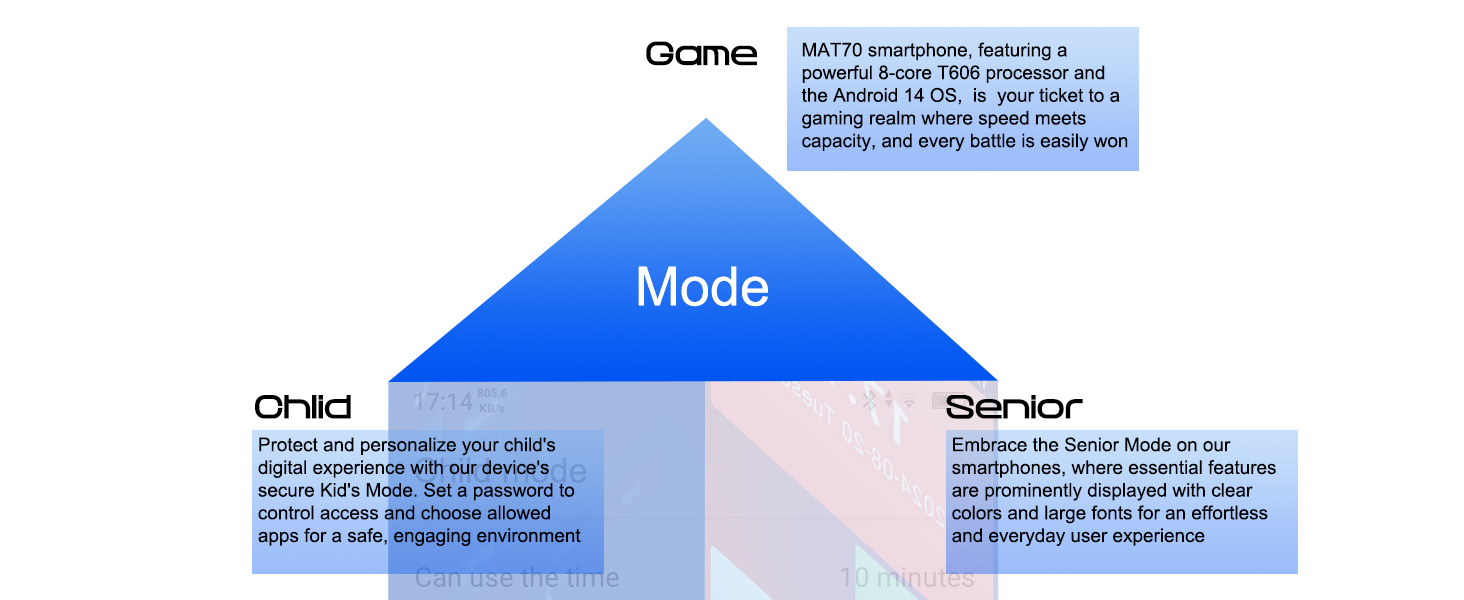
Image 11.1: Diagram illustrating the Game, Child, and Senior modes available on the Xgody Mate 70.
12. Vedligeholdelse
To ensure the longevity and optimal performance of your Xgody Mate 70, follow these maintenance guidelines:
- Rensning: Brug en blød, fnugfri klud til at rengøre skærmen og kabinettet. Undgå slibende materialer eller barske kemikalier.
- Beskyttelse: Use the provided protective case and screen film to guard against scratches and minor impacts.
- Temperatur: Avoid exposing the phone to extreme temperatures (hot or cold) or direct sunlight for prolonged periods.
- Fugtighed: Keep the phone dry. Do not immerse it in water or expose it to high humidity.
- Softwareopdateringer: Regularly check for and install system updates to benefit from improved security and features.
13. Fejlfinding
This section addresses common issues you might encounter with your Xgody Mate 70.
13.1 Almindelige problemer og løsninger
- Phone does not turn on:
- Sørg for, at batteriet er opladet. Tilslut telefonen til opladeren i mindst 30 minutter.
- Tryk og hold tænd/sluk-knappen nede i 10-15 sekunder for at fremtvinge en genstart.
- Batteriet aflades hurtigt:
- Luk ubrugte programmer, der kører i baggrunden.
- Reducer skærmens lysstyrke.
- Deaktiver Wi-Fi, Bluetooth eller GPS, når de ikke er i brug.
- Tjek batteriforbruget i Indstillinger for at identificere strømkrævende apps.
- Kan ikke oprette forbindelse til Wi-Fi:
- Sørg for, at Wi-Fi er aktiveret på din telefon.
- Genstart din Wi-Fi-router.
- Forget the network in your phone's Wi-Fi settings and reconnect.
- Apps går ned eller fryser:
- Clear the cache and data of the problematic app in Settings > Apps.
- Update the app to its latest version.
- Genstart telefonen.
- SIM-kort ikke fundet:
- Ensure the SIM card is correctly inserted into the tray.
- Genstart telefonen.
- Test the SIM card in another compatible device to rule out a card issue.
If issues persist, contact Xgody customer support for further assistance.
14. Specifikationer
Detailed technical specifications for the Xgody Mate 70.
| Feature | Specifikation |
|---|---|
| Mærke | Xgody |
| Modelnummer | makker 70 |
| Operativsystem | Android 14 |
| Processor | T606 Octa-core |
| RAM-hukommelse | 12 GB (4 GB fysisk + 8 GB virtuel) |
| Intern opbevaring | 128 GB |
| Udvidelig opbevaring | Op til 1 TB (TF-kort) |
| Skærmstørrelse | 6.52 tommer |
| Opløsning | 720 x 1600 (HD+) |
| Opdateringshastighed | 90 Hz |
| Bagkamera | 24 MP |
| Forreste kamera | 8 MP |
| Batterikapacitet | 5500 mAh |
| Opladning | 5V 2A Fast Charging (Type-C) |
| Trådløs bærer | Ulåst |
| Cellulær teknologi | 4G |
| Trådløs netværksteknologi | LTE, 2.4G+5G WiFi |
| Forbindelsesteknologi | 4G, Bluetooth 5.0 |
| Navigation | GPS/Beidou/GLONASS |
| Varens vægt | 196 g |
| Pakkedimensioner | 19.9 x 11.5 x 7.7 cm |
15. Garanti og support
For warranty information and customer support, please refer to the warranty card included in your product packaging or visit the official Xgody webwebsted. Gem din købsbevis til garantikrav.
Online support: For frequently asked questions and additional resources, please visit the Xgody support page.


