1. Introduktion
This manual provides essential instructions for the safe and effective use of your Dekala PlaySmart Kids Phone. Please read it thoroughly before operating the device and retain it for future reference.
2. Sikkerhedsoplysninger
Advarsel:
- Dette produkt er beregnet til børn i alderen 36 måneder og derover.
- Opsyn af voksne anbefales under brug.
- Udsæt ikke enheden for vand eller ekstreme temperaturer.
- Hold små dele væk fra små børn for at undgå kvælningsfare.
- Brug kun det medfølgende opladningskabel og adapter.
3. Pakkens indhold
Tjek venligst pakken for følgende varer:
- Dekala PlaySmart Kids Phone
- USB opladningskabel
- Brugervejledning (dette dokument)
- (Additional accessories may vary by package)
4. Produktet er slutview
The Dekala PlaySmart Kids Phone is designed to provide an engaging and educational experience for children. It features a 2.8-inch HD touchscreen and a durable build.

Figur 1: Dekala PlaySmart Kids Phone, showing the front screen and the back panel with camera lenses.
Nøglefunktioner:
- 180° Rotatable Camera: For photos and video recording.
- Music Player: Enjoy pre-loaded or user-added music.
- Video Recorder: Capture moments.
- Educational Games: 26 puzzle games to stimulate learning.
- Habit Tracker: Helps children manage daily routines.
- Calendar: Basic time management.
- Learning Cards & Audiobooks: 100 learning cards and 10 audio storybooks for educational content.
- Parental Controls: Manage screen time and access to features.
5. Opsætning
5.1. Opladning af enheden
- Connect the USB charging cable to the charging port on the phone.
- Sæt den anden ende af USB-kablet i en kompatibel USB-strømadapter (medfølger ikke) eller en computers USB-port.
- The screen will indicate charging status. Allow approximately 2-3 hours for a full charge.
- Afbryd opladeren, når den er fuldt opladet.
5.2. Tænd/sluk
- To power on: Press and hold the power button (usually located on the side) until the screen lights up.
- To power off: Press and hold the power button, then follow the on-screen prompts to shut down.
5.3. Indledende opsætning
Upon first power-on, you may be prompted to set the date, time, and language. Follow the on-screen instructions.
6. Betjeningsvejledning

Figur 2: Main interface displaying various applications and customizable wallpapers.
6.1. Navigation
- Touchskærm: Tryk på ikoner for at åbne applikationer, og stryg for at navigere mellem skærme.
- Hjemknappen: A physical or on-screen button (usually at the bottom center) to return to the main screen.
6.2. Camera and Video Recorder
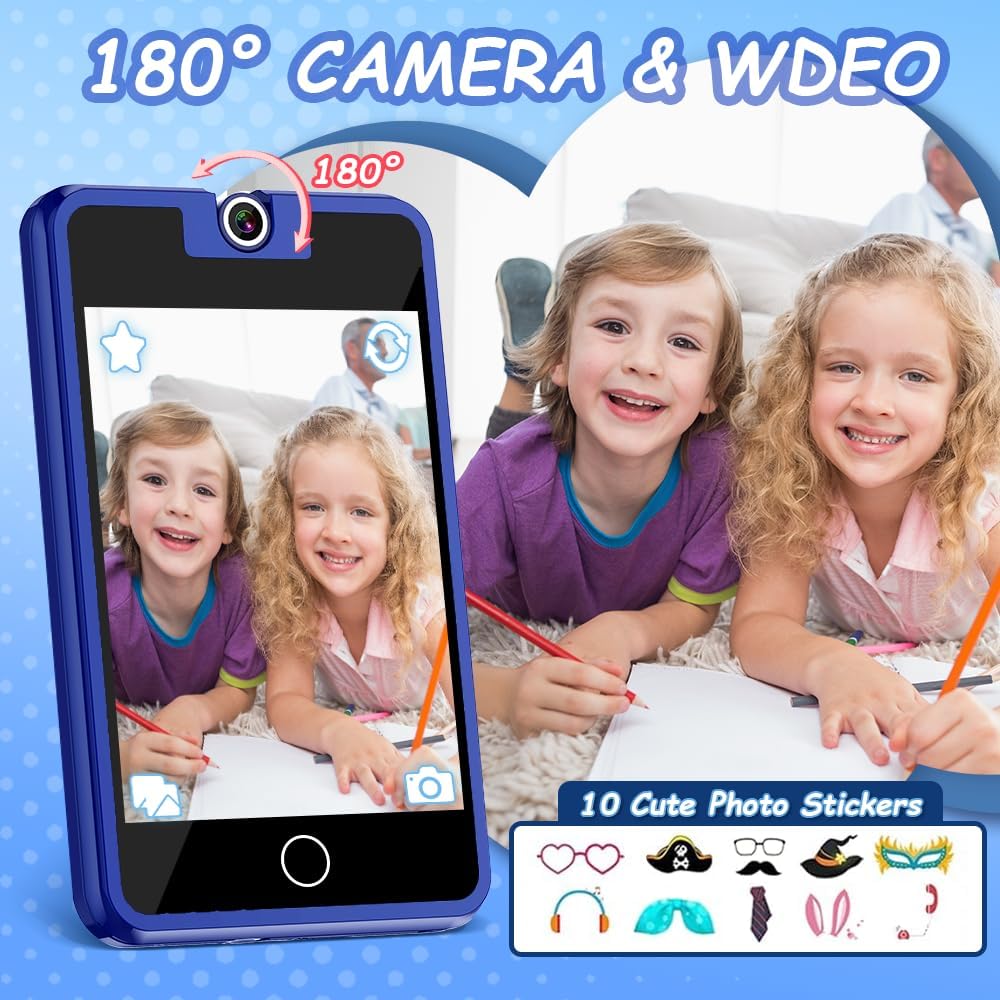
Figur 3: The 180° rotatable camera in action, allowing for both front and rear-facing shots. Includes options for fun photo stickers.
- Tryk på ikonet "Kamera" for at åbne kameraapplikationen.
- Rotate the camera lens 180° to switch between front and rear views.
- Tryk på udløserknappen for at tage et billede eller starte/stoppe videooptagelse.
- Explore fun photo stickers and filters within the camera app.
6.3. Musikafspiller

Figur 4: Music player interface, showing track information and playback controls.
- Tap the "Music" icon to access the music player.
- Browse pre-loaded songs or any music files transferred to the device.
- Use the on-screen controls for play, pause, skip, and volume adjustment.
6.4. Educational Games

Figur 5: Example of an educational puzzle game and the variety of games available.
- Tap the "Games" icon to view the selection of 26 puzzle games.
- Select a game to start playing.
- Parental controls can be used to manage access to games (see section 6.7).
6.5. Habit Tracker

Figur 6: The habit tracker interface, designed to help children manage and track daily routines.
- Tap the "Habit Tracker" icon.
- Set up and track daily activities such as "Get Up," "Brush Your Teeth," "Homework," etc.
- Use the alarm and timer functions to assist with habit formation.
6.6. Learning Cards and Audiobooks

Figur 7: Learning content including 100 learning cards covering various themes and 10 audio storybooks.
- Access "Knowledge Card" for 100 learning cards on various topics.
- Open "Story" to listen to 10 pre-loaded audiobooks.
6.7. Forældrekontrol
The device includes parental control features to manage screen time and access to specific applications or content.
- Naviger til menuen "Indstillinger".
- Locate and select "Parental Control" or a similar option.
- Set a password (if prompted) to secure the settings.
- Adjust settings for screen time limits, game access, and other features as desired.
7. Vedligeholdelse
- Rensning: Use a soft, dry cloth to clean the screen and body of the device. Do not use liquid cleaners or abrasive materials.
- Opbevaring: Opbevar enheden på et køligt, tørt sted væk fra direkte sollys, når det ikke er i brug.
- Batteripleje: For at forlænge batteriets levetid bør du undgå at aflade batteriet helt ofte. Oplad enheden regelmæssigt.
8. Fejlfinding
| Problem | Mulig årsag | Løsning |
|---|---|---|
| Enheden tænder ikke. | Lavt batteri. | Oplad enheden i mindst 30 minutter. |
| Skærmen reagerer ikke. | Midlertidig softwarefejl. | Perform a soft reset by holding the power button for 10-15 seconds. |
| Kan ikke høre lyd. | Lydstyrken er for lav eller slået fra. | Check volume settings in the "Settings" menu or use volume buttons. |
| Games are not accessible. | Parental controls enabled. | Adjust parental control settings in the "Settings" menu. |
9. Specifikationer
- Model: PlaySmart
- Skærm: 2.8 tommer HD-touchskærm
- Kamera: 180° drejelig
- Dimensioner: 2 x 0.3 x 3 tommer
- Vægt: 5 ounce
- Batteri: 1 ikke-standard batteri (inkluderet)
- Anbefalet alder: 36 måneder +
- Mærke: Dekala
10. Garantioplysninger
Specific warranty details are not provided in the product information. Please refer to the product packaging or contact the manufacturer directly for warranty terms and conditions.
11. Kundesupport
For further assistance, technical support, or inquiries, please contact Dekala customer service through their official webwebstedet eller kontaktoplysningerne på produktemballagen.
Webwebsted: Dekala Store on Amazon


