1. Introduktion
This manual provides essential information for setting up, operating, and maintaining your VIZIO 32-inch V-Series Smart HD TV, model VHD32M-0810. This television features a 720p Full Array LED display, integrated smart TV capabilities, Bluetooth connectivity, and built-in support for Apple AirPlay 2 and Chromecast.

Billede 1.1: Forside view of the VIZIO 32-inch V-Series Smart HD TV showcasing its smart interface.
2. Hvad er der i æsken
Verify that all the following components are included with your VIZIO TV:
- VIZIO 32-inch V-Series Smart HD TV
- Strømkabel
- Fjernbetjening
- TV-bord (2 stk.)
3. Opsætning
3.1 Fysisk opsætning
Your VIZIO TV can be placed on a flat surface using the included stand or mounted on a wall (wall mount sold separately).
Montering af tv-standeren:
- Placer forsigtigt tv'et med forsiden nedad på en blød, ren overflade for at forhindre, at skærmen beskadiges.
- Juster hvert stativstykke med de tilsvarende riller i bunden af tv'et.
- Fastgør stativerne med de medfølgende skruer. Sørg for, at de er spændt godt fast.

Image 3.1: VIZIO TV with its stand attached, ready for placement.
Vægmontering:
If you plan to wall-mount your TV, refer to the instructions provided with your specific wall mount kit. Ensure the mount is compatible with VESA standards for a 32-inch television.
3.2 Strømtilslutning
Connect the power cable to the AC IN port on the back of the TV, then plug the other end into a working electrical outlet.

Image 3.2: Rear panel of the VIZIO TV with input ports visible.
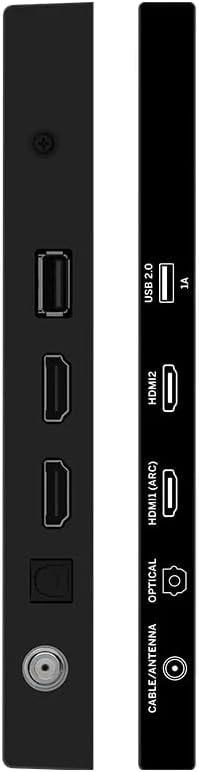
Billede 3.3: Side view of the VIZIO TV highlighting connectivity ports.
3.3 Indledende opsætning
Når du tænder det første gang, vil TV'et guide dig gennem den indledende opsætningsproces. Dette omfatter:
- Sprogvalg: Vælg dit foretrukne sprog.
- Netværks forbindelse: Connect to your home Wi-Fi network using the built-in WiFi 5 dual-band technology for faster and more reliable streaming.
- Kontoopsætning: Follow on-screen prompts to set up or log in to your VIZIO account to access smart features and apps.
- Kanalscanning: If using an antenna, perform a channel scan to find available over-the-air broadcasts.
4. Betjeningsvejledning
4.1 Fjernbetjening
The included remote control provides full functionality for navigating your VIZIO Smart TV. It features dedicated buttons for popular streaming services, input selection, and menu access.
Vigtige fjernbetjeningsfunktioner:
- Power knap: Tænder eller slukker for tv'et.
- Input knap: Cycles through available input sources (HDMI, USB, etc.).
- Navigation Pad (Arrow Buttons & OK): Bruges til at navigere gennem menuer og vælge muligheder.
- Lydstyrke op/ned: Justerer lydstyrken.
- Kanal op/ned: Changes TV channels (if applicable).
- Dedikerede app-knapper: Quick access to services like Netflix, Prime Video, Hulu, etc.
- Menu/Indstillinger-knap: Åbner tv'ets indstillingsmenu.
Video 4.1: Demonstration of the VIZIO TV remote control and user interface navigation.
4.2 Smart TV-funktioner
Your VIZIO V-Series TV offers a comprehensive smart platform for entertainment:
- Streaming apps: Access a wide range of pre-installed and downloadable applications such as Netflix, Prime Video, Disney+, Hulu, YouTube, and more.
- VIZIO WatchFree+: Enjoy hundreds of free channels and movies without subscription fees.
- Apple AirPlay 2: Stream content directly from your Apple devices to the TV.
- Chromecast indbygget: Cast your favorite entertainment from your phone, tablet, or laptop directly to the TV.
4.3 Forbindelse
The TV provides various connectivity options:
- Bluetooth: Pair wireless headphones or speakers for a personalized audio experience.
- USB: Tilslut USB-enheder til medieafspilning.
- HDMI: Multiple HDMI ports for connecting external devices like gaming consoles, Blu-ray players, or cable boxes.
- Wi-Fi 5: High-speed wireless internet connection for streaming and smart features.
4.4 Billed- og lydindstillinger
Tilpas din viewlytteoplevelsen via tv'ets indstillingsmenu:
- Billedtilstande: Select from various preset picture modes (e.g., Vivid, Calibrated Dark, Game, Sports) or customize settings like brightness, contrast, and color.
- Lydtilstande: Adjust audio settings, including presets for different content types, and leverage DTS Virtual X for an enhanced audio experience.
5. Specifikationer
| Feature | Detalje |
|---|---|
| Mærke | VIZIO |
| Modelnummer | VHD32M-0810 |
| Skærmstørrelse | 32 tommer |
| Displayteknologi | LED (Full Array) |
| Opløsning | 720p |
| Opdateringshastighed | 60 Hz |
| Forbindelsesteknologi | Bluetooth, USB, Wi-Fi |
| Særlige funktioner | Chromecast Built-in, Apple AirPlay 2, DTS Virtual X |
| Varens vægt | 12.27 pund |
| Produktdimensioner | 6.6 x 28.18 x 18.9 tommer |
6. Vedligeholdelse
- Rengøring af skærmen: Use a soft, lint-free cloth specifically designed for electronics. Avoid harsh chemicals or abrasive materials.
- Rengøring af rammen: Wipe the TV frame with a soft, damp klæde.
- Softwareopdateringer: Ensure your TV's software is up-to-date for optimal performance and security. Updates are typically downloaded automatically when connected to the internet.
7. Fejlfinding
If you encounter issues with your VIZIO TV, try the following steps:
- Ingen strøm:
- Check if the power cable is securely connected to both the TV and the electrical outlet.
- Ensure the outlet is functional by plugging in another device.
- Intet billede/lyd:
- Verify the correct input source is selected on the TV.
- Check all HDMI or other video/audio cables for secure connections.
- Sørg for, at lydstyrken ikke er slået fra eller indstillet for lavt.
- Problemer med netværksforbindelse:
- Genstart din Wi-Fi-router og dit modem.
- Check the TV's network settings to ensure it's connected to the correct network.
- Move the TV closer to the router if signal strength is weak.
- Fjernbetjeningen reagerer ikke:
- Udskift batterierne i fjernbetjeningen.
- Sørg for, at der ikke er nogen forhindringer mellem fjernbetjeningen og tv'ets IR-sensor.
- Generelle præstationsproblemer:
- Udfør en soft nulstilling ved at tage stikket ud af tv'et i 60 sekunder og derefter sætte det i igen.
- If issues persist, consider performing a factory reset (refer to the TV's on-screen settings for this option, as it will erase all personalized settings).
8. Garanti og support
This VIZIO TV is offered as an Amazon Renewed product. Amazon Renewed products are backed by the Amazon Renewed Guarantee, which provides a replacement or refund within 90 days of receipt if the product does not work as expected.
For further assistance, please refer to the VIZIO support website or contact Amazon customer service for Amazon Renewed product inquiries.
Additional protection plans may be available for purchase separately, offering extended coverage beyond the Amazon Renewed Guarantee.


