1. Introduktion
This manual provides essential information for the safe and effective operation, maintenance, and troubleshooting of your Oakland RM-1812 Industrial Router. Please read all instructions carefully before using the tool to ensure personal safety and optimal performance.
The Oakland RM-1812 Router is a powerful 3 HP industrial tool designed for precision routing tasks in various materials, primarily wood. It features a versatile collet system accommodating both 1/2-inch and 1/4-inch shank router bits, and variable speed control for adapting to different applications.
2. Sikkerhedsinstruktioner
ADVARSEL: Følg altid grundlæggende sikkerhedsforanstaltninger for at mindske risikoen for brand, elektrisk stød og alvorlig personskade.
- Læs manualen: Familiarize yourself with the controls and proper use of the router.
- Bær øjenbeskyttelse: Bær altid sikkerhedsbriller eller sikkerhedsbriller med sideskærme.
- Brug høreværn: Langvarig udsættelse for støj fra elværktøj kan forårsage høreskader.
- Sikkert arbejdsemne: Altid clamp eller på anden måde fastgør emnet for at forhindre bevægelse under drift.
- Hold arbejdsområdet rent: Rodede områder inviterer til ulykker.
- Undgå farlige miljøer: Brug ikke elværktøj i damp eller våde steder, eller udsæt dem for regn.
- Brug det rigtige værktøj: Tving ikke værktøjet eller tilbehøret til at udføre et arbejde, som det ikke er designet til.
- Afbryd strømmen: Always disconnect the router from the power source before making adjustments, changing accessories, or performing maintenance.
- Vedligehold værktøj med omhu: Hold skæreværktøjer skarpe og rene for bedre og sikrere ydeevne.
- Tjek for beskadigede dele: Før yderligere brug af værktøjet, skal en beskyttelsesskærm eller en anden del, der er beskadiget, kontrolleres omhyggeligt for at fastslå, om den vil fungere korrekt og udføre sin tilsigtede funktion.
3. Produktkomponenter
The Oakland RM-1812 Industrial Router comes with the following main components:
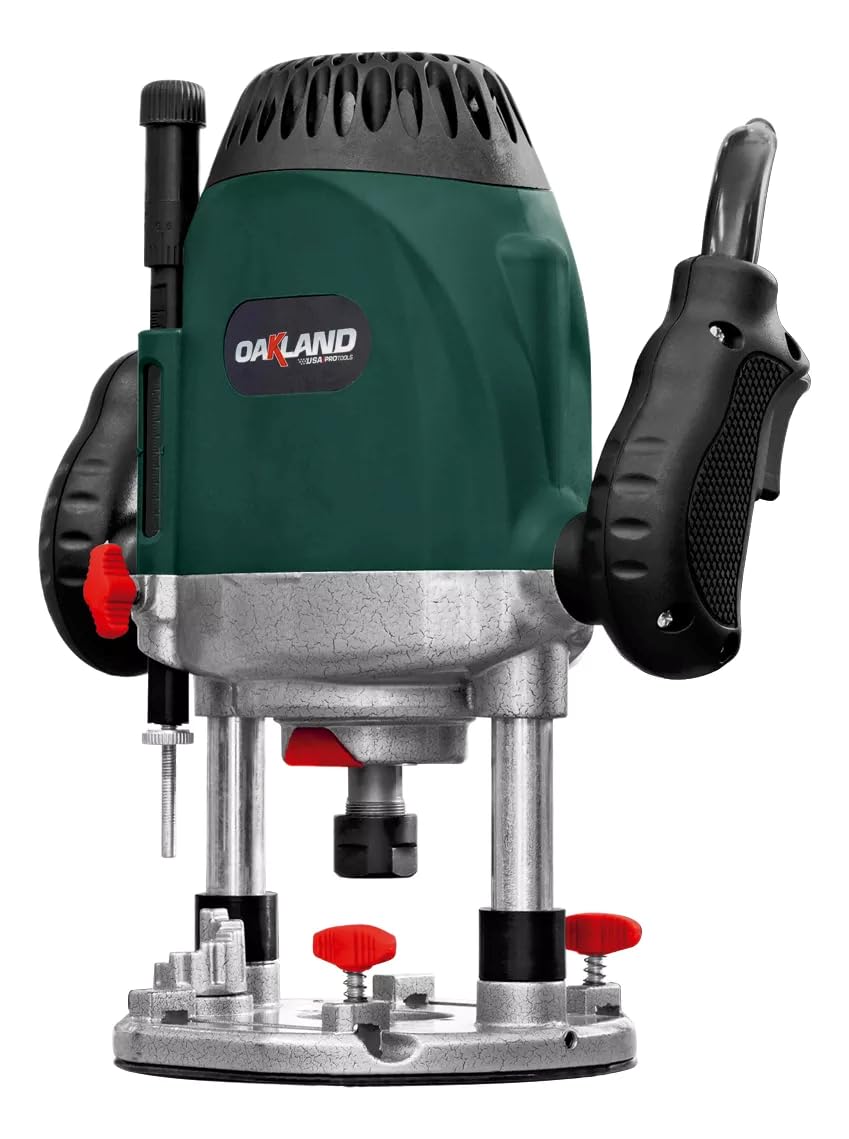
Figur 3.1: Forside view of the Oakland RM-1812 Industrial Router, showing the motor housing, handles, and plunge base assembly.

Figure 3.2: The Oakland RM-1812 Industrial Router with its base attached, highlighting the collet area and depth adjustment mechanism.

Figur 3.3: View of the router emphasizing the ergonomic handles for comfortable and controlled operation.

Figur 3.4: Sideprofile of the Oakland RM-1812 Industrial Router, showing the motor housing and base attachment points.
- Motorhus: Contains the powerful 3 HP electric motor.
- Håndtag: Ergonomisk designet for komfortabelt greb og kontrol.
- Spændetang: Secures the router bit. Compatible with 1/2-inch and 1/4-inch shank bits.
- Basissamling: Provides stability and allows for depth adjustment.
- Dybdejusteringsmekanisme: For precise control over cutting depth.
- Afbryderen: Tænd/sluk-kontrol for motoren.
- Variabel hastighedskontrol: Dial or switch to adjust motor RPM.
4. Opsætning
- Udpakning: Carefully remove the router and all accessories from the packaging. Inspect for any shipping damage. Retain packaging for future transport or storage.
- Attaching Base (if separate): If the base is not pre-attached, align it with the motor housing and secure it using the provided fasteners. Ensure it is firmly seated.
- Installing Router Bit:
- Sørg for, at routeren er frakoblet strømkilden.
- Løsn spændemøtrikken med de medfølgende skruenøgler.
- Sæt fræserværktøjet ind i spændetangen, og sørg for, at mindst 3/4 af skaftet sidder fast. Undgå at fræseværktøjet rammer bunden.
- Spænd spændemøtrikken godt fast med nøglerne. Spænd ikke for hårdt.
- Justering af skæredybde:
- Place the router on a flat surface or the workpiece.
- Loosen the depth adjustment lock.
- Lower the motor until the router bit touches the workpiece.
- Set the desired depth using the depth scale or by eye.
- Tighten the depth adjustment lock securely.
5. Betjeningsvejledning
- Forberedelse af emne: Sikkert clamp your workpiece to a stable workbench. Ensure there are no obstructions in the routing path.
- Strømtilslutning: Plug the router into a suitable electrical outlet. Ensure the power switch is in the "OFF" position before plugging in.
- Hastighedsvalg: Adjust the variable speed control to the appropriate RPM for your material and router bit. Harder materials and larger bits generally require lower speeds.
- Start af routeren: Hold the router firmly with both hands. Turn the power switch to the "ON" position. Allow the motor to reach full speed before engaging the workpiece.
- Fræsningsteknik:
- Always feed the router into the workpiece against the rotation of the bit (climb cutting is generally unsafe for handheld routers).
- Apply steady, even pressure. Do not force the router.
- For dybe snit, lav flere overløb, øgasing dybden med hver passage.
- Maintain control of the router at all times.
- Stop af routeren: Lift the router clear of the workpiece. Turn the power switch to the "OFF" position. Wait for the bit to stop rotating completely before setting the tool down.
6. Vedligeholdelse
Regular maintenance ensures the longevity and safe operation of your Oakland RM-1812 Router.
- Rensning: After each use, disconnect the power and clean the router. Use a soft brush or compressed air to remove dust and debris from the motor vents, collet area, and base. Do not use solvents that could damage plastic parts.
- Pleje af spændetang: Keep the collet and collet nut clean and free of resin buildup. Periodically clean them with a suitable solvent to ensure proper bit gripping. Replace worn or damaged collets.
- Inspektion af strømledning: Regularly inspect the power cord for cuts, abrasions, or damage. If damaged, have it repaired by a qualified service technician.
- Brush Inspection (if applicable): If your router uses carbon brushes, inspect them periodically for wear. Replace both brushes when one is worn down to approximately 1/4 inch (6mm) or less. Refer to a service center for brush replacement if unsure.
- Smøring: This tool is typically lubricated for life and does not require additional lubrication.
- Opbevaring: Store the router in a dry, secure location out of reach of children.
7. Fejlfinding
| Problem | Mulig årsag | Løsning |
|---|---|---|
| Routeren starter ikke. | Ingen strømforsyning; defekt netledning; defekt afbryder. | Check power outlet and cord. Ensure switch is ON. If problem persists, seek professional service. |
| Overdreven vibration. | Loose router bit; bent router bit; worn bearings. | Ensure bit is securely tightened. Replace bent bits. If bearings are worn, seek professional service. |
| Motoren overophedes. | Overbelastning af værktøjet; blokerede ventilationsåbninger. | Reduce feed rate or depth of cut. Clean ventilation slots. Allow tool to cool. |
| Dårlig snitkvalitet. | Dull router bit; incorrect speed; improper feed rate. | Replace or sharpen bit. Adjust speed and feed rate according to material. |
8. Specifikationer
- Model: RM-1812
- Mærke: Oakland
- Magt: 3 hestekræfter (HK)
- Strømkilde: Elektrisk
- Spændespændestørrelse: 1/2 inch and 1/4 inch (via adapter, if included)
- Fabrikant: OAKLAND
- Komponenter inkluderet: 1 (Router unit)
9. Garanti og support
This Oakland RM-1812 Industrial Router is covered by a manufacturer's warranty against defects in materials and workmanship. The specific terms and duration of the warranty may vary by region and retailer. Please retain your proof of purchase for warranty claims.
For technical support, service, or warranty inquiries, please contact your authorized Oakland dealer or the manufacturer's customer service department. Contact information can typically be found on the product packaging or the official Oakland webwebsted.
Always refer to official channels for the most accurate and up-to-date support information.


