Indledning
Thank you for choosing the OnePlus Nord Buds 3 Pro wireless earbuds. These earbuds are designed to provide an immersive audio experience with features like Hybrid Active Noise Cancellation, deep bass, and extended battery life. This manual provides detailed instructions for setting up, operating, maintaining, and troubleshooting your device to ensure optimal performance.
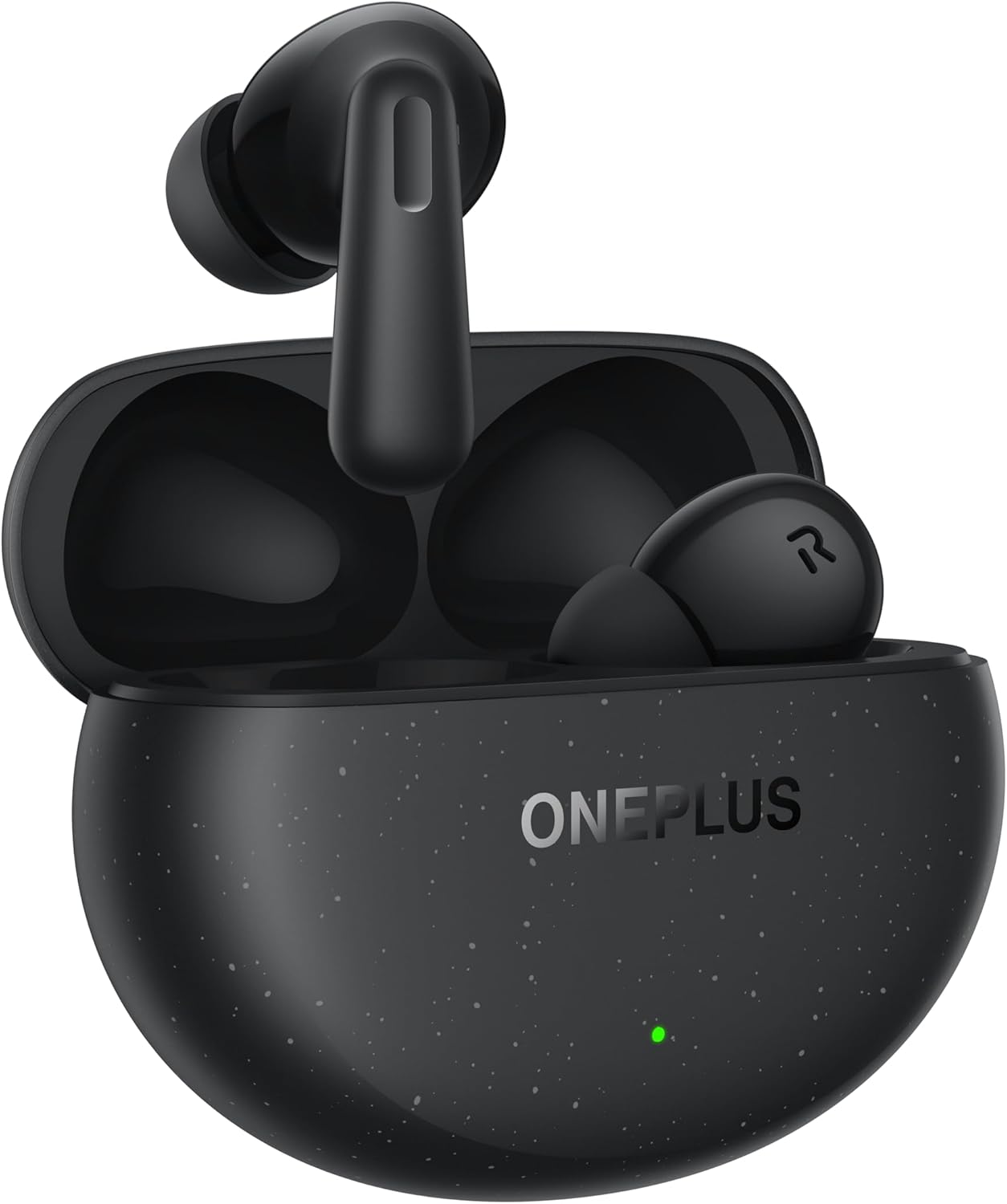
Image: The OnePlus Nord Buds 3 Pro earbuds, in Starry Black, are shown inside their open charging case. The case has a speckled finish and the OnePlus logo. A small green LED indicator is visible on the front of the case.
Hvad er der i æsken
Carefully unpack your OnePlus Nord Buds 3 Pro and ensure all items are present:
- OnePlus Nord Buds 3 Pro earbuds (1 pair)
- OnePlus Nord Buds 3 Pro charging case (1 unit)
- Silicon eartips (3 pairs: S, M, L)
- USB Type-C charging cable (1 unit)
- User guide (1 unit)
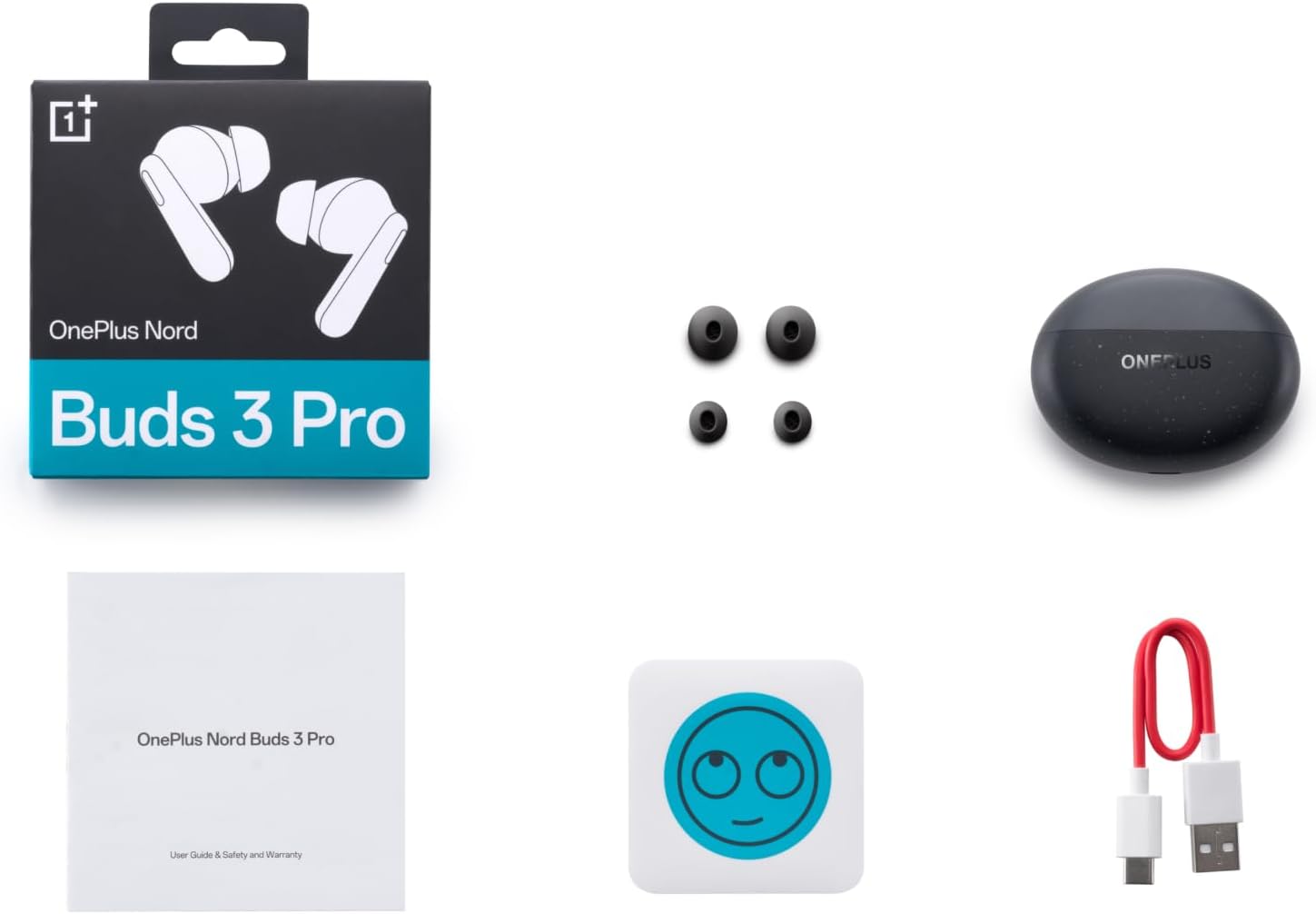
Image: A flat lay of the OnePlus Nord Buds 3 Pro package contents, including the retail box, the charging case, three pairs of silicone eartips, a USB Type-C charging cable, and the user guide.
Opsætning
1. Første opladning
Oplad ørepropperne og opladningsetuiet helt før første brug. Tilslut det medfølgende USB Type-C-kabel til opladningsporten på etuiet og en strømkilde. Indikatorlampen på etuiet viser opladningsstatus.
2. Parring med din enhed
- Sørg for, at ørepropperne er i opladningsetuiet, og at låget er åbent.
- Tryk og hold funktionsknappen på opladningsetuiet nede i 2 sekunder, indtil indikatorlampen blinker hvidt, hvilket angiver parringstilstand.
- On your device (smartphone, tablet, etc.), go to Bluetooth settings and select "OnePlus Nord Buds 3 Pro" from the list of available devices.
- For Android devices, the earbuds support Google Fast Pair for quick connection. Simply open the case near your Android device and follow the on-screen prompts.

Image: A person holding a OnePlus Nord Buds 3 Pro charging case and a smartphone. The smartphone screen displays a prompt for Google Fast Pair, showing the earbuds ready to connect, illustrating the pairing process.
3. HeyMelody App
For enhanced features and customization, download the HeyMelody app from your device's app store. The app allows you to manage settings, update firmware, and locate your earbuds.
Betjeningsvejledning
Tryk på kontrolelementer
The OnePlus Nord Buds 3 Pro feature intuitive touch controls on each earbud. Default controls are as follows, but can often be customized via the HeyMelody app:
- Enkelt tryk: Afspil/pause musik, besvar/afslut opkald.
- Dobbeltklik: Næste nummer, Afvis opkald.
- Tredobbelt tryk: Forrige nummer.
- Tryk og hold nede (1 sekund): Switch between Active Noise Cancellation (ANC) and Transparency mode.
Aktiv støjreduktion (ANC) og transparenstilstand
The earbuds offer Hybrid Active Noise Cancellation up to 49dB to minimize ambient noise. Transparency mode allows you to hear your surroundings without removing the earbuds. Toggle between these modes by pressing and holding the earbud touch area.

Image: An infographic detailing key features of the OnePlus Nord Buds 3 Pro, including up to 44 hours listening time, 49dB Hybrid Active Noise Cancellation, 12.4mm Titanized Diaphragm, and Basswave 2.0 technology.
Lydkvalitet
Equipped with a 12.4mm titanium-coated diaphragm and Basswave 2.0 technology, the Nord Buds 3 Pro deliver rich bass, clear vocals, and an immersive sound experience.
Batteri og opladning
- Øretelefon batterilevetid: Up to 44 hours with ANC off, up to 20 hours with ANC on (including charging case).
- Hurtig opladning: 10 minutes of charging provides up to 11 hours of playtime.
- Opladningsetui: Recharge the case using the provided USB Type-C cable.
Opretholdelse
- Rensning: Rengør regelmæssigt ørepropperne og opladningsetuiet med en blød, tør og fnugfri klud. Brug ikke skrappe kemikalier eller slibende materialer.
- Ørespidser: Remove and clean the silicone eartips with water and mild soap if necessary. Ensure they are completely dry before reattaching.
- Opladningskontakter: Hold opladningskontakterne på både ørepropperne og indersiden af etuiet rene og fri for snavs for at sikre korrekt opladning.
- Opbevaring: Når ørepropperne ikke er i brug, skal de opbevares i deres opladningsetui for at beskytte dem og holde dem opladede. Undgå ekstreme temperaturer.
Fejlfinding
Ørepropper parrer eller opretter ikke forbindelse:
- Sørg for, at øretelefonerne er opladet.
- Place earbuds in the case, close the lid, then open it again to re-enter pairing mode.
- Tjek din enheds Bluetooth-indstillinger, og sørg for, at Bluetooth er aktiveret.
- Prøv at glemme enheden i dine Bluetooth-indstillinger og parre den igen.
- Genstart din enhed.
Ingen lyd eller dårlig lydkvalitet:
- Kontroller lydstyrkeniveauet på både din enhed og ørepropperne.
- Ensure the earbuds are properly seated in your ears and the correct size eartips are used.
- Clean any debris from the earbud speakers and charging contacts.
- Gå tættere på din tilsluttede enhed for at undgå interferens.
Øretelefoner oplader ikke:
- Sørg for, at opladningskablet er korrekt tilsluttet til både etuiet og strømkilden.
- Kontroller, at strømkilden er aktiv.
- Rengør opladningskontakterne på både ørepropperne og indersiden af etuiet.
Specifikationer
| Feature | Detalje |
|---|---|
| Modelnavn | Nord Buds 3 Pro (E511A) |
| Mærke | OnePlus |
| Forbindelsesteknologi | Bluetooth |
| Bluetooth version | 5.4 |
| Støjkontrol | Hybrid aktiv støjreduktion (op til 49 dB) |
| Driver størrelse | 12.4mm Titanized Diaphragm |
| Frekvensområde | 20 Hz - 20,000 Hz |
| Følsomhed | 38 dB |
| Impedans | 32 Ohm |
| Batterilevetid (ørepropper + etui) | Op til 44 timer (ANC slukket), op til 20 timer (ANC tændt) |
| Hurtig opladning | 10 minutters opladning giver 11 timers spilletid |
| Opladningsgrænseflade | USB Type-C |
| Øreplacering | In Ear |
| Varens vægt | 3.52 ounce (0.1 kilo) |
| Produktdimensioner | 1.09 x 0.92 x 0.82 tommer |
Garanti og support
The OnePlus Nord Buds 3 Pro are covered by a limited warranty. Please refer to the warranty card included in your package for specific terms and conditions, or visit the official OnePlus webwebstedet for detaljerede garantioplysninger.
For teknisk support, hjælp til fejlfinding eller serviceforespørgsler, besøg venligst OnePlus-support webwebsted eller kontakt deres kundeservice direkte.


