1. Introduktion
This manual provides essential information for the installation, operation, and maintenance of your ZOTAC GAMING GeForce RTX 4070 Ti SUPER SOLID OC 16GB graphics card. Please read this manual thoroughly before installation to ensure proper functionality and to prevent damage.

Image 1.1: ZOTAC GAMING GeForce RTX 4070 Ti SUPER SOLID OC 16GB Graphics Card and its retail packaging.
2. Pakkens indhold
Bekræft at alle varer er til stede i pakken:
- ZOTAC GAMING GeForce RTX 4070 Ti SUPER SOLID OC 16GB Graphics Card
- GPU Support Stand
- Brugervejledning (dette dokument)
- Power Adapter Cable (if applicable, check your specific model)
3. Systemkrav
- PCI Express-kompatibelt bundkort med en dual-width x16 grafikslot
- Minimum 750W power supply with three available 8-pin PCIe power connectors (or equivalent 12VHPWR connector)
- Minimum 16GB system memory
- Microsoft Windows 10/11 64-bit or Linux 64-bit operating system
- Internetforbindelse til driverinstallation
4. Installationsvejledning
4.1. Forberedelse
- Sluk for computeren, og tag strømkablet ud.
- Åbn din computerkasse.
- Ground yourself to discharge any static electricity.
4.2. Installation af grafikkortet
- Find et ledigt PCI Express x16-slot på dit bundkort.
- Fjern de nødvendige dæksler til udvidelsesslots fra computerens kabinet.
- Carefully insert the graphics card into the PCIe x16 slot until it is fully seated. Ensure the retention clip locks into place.
- Fastgør grafikkortet til kabinettet med skruer.
- Connect the required power cables from your power supply to the graphics card. This model typically requires three 8-pin PCIe power connectors or a single 12VHPWR connector. Ensure all connections are secure.
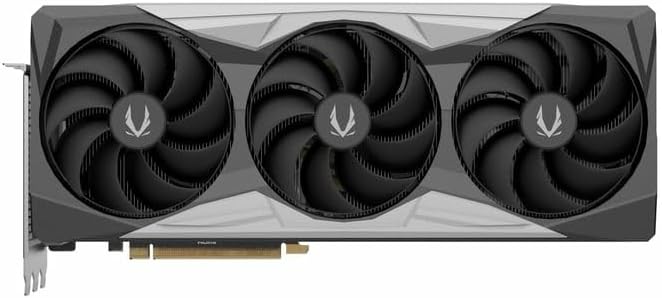
Billede 4.1: Forside view of the graphics card, showing the triple fan design.
4.3. Installing the GPU Support Stand
The included GPU support stand helps prevent sag and provides additional stability for the graphics card. Follow the instructions provided with the stand for proper installation within your PC case.
4.4. Closing the Case and Connecting Peripherals
- Luk computerens kabinet.
- Connect your monitor(s) to the display outputs on the graphics card (DisplayPort or HDMI).
- Reconnect the power cable and other peripherals to your computer.

Billede 4.2: Bagside view of the graphics card, showing three DisplayPort outputs and one HDMI output.
5. Betjeningsvejledning
5.1. Driver installation
- Tænd din computer.
- Når operativsystemet er indlæst, skal du downloade de nyeste grafikdrivere fra den officielle NVIDIA-platform webwebsted (www.nvidia.com/drivers) eller ZOTAC webwebsted (www.zotac.com/support).
- Følg instruktionerne på skærmen for at fuldføre driverinstallationen. Det kan være nødvendigt at genstarte systemet.
5.2. Softwareværktøjer
ZOTAC provides utilities such as FireStorm for monitoring and adjusting graphics card settings, including fan speed control (Active Fan Control, FREEZE Fan Stop) and performance profiles. These can be downloaded from the ZOTAC webwebsted.
6. Vedligeholdelse
- Fjernelse af støv: Periodically clean dust from the graphics card fans and heatsink using compressed air. Ensure the computer is powered off and unplugged before cleaning.
- Driver opdateringer: Keep your graphics drivers updated to ensure optimal performance and compatibility.
- Temperaturovervågning: Use monitoring software to keep track of the graphics card's temperature during operation. Excessive temperatures can indicate poor airflow or dust buildup.

Billede 6.1: Vinklet view of the graphics card, highlighting its robust cooling solution.
7. Fejlfinding
- Ingen skærmoutput:
- Sørg for, at skærmkablet er korrekt tilsluttet til grafikkortet og skærmen.
- Kontroller, at grafikkortet er korrekt placeret i PCIe-slottet.
- Check that all power cables are properly connected to the graphics card.
- Test med en anden skærm eller et andet kabel, hvis det er muligt.
- Systemustabilitet eller nedbrud:
- Ensure graphics drivers are correctly installed and up to date.
- Check for adequate power supply capacity.
- Overvåg temperaturerne for at forhindre overophedning.
- Verify system memory (RAM) stability.
- Fan Noise or Malfunction:
- Rengør ventilatorer og køleplade for støv.
- Ensure no cables are obstructing fan rotation.
- Use ZOTAC FireStorm utility to check fan speed settings.
8. Specifikationer
| Feature | Detalje |
|---|---|
| Modelnummer | ZT-D40730R-10P |
| Grafik processor | NVIDIA GeForce RTX 4070 Ti SUPER |
| Videohukommelse | 16 GB GDDR6X |
| Hukommelsesgrænseflade | 256-bit |
| Hukommelsesur | 21000 MHz (effektiv) |
| Motor ur | Boost: 2640 MHz |
| Vis udgange | 3 x DisplayPort 1.4a, 1 x HDMI 2.1a |
| HDCP Support | Ja |
| Maksimal digital opløsning | Up to 4K (7680x4320 @60Hz) |
| PCI Express | PCI Express 4.0 x16 |
| Anbefalet strømforsyning | 750W |
| Strømstik | 1 x 12VHPWR (or 3 x 8-pin PCIe via adapter) |
| Dimensioner (LxBxH) | 16.73 x 11.54 x 3.94 tommer (ca.) |
| Vægt | 2.2 pund (ca.) |
| Kølesystem | IceStorm 2.0 Advanced Cooling, Triple 100mm Fans, FREEZE Fan Stop, Active Fan Control |
| Funktioner | NVIDIA DLSS 3.5, Ray Tracing, Metal Backplate, GPU Support Stand |
9. Garanti og support
For detaljerede garantioplysninger henvises til garantikortet, der følger med dit produkt, eller besøg den officielle ZOTAC website's support section. ZOTAC provides technical support and resources for their products.
- ZOTAC-support Webwebsted: www.zotac.com/support
- Produktregistrering: Registrer dit produkt på ZOTAC webwebstedet for at aktivere din garanti og modtage produktopdateringer.


