1. Introduktion
This manual provides detailed instructions for the installation, operation, and maintenance of your Biorunn 9-inch Android Car Stereo Radio. This head unit is designed specifically for Kia Ceed models from 2018 to 2021, offering advanced features such as GPS navigation, wireless and wired Car-Play, Android Auto, IPS display, WiFi connectivity, and FM RDS radio.
Please read this manual thoroughly before installation and use to ensure proper functionality and to maximize your user experience. Keep this manual for future reference.
2. Pakkens indhold
Bekræft, at alle nedenstående varer er inkluderet i din pakke. Hvis der mangler eller er beskadigede varer, bedes du kontakte din forhandler.

Figur 2.1: Pakkens indhold overview
- Hovedenhed (Maskine)
- Canbus-boks (hvis relevant for din bilmodel)
- RCA-kabelsæt
- Reversing Camera Cable (Camera not included)
- USB-kabler (flere)
- Mikrofon (MIC)
- GPS antenne
- 4G-antenne (hvis relevant)
- Strømforsyning
3. Opsætning og installation
Installation of the Biorunn car stereo requires technical knowledge and experience with car electronics. It is highly recommended to have the unit installed by a qualified professional to avoid damage to the product or your vehicle.
3.1 Kontrol før installation
- Ensure the vehicle's ignition is off and the battery is disconnected before starting any installation.
- Confirm compatibility with your Kia Ceed (2018-2021) model.
- Review the wiring diagram carefully.
3.2 Ledningsdiagram
Refer to the following diagram for proper connection of the head unit to your vehicle's electrical system. Pay close attention to power, ground, speaker, and accessory connections.

Figure 3.1: Rear Panel Wiring Diagram
3.3 Installationstrin (generelt)
- Fjern forsigtigt den originale bilstereo og beklædningspanelerne.
- Connect the main power harness, speaker wires, and other necessary cables (GPS antenna, USB cables, microphone, reversing camera cable) to the new head unit according to the wiring diagram.
- If your car requires a Canbus box, connect it as instructed.
- Monter den nye hovedenhed sikkert i åbningen på instrumentbrættet.
- Reconnect the vehicle battery and test the unit's functionality before reassembling the trim panels.
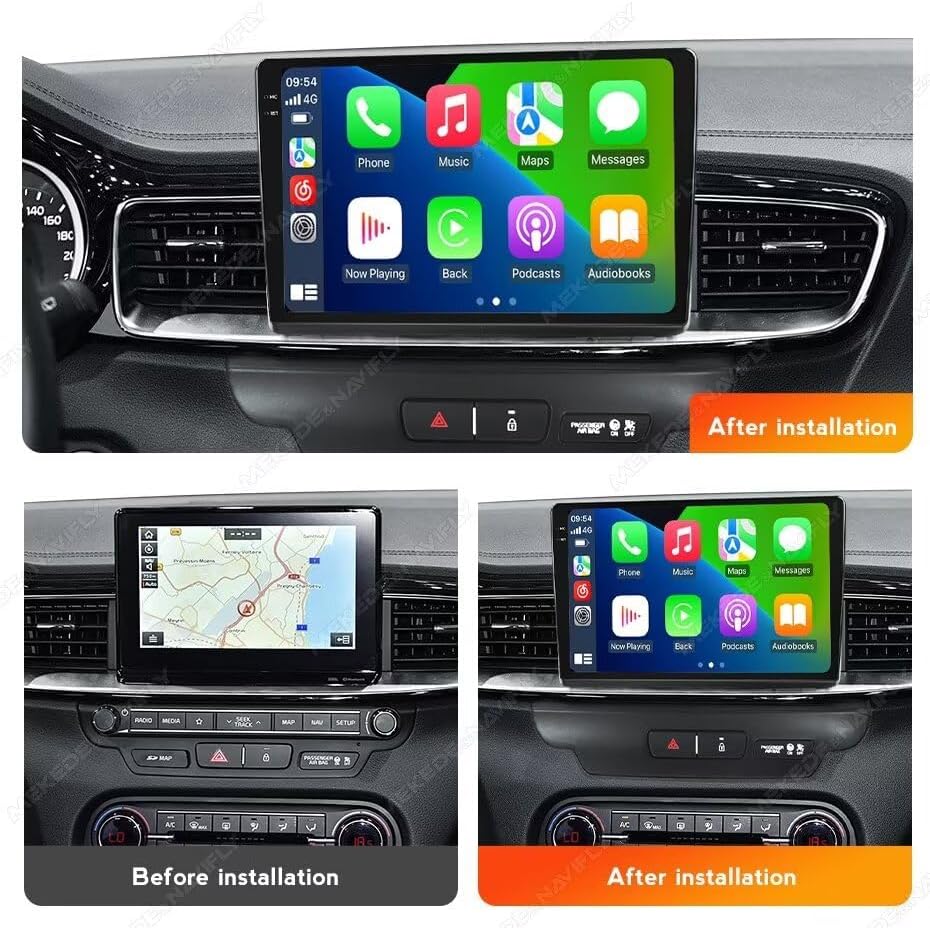
Figur 3.2: Før og efter installation Eks.ample
4. Betjeningsvejledning
4.1 CarPlay og Android Auto
The head unit supports both wireless and wired Car-Play and Android Auto. This allows seamless integration of your smartphone for navigation, music, calls, and messages directly on the stereo display.
- Sådan forbinder du: Ensure your phone's Bluetooth and Wi-Fi are enabled. Follow the on-screen prompts on the head unit to pair your device. For wired connection, use a compatible USB cable.
- Once connected, your phone's compatible apps will appear on the stereo screen, allowing for safe and convenient use while driving.

Figure 4.1: Car-Play and Android Auto Interface
4.2 Bluetooth-funktion (BT)
The integrated Bluetooth 5.0 module enables hands-free calling and audio streaming.
- Parring: Go to the Bluetooth settings on the head unit and search for available devices. Select your phone from the list and confirm the pairing code.
- Håndfri opkald: Once paired, you can make and receive calls directly through the stereo. The unit supports phone book download and caller ID display.
- BT musikstreaming: Play audio from your paired smartphone wirelessly through the car's speakers.

Figure 4.2: Bluetooth Calling and Music
4.3 FM RDS-radio
Enjoy your favorite radio stations with the built-in FM RDS tuner.
- Automatisk søgning: Brug den automatiske scanningsfunktion til at finde og gemme tilgængelige stationer.
- Manuel søgning: Indstil manuelt til bestemte frekvenser.
- Forudindstillede stationer: Save up to 18 of your preferred stations for quick access.
- RDS-funktion: Viser stationsoplysninger såsom sangtitel eller programnavn, hvor det er muligt.

Figur 4.3: FM RDS-radiogrænseflade
4.4 Reversing Video Input
The unit supports video input from an aftermarket reversing camera (camera not included). When the vehicle is shifted into reverse, the display will automatically switch to the camera view, der hjælper med sikker parkering og manøvrering.
- Forbindelse: Connect your reversing camera to the dedicated 'Camera Input' RCA port on the rear of the head unit (refer to Figure 3.1).
- Aktivering: Ensure the reverse trigger wire is correctly connected to your vehicle's reverse light circuit.

Figur 4.4: Bakkamera-display
4.5 Opdelt skærmfunktion
The split-screen feature allows you to run two applications simultaneously on the display, enhancing multitasking and convenience.
- Aktivering: While an app is open, long-press the recent apps button or drag an app to one side of the screen (method may vary slightly based on Android version).
- Anvendelse: F.eksampDu kan have navigation på den ene side og musikafspilning på den anden.

Figur 4.5: Opdelt skærmfunktionalitet
4.6 Ratstyring
The unit supports original steering wheel controls, allowing you to manage audio playback, volume, and calls without taking your hands off the wheel. This feature requires correct wiring during installation (refer to Figure 3.1).
5. Vedligeholdelse
To ensure the longevity and optimal performance of your Biorunn car stereo, follow these maintenance guidelines:
- Rensning: Brug en blød, tør klud til at rengøre skærmen og ydersiden. Tør let ved genstridige pletter.ampRengør kluden med vand eller et skærmsikkert rengøringsmiddel. Undgå skrappe kemikalier eller slibende materialer.
- Softwareopdateringer: Periodically check for available software updates from the manufacturer to ensure you have the latest features and bug fixes. Updates can typically be performed via Wi-Fi.
- Temperatur: Undgå at udsætte enheden for ekstreme temperaturer. Selvom den er designet til brug i biler, kan langvarig udsættelse for direkte sollys eller ekstrem kulde påvirke ydeevnen.
- Forbindelser: Sørg for, at alle kabler og forbindelser er sikre. Løse forbindelser kan føre til periodiske problemer.
6. Fejlfinding
If you encounter issues with your Biorunn car stereo, refer to the following common problems and solutions:
| Problem | Mulig årsag | Løsning |
|---|---|---|
| Ingen strøm | Løs strømforbindelse, sprunget sikring, forkert ledningsføring. | Check power harness connections. Inspect vehicle fuses. Verify wiring against diagram. |
| Ingen lyd | Speaker wires disconnected, volume too low, incorrect audio output settings. | Check speaker wire connections. Increase volume. Verify audio settings in the system menu. |
| GPS virker ikke / unøjagtig | GPS antenna not connected, antenna placed in a poor reception area, outdated maps. | Sørg for, at GPS-antennen er korrekt tilsluttet og placeret med en fri åbning view of the sky. Update navigation maps if necessary. |
| Berøringsskærm reagerer ikke | Software glitch, system freeze. | Restart the unit (turn off vehicle ignition and restart). If issue persists, perform a factory reset (note: this will erase user data). |
| Problemer med Bluetooth-forbindelse | Telefonen kan ikke findes, forkert parring, interferens. | Sørg for, at telefonens Bluetooth er aktiveret og synlig. Slet tidligere parringer, og par dem igen. Flyt telefonen tættere på enheden. |
Hvis disse løsninger ikke løser problemet, bedes du kontakte kundesupport.
7. Specifikationer
Key technical specifications for the Biorunn 9-inch Android Car Stereo Radio:
- Operativsystem: Android
- Kerne: 4-kerne
- VÆDDER: 2 GB
- ROM: 32 GB
- Skærmstørrelse: 9 tommer
- Skærmopløsning: 1280 x 720 (IPS Touch Screen)
- Touch Screen Type: Kapacitiv
- Forbindelse: Wireless (Wi-Fi), Bluetooth 5.0
- Særlige funktioner: Built-in Wireless/Wired Car-Play, Android Auto, GPS Navigation, FM RDS Radio, Split Screen, Steering Wheel Control Support
- Audio Format Support: MP3, WMA, AAC, RM, FALC osv.
- Understøttelse af videoformat: MPEG-1/2/4, H264, H263, VC1, RV, RMVB, DivX, Sorenson SparK, Spark, VP184, AVS Stream, 1080P full format
- Photo Format Support: JPG/BMP/JEPG/GIF/PNG
- USB-porte: USB1, USB2
- Sprog: Supports multiple languages including English, German, French, Spanish, Italian, Portuguese, Russian, Dutch, Polish, Japanese, Chinese, Arabic, etc.
8. Garanti og support
Your Biorunn car stereo is covered by a manufacturer's warranty. Please refer to the warranty card included with your product or contact your point of purchase for specific warranty terms and conditions.
For technical support, troubleshooting assistance beyond this manual, or warranty claims, please contact Biorunn customer service through the vendor's platform or the official Biorunn website. When contacting support, please have your product model number and purchase details ready.
Online ressourcer: For additional information, FAQs, and software updates, visit the official Biorunn store or support page.


