1. Introduktion
This manual provides detailed instructions for the installation, operation, and maintenance of the Aigo B760L D4 Motherboard. Please read this manual thoroughly before installing or using the product to ensure proper functionality and to prevent damage.
2. Sikkerhedsoplysninger
Overhold altid følgende sikkerhedsforanstaltninger:
- Disconnect power before installing or removing any components.
- Hold bundkortet i kanterne for at undgå at berøre følsomme komponenter.
- Use an anti-static wrist strap to prevent electrostatic discharge (ESD) damage.
- Sørg for tilstrækkelig ventilation i computerkabinettet for at forhindre overophedning.
- Udsæt ikke bundkortet for fugt eller ekstreme temperaturer.
3. Pakkens indhold
Bekræft at alle varer er til stede i pakken:
- Aigo B760L D4 Motherboard
- Brugervejledning (dette dokument)
- SATA-kabler (antallet kan variere)
- I / O-skjold
- Driver-cd/USB (hvis medfølger)
4. Produktet er slutview
The Aigo B760L D4 is an M-ATX motherboard designed for Intel LGA 1700 processors, featuring the Intel B760 chipset. It supports DDR4 memory and offers a range of connectivity options.
4.1 Bundkortlayout
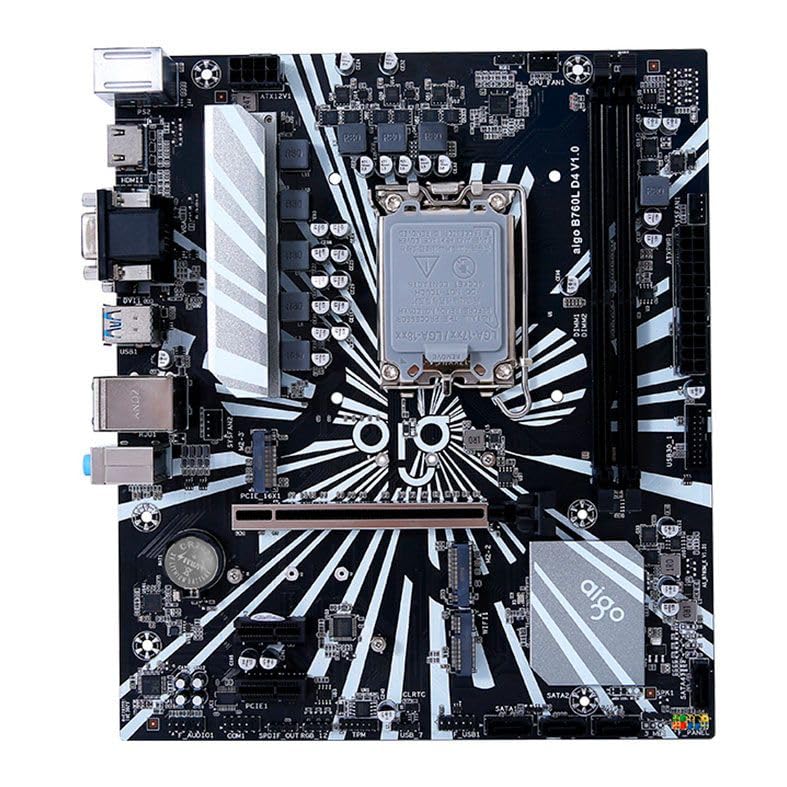
Figur 1: Overview of the Aigo B760L D4 Motherboard alongside its retail packaging.

Figur 2: Top-down view of the Aigo B760L D4 Motherboard, highlighting component placement.

Figur 3: Vinklet view of the Aigo B760L D4 Motherboard, showing the CPU socket and memory slots.
4.2 Bageste I/O-panel

Figure 4: Rear I/O panel of the Aigo B760L D4 Motherboard, displaying various connectivity ports.
Det bageste I/O-panel inkluderer:
- 1 x PS/2 Keyboard and Mouse port
- 2 x USB 2.0 porte
- 4 x USB 3.0 porte
- 1 x HDMI-port
- 2 x DVI ports
- 1 x VGA-port
- 1 x RJ45 LAN port
- Audio jacks (Line In, Line Out, Mic In)
5. Opsætning
5.1 Installation af CPU'en
- Find LGA 1700 CPU-sokkelen på bundkortet.
- Åbn CPU-sokkelhåndtaget, og løft belastningspladen.
- Juster omhyggeligt CPU'en med soklen, og sørg for, at det trekantede mærke på CPU'en matcher mærket på soklen.
- Placer forsigtigt CPU'en i soklen uden at tvinge den.
- Luk lastpladen og fastgør den med håndtaget.
5.2 Installing DDR4 Memory
The motherboard supports up to 64GB of DDR4 memory across two slots, with speeds from 2133 MHz to 3200 MHz in dual-channel configuration.
- Åbn klipsene i begge ender af DIMM-stikket.
- Juster hukommelsesmodulet med stikket, og sørg for, at hakket på modulet passer til nøglen i stikket.
- Tryk godt ned i begge ender af hukommelsesmodulet, indtil klipsene klikker på plads.
5.3 Installation af lagerenheder
The motherboard features 4 x SATA 3.0 ports and 2 x M.2 NVME Dual-Protocol slots.
5.3.1 SATA-drev
- Tilslut den ene ende af et SATA-datakabel til en SATA-port på bundkortet.
- Tilslut den anden ende af SATA-datakablet til din SATA-harddisk eller SSD.
- Tilslut et SATA-strømkabel fra din strømforsyning til drevet.
5.3.2 M.2 NVME Drives
- Locate an M.2 slot on the motherboard.
- Fjern M.2-afstandsskruen.
- Insert the M.2 NVME drive into the slot at a 30-degree angle.
- Gently push the drive down and secure it with the standoff screw.
5.4 Tilslutning af strøm
Tilslut 24-bens ATX-strømstikket og 8-bens ATX 12V-strømstikket fra din strømforsyning til de tilsvarende porte på bundkortet.
5.5 Installing Expansion Cards
The motherboard includes 1 x PCIe x16 slot and 1 x PCIe x1 slot.
- Juster dit udvidelseskort (f.eks. grafikkort) med det relevante PCIe-stik.
- Tryk godt ned, indtil kortet sidder korrekt i stikket.
- Fastgør kortet til computerkabinettet med en skrue.
6. Betjening
6.1 Første opstart og BIOS-opsætning
Når du har samlet systemet, skal du tilslutte en skærm, et tastatur og en mus. Tænd systemet. Tryk på den angivne tast under opstart (normalt DEL or F2) to enter the BIOS/UEFI setup utility. Here you can configure boot order, system time, and other advanced settings.
6.2 Installation af operativsystem
The Aigo B760L D4 Motherboard supports Windows 10 and Windows 11 operating systems. Insert your OS installation media (USB drive or DVD) and follow the on-screen instructions to install the operating system.
6.3 Driverinstallation
After OS installation, install the necessary drivers for the chipset, audio, LAN, and other integrated components. These drivers are typically provided on a CD/USB with the motherboard or can be downloaded from the manufacturer's webwebsted.
7. Vedligeholdelse
- Hold det rent: Regularly clean dust from inside your computer case using compressed air. Dust accumulation can lead to overheating.
- BIOS-opdateringer: Kontroller jævnligt producentens website for BIOS/UEFI updates. Updates can improve stability, compatibility, and performance. Follow update instructions carefully.
- Driver opdateringer: Hold dine drivere opdaterede for at sikre optimal ydeevne og kompatibilitet med ny software og hardware.
- Miljøkontrol: Operate the system in a cool, dry, and well-ventilated environment.
8. Fejlfinding
8.1 Ingen strøm
- Ensure the power supply is connected correctly to the motherboard (24-pin and 8-pin ATX 12V).
- Check if the power supply switch is in the "ON" position.
- Verify that the power button on the case is correctly connected to the motherboard's front panel header.
8.2 Ingen visning
- Sørg for, at skærmen er tilsluttet den korrekte videoudgang (enten integreret grafik eller et dedikeret grafikkort).
- Sæt grafikkortet og hukommelsesmodulerne i igen.
- Prøv at starte op med kun ét hukommelsesmodul installeret.
8.3 Systemustabilitet / Nedbrud
- Kontroller CPU- og GPU-temperaturerne for at sikre, at de ikke overopheder.
- Verify that all power connectors are securely attached.
- Kør hukommelsesdiagnosticeringsværktøjer for at kontrollere for defekt RAM.
- Ensure BIOS is updated to the latest stable version.
9. Specifikationer
| Feature | Specifikation |
|---|---|
| Mærke | Aigo |
| Model | AIGO-B760L-D4 |
| Chipsæt | Intel B760 |
| CPU socket | LGA 1700 |
| Hukommelsessokler | 2 x DDR4 DIMM-stik |
| Maksimal hukommelseskapacitet | 64 GB |
| Understøttelse af hukommelseshastighed | 2133 ~ 3200 MHz (Dual Channel) |
| Lydgrænseflade | 1 x HDMI, 2 x DVI, 1 x VGA |
| SATA Slots | 4 x SATA 3.0 |
| M.2 Slots | 2 x M.2 NVME Dual-Protocol |
| USB-porte (bagside) | 2 x USB 2.0, 4 x USB 3.0 |
| Udvidelsesslots | 1 x PCIe x1, 1 x PCIe x16 |
| Operativsystemsupport | Windows 10/11 |
| PS/2 port | 1 x PS/2 Keyboard and Mouse |
| Effektfase | 8-faset |
| Strømstik | 1 x 24-bens ATX, 1 x 8-bens ATX 12V |
| WiFi -interface | 1 x WiFi interface (PCIe compatible) |
| LAN-port | 1 x RJ45 |
| Dimensioner | 24.4 x 21 cm (M-ATX) |
10. Garanti og support
For warranty information and technical support, please refer to the documentation provided with your purchase or visit the official Aigo webwebsted. Gem din købsbevis til garantikrav.


