1. Introduktion
This manual provides detailed instructions for the installation, operation, and maintenance of your Sodola 10Gb L2 Managed PoE Switch. This device is designed to facilitate high-speed data transfer and efficient power delivery over Ethernet, suitable for various networking environments.
The switch features 4 x 10G PoE ports, 1 x 10G RJ-45 uplink port, and 1 x 10G SFP+ port. It supports advanced Layer 2 management functionalities and adheres to IEEE802.3af/at/bt PoE standards.

Billede 1.1: Forside view of the Sodola 10Gb L2 Managed PoE Switch.
2. Produktet er slutview
2.1. Pakkens indhold
- Sodola 10Gb L2 Managed PoE Switch (Model: 4X10G POE+10G RJ45+SFP+)
- Strømadapter/kabel
- Brugermanual
2.2. Hardwarefunktioner

Image 2.1: Front and rear panel overview of the switch, highlighting ports and indicators.
The switch features a robust metal casing and an efficient cooling system. Key components include:
- Porte:
- 4 x 10G PoE Ports (10GBase-T)
- 1 x 10G RJ-45 Uplink Port (10GBase-T)
- 1 x 10G SFP+ Port
- 1 x Console Port (RJ45)
- LED-indikatorer:
- SYS: System status indicator (slowly blinking indicates running)
- Link/Act: Per-port link/activity indicator (Green for 2.5/5Gbps, Yellow for 10Gbps)
- PoE: Per-port PoE indicator
- Bagside:
- Nulstil knap
- Jordskrue
- AC indgang

Billede 2.2: Overview of the switch's cooling fan, lightning protection, power, and bandwidth capabilities.
3. Opsætning
3.1. Fysisk installation
The Sodola 10Gb L2 Managed PoE Switch is designed for desktop placement or wall mounting. A wall-mount kit is not included. This model does not support 1U rack mounting.
- Desktopplacering: Place the switch on a stable, flat surface with adequate ventilation. Ensure no objects block the ventilation holes on the sides.
- Vægmontering: If wall mounting, ensure the wall can support the switch's weight. Use appropriate screws and anchors (not supplied) for secure installation.

Image 3.1: The switch is designed for desktop installation only and is not rack mountable.
3.2. Strømtilslutning
- Connect the provided power cable to the AC input port on the rear of the switch.
- Sæt den anden ende af strømkablet i en almindelig stikkontakt.
- Verify the SYS LED indicator illuminates, indicating the switch is receiving power.
3.3. Netværksforbindelse
- Connect your network devices (e.g., computers, servers, NAS, IP cameras, wireless APs) to the 10G PoE ports or the 10G RJ-45 uplink port using Ethernet cables.
- For SFP+ connectivity, insert a compatible SFP+ module into the SFP+ port and connect it to your fiber optic network.
- Observe the Link/Act LEDs for each connected port. A solid or blinking LED indicates a successful connection and activity.

Billede 3.2: Eks.ample 10G LAN setup for home or small office environments.
3.4. Indledende Web interface konfiguration
To access the switch's management interface:
- Ensure your computer's IP address is set via IPv4 and is within the same subnet as the switch's default IP address (e.g., 192.168.0.x).
- Åbn a web browseren og naviger til standard-IP-adressen: 192.168.0.1.
- Indtast standardoplysningerne:
Brugernavn: admin
Adgangskode: admin - Upon successful login, you can configure various Layer 2 management features.
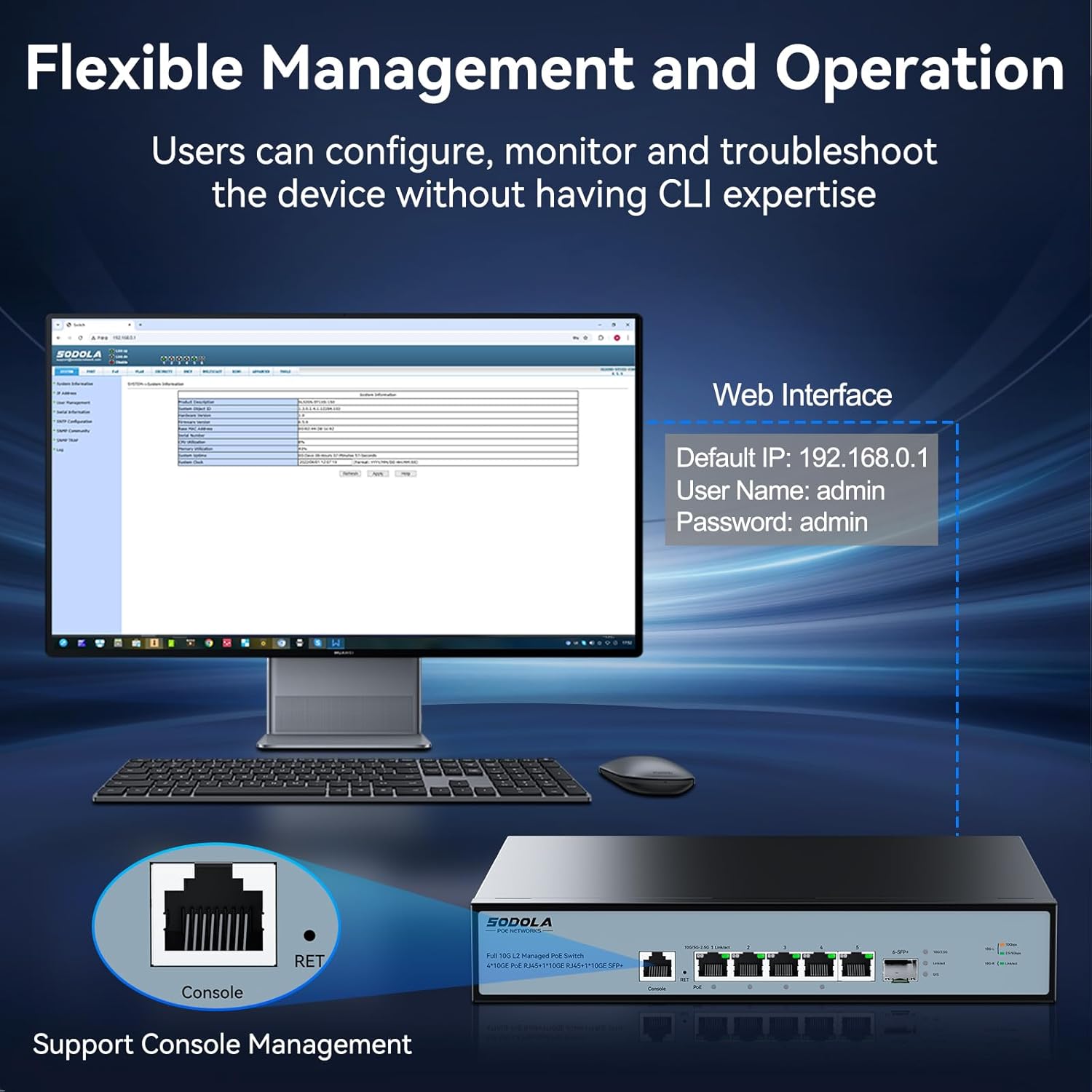
Image 3.3: Accessing the web management interface and console port for configuration.
4. Betjeningsvejledning
4.1. Power over Ethernet (PoE) Functionality
The switch provides Power over Ethernet capabilities to compatible devices.
- Port 1: Supports IEEE802.3af/at/bt standards with a maximum output of 90W.
- Porte 2-4: Support IEEE802.3af/at standards, offering up to 30W per port.
- Samlet PoE-budget: The switch has a total power supply capacity of 150W for all PoE ports.
When a PoE-compatible device is connected, the switch automatically detects its power requirements and supplies the necessary power. The PoE LED indicator for the respective port will illuminate.

Image 4.1: Diagram illustrating PoE+ IEEE802.3af/at/bt support for various devices.
4.2. Layer 2 Management Features
The switch offers a comprehensive suite of Layer 2 management features accessible via the web interface or console port:
- VLAN (virtuelt lokalnetværk): Segmentér dit netværk for forbedret sikkerhed og ydeevne.
- LACP (Link Aggregation Control Protocol): Kombinér flere fysiske links til et enkelt logisk link for øget båndbredde og redundans.
- SNMP (Simple Network Management Protocol): Monitor network devices and manage network performance.
- DHCP (Dynamic Host Configuration Protocol): Manage IP address assignment.
- Multicast: Efficiently deliver data to multiple recipients simultaneously (e.g., IGMP).
- MAC Address Management: Control access based on MAC addresses.
- RSTP (Rapid Spanning Tree Protocol): Prevent network loops and ensure network redundancy.
- QoS (Quality of Service): Prioriter netværkstrafik til kritiske applikationer.
- ACL (Adgangskontrolliste): Filtrer netværkstrafik baseret på definerede regler.
Refer to the online documentation or the switch's web interface help section for detailed configuration guides on each feature.

Image 4.2: Visual representation of the advanced Layer 2 management features supported by the switch.
5. Vedligeholdelse
5.1. Cooling and Ventilation
The switch is equipped with an upgraded cooling fan that intelligently adjusts its speed based on power consumption and heat. This ensures optimal operating temperature and near-silent operation during idle times.
- Sørg for tilstrækkelig luftgennemstrømning omkring kontakten. Bloker ikke ventilationsåbningerne.
- Avoid placing the switch in enclosed spaces or near heat sources.
5.2. Rensning
For at opretholde optimal ydeevne skal du regelmæssigt rengøre kontaktens yderside.
- Frakobl strømkablet før rengøring.
- Brug en blød, tør klud til at tørre overfladen af.
- Brug ikke flydende rengøringsmidler eller aerosolrengøringsmidler, da de kan beskadige enheden.
5.3. Firmwareopdateringer
Kontroller jævnligt producentens website for available firmware updates. Firmware updates can provide new features, performance improvements, and security enhancements. Follow the instructions provided with the firmware update package carefully.
6. Fejlfinding
This section addresses common issues you might encounter with your Sodola 10Gb L2 Managed PoE Switch.
6.1. Ingen strøm
- Ensure the power cable is securely connected to both the switch and the electrical outlet.
- Kontroller, at stikkontakten fungerer ved at tilslutte en anden enhed.
- Check the SYS LED indicator. If it is off, the switch is not receiving power.
6.2. No Network Link
- Ensure Ethernet cables are securely connected to both the switch port and the network device.
- Verify the cable type is appropriate for the connection speed (e.g., Cat6a or higher for 10Gbps).
- Check the Link/Act LED for the specific port. If it is off, there is no active link.
- Test with a different Ethernet cable or port.
6.3. PoE Not Working
- Confirm the connected device is PoE-compatible and adheres to IEEE802.3af/at/bt standards.
- Check the PoE LED indicator for the port. If it is off, power is not being supplied.
- Ensure the total power consumption of all connected PoE devices does not exceed the switch's 150W PoE budget.
- Verify the device is connected to a PoE-enabled port (Ports 1-4).
6.4. Kan ikke få adgang Web Interface
- Ensure your computer's IP address is configured to be in the same subnet as the switch (default 192.168.0.1).
- Ryd din web browser's cache.
- Verify you are using the correct default IP address (192.168.0.1) and credentials (admin/admin).
- If the IP address has been changed and forgotten, you may need to perform a factory reset using the reset button on the rear panel.
6.5. Fabriksindstilling
To restore the switch to its factory default settings, locate the Reset button on the rear panel. With the switch powered on, use a paperclip or similar pointed object to press and hold the Reset button for approximately 5-10 seconds until the LEDs indicate a reset process has begun. The switch will then restart with default settings.
7. Specifikationer
| Feature | Specifikation |
|---|---|
| Model | 4X10G POE+10G RJ45+SFP+(Managed) |
| Mærke | Sodola |
| Interface Type | PoE, SFP+ |
| Antal havne | 6 (4x 10G PoE, 1x 10G RJ45, 1x 10G SFP+) |
| PoE Standard | IEEE802.3af/at/bt |
| Max PoE Output (Port 1) | 90W |
| Max PoE Output (Ports 2-4) | 30W per port |
| Samlet PoE-budget | 150W |
| Dataoverførselshastighed | 10 Gigabit i sekundet |
| Backplane båndbredde | 120 Gbps |
| Pakkevideresendelseshastighed | 89.28 MPps |
| MAC-adressetabelstørrelse | 16K |
| Etui materiale | Metal |
| Farve | Sort |
| Varens vægt | 4.97 pund |
| Pakkedimensioner | 16.1 x 10.91 x 3.66 tommer |
| Kompatible enheder | Camera, Desktop, Laptop, Printer, Router |
8. Garanti og support
Your Sodola 10Gb L2 Managed PoE Switch is backed by a one-year warranty, ensuring coverage against manufacturing defects and malfunctions under normal use.
Sodola also provides lifetime after-sales service. A dedicated team of technical engineers is available to assist you with any issues or questions you may have regarding the product. For technical support or warranty claims, please contact Sodola customer service through their official channels or visit the Sodola Store on Amazon.


