1. Introduktion
This manual provides comprehensive instructions for the setup, operation, maintenance, and troubleshooting of your Lamzu Maya X Wireless Gaming Mouse. Please read this manual carefully to ensure proper use and to maximize the performance of your device.
2. Produktet er slutview
2.1 Nøglefunktioner
- Ultralet design: Weighs approximately 47g for extended comfort during use.
- Symmetrisk form: Accommodates various grip styles including palm, claw, and fingertip.
- Optiske afbrydere: Durable and responsive, rated for over 70 million clicks.
- Dust-Proof Encoder: 30-grid roller for precise and responsive scroll wheel actions.
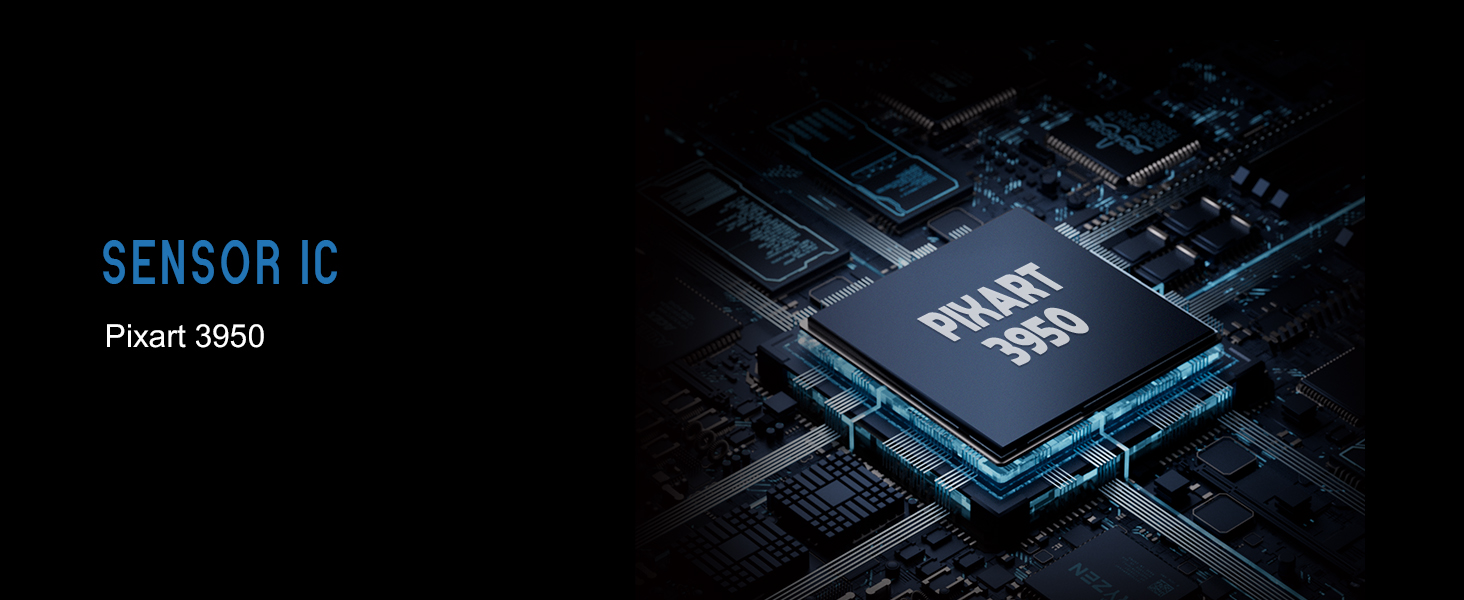
- Pixart PAW 3950-sensor: Supports up to 30,000 DPI and 750 IPS.
- Nordisk 52840 MCU: Ensures power efficiency, fast response times, and accurate motion tracking.
- Høj meningsmålingsrate: Up to 8,000 Hz with the optional 8K dongle.
2.2 Pakkens indhold
- Lamzu Maya X trådløs gamingmus
- PTFE Skates (x1 set)
- 8K Dongle (x1)
- MAYA X støvtæt forsegling
- 1.8m Type-C Paracord Cable
- Fløjlstaske
- MAYA X musegreb
2.3 Musens komponenter
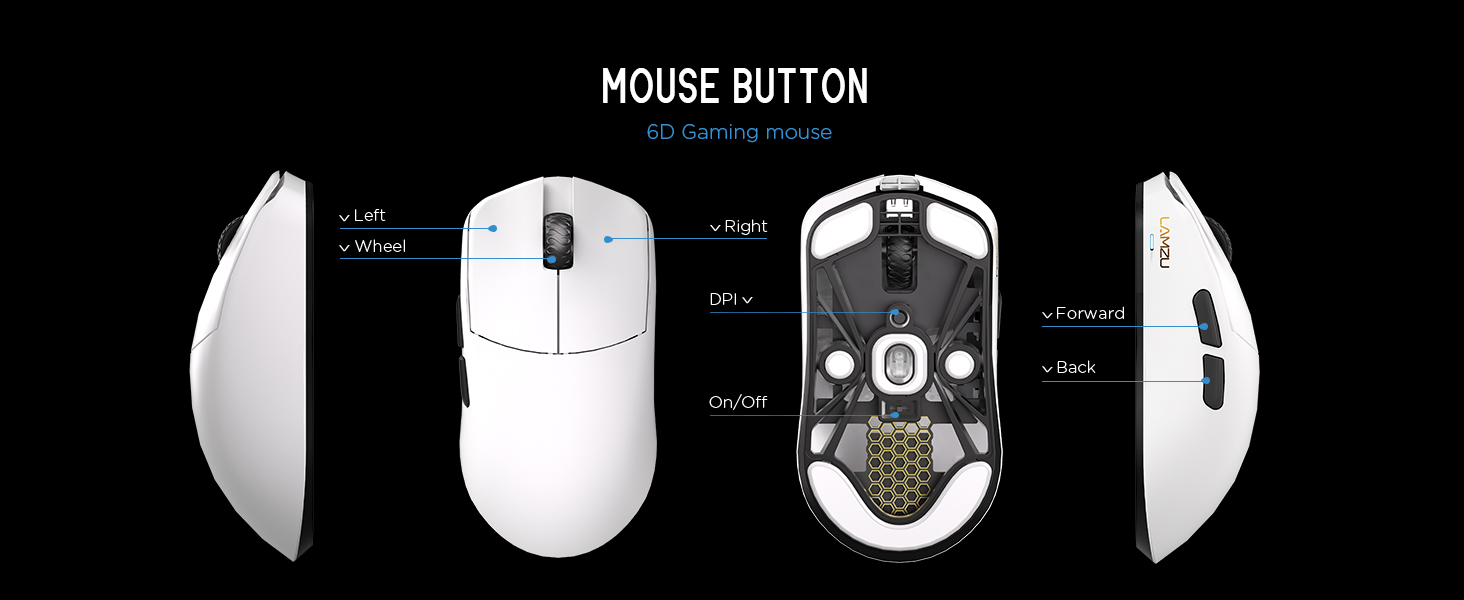
Billede 2.3.1: Diagram illustrating the various buttons and internal structure of the Lamzu Maya X mouse, including left click, right click, scroll wheel, DPI button, forward, back buttons, and the on/off switch.
- Venstre knap: Primær klikfunktion.
- Højre knap: Sekundær klikfunktion.
- Scrollhjul: Til scrollning og mellemklikfunktion.
- DPI knap: Adjusts Dots Per Inch sensitivity.
- Frem-knap: Navigational function (e.g., browser forward).
- Tilbage knap: Navigational function (e.g., browser back).
- Tænd/sluk-knap: Powers the mouse on or off.
3. Opsætning
3.1 Første tilslutning og opladning
- Oplad musen: Connect the provided Type-C paracord cable to the mouse and a USB port on your computer. The mouse will charge while connected.
- Tænd: Find tænd/sluk-knappen på undersiden af musen, og skub den til "Tændt"-positionen.
- Connect Wireless Dongle: Insert the 8K wireless dongle into an available USB port on your computer. The mouse should automatically pair.
- Wired Mode (Optional): To use the mouse in wired mode, connect the Type-C paracord cable directly to the mouse and your computer. The mouse will function as a wired device and charge simultaneously.
Billede 3.1.1: The Lamzu Maya X mouse connected via its Type-C paracord cable, illustrating both wired operation and charging capabilities.
3.2 Installation af driver og software
The Lamzu Maya X mouse utilizes a web-based driver for customization. To access the software and update firmware:
- Visit the official Lamzu webwebsted.
- Navigate to the support or downloads section for the Maya X model.
- Download web driver application. This application allows for DPI adjustment, polling rate settings, macro programming, and firmware updates.
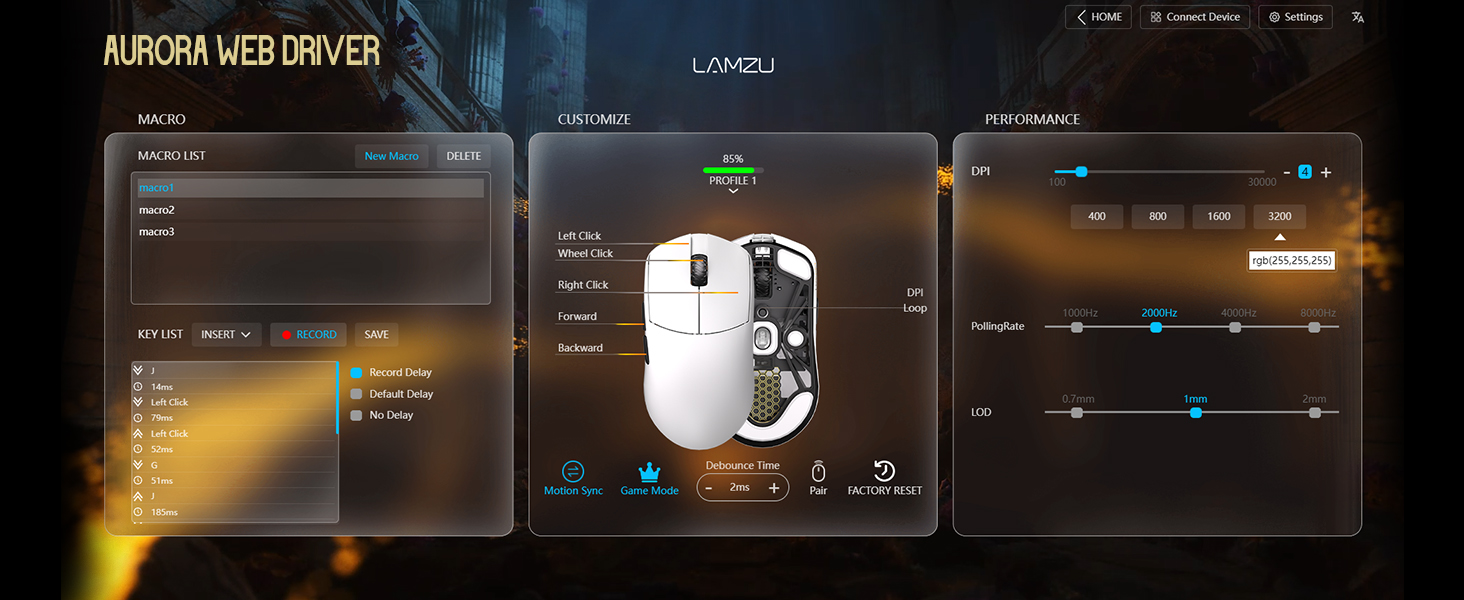
Billede 3.2.1: Screenshot of the Aurora Web Driver interface, displaying options for macro creation, button customization, DPI settings (up to 30000), polling rate selection (up to 8000Hz), and Lift-Off Distance (LOD).
4. Betjeningsvejledning
4.1 DPI-justering
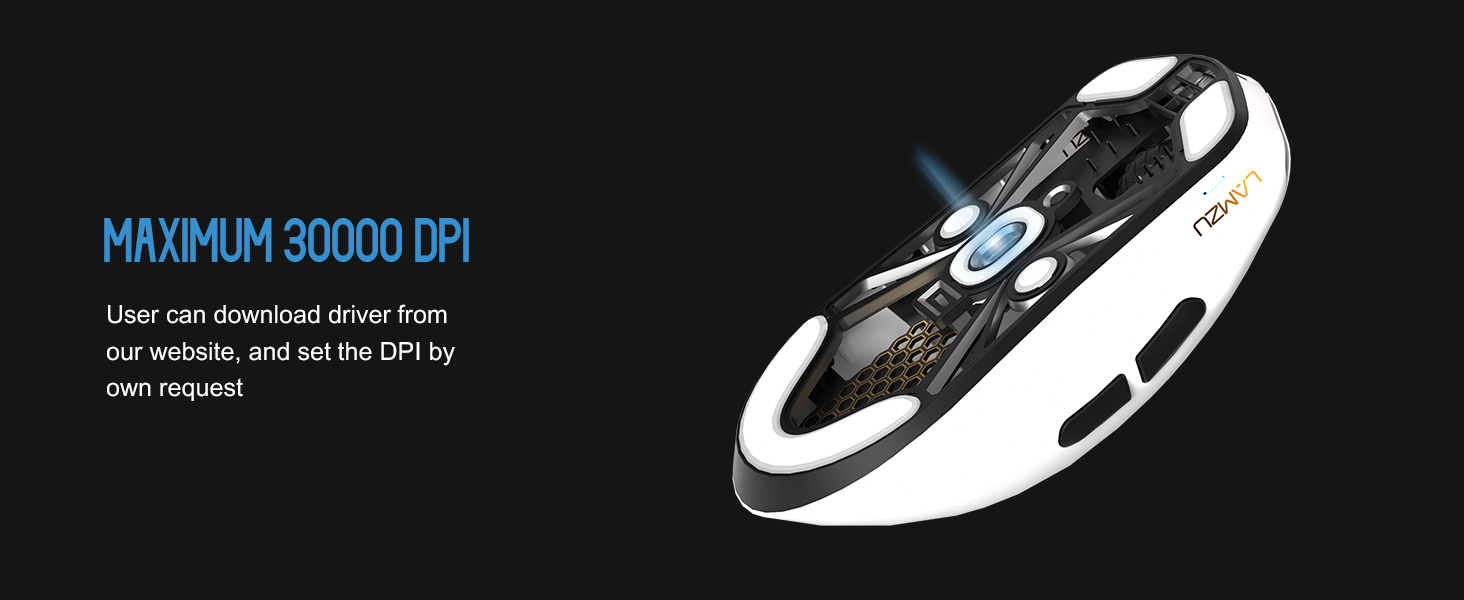
The DPI (Dots Per Inch) setting controls the mouse cursor's sensitivity. You can adjust the DPI using the dedicated DPI button on the mouse or through the Aurora Web Driver software. The Pixart PAW 3950 sensor supports up to 30,000 DPI.
Billede 4.1.1: En underside view of the Lamzu Maya X mouse, emphasizing its optical sensor and the capability to reach a maximum of 30,000 DPI, configurable via software.
4.2 Afstemningsprocent
The polling rate determines how often the mouse reports its position to the computer. The Maya X supports up to 8,000 Hz polling rate when using the included 8K dongle. Higher polling rates result in smoother cursor movement and reduced input lag.
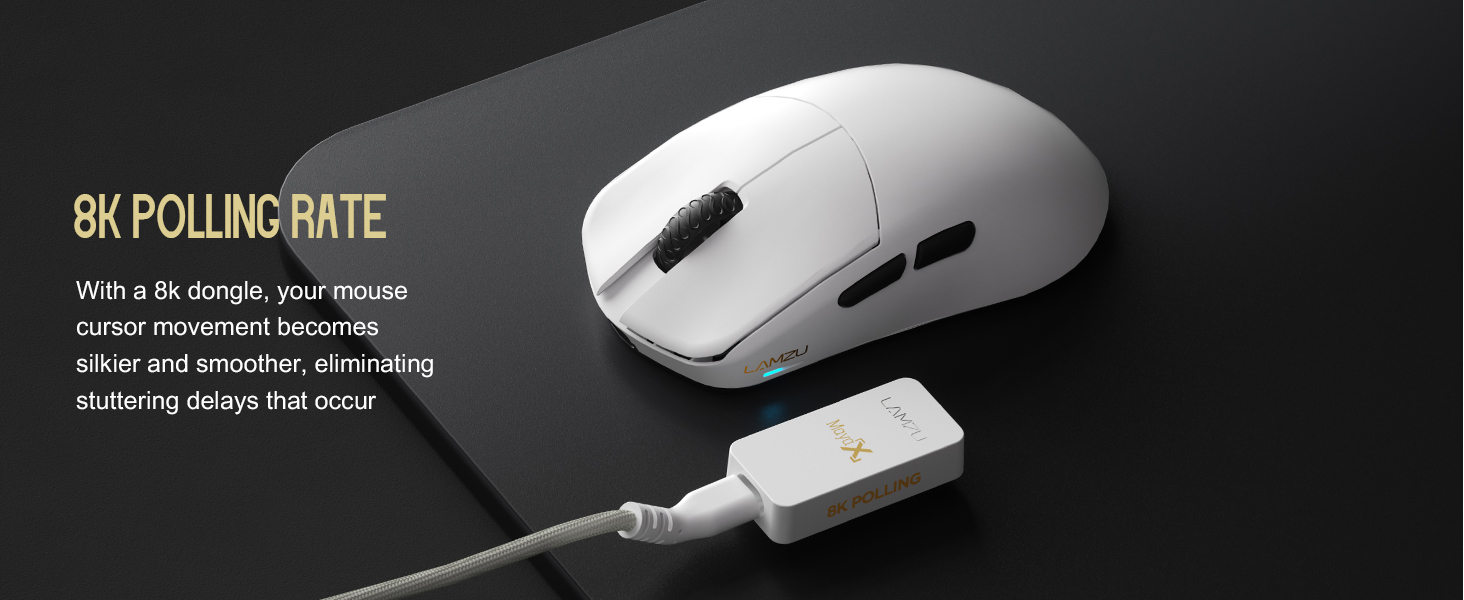
Billede 4.2.1: The Lamzu Maya X mouse positioned next to its 8K polling rate dongle, highlighting the benefit of smoother and more responsive cursor movement provided by high polling rates.
4.3 Grip Styles
The symmetrical design of the Maya X mouse is engineered to accommodate various common grip styles:
- Håndgreb: The entire palm rests on the mouse.
- Klogreb: Fingers are arched, and the palm rests on the back of the mouse.
- Fingerspidsgreb: Only the fingertips make contact with the mouse.
Billede 4.3.1: A visual guide demonstrating the three primary mouse grip styles—Palm Grip, Claw Grip, and Fingertip Grip—and how the Maya X mouse is designed to be compatible with each.
4.4 Wired and Wireless Modes
The Maya X mouse supports both 2.4G wireless and wired (USB Type-C) connectivity. You can switch between modes by connecting or disconnecting the Type-C cable. In wired mode, the mouse operates at a 1K polling rate, while wireless mode with the 8K dongle supports up to 8K polling.
5. Vedligeholdelse
5.1 Rengøring
- Sørg for, at musen er slukket, inden den rengøres.
- Brug let en blød, fnugfri klud damprengøres med vand eller en mild rengøringsopløsning til at tørre musens overflade af.
- Undgå at bruge skrappe kemikalier, slibemidler eller opløsningsmidler.
- Brug trykluft til at fjerne støv fra sprækker og omkring knapper.
- Til den optiske sensor skal du bruge en vatpind, der er letampened with isopropyl alcohol to gently clean the lens.
5.2 Pleje af batterier
- For at forlænge batteriets levetid bør du undgå at aflade musen helt ofte.
- Opbevar musen ved stuetemperatur, når den ikke er i brug i længere perioder.
- Hvis batteriet skal opbevares i længere tid, skal det oplades til cirka 50% før opbevaring.
6. Fejlfinding
- Musen reagerer ikke:
- Sørg for, at musen er tændt.
- Kontroller batteriniveauet og oplad om nødvendigt.
- Verify the wireless dongle is securely plugged into a USB port.
- Try connecting the mouse in wired mode to confirm functionality.
- Genstart din computer.
- Intermitterende forbindelse:
- Sørg for, at den trådløse dongle ikke er blokeret, og at den er tæt på musen.
- Undgå at placere donglen i nærheden af andre trådløse enheder, der kan forårsage interferens.
- Update mouse firmware via the Aurora Web Chauffør.
- Markøren hopper eller forsinkes:
- Clean the optical sensor (refer to Section 5.1).
- Ensure the mousepad surface is clean and uniform.
- Adjust the polling rate in the software.
- Check for any background applications consuming excessive system resources.
- Knapper virker ikke:
- Check button assignments in the Aurora Web Chauffør.
- Sørg for, at der ikke er fysiske forhindringer i at trykke på knapper.
7. Specifikationer
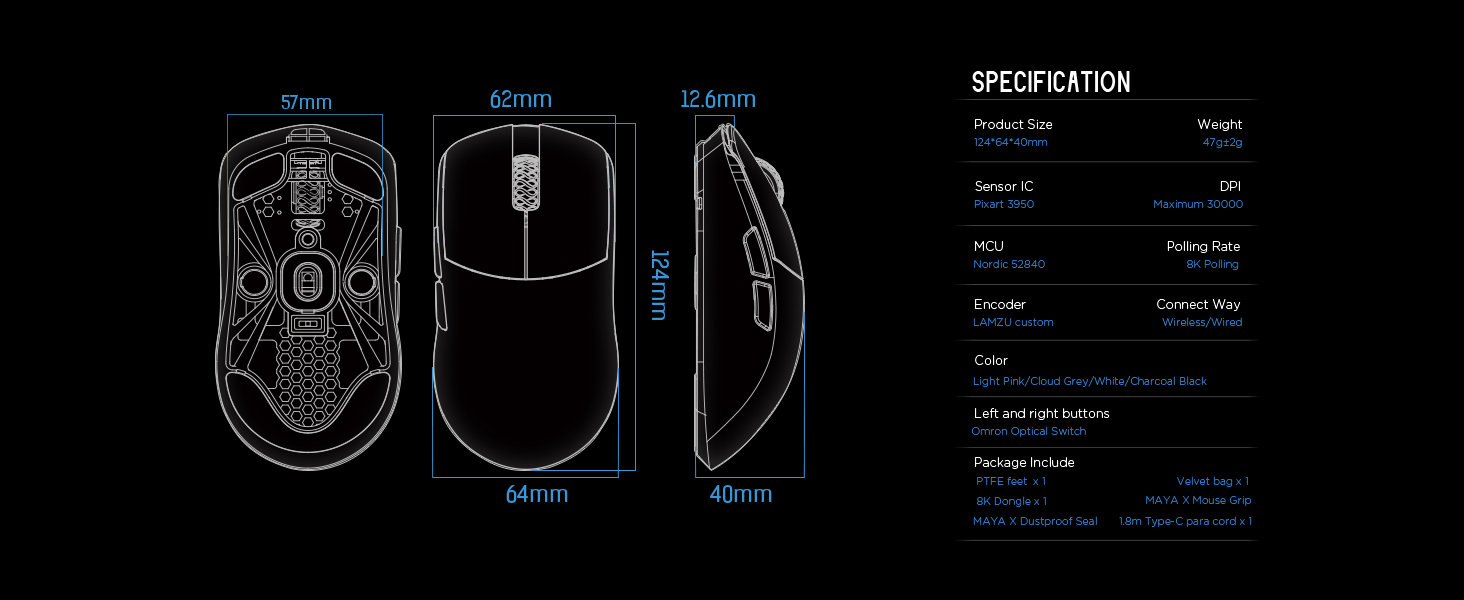
| Produktdimensioner | 4.88 x 2.52 x 0.04 tommer (124 x 64 x 40 mm) |
| Varens vægt | 1.66 ounce (47 g) |
| Sensor IC | Pixart PAW 3950 |
| Maksimal DPI | 30,000 |
| MCU | Nordic 52840 |
| Afstemningsfrekvens | Op til 8,000 Hz (med 8K-dongle) |
| Forbindelsesteknologi | 2.4G Wireless, USB Type-C Wired |
| Afbrydere | Optical Switches (Left/Right buttons) |
| Encoder | Dust-Proof Encoder |
| Batteri | 1 lithium-ion batteri (medfølger) |
| Fabrikant | Lamzu |

Billede 7.1.1: A technical diagram detailing the dimensions (length, width, height) of the Lamzu Maya X mouse and a summary of its key specifications, including weight, sensor, MCU, DPI, and polling rate.
8. Garanti og support
For warranty information and technical support, please refer to the official Lamzu website or contact their customer service directly. Details regarding product registration, warranty claims, and frequently asked questions can typically be found in the support section of the webwebsted.
Officiel Webwebsted: www.lamzu.com


