1. Introduktion
Thank you for choosing the AODELAN Wireless Camera Remote Control. This device is designed to provide convenient wireless control over various camera functions, including autofocus, shutter release, video recording, and zoom, for compatible Canon, Sony, and Nikon cameras, as well as smartphones. Please read this manual thoroughly before use to ensure proper operation and to maximize your experience.
2. Produktet er slutview
The AODELAN Wireless Camera Remote Control features an ergonomic design with clearly labeled buttons for intuitive operation. It allows for wireless control up to 10 meters (32.8 feet).

Image 2.1: Remote Control Diagram. This image displays the AODELAN Wireless Camera Remote Control with various components labeled, including light indicators, device selection buttons (A, B, C), power zoom buttons (W, T), shooting button, video recording button, and the ON-OFF switch.
2.1 Komponenter
- Camera Indicator Lamp (1): Indicates connection status for cameras.
- Devices Buttons (A, B, C) (2): Used to select and pair with up to three different cameras or devices.
- Power Zoom (W, T) (3): Controls zoom in (T) and zoom out (W) functions on compatible lenses.
- Shooting Button (4): Activates autofocus and triggers the shutter for still photography.
- Video Recording Button (5): Starter og stopper videooptagelse.
- ON - OFF Switch (6): Tænder eller slukker fjernbetjeningen.
- Indikator Lamp for Phone (7): Indicates connection status for smartphones.
2.2 Hvad er inkluderet

Billede 2.2: Pakkens indhold. This image shows the AODELAN Wireless Camera Remote Control and an included wrist strap.
The package includes the AODELAN Wireless Camera Remote Control and a wrist strap for secure handling.
3. Opsætning
3.1 Batteriinstallation
The remote control requires 2 AAA batteries (not included). To install:
- Find batterirummet på bagsiden af fjernbetjeningen.
- Skub batteridækslet åbent.
- Isæt to AAA-batterier, og sørg for at polariteten (+/-) vender korrekt.
- Luk batteridækslet forsvarligt.

Billede 3.1: Batterirum. This image illustrates the back of the remote control with the battery compartment open, showing where to insert two AAA batteries.
3.2 Parring med din enhed
The remote control can be paired with up to three cameras (Canon, Sony, Nikon) and one smartphone simultaneously. The operating range is approximately 10 meters (32.8 feet).

Image 3.2: Wireless Communication. This image depicts the remote control wirelessly communicating with a camera, highlighting the 10m/32.8ft operating range.
To pair the remote with a camera or smartphone:
- Turn on the remote control using the ON-OFF switch.
- Select an unused device button (A, B, or C) on the remote by pressing it for 2-3 seconds until its indicator light flashes.
- On your camera or smartphone, enable Bluetooth and enter pairing mode. Refer to your device's manual for specific instructions.
- Once the remote control appears in your device's Bluetooth list, select it to complete pairing. The indicator light on the remote will become solid when successfully connected.
Specific Pairing Notes:
- Canon Cameras: Ensure the camera is set to "Bluetooth remote trigger mode" in its settings.
- Sony Cameras: Some models (e.g., A9, A7 III, A6400, DSC-RX0 II) may require specific firmware versions for full compatibility.
- Nikon Cameras: Ensure your Nikon camera supports Bluetooth remote control.
- Smartphones: Pairing is done via standard Bluetooth settings.

Image 3.3: Device Compatibility. This image provides a detailed list of compatible Nikon, Sony, and Canon camera models, along with specific notes regarding firmware updates or zoom function limitations.
4. Betjeningsvejledning
4.1 Shutter Release and Autofocus
Sådan tager du et billede:
- Ensure your camera is powered on and in photo mode.
- Tryk på Skydeknap (camera icon) halfway to activate autofocus.
- Tryk på Skydeknap fully to release the shutter and capture the image.

Image 4.1: Image Capture. This image demonstrates using the remote control to capture a still image, showing the remote and the resulting photograph.
4.2 Videooptagelse
To start and stop video recording:
- Ensure your camera is powered on and in video recording mode.
- Tryk på Videooptagelsesknap (red circle) once to start recording. The camera's recording indicator will illuminate.
- Tryk på Videooptagelsesknap igen for at stoppe optagelsen.
4.3 Zoomkontrol
De W (Wide-angle) and T (Telephoto) buttons control the optical zoom of compatible lenses.
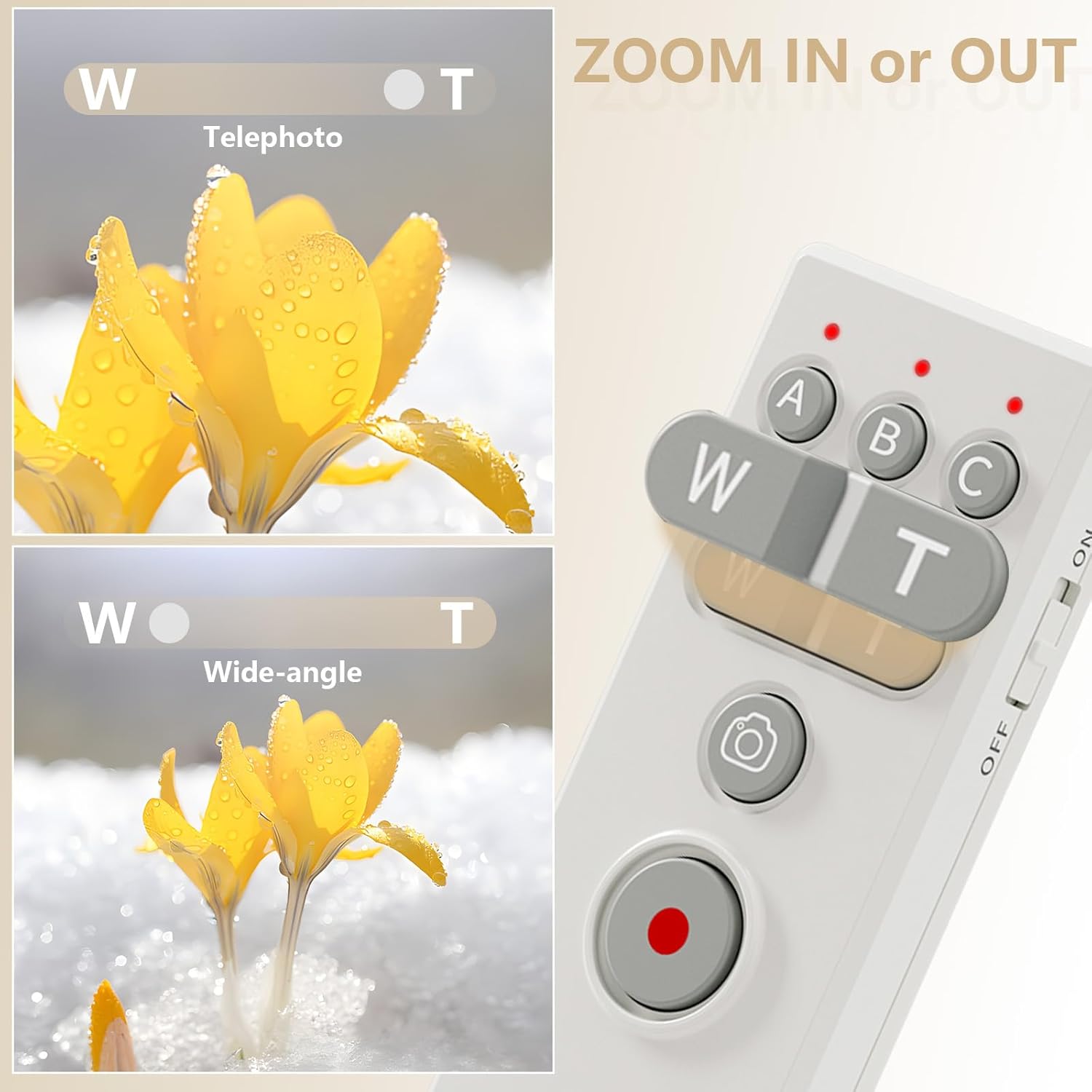
Image 4.2: Zoom Function. This image highlights the 'W' and 'T' buttons on the remote for zoom control, illustrating their effect with examples of wide-angle and telephoto shots of flowers.
Important Zoom Notes:
- Canon: Zoom functionality only works with the Canon PZ-E1 Power Zoom Adapter (not included) and specific lenses like the EF-S 18-135mm f/3.5-5.6 IS USM lens.
- Nikon Z Series: The zoom function is not supported for Nikon Z series cameras.
- Smartphones: Zoom functionality may be limited or unavailable depending on the smartphone model and camera application.
4.4 Styring af flere enheder
The remote control can manage up to three cameras and one smartphone simultaneously. Use the A, B, and C buttons to switch between paired devices.

Image 4.3: Multi-Device Control. This image shows a hand holding the remote control, with multiple cameras and a smartphone set up, indicating the remote's ability to control up to four devices simultaneously.
4.5 Bulb Mode Operation
For long exposure photography using Bulb mode:
- Set your camera to Bulb exposure mode (often labeled 'B' or 'Time').
- Tryk på Skydeknap once to open the shutter.
- Tryk på Skydeknap again to close the shutter, ending the exposure.

Image 4.4: Bulb Mode. This image displays a long exposure photograph of light trails, illustrating the effect achievable with Bulb mode.
4.6 Anti-Shake Functionality
Using the remote control minimizes camera shake, resulting in sharper images, especially in low light or with long exposures.

Image 4.5: Sharper Photos. This image presents a side-by-side comparison of a bird photograph, showing a less sharp image labeled 'Before use' and a sharper image labeled 'After use', demonstrating the benefit of anti-shake for stable images.
4.7 Videodemonstration
Video 4.1: AODELAN Remote Control with Sony A6100. This short video demonstrates the AODELAN remote control being used with a Sony A6100 camera, showcasing its compatibility and basic functions like shutter release.
5. Vedligeholdelse
- Hold fjernbetjeningen tør og ren. Undgå udsættelse for fugt eller ekstreme temperaturer.
- Rengør fjernbetjeningen med en blød, tør klud. Brug ikke skrappe kemikalier eller slibende rengøringsmidler.
- Hvis fjernbetjeningen ikke skal bruges i længere tid, skal du fjerne batterierne for at forhindre lækage.
- The remote can be powered via USB-TYPE-C from a power bank for extended use.

Image 5.1: Power Bank Connection. This image shows the remote control connected to a power bank via a USB-C cable, indicating its ability to be powered externally.
6. Fejlfinding
- Fjernbetjeningen parres ikke:
- Sørg for, at batterierne er korrekt installeret og opladet.
- Verify the remote is powered on.
- Confirm your camera/smartphone's Bluetooth is enabled and in pairing mode.
- Check camera settings for specific Bluetooth remote control options (e.g., Canon's "Bluetooth remote trigger mode").
- Ensure your camera model is listed as compatible in Section 3.2.
- Zoom function not working:
- Confirm your lens supports power zoom and, for Canon, if the PZ-E1 Power Zoom Adapter is required and attached.
- Note that Nikon Z series cameras do not support the zoom function via this remote.
- Smartphone zoom functionality may vary.
- Limited functions with smartphone:
- When paired with a smartphone, the remote may only trigger photo/video based on the phone's current camera app setting. Zoom and other advanced functions might not be supported.
- Remote unresponsive:
- Udskift batterierne med nye.
- Turn the remote off and on again.
- Re-pair the remote with your device.
7. Specifikationer
| Feature | Detalje |
|---|---|
| Mærke | AODELAN |
| Modelnummer | 51541c17-fd61-41ae-acf2-fa9d3aa34dc0 |
| Forbindelsesteknologi | Bluetooth |
| Kompatible enheder | Canon, Sony, Nikon Cameras, Smartphones |
| Maks. antal understøttede enheder | 4 (3 cameras + 1 smartphone) |
| Driftsområde | Op til 10 m / 32.8 fod |
| Strømkilde | 2 x AAA Batteries (not included), USB-TYPE-C (for power bank) |
| Varens vægt | 2.39 ounce |
| Pakkedimensioner | 5.55 x 2.05 x 1.02 tommer |
8. Support
For further assistance or inquiries, please contact AODELAN customer support through the retailer's platform or the official AODELAN webwebsted.


