1. Introduktion
The Darmoshark M3Pro is a high-performance wireless gaming mouse designed for versatility and precision. It features a tri-mode connection, allowing seamless switching between 2.4G wireless, Bluetooth, and wired USB-C modes. Equipped with the PAW3395 optical sensor and a lightweight ergonomic design, the M3Pro is engineered to enhance your gaming and productivity experience across various platforms.
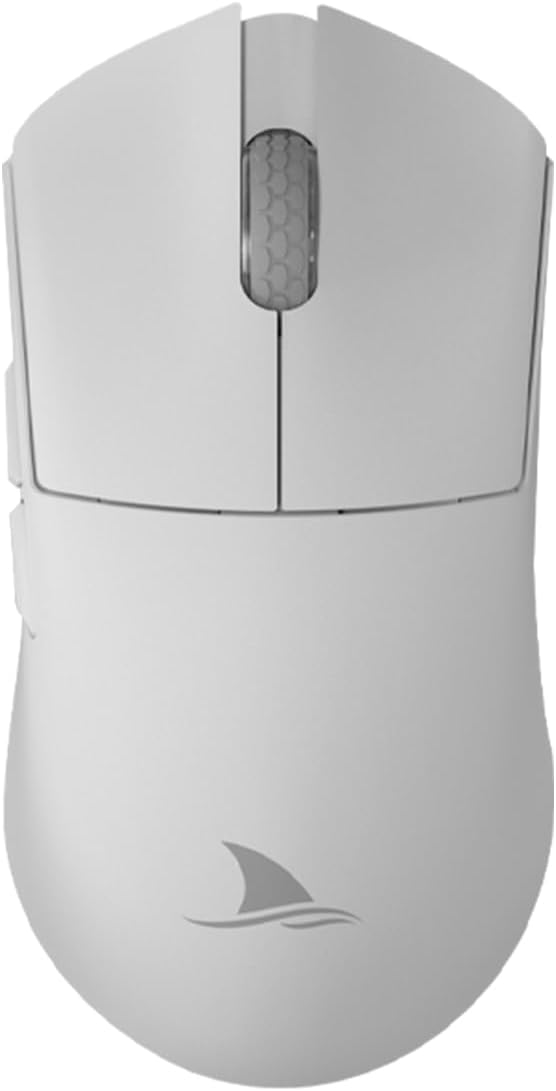
Billede 1: Top view of the Darmoshark M3Pro Wireless Gaming Mouse.
2. Produktfunktioner
- Tri-mode-tilslutning: Supports 2.4G wireless, Bluetooth 5.0, and wired USB-C connections for maximum flexibility across multiple devices.
- Højtydende sensor: Integrates the PAW3395 optical sensor, offering up to 26000 DPI, 650 IPS tracking speed, 1000Hz polling rate, and 50G acceleration for precise and responsive tracking.
- Letvægtsdesign: Weighs approximately 55g with dimensions of 129.5 x 66.2 x 39.6 mm, providing comfort during extended use and quick maneuverability.
- Holdbare afbrydere: Features TTC Dustproof Gold Microswitches for crisp clicks and a responsive feel.
- Precision Scroll Wheel: Equipped with TTC Golden Wheel Encoders for accurate and smooth scrolling.
- Programmerbare knapper: 8 customizable buttons allow for personalized macros and functions via dedicated software.
- Lang batterilevetid: Built-in 500mAh lithium-ion battery provides approximately 280 hours of interval use (8 hours/day office calculation) or 140 hours of continuous use in 2.4G 1KHz return rate mode.
- Høj meningsmålingsrate: Supports up to 4KHz return rate for ultra-low latency.

Image 2: Lightweight design and dimensions of the M3Pro mouse.

Image 3: Illustration of TTC Dustproof Gold Micromotion switches.
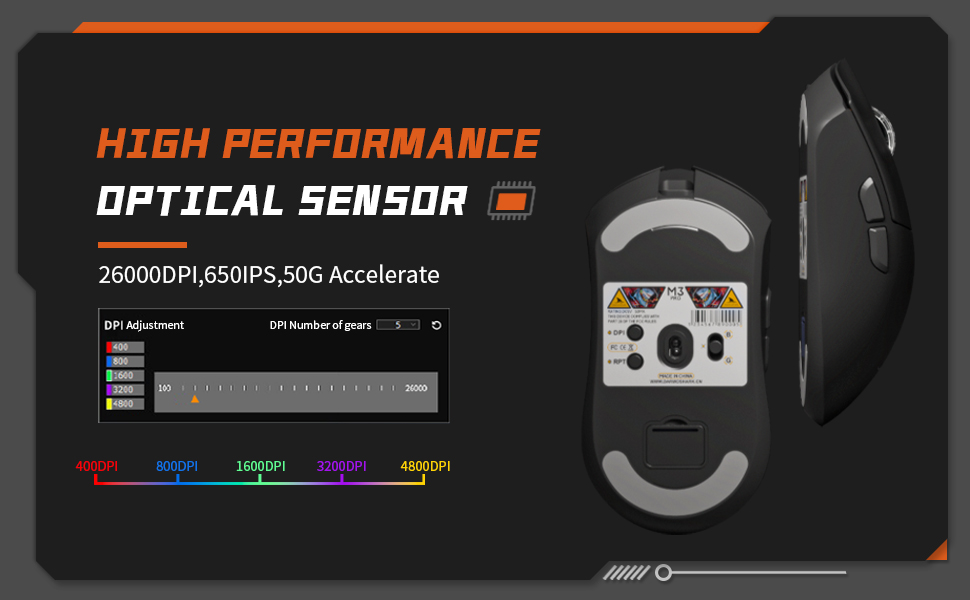
Image 4: Battery life information for the M3Pro mouse.
3. Opsætning
3.1 Opladning af musen
Before first use, it is recommended to fully charge the mouse. Connect the included USB-C cable to the mouse and to a USB power source (e.g., computer USB port, USB wall adapter). The mouse's indicator light will show charging status.

Image 5: M3Pro mouse connected for charging via USB-C.
3.2 Tilslutning af musen
The M3Pro supports three connection modes:
- 2.4G trådløs tilstand:
- Locate the 2.4G USB receiver stored in the compartment at the bottom of the mouse.
- Sæt USB-modtageren i en ledig USB-port på din computer.
- Switch the mode selector switch on the bottom of the mouse to the '2.4G' position. The mouse should connect automatically.
- Bluetooth-tilstand:
- Switch the mode selector switch on the bottom of the mouse to the 'Bluetooth' position.
- Aktiver Bluetooth på din computer eller enhed, og søg efter nye enheder.
- Select "Darmoshark M3Pro" from the list of available devices to pair.
- Kablet tilstand:
- Tilslut USB-C-kablet til musen og den anden ende til en USB-port på din computer.
- Musen skifter automatisk til kablet tilstand og begynder at oplade.

Image 6: Tri-mode connection options for the M3Pro mouse.
3.3 Softwareinstallation
To customize DPI settings, button functions, and macro settings, download the official Darmoshark M3Pro software from the official Darmoshark webFølg instruktionerne på skærmen for installation.

Image 7: Software interface for DPI adjustment and customization.
4. Betjeningsvejledning
4.1 DPI-justering
The M3Pro mouse features a dedicated DPI adjustment button, typically located on the bottom of the mouse or programmable via software. Press this button to cycle through preset DPI levels. The software allows for fine-tuning and custom DPI profiles.
4.2 Programmerbare knapper
The 8 programmable buttons can be configured using the Darmoshark M3Pro software. This includes remapping functions, assigning macros, and setting up specific commands for different applications or games.
4.3 Modeskift
Use the physical switch on the bottom of the mouse to select between 2.4G wireless, Bluetooth, and wired modes. Ensure the correct mode is selected for your desired connection type.
4.4 Batteristatusindikator
The mouse may feature an indicator light (often on the scroll wheel or near the DPI button) that changes color or blinks to indicate battery level or charging status. Refer to the software for more detailed battery information.
5. Vedligeholdelse
5.1 Rengøring
For at opretholde optimal ydeevne skal du rengøre din mus regelmæssigt. Brug en blød, tør klud til at tørre overfladen af. Ved genstridigt snavs kan du bruge en let tør klud.amp cloth with mild soap can be used, ensuring no liquid enters the mouse. Avoid harsh chemicals or abrasive materials.
5.2 Grip Stickers and Mouse Feet
The M3Pro includes optional grip stickers for enhanced handling. While effective, these stickers may show discoloration with prolonged use. The mouse also comes with extra bottom feet, which can be replaced if the original feet wear out, ensuring smooth gliding performance.
6. Fejlfinding
- Musen svarer ikke: Ensure the mouse is charged and the correct connection mode (2.4G, Bluetooth, or Wired) is selected. Check USB receiver connection for 2.4G mode or Bluetooth pairing for Bluetooth mode.
- Forsinkelse eller afbrydelse: For wireless modes, ensure the mouse is within range of the receiver/device and there are no strong interferences (e.g., other wireless devices). Try connecting via wired mode to rule out wireless issues.
- DPI/Button issues: Verify settings in the Darmoshark M3Pro software. Ensure the software is up-to-date.
- Cursor erratic movement: Clean the optical sensor at the bottom of the mouse. Ensure you are using the mouse on a suitable surface (e.g., a mouse pad).
7. Specifikationer
| Feature | Specifikation |
|---|---|
| Mærke | Darmoshaj |
| Model | M3Pro |
| Forbindelse | Tri-Mode (2.4G Wireless, Bluetooth, USB-C Wired) |
| Sensor | PAW3395 Optisk Sensor |
| DPI opløsning | Op til 26000 DPI |
| Sporingshastighed | 650 IPS |
| Acceleration | 50G |
| Afstemningsfrekvens | Up to 4KHz (2.4G mode) |
| Knapper | 8 Programmerbare knapper |
| Afbrydere | TTC Dustproof Gold Microswitches |
| Encoder | TTC Golden Wheel Encoder |
| Vægt | Ca. 55 g |
| Dimensioner | 129.5 x 66.2 x 39.6 mm |
| Batterikapacitet | 500mAh Lithium Ion |
| Kompatibel OS | Linux, Windows 7, Windows XP (and newer versions) |
| Håndorientering | Højre |

Image 8: Product parameter diagram with button layout and dimensions.
8. Officiel produktvideo
Video 1: En overview of the Darmoshark M3Pro Wireless Gaming Mouse, highlighting its features and performance in a gaming context.
9. Garanti og support
For warranty information and technical support, please refer to the documentation included with your product or visit the official Darmoshark website. You may also contact customer support via the hotline: 4008-860-368.


