
1. Produktet er slutview
The CAPOXO Wired 1080p Full HD Video Recording Camera is designed for discreet surveillance and recording. This device captures high-definition video with audio, features motion detection, and includes a night lamp for low-light conditions. It operates without Wi-Fi, storing recordings directly onto a memory card for easy access.
This manual provides detailed instructions for setting up, operating, and maintaining your CAPOXO camera to ensure optimal performance.
2. Pakkens indhold
Bekræft at alle varer er til stede i din pakke:
- CAPOXO Wired 1080p Full HD Video Recording Camera
- USB kabel
- Brugermanual
Note: A Micro SD card (16GB, 32GB, or 64GB Class 10 recommended) and a 5V/1A charger are not included and must be purchased separately.
3. Produktfunktioner
- Full HD 1080p Video Recording: Optager klare HD-videooptagelsertage.
- Lydoptagelse: Optager lyd sammen med video.
- Bevægelsesdetektion: Automatically triggers video recording when motion is detected.
- Nat Lamp Evne: Equipped with white LED lights for recording in low-light or dark conditions.
- Kontinuerlig optagelse: Records directly to a Micro SD card (not included).
- Nem opsætning: Wired operation, no complex Wi-Fi configuration required.
- Bærbart design: Compact and easy to carry or clip.
- Drejelig linse: 90° rotatable lens for wider viewing vinkler.

Image: The CAPOXO camera featuring its 90-degree rotatable lens, allowing for flexible recording angles.

Billede: Nærbillede view of the CAPOXO camera's rotatable lens mechanism, highlighting its design for wider field of view.
4. Opsætningsvejledning
4.1 Opladning af kameraet
- Before first use, charge the camera for at least 1 hour.
- Connect the camera to a 5V/1A charger (not included) using the provided USB cable.
- Opladningsindikatorlampen lyser under opladning og slukker, når den er fuldt opladet.
- A full charge provides up to 3 hours of continuous operation. The camera can also be used while charging for extended recording.
4.2 Indsættelse af Micro SD-kortet
- Sørg for, at kameraet er slukket.
- Find Micro SD-kortstikket på siden af kameraet.
- Gently insert a Class 10 Micro SD card (16GB, 32GB, or 64GB) into the slot until it clicks into place.
- For at fjerne det skal du forsigtigt skubbe kortet ind igen, indtil det springer ud.

Image: Diagram showing the CAPOXO camera's various components, including the Micro SD card slot, ON/OFF switch, and recording buttons.
5. Betjeningsvejledning
5.1 Tænd/sluk
- For at tænde, skub ON/OFF skifte til "ON"-positionen.
- For at slukke skal du skubbe ON/OFF skifte til "OFF"-positionen.

Image: A hand demonstrating how to operate the CAPOXO camera, highlighting the easy-to-use ON/OFF switch for one-button recording.
5.2 Videooptagelse
- Ensure the camera is powered on and a Micro SD card is inserted.
- Slide the "SAVE -> VIDEO" switch to the "VIDEO" position to start recording.
- The indicator light will flash to confirm recording is in progress.
- To stop recording, slide the "SAVE -> VIDEO" switch back to the "SAVE" position. The video file vil blive gemt på Micro SD-kortet.
5.3 Optagelse af bevægelsesdetektering
The camera automatically records 1080p HD videos when motion is detected. This feature is active when the camera is powered on and in recording mode.
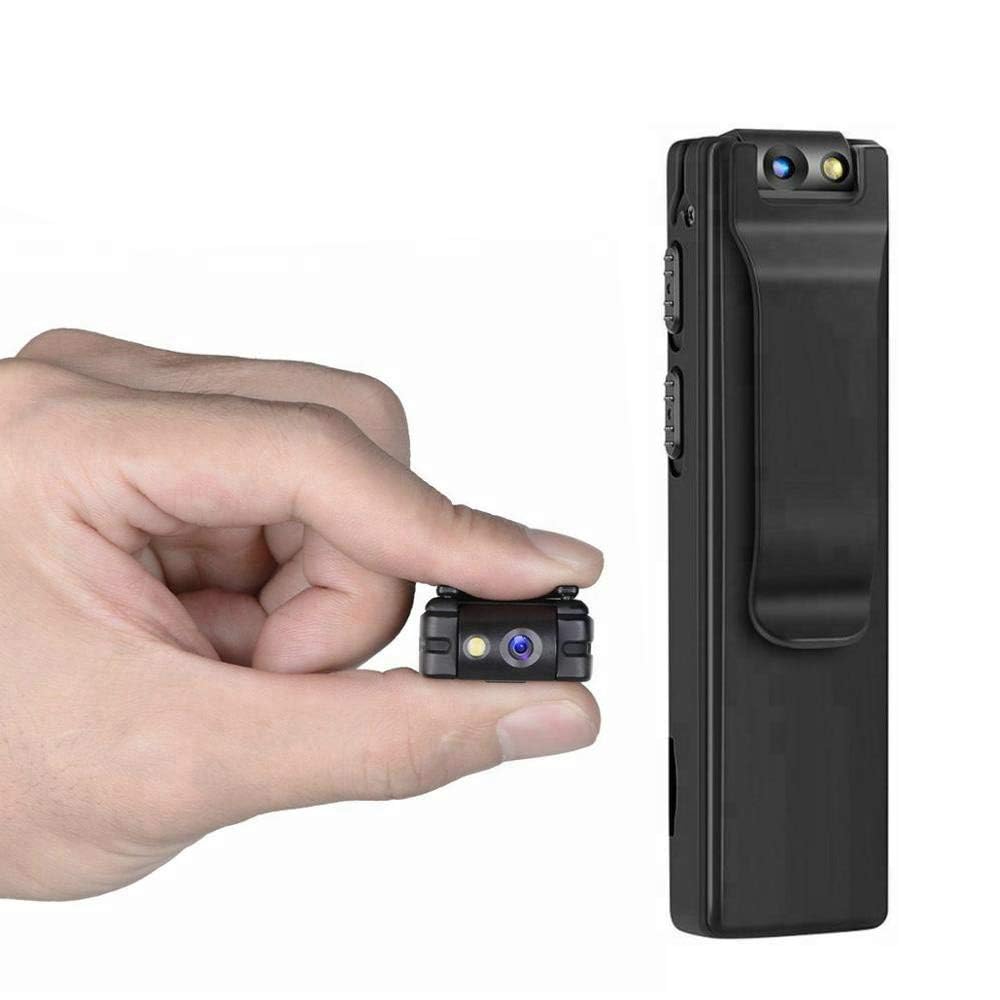
Image: Illustration of the CAPOXO camera's motion detection feature, showing it capturing activity in a room.
5.4 Night Lamp Mode
The camera is equipped with white LED lights to enhance visibility and recording quality in low-light or dark environments.
- To activate the night lamp, slide the "ON -> LAMP" switch to the "LAMP" position.
- To deactivate, slide the switch back to the "ON" position.
5.5 Optagelse af billeder
- Sørg for, at kameraet er tændt.
- Press the "PHOTO" button once to take a still image. The indicator light may flash briefly.
- Photos are saved to the Micro SD card.
5.6 Viewi optagelser
- Sluk kameraet.
- Fjern Micro SD-kortet fra kameraet.
- Insert the Micro SD card into a computer's card reader or a compatible device.
- Få adgang til files on the Micro SD card to view dine optagede videoer og fotos.

Image: The CAPOXO camera shown in different usage environments, including an office, car, laboratory, and home, demonstrating its versatility.

Image: The CAPOXO camera depicted in diverse settings such as business meetings, family gatherings, children playing, and outdoor adventures, illustrating its broad application.
6. Vedligeholdelse
- Rensning: Use a soft, dry cloth to clean the camera body. Do not use liquid cleaners or solvents.
- Linsepleje: Gently wipe the lens with a microfiber cloth designed for optics. Avoid touching the lens with bare fingers.
- Opbevaring: Opbevar kameraet et køligt og tørt sted, væk fra direkte sollys og ekstreme temperaturer.
- Batterilevetid: For at forlænge batteriets levetid, undgå at aflade batteriet helt ofte. Oplad det regelmæssigt, selvom det ikke er i brug i længere perioder.
- SD-kortadministration: Regularly back up important recordings and format the Micro SD card periodically to maintain optimal performance and prevent data corruption.
7. Fejlfinding
Kamera tænder ikke
- Ensure the battery is charged. Connect the camera to a charger for at least 1 hour.
- Kontroller, at tænd/sluk-knappen er i "TIL"-positionen.
Kan ikke optage video
- Check if a Micro SD card is properly inserted.
- Sørg for, at der er tilstrækkelig ledig plads på Micro SD-kortet.
- Verify the Micro SD card is Class 10 and within the supported capacity (16GB, 32GB, 64GB).
- Format the Micro SD card if it's a new card or if you encounter issues.
Dårlig videokvalitet
- Sørg for, at kameralinsen er ren og fri for pletter eller støv.
- Check lighting conditions. Use the night lamp i omgivelser med svagt lys.
Bevægelsesdetektion virker ikke
- Ensure the camera is powered on and in recording mode.
- Verify there are no obstructions blocking the camera's view.
Camera Unresponsive (Reset)
- If the camera becomes unresponsive, locate the "RESET" button (often a small pinhole).
- Use a thin object (like a paperclip) to gently press and hold the reset button for a few seconds.
- The camera should restart.
8. Specifikationer
| Mærke | Capoxo |
| Modelnummer | Capoxo-A-Cctv-Camera |
| Videooptagelsesopløsning | 1080p fuld HD |
| Forbindelsesteknologi | Wired (USB for charging/data transfer) |
| Flash-hukommelsestype | Micro SD (supports 16GB, 32GB, 64GB Class 10) |
| Videooptagelsesformat | AVI |
| Understøttet lydformat | AAC |
| Særlige funktioner | Motion Detection, Night Lamp, HD Resolution, 90° Rotatable Lens |
| Batterilevetid | Op til 3 timer (efter fuld opladning) |
| Opladningsindgang | 5V/1A (charger not included) |
| Dimensioner (LxBxH) | 9 x 2.5 x 1 centimeter |
| Varens vægt | 250 g |
| Inkluderede komponenter | Camera, USB Cable, Manual |
9. Garanti og support
For warranty information or technical support, please refer to the contact details provided with your purchase documentation or visit the official CAPOXO webwebsted.
Gem venligst din købsbevis i tilfælde af garantikrav.