Indledning
This manual provides detailed instructions for the QCOQ T60 Smart Watch. It covers setup, operation, maintenance, and troubleshooting to ensure optimal use of your device. The QCOQ T60 Smart Watch features a 1.91-inch display, Bluetooth call functionality, heart rate monitoring, and IP68 water resistance.
Pakkens indhold
Tjek venligst pakken for følgende varer:
- QCOQ T60 Smart Watch (1 unit)
- Ladekabel
- Brugermanual
Opsætning
1. Opladning af enheden
Before first use, fully charge the smart watch. Connect the magnetic charging cable to the charging contacts on the back of the watch and plug the USB end into a standard USB power adapter (not included).

Image: The QCOQ T60 Smart Watch connected to its magnetic charging cable, illustrating the charging process. The watch display shows an 80% battery level, indicating partial charge.
- Opladningstid: Cirka 2 timer for en fuld opladning.
- Battery Life: Up to 7 days of typical usage on a full charge.
2. Appinstallation og parring
To utilize all features of your QCOQ T60 Smart Watch, download and install the companion application on your smartphone.
- Scan the QR code provided in the quick start guide or search for the app name (usually indicated in the watch's initial setup screen or manual) in your smartphone's app store (App Store for iOS, Google Play Store for Android).
- Sørg for, at Bluetooth er aktiveret på din smartphone.
- Åbn den installerede app, og følg instruktionerne på skærmen for at oprette en konto eller logge ind.
- Within the app, navigate to the device pairing section and select your QCOQ T60 Smart Watch from the list of available devices.
- Bekræft parringsanmodningen på både din smartphone og smarturet.
Betjeningsvejledning
1. Grundlæggende navigation
The QCOQ T60 Smart Watch features a touchscreen display and a side button for navigation.
- Stryg op/ned: Rul gennem menuer og notifikationer.
- Stryg til venstre/højre: Få adgang til hurtige funktioner eller forskellige widgets.
- Tryk på: Vælg et element eller bekræft en handling.
- Side knap: Tryk for at vende tilbage til startskærmen eller vække enheden. Langt tryk for strømindstillinger.
2. Bluetooth-opkaldsfunktionalitet
Once paired with your smartphone, the QCOQ T60 Smart Watch allows you to make and answer calls directly from your wrist.
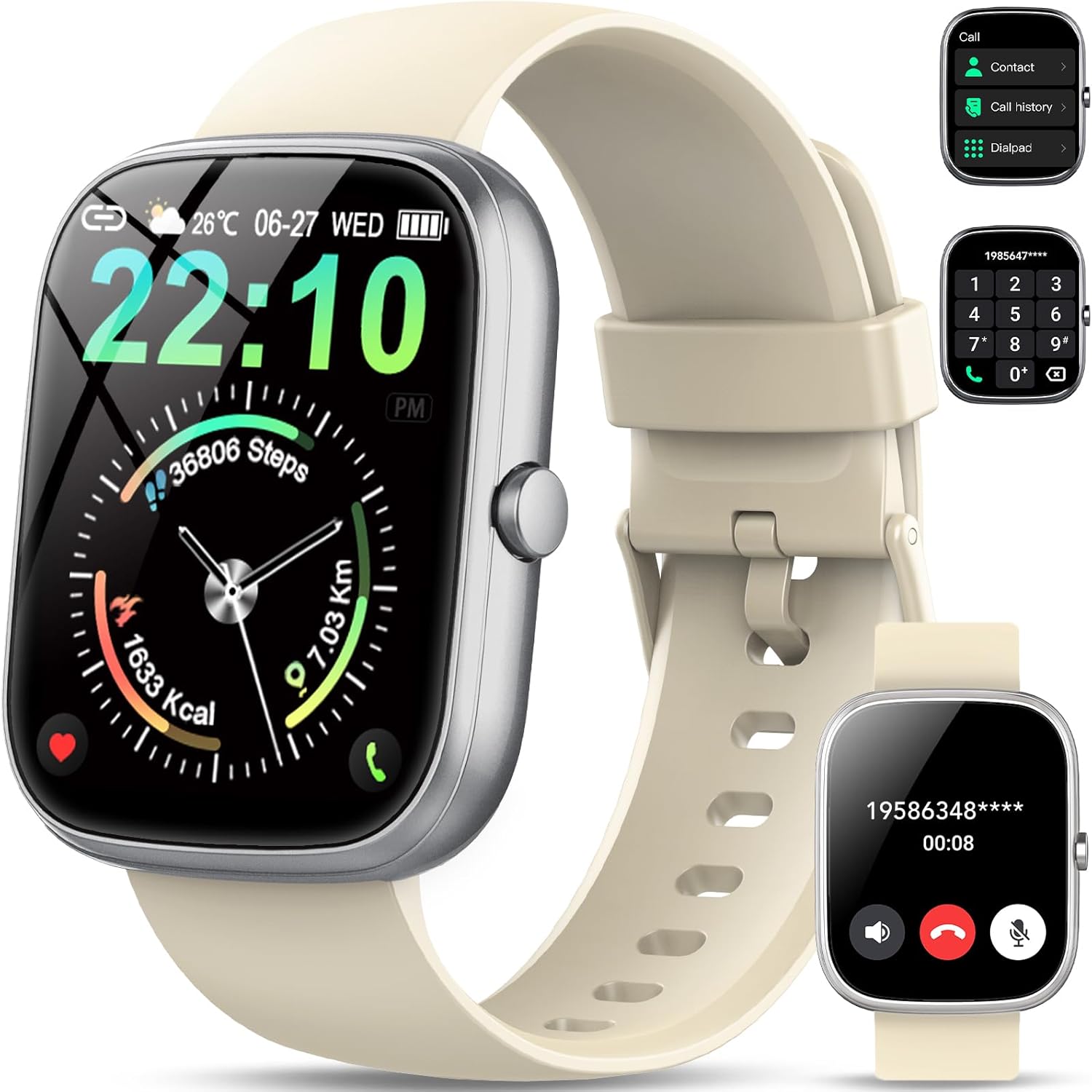
Image: The QCOQ T60 Smart Watch screen showing the call interface, including options to access contacts, view call history, and use a dialpad. A separate inset shows an incoming call notification.
- Besvarelse af opkald: Når der modtages et indgående opkald, skal du trykke på det grønne svarikon på urskærmen.
- Foretage opkald: Access the 'Call' menu on the watch, then select from contacts, call history, or use the dialpad to enter a number.
3. Meddelelser
Modtag notifikationer fra din smartphone direkte på dit ur.

Image: The QCOQ T60 Smart Watch screen showing notifications from various social media and messaging applications. Adjacent to it, a smartphone displays an incoming call, demonstrating the watch's Bluetooth call feature.
- Sørg for, at notifikationstilladelser er aktiveret for den ledsagende app på din smartphone.
- Stryg ned fra toppen af urskiven for at view nylige notifikationer.
4. Fitnesstracking
The QCOQ T60 Smart Watch monitors various fitness metrics.

Image: A visual representation of the QCOQ T60 Smart Watch's fitness capabilities, highlighting over 110 sport modes, step counting, calorie expenditure tracking, IP68 water resistance, and comprehensive daily activity data.
- Heart Rate Monitoring: The watch provides real-time heart rate data. Access the heart rate function on the watch or through the app.
- Step Count & Calories: Sporer dine daglige skridt, distance og estimerede kalorieforbrændinger.
- Sportstilstande: Select from over 110 sport modes to track specific activities.
5. Søvnovervågning
The watch automatically monitors your sleep patterns.

Image: The QCOQ T60 Smart Watch screen showing detailed sleep monitoring data, including deep, light, and awake sleep stages. Another section displays a 7-day weather forecast.
- Wear the watch while sleeping for accurate data.
- View detailed sleep analysis in the companion app, including deep sleep, light sleep, and awake times.
6. Andre funktioner
- Vejrudsigt: View current weather and a 7-day forecast.
- Musik kontrol: Styr musikafspilning på din smartphone (afspil, pause, spring numre over).
- Fjernbetjening til kameraet: Brug uret som fjernbetjent lukker til dit smartphonekamera.
- Stemmeassistent: Få adgang til din smartphones stemmeassistent.
- Stillesiddende påmindelse: Modtag beskeder om at flytte dig efter perioder med inaktivitet.
- Alarm: Indstil alarmer direkte fra uret.
- Overvågning af ilt i blodet: Mål dit iltniveau i blodet.
- Kvinders sundhed: Spor menstruationscyklusser og relaterede data.
- Lommeregner: Grundlæggende lommeregnerfunktion.
7. Tilpasning af urskiver
Tilpas dit ur med forskellige urskiver.

Image: A collage of various watch faces available for the QCOQ T60 Smart Watch, demonstrating the range of styles and information displays, including options for personalized backgrounds.
- Long press on the current watch face to enter the watch face selection menu.
- Swipe left or right to browse available watch faces. Tap to select.
- More watch faces and customization options (including custom backgrounds) are available through the companion app.
Opretholdelse
1. Rensning
- Tør urets skærm og kabinet af med en blød, fnugfri klud.
- For the strap, use a mild soap and water solution if necessary, then rinse thoroughly and dry completely before wearing.
- Undgå at bruge skrappe kemikalier eller slibende materialer.
2. Vandtæthed (IP68)
The QCOQ T60 Smart Watch is IP68 rated, meaning it is resistant to dust and can withstand immersion in water up to 1.5 meters for up to 30 minutes. It is suitable for daily use, such as hand washing or light rain.
- Do not use the watch for diving, hot showers, saunas, or in environments with high-pressure water.
- Vandtæthed er ikke en permanent tilstand og kan aftage over tid ved normal slitage.
3. Batteripleje
- Undgå ekstreme temperaturer, da disse kan forringe batteriets ydeevne.
- Oplad uret regelmæssigt; undgå at lade batteriet aflades helt i længere perioder.
Fejlfinding
- Uret tænder ikke: Sørg for, at uret er fuldt opladet. Tilslut det til opladeren i mindst 10 minutter.
- Kan ikke parres med smartphone:
- Sørg for, at Bluetooth er aktiveret på din telefon og uret.
- Sørg for, at uret er inden for din telefons rækkevidde.
- Genstart både uret og din telefon.
- Check if the companion app has necessary permissions.
- Ikke modtaget meddelelse:
- Verify that notifications are enabled in the watch's settings and the companion app.
- Sørg for, at uret er korrekt forbundet via Bluetooth.
- Tjek din telefons notifikationsindstillinger for appen.
- Unøjagtige puls-/aktivitetsdata: Ensure the watch is worn snugly on your wrist, not too tight or too loose. Clean the sensor regularly.
Specifikationer
| Feature | Specifikation |
|---|---|
| Mærke | QCOQ |
| Model | T60 |
| Skærmstørrelse | 1.91 tommer |
| Displayteknologi | LCD |
| Opløsning | 240 x 240 |
| Forbindelse | Bluetooth |
| Kompatible enheder | Smartphone |
| Vandmodstand | IP68 |
| Særlige funktioner | Heart Rate Monitor, Notifications, Camera Remote, Voice Assistant |
| Human Interface Input | Touchskærm |
| GPS | Ingen GPS |
| Batteritype | Lithium-ion (1 påkrævet) |
| Dimensioner (pakke) | 17.4 x 9.4 x 1.8 cm |
| Vægt (pakke) | 38.19 g |
| Farve | Cremet hvid |
Sikkerhedsoplysninger
- Consult your doctor before starting any new exercise regimen or if you have pre-existing health conditions.
- Forsøg ikke at skille uret ad eller modificere det.
- Hold enheden væk fra ekstrem varme eller kulde.
- Bortskaf enheden og dens batteri i henhold til lokale regler.
Garanti og support
For warranty information and customer support, please refer to the documentation included with your purchase or visit the official QCOQ website. Ensure you have your purchase receipt and product model number (T60) available when contacting support.


