1. Introduktion
Thank you for choosing the CHEREEKI Wireless Gamepad for PS-4. This manual provides detailed instructions on how to set up, operate, and maintain your new controller. Please read this manual carefully before use to ensure optimal performance and longevity of your device. This controller is designed to enhance your gaming experience with its advanced features and ergonomic design.
2. Produktet er slutview
2.1 Nøglefunktioner
- Kompatibilitet: Compatible with PS-4, PS-4 Slim, and PS-4 Pro consoles, providing a stable signal up to 8 meters without delay.
- Ergonomisk design: Manually mounted with highly sensitive buttons and classic analog stick design for precise and comfortable gaming.
- 6-Axis Sensor & Dual Motors: Equipped with a built-in 6-axis sensor (gyroscope and accelerometer) and dual vibration motors for immersive gaming feedback.
- Touchpad & Light Bar: Features a multi-touch touchpad and an integrated light bar for new gaming possibilities.
- Lang batterilevetid: 600mAh battery provides up to 7 hours of playtime on a 2-3 hour charge.
- Delingsfunktion: Includes a dedicated SHARE button for easy sharing of video clips and screenshots.
- Stereo Headphone Socket: A 3.5mm audio jack allows connection of headphones for immersive audio.
2.2 Pakkens indhold
- CHEREEKI Wireless Gamepad
- USB opladningskabel
- Brugermanual
2.3 Controllerlayout

Figur 2.3.1: For og bag view of the CHEREEKI Wireless Gamepad, highlighting key components such as the R1/R2/L1/L2 buttons, Light Bar, Micro USB Port, SHARE button, OPTIONS button, Directional Buttons, Left Stick, Home Button, Right Stick, Extension Port, and Stereo Headset Jack.
Familiarize yourself with the various buttons and ports on your controller:
- Retningsknapper (D-Pad): Til præcis retningsbestemt input.
- Venstre/højre analoge pinde: Til 360-graders bevægelse og kamerakontrol.
- Handlingsknapper (Trekant, Cirkel, Kryds, Firkant): Til handlinger i spillet.
- DEL-knap: To share gameplay moments.
- INDSTILLINGER-knap: To access in-game menus and options.
- PS-knap (Hjem-knap): To turn on/off the controller, access the PS-4 home screen.
- Touchpad: Multi-touch surface for interactive gameplay.
- L1/R1 knapper: Skulderknapper.
- L2/R2-udløsere: Analoge triggere til præcis input.
- Lysbjælke: Indicates player number, health, and other game information.
- Micro USB -port: Til opladning og kabelforbindelse.
- Stereoheadset-stik: 3.5 mm port til tilslutning af hovedtelefoner eller headsets.
- Udvidelsesport: For connecting compatible accessories.
3. Opsætning
3.1 Initial Connection & Pairing
For the first-time connection, the controller must be paired with your PS-4 console using a USB cable.
- Sørg for, at din PS-4-konsol er tændt.
- Connect one end of the provided USB charging cable to the Micro USB port on the controller and the other end to a USB port on your PS-4 console.
- Press the PS button (Home button) on the controller. The light bar will flash and then glow solid, indicating successful pairing.
- Når den er parret, kan du frakoble USB-kablet for at bruge controlleren trådløst.
3.2 Reconnecting Wirelessly
After initial pairing, the controller will automatically attempt to reconnect wirelessly to the last paired PS-4 console when you press the PS button.
3.3 Opladning af controlleren

Figur 3.3.1: Illustration of the CHEREEKI Wireless Gamepad's battery life, indicating a charging time of 2 hours for 7 hours of play time.
The controller is equipped with a 600mAh rechargeable Lithium-Ion battery.
- Connect the controller to your PS-4 console or a standard USB charger (5V/1A) using the provided USB cable.
- The light bar will slowly flash orange while charging.
- Once fully charged (approximately 2-3 hours), the light bar will turn off.
- A full charge provides up to 7 hours of continuous gameplay.
4. Betjeningsvejledning
4.1 Tænd/sluk
- For at tænde: Press the PS button. The controller will attempt to connect to the PS-4 console.
- For at slukke: If connected to the PS-4, hold the PS button for about 10 seconds until the light bar turns off. The controller will also power off automatically after a period of inactivity.
4.2 Kompatibilitet

Figur 4.2.1: The CHEREEKI Wireless Gamepad demonstrating wide compatibility with PS4, PS4 Slim, and PS4 Pro consoles.
This controller is fully compatible with PlayStation 4, PlayStation 4 Slim, and PlayStation 4 Pro consoles. It provides a stable and responsive connection for all compatible PS-4 titles.
4.3 Motion Sensor (Gyro) Control
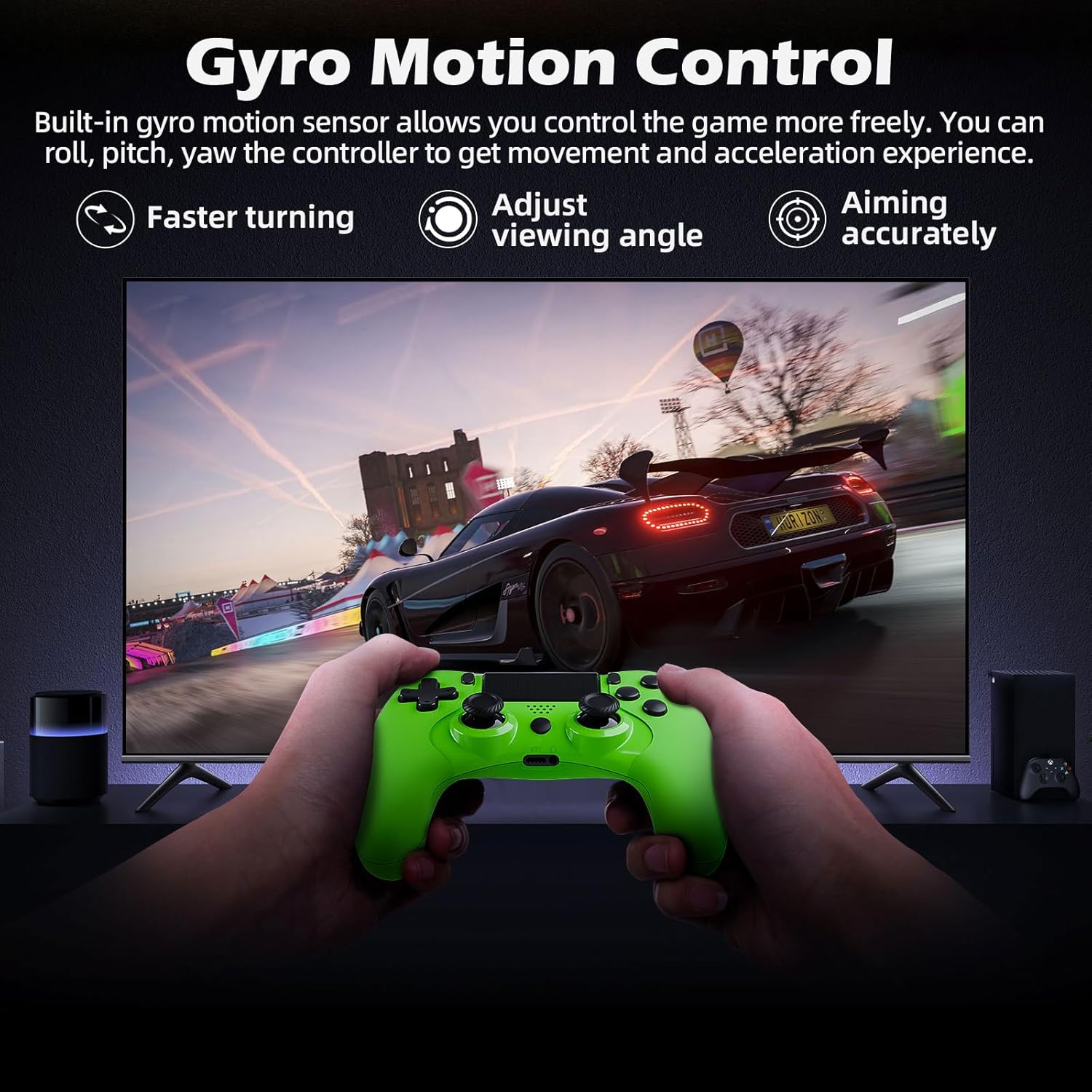
Figur 4.3.1: A user playing a racing game with the CHEREEKI Wireless Gamepad, demonstrating the built-in gyro motion sensor for controlling movement and acceleration, allowing for faster turning, adjusting viewing angle, and accurate aiming.
The built-in 6-axis motion sensor allows for intuitive control in games that support motion sensing. You can roll, pitch, and yaw the controller to control in-game actions, providing a more immersive and dynamic gaming experience, especially for racing or aiming.
4.4 Dobbelt motorvibration

Figur 4.4.1: The CHEREEKI Wireless Gamepad illustrating its dual motor vibration feature, designed to provide an immersive tactile feedback experience during gameplay.
The integrated dual vibration motors provide realistic feedback for in-game events such as crashes, explosions, or impacts, making your gaming experience more immersive and engaging.
4.5 Brug af touchpad'en
The multi-touch touchpad on the front of the controller can be used for navigation, gestures, and specific in-game interactions, depending on the game's design.
4.6 Lydforbindelse
Plug any standard 3.5mm stereo headset or headphones into the audio jack at the bottom of the controller for in-game audio and voice chat (if supported by the headset).
4.7 Sharing Gameplay
Press the SHARE button to access the sharing menu. From here, you can easily upload screenshots, video clips, or start live broadcasts of your gameplay.
5. Vedligeholdelse
5.1 Rengøring
- Brug en blød, tør klud til at tørre overfladen på controlleren af.
- Til genstridigt snavs, let dampda kluden med vand eller en mild rengøringsopløsning.
- Do not use strong chemicals, abrasive cleaners, or allow water to enter the controller's ports.
5.2 Opbevaring
- Opbevar controlleren et køligt, tørt sted væk fra direkte sollys og ekstreme temperaturer.
- Undgå at tabe controlleren eller udsætte den for kraftige stød.
- Hvis batteriet opbevares i længere tid, skal det oplades med jævne mellemrum (f.eks. hver 3.-6. måned) for at opretholde batteriets tilstand.
6. Fejlfinding
6.1 Controller Not Connecting/Responding
- Tjek USB-forbindelse: Ensure the USB cable is securely connected to both the controller and the PS-4 console.
- Genparr controller: Connect the controller to the PS-4 with a USB cable and press the PS button to re-pair.
- Nulstil controller: Locate the small reset button on the back of the controller (often near the L2 button, inside a tiny hole). Use a paperclip to press and hold the button for 3-5 seconds. Then, reconnect via USB and press the PS button.
- Oplad batteri: Sørg for, at controlleren har tilstrækkelig batteriopladning.
- Interferens: Move closer to the PS-4 console or ensure there are no strong wireless interference sources nearby.
6.2 Input Lag or Disconnection
- Afstand: Ensure you are within the effective wireless range (up to 8m).
- Batteriniveau: Low battery can affect wireless performance. Charge the controller.
- Interferens: Other wireless devices (Wi-Fi routers, Bluetooth devices) can cause interference. Try to minimize these or move the console/controller.
- Nulstil controller: Udfør en hård nulstilling som beskrevet ovenfor.
6.3 Opladningsproblemer
- Tjek kabel: Prøv et andet USB-kabel for at udelukke et defekt kabel.
- Tjek opladningsport: Ensure the Micro USB port on the controller is clean and free of debris.
- Strømkilde: Try charging from a different USB port on the PS-4 or a different USB wall adapter.
7. Specifikationer
| Feature | Specifikation |
|---|---|
| Modelnummer | STK-4006L |
| Forbindelse | Trådløs (Bluetooth), Kablet (USB) |
| Kompatibilitet | PS-4, PS-4 Slim, PS-4 Pro |
| Batteritype | Lithium Ion |
| Batterikapacitet | 600 mAh |
| Opladningstid | Ca. 2-3 timer |
| Spilletid | Op til 7 timer |
| Wireless Range | Op til 8 meter |
| Dimensioner | 17.4 x 12.1 x 7.3 cm |
| Vægt | 210 g |
| Sensorer | 6-axis motion sensing system (gyroscope, accelerometer) |
| Vibration | Dobbelt vibrationsmotorer |
| Audio Port | 3.5 mm Stereo Headset-stik |
8. Garanti og support
8.1 Garantioplysninger
This CHEREEKI product is covered by a standard manufacturer's warranty against defects in materials and workmanship. Please refer to your purchase documentation for specific warranty terms and duration. The warranty does not cover damage caused by misuse, accidents, unauthorized modifications, or normal wear and tear.
8.2 Kundesupport
For technical support, troubleshooting assistance, or warranty claims, please contact CHEREEKI customer service. You can typically find contact information on the product packaging, the retailer's website, or the official CHEREEKI brand store on Amazon.
When contacting support, please have your product model number (STK-4006L) and purchase details ready.


