1. Introduktion
This manual provides detailed instructions for the Rapoo E9350L Multi-Device Wireless Keyboard. The E9350L is an ultra-thin, 99-key keyboard designed for seamless switching between up to four devices across various operating systems including Windows, Mac OS, Linux, and Chrome OS. It features low-profile chiclet keycaps for comfortable and quiet typing, a compact layout with a numeric keypad, and a long-lasting rechargeable battery.
2. Hvad er der i æsken
- 1 x E9350L Wireless Keyboard
- 1 x ladekabel (USB-C)
- 1 x Brugervejledning
3. Opsætning
3.1 Indledende opladning
Before first use, fully charge the keyboard using the provided USB-C cable. Connect the USB-C end to the keyboard's charging port and the USB-A end to a power source (e.g., computer USB port, USB wall adapter). The battery indicator light will show charging status.
3.2 Tilslutning til enheder
The E9350L supports connection via 2.4GHz wireless (using a USB receiver) and Bluetooth 5.0/4.0. It can connect to up to four devices simultaneously.
3.2.1 2.4 GHz trådløs forbindelse
- Locate the 2.4GHz USB receiver, typically stored in a compartment on the keyboard or included separately.
- Sæt USB-modtageren i en ledig USB-port på din computer eller enhed.
- Tænd tastaturet. Det burde automatisk oprette forbindelse til modtageren.
3.2.2 Bluetooth Connection (for up to 3 devices)
- Tænd for tastaturet.
- Press and hold the Bluetooth pairing key (usually indicated by a Bluetooth icon or a number like '1', '2', or '3' on the F-keys) for 3-5 seconds until the indicator light flashes rapidly. This indicates pairing mode.
- Gå til Bluetooth-indstillingerne på din enhed (computer, tablet, smartphone) og søg efter nye enheder.
- Select "Rapoo E9350L" or a similar name from the list of available devices.
- Follow any on-screen prompts to complete the pairing process. The indicator light on the keyboard will become solid when connected.
- Repeat for additional Bluetooth devices using different Bluetooth pairing keys.

Figure 3.2.2: Multi-Device and Multi-OS Connectivity
4. Betjeningsvejledning
4.1 Skift mellem tilsluttede enheder
To switch between your connected devices, simply press the corresponding device key (e.g., F1 for 2.4GHz, F2/F3/F4 for Bluetooth devices). The device indicator light will illuminate to show which device is currently active.
4.2 multimediegenvejstaster
The keyboard features 12 multimedia hotkeys (F1-F12) that provide quick access to common functions. To use these functions, press the Fn tasten samtidigt med den ønskede F-tast.
- Fn+F1: Forrige spor
- Fn+F2: Afspil/pause
- Fn+F3: Næste spor
- Fn+F4: Stum
- Fn+F5: Lydstyrke ned
- Fn+F6: Lydstyrke op
- Fn+F7: Hjem
- Fn+F8: Søg
- Fn+F9: E-mail
- Fn+F10: Web Browser
- Fn+F11: Min computer
- Fn+F12: Kalkulator
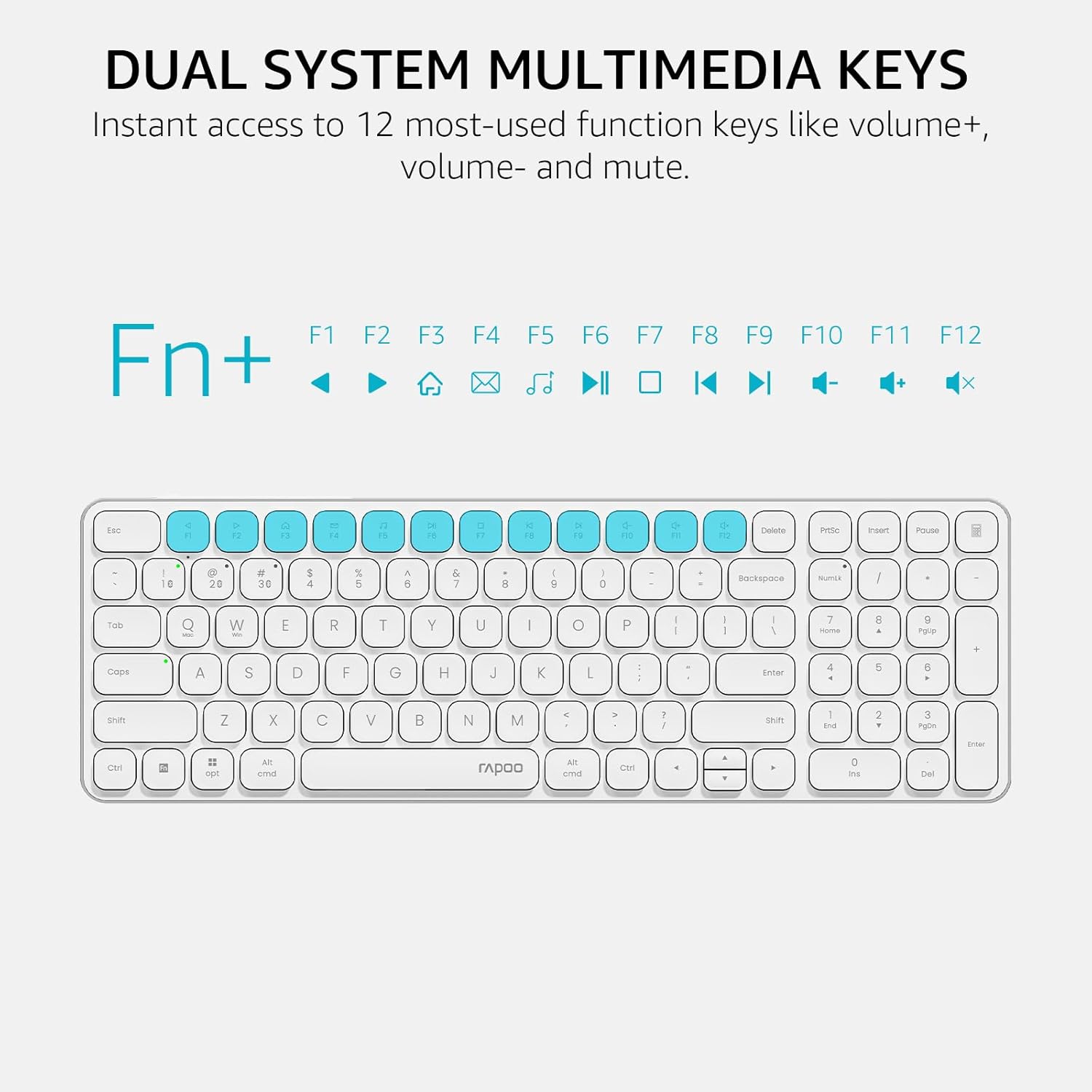
Figure 4.2: Dual System Multimedia Keys
4.3 Indikatorlys
The keyboard features indicator lights for device selection, capitalization (Caps Lock), and battery status.
- Enhedsindikator: Shows which of the 4 connected devices is currently active.
- Caps Lock-indikator: Illuminates when Caps Lock is enabled.
- Batteriindikator: Shows low battery warning and charging status.

Figure 4.3: Device and Capitalization Indicator Lights
5. Vedligeholdelse
5.1 Rengøring
For at rengøre tastaturet skal du forsigtigt tørre overfladen af med en blød kludamp cloth. For deeper cleaning between keys, use compressed air to remove dust and debris. Avoid using harsh chemicals or abrasive materials.
5.2 Pleje af batterier
The E9350L features a rechargeable lithium polymer battery. To maximize battery life:
- Oplad tastaturet helt før første brug.
- Undgå at aflade batteriet helt regelmæssigt.
- Opbevar tastaturet et køligt og tørt sted, hvis det ikke bruges i længere perioder.
- The keyboard supports fast charging, providing a full day's use with just 10 minutes of charging. A full charge can last up to 90 days.

Figure 5.2: 90-Day Rechargeable Battery
6. Fejlfinding
6.1 Tastatur opretter ikke forbindelse
- Sørg for, at tastaturet er tændt og fuldt opladet.
- For 2.4GHz connection, verify the USB receiver is securely plugged into a working USB port.
- For Bluetooth connection, ensure Bluetooth is enabled on your device and the keyboard is in pairing mode (flashing indicator light). Try re-pairing the device.
- Prøv at tilslutte til en anden USB-port eller en anden enhed for at udelukke problemer med porten eller enheden.
6.2 Typing Delays or Disconnections
- Check for interference from other wireless devices. Move the keyboard closer to the receiver/device.
- Sørg for, at tastaturets batteri ikke er lavt.
- Update Bluetooth drivers on your computer if applicable.
6.3 Multimedia Keys Not Working
- Sørg for at du trykker på Fn tasten samtidigt med den ønskede F-tast.
- Some operating systems may require specific driver updates or settings adjustments for multimedia keys.
7. Specifikationer
| Feature | Detalje |
|---|---|
| Modelnummer | E9350L |
| Dimensioner (L x B x H) | 14.29 x 4.69 x 0.51 tommer (36.3 x 11.9 x 1.3 cm) |
| Varens vægt | 12.9 ounce |
| Forbindelsesteknologi | Bluetooth (5.0/4.0), RF (2.4GHz) |
| Antal understøttede enheder | Up to 4 (1 x 2.4GHz, 3 x Bluetooth) |
| Nøglelayout | 99-Key Compact with Numeric Keypad |
| Nøgletype | Lav-profile Chiclet |
| Batteritype | Genopladelig lithiumpolymer |
| Batterilevetid | Op til 90 dage på fuld opladning |
| Kompatible enheder | Laptop, PC, Projector, Smartphone, Tablet |
| Kompatibel OS | Windows, Mac OS, Linux, iOS, Android, Chrome OS |
| Materiale | Aluminum (frame) |

Figur 7.1: Produktmål
8. Garantioplysninger
For detailed warranty information, please refer to the official Rapoo website or contact Rapoo customer support. Keep your purchase receipt as proof of purchase for any warranty claims.
9. Support
If you encounter any issues or have questions regarding your Rapoo E9350L keyboard, please visit the official Rapoo support page or contact their customer service. You can find more information and resources on the Rapoo Store on Amazon.


