1. Introduktion
This manual provides instructions for the safe and effective use of your GT POWER AC/DC Power Adapter, Model 109. This adapter is designed to provide power to compatible TP-Link Mesh Wi-Fi 7 Systems, specifically Deco BE63, BE10000, and BE11000 models. Please read this manual thoroughly before use and retain it for future reference.
2. Sikkerhedsoplysninger
WARNING: To reduce the risk of fire or electric shock, carefully follow these instructions.
- Ensure the adapter's voltage and current ratings match the requirements of your device.
- Udsæt ikke adapteren for regn eller fugt.
- Do not open the adapter casing. Der er ingen dele indeni, som kan serviceres af brugeren.
- Keep the adapter away from excessive heat sources.
- Tag altid adapteren ud af stikkontakten før rengøring, eller hvis den ikke skal bruges i længere tid.
- Brug ikke adapteren, hvis ledningen eller stikket er beskadiget.
- This adapter is designed for indoor use only.
- The adapter features Over Voltage Protection (OVP), Over Current Protection (OCP), and Short Circuit Protection (SCP) for enhanced safety.
3. Produktet er slutview
The GT POWER AC Adapter (Model 109) is a compact power supply unit designed for specific TP-Link Deco Mesh Wi-Fi systems. It converts AC wall power to the DC power required by your device.

Figur 1: Front view of the GT POWER AC Adapter. The label indicates input voltage (AC100-240V) and output (DC12V 3A).
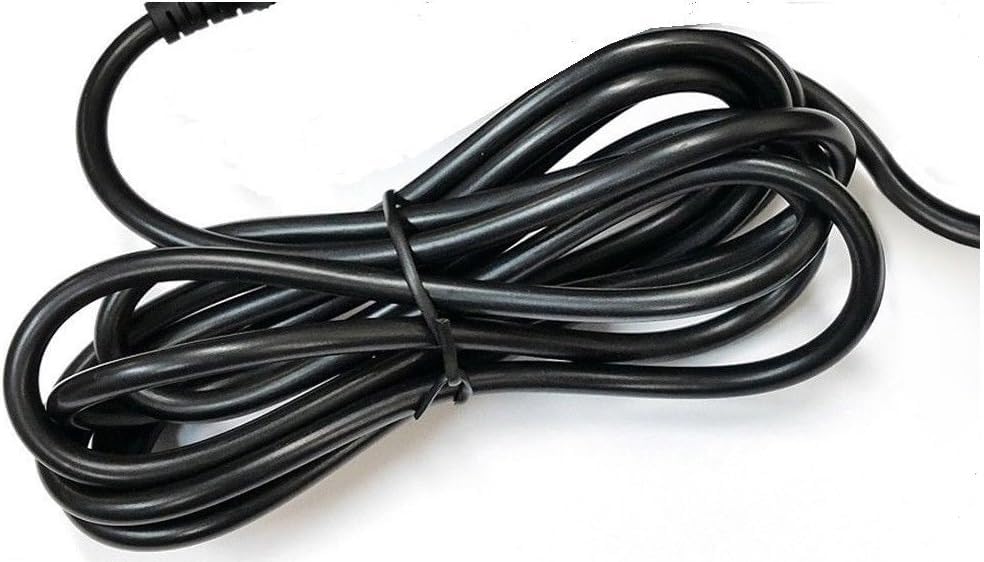
Figur 2: Side view of the adapter, highlighting the barrel connector that plugs into your device.
4. Opsætning
Follow these steps to connect your GT POWER AC Adapter to your TP-Link Deco Mesh Wi-Fi System:
- Ensure your TP-Link Deco device is powered off.
- Locate the power input port on your TP-Link Deco device. This is typically a circular port.
- Insert the barrel connector of the GT POWER AC Adapter firmly into the power input port of your Deco device.
- Sæt strømadapteren i en standard 110V AC-stikkontakt.
- Power on your TP-Link Deco device.
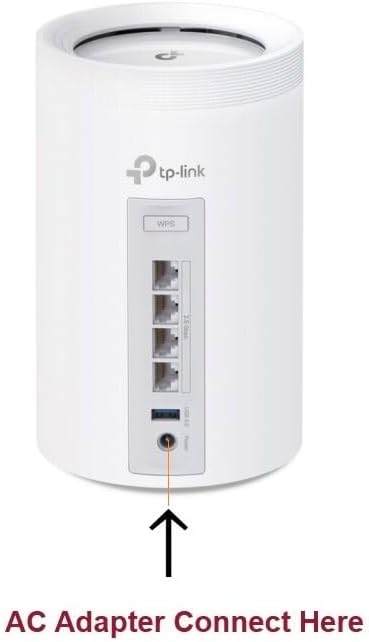
Figur 3: Example of connecting the AC adapter to a compatible TP-Link Deco device. The arrow indicates the power input port.
5. Betjeningsvejledning
Once properly connected and plugged into a power outlet, the GT POWER AC Adapter will continuously supply power to your TP-Link Deco device. No further user interaction is required for operation.
- Ensure the adapter is always plugged into a functional power outlet.
- Avoid disconnecting the adapter during critical operations of your Deco device.
6. Vedligeholdelse
The GT POWER AC Adapter requires minimal maintenance:
- Keep the adapter clean and free from dust. Use a dry, soft cloth for cleaning.
- Brug ikke flydende rengøringsmidler eller aerosoler.
- Regularly inspect the power cord and connector for any signs of damage. If damage is observed, discontinue use immediately.
- Opbevar adapteren et køligt og tørt sted, når den ikke er i brug.
7. Fejlfinding
If your TP-Link Deco device is not receiving power, consider the following:
- Ingen strøm:
- Verify the adapter is securely plugged into both the wall outlet and the Deco device.
- Test stikkontakten med en anden enhed for at sikre, at den fungerer.
- Inspect the adapter's cable and connector for any visible damage.
- Intermitterende strøm:
- Sørg for, at alle forbindelser er tætte.
- Avoid bending or stressing the power cord.
Kontakt kundesupport, hvis problemerne fortsætter.
8. Specifikationer
| Feature | Detalje |
|---|---|
| Mærke | GT POWER |
| Modelnummer | 109 |
| Input bindtage | AC 100-240V |
| Udgang Voltage/Strøm | DC 12V / 3A |
| Plug-format | Type A (amerikansk standard) |
| Beskyttelsesfunktioner | OVP (Over Voltage-beskyttelse), OCP (overstrømsbeskyttelse), SCP (kortslutningsbeskyttelse) |
| UPC | 781834735527 |
9. Garanti og support
This GT POWER AC Adapter comes with a Et års garantiDerudover en 30-dages pengene tilbage guarantee is offered.
For technical support or warranty claims, please contact the seller, GTXPower, through the platform where the product was purchased.


