1. Introduktion
Thank you for choosing the Deli ET530 Digital Safe Box. This manual provides essential information for the proper installation, operation, and maintenance of your safe. Please read these instructions carefully before use to ensure optimal security and functionality.
2. Sikkerhedsoplysninger
- Keep override keys in a secure location away from the safe. Do not store them inside the safe.
- Ensure the safe is installed on a stable surface or securely mounted to a wall or floor.
- Udsæt ikke pengeskabet for ekstreme temperaturer eller fugtighed.
- Replace batteries promptly when the low battery indicator appears to avoid lockout.
- Avoid sharing your access code with unauthorized individuals.
3. Pakkens indhold
Bekræft at alle komponenter er til stede i pakken:
- 1 x Deli ET530 Digital Safe Box
- 2 x Security Override Keys
- 4 x AA Batteries (1.5V)
- 2 x Fixing Bolts for mounting
- 1 x Removable Shelf
- 1 x Custom Carpet Interior
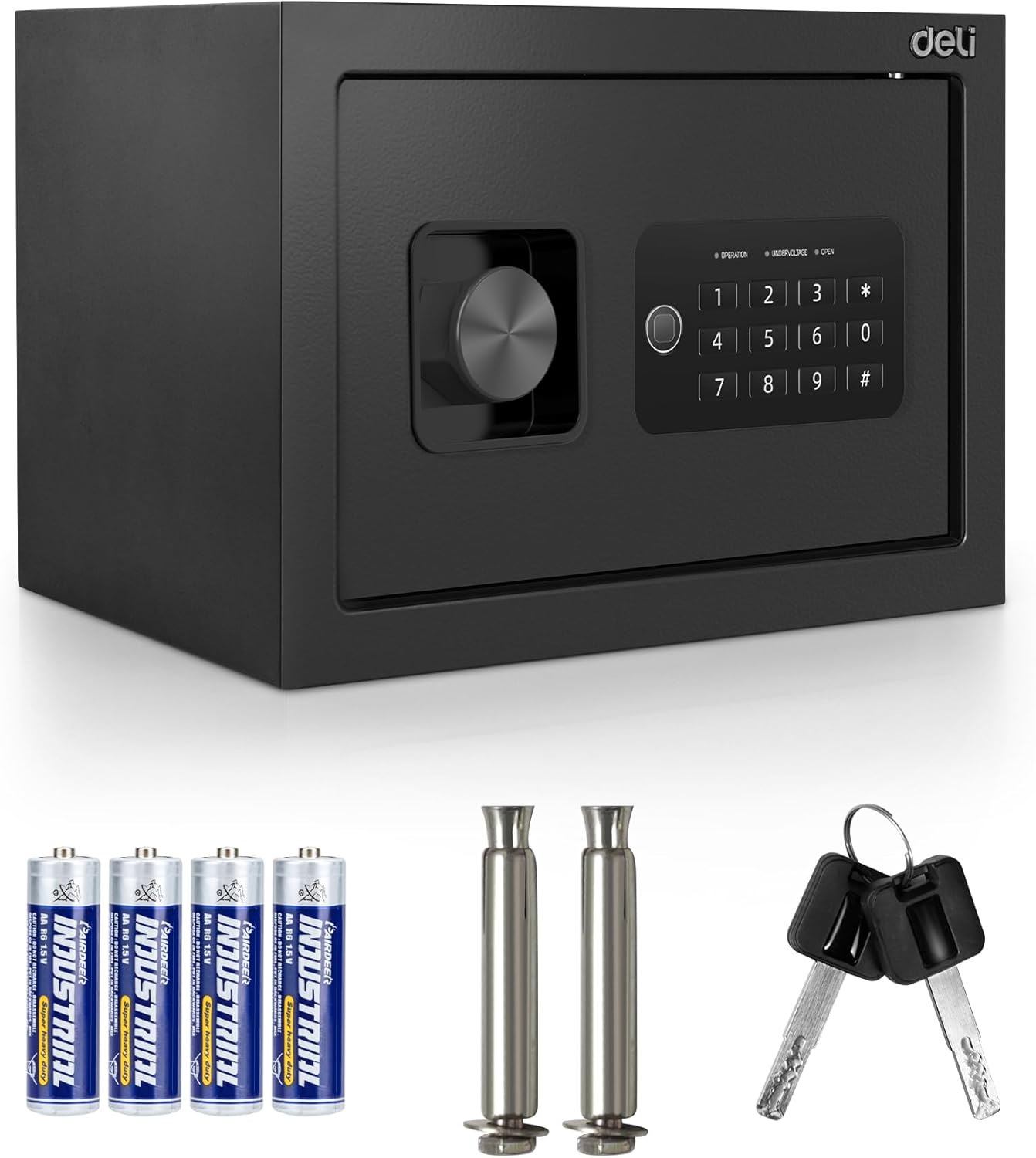
Image 3.1: Deli ET530 Digital Safe Box and its accessories.
4. Produktet er slutview
The Deli ET530 Digital Safe Box is designed to protect your valuables with a robust steel construction and a dual-key system. It features a digital keypad for electronic access and a manual override key system for emergency entry.
Nøglefunktioner:
- Digitalt tastatur: Allows setting a personal user code for quick access.
- Dual Key System: Provides both electronic and mechanical key access.
- Anti-Saw Locking Bolts: Two 16mm steel locking bolts enhance security against forced entry.
- Holdbar stålkonstruktion: Offers protection against physical attacks.
- Aftagelig hylde: Allows for flexible storage arrangements inside the safe.
- Carpeted Interior: Protects stored items from scratches and damage.
- Pre-drilled Holes: Facilitates permanent mounting to floors or walls for added security.

Image 4.1: Internal features of the Deli ET530 Digital Safe Box.

Image 4.2: Anti-drilling and pry-resistant construction details.
5. Opsætning
5.1. Batteriinstallation
- Find batterirummet på indersiden af døren til pengeskabet.
- Insert 4 AA (1.5V) batteries, ensuring correct polarity (+/-).
- Luk batterirummets dæksel.
5.2. Indstilling af indledende kode
Upon first use, or after a battery change, you will need to set your personal access code.
- With the safe door open, locate the red reset button on the inside of the door (refer to Image 4.1).
- Press the red reset button. The keypad will beep, and the 'OPERATION' light will illuminate.
- Indtast din ønskede 3-8-cifrede kode på tastaturet.
- Press the '#' key to confirm. The 'OPERATION' light will flash, indicating the code has been successfully set.
- Test den nye kode med døren åben, før du lukker den.
5.3. Montering af pengeskabet
For enhanced security, it is recommended to permanently mount the safe to a floor or wall.
- Vælg et passende sted til montering.
- Use the pre-drilled holes at the back or bottom of the safe as a template to mark drilling points on the wall or floor.
- Drill holes using an appropriate drill bit for your wall/floor material.
- Align the safe with the drilled holes and secure it using the provided fixing bolts.

Image 5.1: Pre-drilled anchor holes for mounting.
6. Betjeningsvejledning
6.1. Opening the Safe with Digital Keypad
- Indtast din personlige kode på 3-8 cifre på tastaturet.
- Press the '#' key. The 'OPEN' light will illuminate.
- Drej knappen med uret inden for 5 sekunder for at åbne pengeskabslågen.

Image 6.1: Opening the safe using the electronic keypad.
6.2. Opening the Safe with Override Keys (Emergency Access)
In case of battery failure or forgotten code, the safe can be opened using the override keys.
- Locate the keyhole cover on the keypad panel.
- Remove the cover to expose the keyhole.
- Insert one of the override keys and turn it counter-clockwise.
- While holding the key turned, rotate the knob clockwise to open the safe door.
- Fjern nøglen, når døren er åben.

Image 6.2: Opening the safe using the override key.
6.3. Lukning af pengeskabet
- Luk pengeskabslågen godt.
- Turn the knob counter-clockwise to engage the locking bolts.
6.4. Changing the User Code
To change your personal code:
- Åbn pengeskabsdøren.
- Press the red reset button on the inside of the door. The 'OPERATION' light will illuminate.
- Indtast din nye 3-8-cifrede kode.
- Press the '#' key to confirm. The 'OPERATION' light will flash.
- Test den nye kode med døren åben, før du lukker den.
7. Vedligeholdelse
- Rensning: Tør pengeskabets yderside af med en blød, tør kludamp klæde. Undgå slibende rengøringsmidler.
- Udskiftning af batteri: Replace all 4 AA batteries when the 'UNDERVOLTAGE' indicator light illuminates. Always use new, high-quality alkaline batteries.
- Nøglevedligeholdelse: Keep override keys clean and dry. Do not force keys into the lock.

Image 7.1: Soft carpeted interior for item protection.
8. Fejlfinding
| Problem | Mulig årsag | Løsning |
|---|---|---|
| Pengeskabet åbner ikke med kode. | Incorrect code entered. Batteries are low or dead. Keypad is locked. | Re-enter code carefully. Replace batteries. Wait 3 minutes if keypad is locked due to multiple incorrect entries. Use override key. |
| Tastaturet reagerer ikke. | Batterierne er døde eller forkert installeret. | Udskift batterierne, og sørg for korrekt polaritet. |
| 'UNDERVOLTAGE' light is on. | Batterierne er lave. | Udskift alle 4 AA-batterier med det samme. |
| Safe door cannot be closed. | Blokering i dørkarmen. Låseboltene er trukket ud. | Remove any obstructions. Ensure the knob is turned to retract bolts before closing. |
9. Specifikationer
| Feature | Detalje |
|---|---|
| Modelnummer | TM-5-ET530 |
| Udvendige mål (D x B x H) | 25 cm x 35 cm x 25 cm (9.8" x 13.8" x 9.8") |
| Intern lydstyrke | Approximately 0.8 Cubic Feet |
| Vægt | 8.7 kilo |
| Materiale | Legeret stål |
| Låsetype | Digital Keypad and Key |
| Strømkilde | 4 x AA (1.5V) batterier |
| Særlige funktioner | Anti-Theft, Removable Shelf, Carpeted Interior |
| Monteringstype | Floor Mount / Wall Mount (Pre-drilled holes) |

Image 9.1: Deli ET530 Digital Safe Box dimensions.
10. Garanti og support
For warranty information and customer support, please refer to the documentation provided at the point of purchase or contact your retailer. You may also visit the official Deli webwebsted for yderligere hjælp.


