1. Introduktion
This manual provides detailed instructions for the safe and effective operation of your JYX T18-T Karaoke Machine. Please read this manual thoroughly before using the product and retain it for future reference. The JYX T18-T is a portable Bluetooth karaoke speaker designed for various audio applications, featuring dual wireless microphones, dynamic lighting, and multiple connectivity options.
2. Pakkens indhold
Sørg for, at alle nedenstående varer er til stede i din pakke:
- 1 x JYX T18-T Karaoke Machine with 6.5" Subwoofer
- 2 x Studio-grade Wireless Microphones
- 1 x skulderrem
- 1 x Type-C ladekabel
- 1 x AUX-kabel
- 1 x brugermanual

Figure 2.1: JYX T18-T Karaoke Machine with included wireless microphones, charging cables, and shoulder strap.
3. Produktet er slutview
Familiarize yourself with the main components and controls of your karaoke machine.

Figur 3.1: Detaljeret view of the control panel, showing microphone volume, echo, USB/TF card slots, AUX input, master volume, and playback controls.
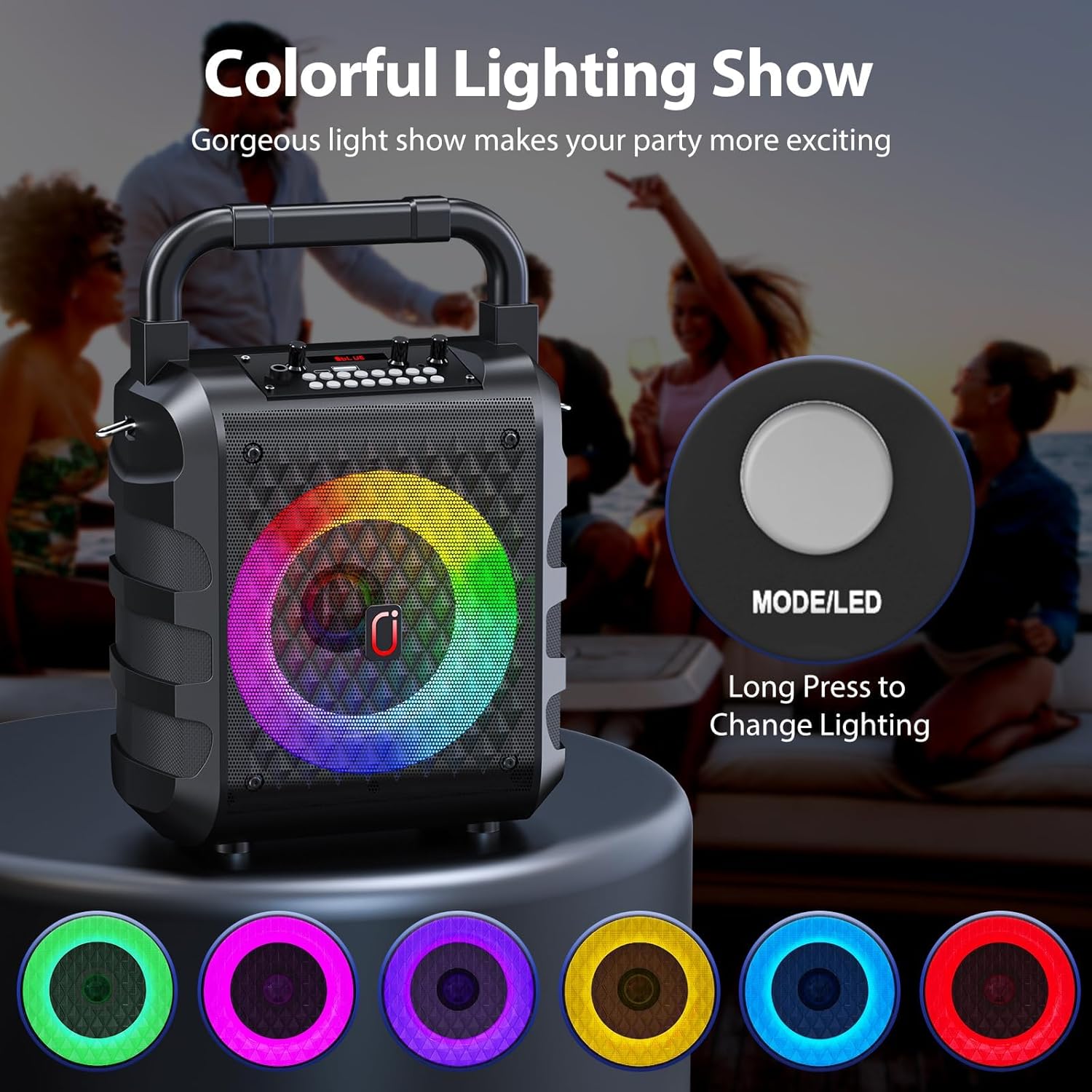
Figure 3.2: Close-up of a wireless microphone, highlighting its integrated volume and echo controls.
4. Opsætning
4.1 Opladning af enheden
Before first use, fully charge the karaoke machine and both wireless microphones. Use the provided Type-C cable to charge the main unit. The charging indicator light will illuminate during charging and turn off when fully charged. Microphones are also rechargeable via their respective Type-C ports.
4.2 Tænd/sluk
To power on the karaoke machine, locate the ON/OFF switch on the control panel and slide it to the "ON" position. To power off, slide the switch to "OFF". For the wireless microphones, press and hold the power button on each microphone until the display illuminates.
5. Betjeningsvejledning
5.1 Bluetooth-forbindelse
- Power on the JYX T18-T Karaoke Machine. It will automatically enter Bluetooth pairing mode, indicated by "BLUE" on the display.
- Aktiver Bluetooth på din smartphone, tablet eller anden Bluetooth-aktiveret enhed.
- Søg efter available devices and select "JYX-T18" (or similar, e.g., "T19" for variant) from the list.
- Once connected, you will hear an audible confirmation "Bluetooth connected".
- You can now play audio from your device through the karaoke machine.
Video 5.1: Demonstration of Bluetooth connection and basic operation for a JYX Karaoke Machine (T19-T variant shown, similar functionality to T18-T).
5.2 USB/TF Card/AUX Playback
- USB-afspilning: Insert a USB flash drive into the USB port. The machine will automatically switch to USB mode and begin playing compatible audio files (WAV format supported).
- TF-kortafspilning: Insert a Micro TF card into the TF card slot. The machine will automatically switch to TF card mode and play compatible audio files.
- AUX-indgang: Connect an external audio device (e.g., TV, PC) using the provided AUX cable to the AUX port. The machine will switch to AUX mode.
- Use the "MODE" button on the control panel to cycle between Bluetooth, USB, TF Card, and AUX modes.

Figure 5.1: The control panel illustrating the various input options for media playback.
5.3 Brug af mikrofon
- Power on both wireless microphones. They will automatically pair with the karaoke machine.
- Adjust microphone volume using the "MIC VOL" knob on the main unit or the volume buttons on the microphone itself.
- Adjust echo effect using the "MIC ECHO" knob on the main unit or the echo buttons on the microphone.
- Stemmeskifter: Press the "Voice" button on the main unit to cycle through different voice effects (e.g., deep, high-pitched).
- Mikrofonprioritet: Press the "MIC Priority" button to lower the music volume automatically when speaking into the microphone.
Vigtig: To avoid feedback, do not hold the microphone too close to the speaker while it is active.
Video 5.2: Demonstration of microphone features, including wireless connectivity and voice effects, demonstrated with a similar portable karaoke speaker.
5.4 Dynamic Lighting Effects
The JYX T18-T features 6 dynamic lighting modes. Press the "LED" button on the control panel to cycle through different light patterns and colors. The lights are designed to sync with the music, enhancing the audio experience.
Figure 5.2: The control panel illustrating the various input options for media playback.
Figure 5.3: Close-up of a wireless microphone, highlighting its integrated volume and echo controls.
Video 5.3: A short demonstration of the dynamic lighting effects on a portable karaoke machine.
5.5 Volume and Sound Adjustment
- Hovedvolumen: Use the "VOLUME +" knob on the main unit to adjust the overall sound output.
- Baskontrol: Use the "BASS" knob to adjust the bass level of the audio.
- Instrumentvolumen: If an instrument is connected, use the "Instrument VOL" knob to adjust its volume.
6. Vedligeholdelse
- Keep the device dry and clean. Avoid exposure to extreme temperatures or direct sunlight.
- Rengør ydersiden med en blød, tør klud. Brug ikke slibende rengøringsmidler eller opløsningsmidler.
- Opbevar enheden et køligt og tørt sted, når den ikke er i brug i længere perioder.
- Forsøg ikke selv at adskille eller reparere enheden. Kontakt kundesupport for at få hjælp.
7. Fejlfinding
| Problem | Mulig årsag | Løsning |
|---|---|---|
| Ingen strøm | Batteriet er lavt eller afladet. | Charge the karaoke machine and microphones fully. |
| Ingen lyd fra højttaleren | Volume is too low; incorrect input mode selected; device not connected. | Increase master volume; ensure correct mode (Bluetooth, USB, AUX) is selected; re-pair Bluetooth device. |
| Mikrofon virker ikke | Microphone is off; low battery; not paired. | Power on microphone; charge microphone; ensure microphone is paired (indicated by display). |
| Feedback/Squealing sound | Microphone too close to the speaker. | Move the microphone further away from the speaker. |
8. Specifikationer
- Model: T18-T
- Output Wattage: 20 watt
- Antal kanaler: 2
- Subwoofer størrelse: 6.5 tommer
- Forbindelse: Bluetooth 5.3, Micro TF Card, USB, AUX
- Voltage: 5 volt
- Batteri: Rechargeable Lithium Polymer (8 hours playback)
- Materiale Type: Plast
- Dimensioner (L x B x H): 15.4 x 24.7 x 35.4 cm
- Varens vægt: 2.2 kilo
- Særlige funktioner: Digital Tuner, Echo Effect, Light Up Speaker, PA System, Portable, Voice Changer, 6 Lighting Modes.
9. Garanti og support
For warranty information, technical support, or any inquiries regarding your JYX T18-T Karaoke Machine, please refer to the contact details provided on the product packaging or the official JYX webwebsted. Behold din købskvittering som købsbevis i tilfælde af garantikrav.
Relaterede dokumenter - T18-T
 |
JYX S1 Lydkort Lydkaraokemaskine Brugermanual - Opsætnings- og betjeningsvejledning Officiel brugermanual til JYX S1 lydkort-karaokemaskinen. Find detaljerede instruktioner om opsætning, tilslutninger, produktfunktioner, specifikationer og fejlfinding for dit JYX S1 karaokesystem. |
 |
JYX TX05 Bluetooth Karaoke-maskine Brugermanual Omfattende brugermanual til JYX TX05 Bluetooth Karaoke-maskinen, der beskriver opsætning, betjening, funktioner og fejlfinding for dette bærbare lydsystem med to mikrofoner. |
 |
JYX D17-T Karaoke maskine brugermanual Brugermanual til JYX D17-T Karaoke-maskinen, med detaljerede produktspecifikationer, tilbehør, knapbetjening, mikrofonfunktioner og brugerinstruktioner til Bluetooth-, TF-kort- og AUX-tilstande. |
 |
JYX Karaoke Machine T10-T User Manual User manual for the JYX Karaoke Machine T10-T, providing instructions and specifications for operating the device with two wireless microphones. |
 |
Brugermanual til JYX-TX02 Karaoke-maskine: Betjening, specifikationer og ofte stillede spørgsmål Omfattende brugermanual til JYX-TX02 Karaoke-maskinen. Lær om enhedens betjeningselementer, fjernbetjeningsfunktioner, specifikationer, pakkeliste og ofte stillede spørgsmål om fejlfinding for dette Bluetooth PA-system. |
 |
JYX T17-T Karaoke-maskine Brugermanual - Bærbar højttaler med trådløse mikrofoner Omfattende brugermanual til den bærbare JYX T17-T karaokemaskine. Lær om dens funktioner, opsætning, betjening og fejlfinding af trådløse mikrofoner, LED-lys, Bluetooth, USB, TF og AUX-forbindelse. |