1. Introduktion
The CallToU Wireless Caregiver Pager System is designed to provide reliable communication between caregivers and individuals requiring assistance. This system is ideal for elderly monitoring, home care, and emergency alerts, ensuring timely support. It features multiple receivers and call buttons for flexible placement and use throughout a home or care unit.
2. Pakkens indhold
Kontroller venligst, at alle nedenstående varer er inkluderet i din pakke:
- 2 x Plug-in Receivers (Model CC05WH)
- 1 x USB Rechargeable Portable Receiver (Model CC06WH)
- 2 x Wearable Call Buttons (Wristband style, Model E-01W)
- 2 x Pendant Call Buttons (Model CB01-BU)
- 1 x USB ladekabel
- 1 x snor
- Magnetic Stickers for USB Receiver
- Brugervejledning (dette dokument)
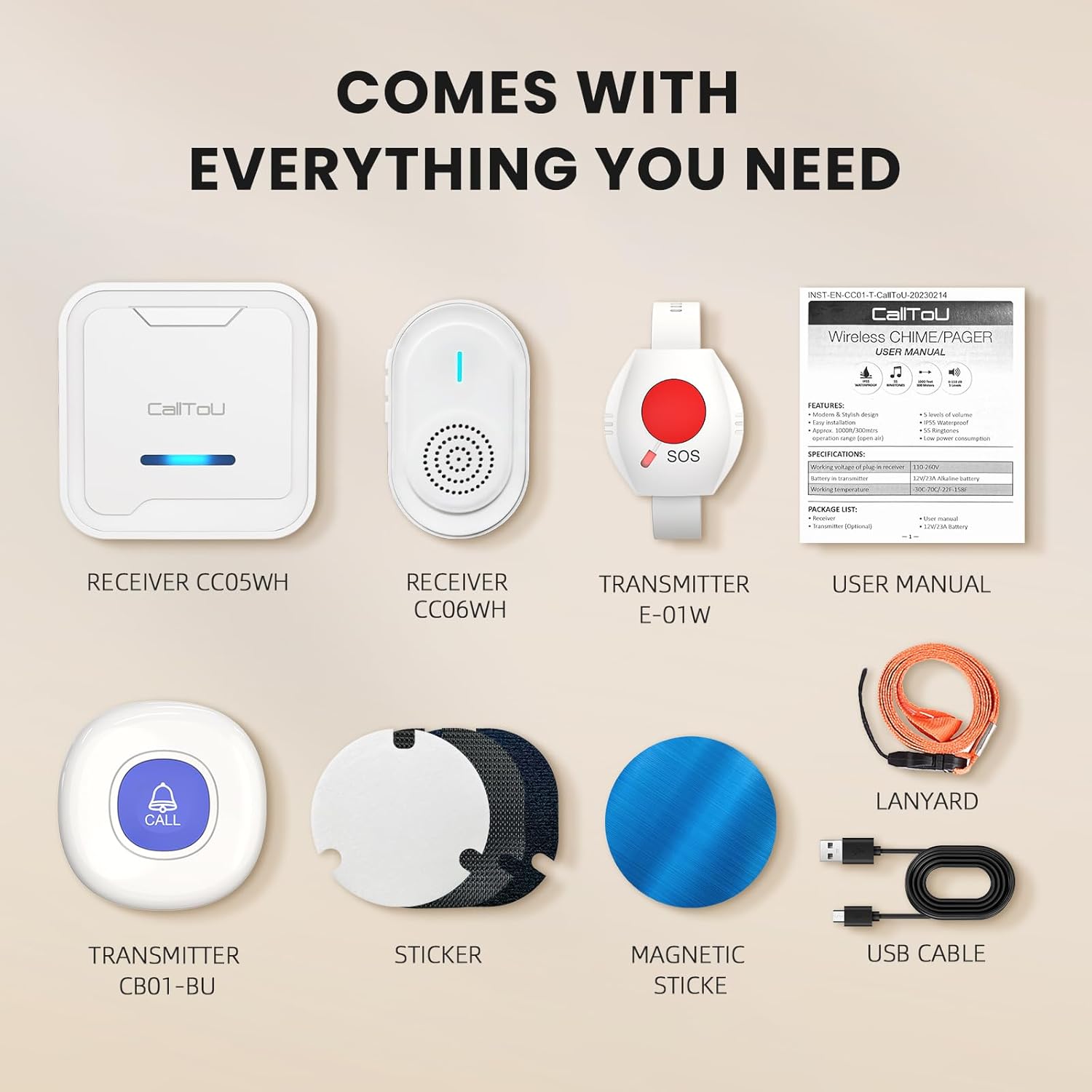
Image: All components included in the CallToU Wireless Caregiver Pager System package, including receivers, call buttons, charging cable, lanyard, and magnetic stickers.
3. Produktet er slutview
The system comprises two types of receivers and two types of call buttons, designed for various needs and environments.
3.1. Receivers
- Plug-in Receiver (CC05WH): Plugs directly into a standard electrical outlet. Features 55 selectable ringtones and 5 adjustable volume levels (0-110dB).
- USB Rechargeable Portable Receiver (CC06WH): Compact and portable, powered by a rechargeable battery via USB. Offers 4 selectable ringtones and 5 adjustable volume levels (0-110dB). Includes a magnetic sticker for flexible placement.
3.2. Opkaldsknapper
- Wristband Call Button (E-01W): Designed to be worn on the wrist for easy access. Features an 'SOS' button.
- Pendant Call Button (CB01-BU): Can be worn around the neck using the included lanyard or mounted on a surface. Features a 'CALL' button.

Billede: En overview of the CallToU Wireless Caregiver Pager System, showing two plug-in receivers, one portable USB receiver, two pendant call buttons, and two wristband call buttons.
4. Opsætningsvejledning
4.1. Receiver Setup
- Plug-in Receivers: Insert the plug-in receivers into standard electrical outlets in desired locations within the home. Ensure they are within range of the call buttons (up to 500+ feet in open areas).
- USB Rechargeable Portable Receiver:
- Opladning: Before first use, fully charge the portable receiver using the provided USB cable. Connect the cable to the receiver and a USB power source (e.g., wall adapter, computer USB port).
- Tænd/sluk: To power on or off the portable receiver, press and hold the power button for 5-10 seconds.
- Placering: The portable receiver can be carried by the caregiver or placed in a central location. Use the magnetic sticker to attach it to surfaces like a refrigerator or wall for convenient access.


Image: Left: The portable USB receiver connected to a USB charging cable. Right: Illustration of how to use the magnetic sticker to attach the portable receiver to a surface.
4.2. Call Button Setup
The call buttons are pre-paired with the receivers. No manual pairing is typically required for initial setup.
- Wristband Call Buttons: Secure the wristband call button comfortably on the wrist of the individual needing assistance.
- Pendant Call Buttons: Attach the lanyard to the pendant call button and place it around the neck, or use adhesive to mount it near a bed, in a bathroom, or other accessible location.


Image: Left: An elderly person wearing a pendant call button around their neck. Right: An elderly person wearing a wristband call button.
5. Betjeningsvejledning
5.1. Initiating an Alert
To send an alert, simply press the large button on either the wristband or pendant call button. The receivers will sound an alarm and flash to notify the caregiver.

Image: A sequence showing an elderly person pressing a call button, a caregiver being alerted by a plug-in receiver, and a caregiver carrying a portable receiver while gardening.
5.2. Justering af lydstyrke
Both plug-in and portable receivers offer 5 levels of adjustable volume, ranging from 0dB (mute) to 110dB (maximum). Use the volume buttons on the side of each receiver to cycle through the volume levels.


Image: Left: The portable receiver indicating 4 available ringtones. Right: The plug-in receiver indicating 55 available ringtones.
5.3. Changing Ringtones
- Plug-in Receivers: Press the 'Music' button on the side of the plug-in receiver to cycle through 55 different ringtones.
- USB Rechargeable Portable Receiver: Press the 'Music' button on the side of the portable receiver to cycle through 4 different ringtones.
The system features a memory function, retaining your selected volume and ringtone settings even after power loss or recharging.
6. Vedligeholdelse
6.1. Rensning
Wipe the devices with a soft, dry cloth. Avoid using abrasive cleaners or solvents, which may damage the surface.
6.2. Batterioplysninger
- Opkaldsknapper: The call buttons use 2 AAA batteries (included). These are typically long-lasting and do not require frequent replacement.
- Portable Receiver: The portable receiver has a built-in rechargeable battery. Recharge it using the provided USB cable when the low battery indicator appears.
6.3. Vandafvisende
The call buttons are rated IP55 waterproof, meaning they are protected against dust and low-pressure water jets from any direction. This makes them suitable for use in bathrooms or during light splashes, but they should not be submerged in water.

Image: The call buttons are shown with water droplets, illustrating their IP55 waterproof rating. Examples of wearing options include fixing on a wall, wearing around the neck, and wearing on the wrist.
7. Fejlfinding
- Ingen alarm fra modtager:
- Ensure receivers are plugged in or charged and powered on.
- Check if the receiver volume is set to 0dB (mute). Adjust volume if necessary.
- Verify that the call button batteries are not depleted. Replace AAA batteries if needed.
- Ensure the call button is within the operating range of the receivers. Obstacles like thick walls can reduce range.
- Short Operating Range:
- The stated range of 500+ feet is for open areas. Actual range may be reduced by walls, floors, and other electronic devices.
- Relocate receivers to a more central position or closer to the call button user.
- Avoid placing receivers near large metal objects or other wireless devices that may cause interference.
- Portable Receiver Constantly Shows Low Battery:
- Ensure the portable receiver is fully charged. A full charge can take several hours.
- If the issue persists after charging, contact customer support for assistance.
- Call Button Not Responding:
- Check and replace the AAA batteries in the call button.
- If the button is damaged (e.g., from dropping), it may require replacement.
8. Specifikationer
| Mærke | CallToU |
| Modelnummer | CC05-06WH |
| Driftsområde | 500+ feet (open area) |
| Receiver Volume Levels | 5 niveauer (0dB til 110dB) |
| Plug-in Receiver Ringtones | 55 |
| Portable Receiver Ringtones | 4 |
| Call Button Water Resistance | IP55 |
| Batterier til opkaldsknappen | 2 x AAA batterier (medfølger) |
| Portable Receiver Power Source | Genopladelig via USB |
| Kontrolmetode | Røre |
| Sensor Technology | Radiofrekvens |
| Produktdimensioner | 2.8"L x 2.4"W x 3"H (Receivers) |
| Varens vægt | 1.01 pund (samlet pakke) |
9. Garanti og support
CallToU is committed to providing comprehensive and reliable service support for its products. If you encounter any issues or have questions regarding your Wireless Caregiver Pager System, please refer to this user manual first.
For further assistance, CallToU offers 24-hour customer service and a professional technology team ready to help. Please contact CallToU customer support through the retailer's platform or the official CallToU website for warranty claims or technical inquiries.


