1. Introduktion
The APC Smart-UPS SMT750C is an Uninterruptible Power Supply (UPS) designed to provide reliable power and surge protection for critical electronic equipment. This unit offers 750VA/500W of line-interactive pure sine wave power, making it suitable for servers, storage systems, network closets, business VoIP setups, desktop computers, and retail POS systems. It features Automatic Voltage-regulering (AVR) for at korrigere volumentage fluctuations and a SmartConnect Ethernet Port for cloud-based remote monitoring. This manual provides essential information for the safe and efficient installation, operation, and maintenance of your SMT750C UPS.
2. Sikkerhedsoplysninger
WARNING: Risk of electric shock. Refer to bottom of unit for warnings.
- Læs alle instruktioner omhyggeligt før installation og drift.
- Denne UPS indeholder interne batterier og kan udgøre en risiko for elektrisk stød, selv når den er frakoblet vekselstrømskilden.
- Do not open or disassemble the UPS. There are no user-serviceable parts inside except for the battery.
- Tilslut kun UPS'en til en jordet stikkontakt.
- Do not use the UPS in direct sunlight, near heat sources, or in areas with excessive humidity.
- Sørg for tilstrækkelig ventilation omkring UPS'en. Bloker ikke ventilationsåbninger.
3. Pakkens indhold
Kontroller, at alle genstande er til stede ved udpakning:
- APC Smart-UPS SMT750C Unit
- 16 GB USB 3.0-drev
- Brugervejledning (dette dokument)
- USB kommunikationskabel
- Strømledning

Image: Included 16GB USB 3.0 Drive. This USB drive provides additional storage or file overførselskapaciteter.
4. Produktet er slutview
Frontpanel
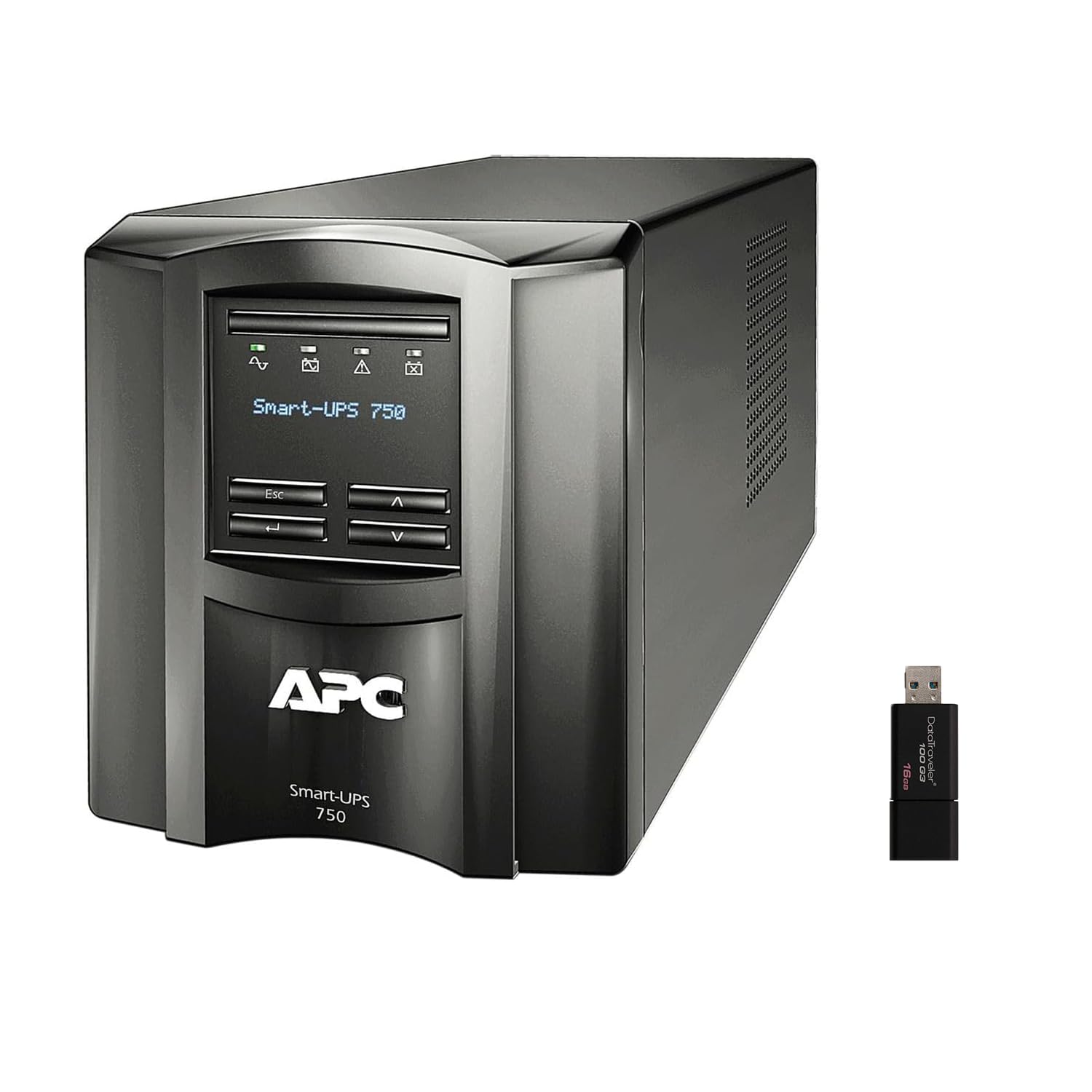
Billede: Forside og side view of the APC Smart-UPS SMT750C. This image displays the compact tower design of the UPS unit.
- Power knap: Controls the main power to the UPS.
- LCD-skærm: Provides real-time status information, load levels, battery charge, and estimated runtime.
- Navigationsknapper: Used to scroll through display menus and adjust settings.
Bagpanel
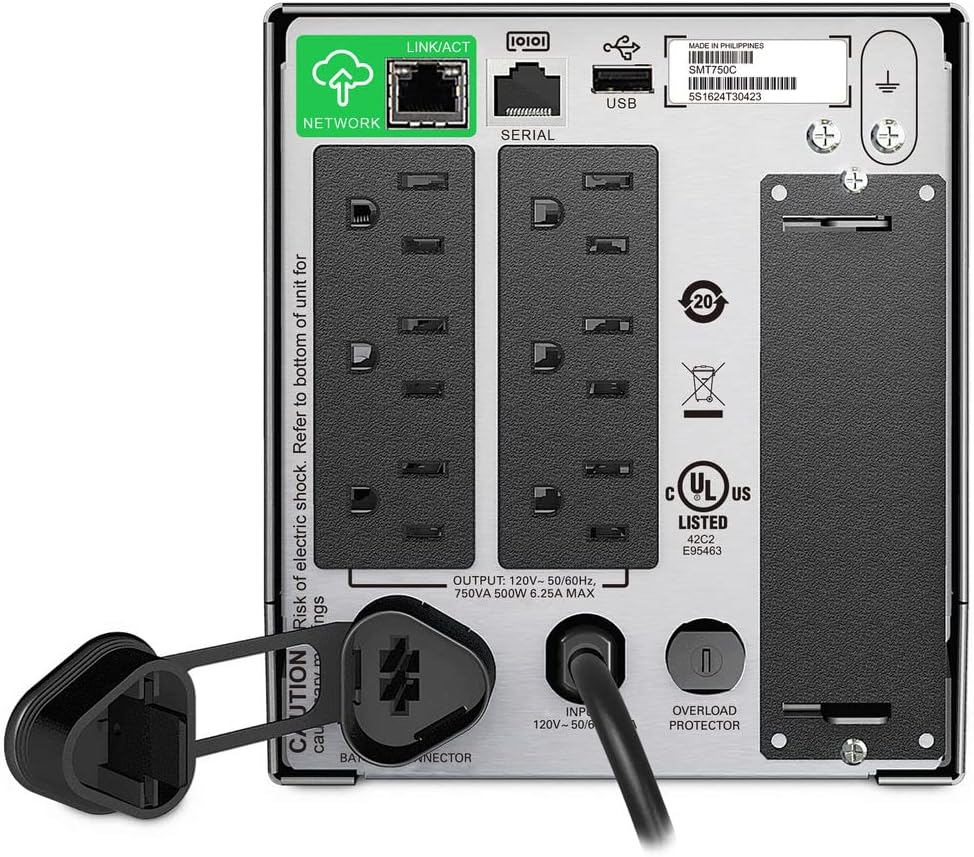
Image: Rear panel of the APC Smart-UPS SMT750C. This view highlights the various input/output ports, including NEMA 5-15R outlets, SmartConnect port, USB, and serial ports.
- NEMA 5-15R Outlets: Six outlets for connecting protected equipment.
- SmartConnect Ethernet-port: For cloud-based remote monitoring and management.
- USB-port: For communication with a computer for graceful shutdown via PowerChute Serial Shutdown software.
- Serie Port: Alternative communication port for graceful shutdown.
- SmartSlot: For optional Network Management Card (sold separately).
- Input strømledning: Connects the UPS to the utility power.
- Overbelastningsbeskytter: Resettable circuit breaker.
5. Opsætning
5.1 Første batteritilslutning
Før første brug skal det interne batteri tilsluttes. Enheden leveres med batteriet frakoblet af sikkerhedsmæssige årsager under transport.
- Placer UPS'en på en stabil overflade.
- Find batteridækslet, typisk i bunden eller bagsiden af enheden.
- Remove the cover to access the battery.
- Connect the red battery cable to the positive (+) terminal and the black battery cable to the negative (-) terminal. Ensure a secure connection.
- Sæt batterirummets dæksel på igen.
5.2 Tilslutning til strømforsyning
- Plug the UPS power cord into a grounded 3-prong AC outlet.
- Lad UPS'en oplade i mindst 24 timer, før kritisk udstyr tilsluttes, for at sikre fuld batterikapacitet.
5.3 Tilslutning af udstyr
- Connect your critical equipment (e.g., computer, monitor, network devices) to the NEMA 5-15R outlets on the rear panel.
- For graceful shutdown capabilities, connect the provided USB cable from the UPS to your computer and install the PowerChute Serial Shutdown software (available for download from APC's webwebsted).
- For remote monitoring, connect an Ethernet cable to the SmartConnect port and follow the instructions for cloud-based setup.
6. Betjening
6.1 Tænd/sluk
- To power on the UPS, press and hold the power button on the front panel until the unit beeps and the display illuminates.
- To power off the UPS, press and hold the power button until the unit beeps and the display turns off.
6.2 Automatisk Voltage Forordning (AVR)
The SMT750C features AVR, which automatically corrects minor voltagudsving (svingninger og stigninger) uden at skifte til batteristrøm. Dette beskytter tilsluttet udstyr mod volatilitettage irregularities and extends battery life.
6.3 Batteribackupdrift
Under en magt outage, the UPS will automatically switch to battery power, providing continuous power to connected equipment. The LCD display will show the estimated remaining runtime. When utility power returns, the UPS will automatically switch back to utility power and recharge its battery.
6.4 Remote Monitoring (SmartConnect)
The SmartConnect port allows for cloud-based remote monitoring of your UPS. This feature enables IT professionals and network administrators to:
- Monitor UPS status and performance.
- Udfør firmwareopgraderinger.
- Udfør fjerndiagnosticering.
- Modtag proaktive e-mailnotifikationer med anbefalede handlinger.
7. Vedligeholdelse
7.1 Udskiftning af batteri
The internal battery is a user-replaceable component. When the battery reaches the end of its service life, the UPS will indicate a battery fault. To replace the battery:
- Ensure the UPS is powered off and disconnected from utility power.
- Fjern batterirummets dæksel.
- Disconnect the battery cables (red and black).
- Carefully slide out the old battery.
- Insert a genuine APC replacement battery (model RBC154, sold separately).
- Connect the battery cables, ensuring correct polarity (red to positive, black to negative).
- Sæt batterirummets dæksel på igen.
- Recycle the old battery responsibly.
7.2 Rengøring
Rengør UPS'ens yderside regelmæssigt med en blød, tør klud. Brug ikke flydende rengøringsmidler eller rengøringsmidler på aerosolbasis. Sørg for, at ventilationsåbningerne er fri for støv og snavs.
8. Fejlfinding
| Problem | Mulig årsag | Løsning |
|---|---|---|
| UPS'en tænder ikke | Batteri ikke tilsluttet eller lav opladning | Ensure battery cables are connected. Plug UPS into AC outlet and allow to charge. |
| UPS'en bipper konstant | Overload or on battery power | Reduce connected load. Check utility power. |
| Batterisymbolet blinker | Battery needs to be flipped (initial setup) or is failing | For new units, ensure battery is correctly oriented and connected. For older units, consider battery replacement. |
| Ingen strøm til stikkontakter | UPS is off, circuit breaker tripped, or utility power lost | Turn on UPS. Reset circuit breaker. Check utility power. |
9. Specifikationer
- Model: SMT750C
- Udgangseffektkapacitet: 500 Watt / 750 VA
- Udgangsforbindelser: 6 x NEMA 5-15R
- Indgangsforbindelser: NEMA 5-15P
- Nominel input Voltage: 120V
- Nominel Output Voltage: 120V
- Batteritype: Blysyre
- Formfaktor: Tårn
- Dimensioner (H x B x D): 6.34 cm x 16.1 cm x 5.43 cm
- Nettovægt: 27.56 lb (12.5 kg)
- Farve: Sort
- Materiale: Metal
- Inkluderet tilbehør: 16 GB USB 3.0-drev
10. Garanti og support
APC tilbyder en standardgaranti for dette produkt. For specifikke garantivilkår og -betingelser henvises til garantikortet, der følger med dit produkt, eller besøg den officielle APC-side. website. For technical support, product registration, or to purchase replacement parts, please visit www.apc.com eller kontakt APCs kundeservice.
Protection plans are available for extended coverage. For example, a 3-Year Protection Plan is available.


