1. Produktet er slutview
The LiNKFOR 6-Channel Audio Mixer is an ultra-compact device designed to combine up to six line-level signal sources into a single output channel. It is suitable for connecting various electronic instruments and audio equipment such as microphones, guitars, basses, keyboards, and phones, making it ideal for small clubs, bars, or personal stage setups. This mixer features individual volume controls for each input and the main output, along with mono/stereo switching capabilities. Its robust all-metal shell ensures durability and reduces electromagnetic interference for a purer sound experience.

Figure 1: LiNKFOR 6-Channel Audio Mixer, showcasing dens kompakte design og kontrollayout.
2. Sikkerhedsoplysninger
- Sørg for, at strømforsyningen voltage matches the device's requirements (5V DC).
- Udsæt ikke enheden for vand, fugt eller ekstreme temperaturer.
- Undgå at skille enheden ad eller ændre den, da dette kan ugyldiggøre garantien og forårsage skade.
- Hold enheden væk fra stærke magnetiske felter.
- Use only the provided or recommended power adapter and cables.
3. Pakkens indhold

Figur 2: Indhold i produktpakken.
Bekræft at alle varer er til stede i din pakke:
- LiNKFOR 6-Channel Audio Mixer (Model 6-IN-1-OUT)
- 5V strømforsyning
- USB Type-C Power Cable with Magnetic Ring
- 6.35 mm lydkabel
- Brugermanual
4. Produktfunktioner
- Ultra-kompakt design: Mixes up to 6 line signal sources into 1 channel for headphones or speakers.
- Alsidig kompatibilitet: Suitable for microphones, guitars, basses, keyboards, phones, and other stage udstyr.
- Uafhængig kontrol: Each input and the main output feature independent volume control.
- Stereo/Mono Switching: Supports switching between stereo and mono modes with a single key.
- Ultralav støjydelse: Designed for impressive audio experience without interference.
- Stabil strømforsyning: Certified 5V power supply and power cable with magnetic ring ensure stable performance.
- Specific Power Switch: Easy to operate on/off switch, eliminating frequent unplugging.
- Holdbar konstruktion: All-metal shell reduces electromagnetic interference and provides a purer sound. Non-slip pads prevent movement during use.
Video 1: Overståetview of a 6-channel stereo audio mixer, highlighting its inputs and controls. This video demonstrates the compact design, 6.35mm input interfaces, independent volume adjustments, and mono/stereo switching capabilities.
5. Opsætning
Follow these steps to set up your LiNKFOR 6-Channel Audio Mixer:
- Strømtilslutning: Connect the provided USB Type-C power cable to the mixer's 5V DC input port. Plug the other end into a compatible 5V USB power source (e.g., wall adapter, computer USB port, power bank).
- Tænd: Press the power switch located on the mixer. The power indicator light will illuminate.
- Indgangsforbindelser: Connect your audio sources (microphones, instruments, phones, etc.) to the INPUT 1-6 jacks using 6.35mm TRS/TS cables.
- Udgangsforbindelse: Connect your headphones or amplifier to the OUTPUT jack using a 6.35mm TRS/TS cable.
- Indledende lydstyrkejustering: Set all LEVEL knobs (1-6) and the main OUTPUT knob to their minimum position before playing any audio to avoid sudden loud sounds.

Figure 3: Connecting the Type-C power supply.
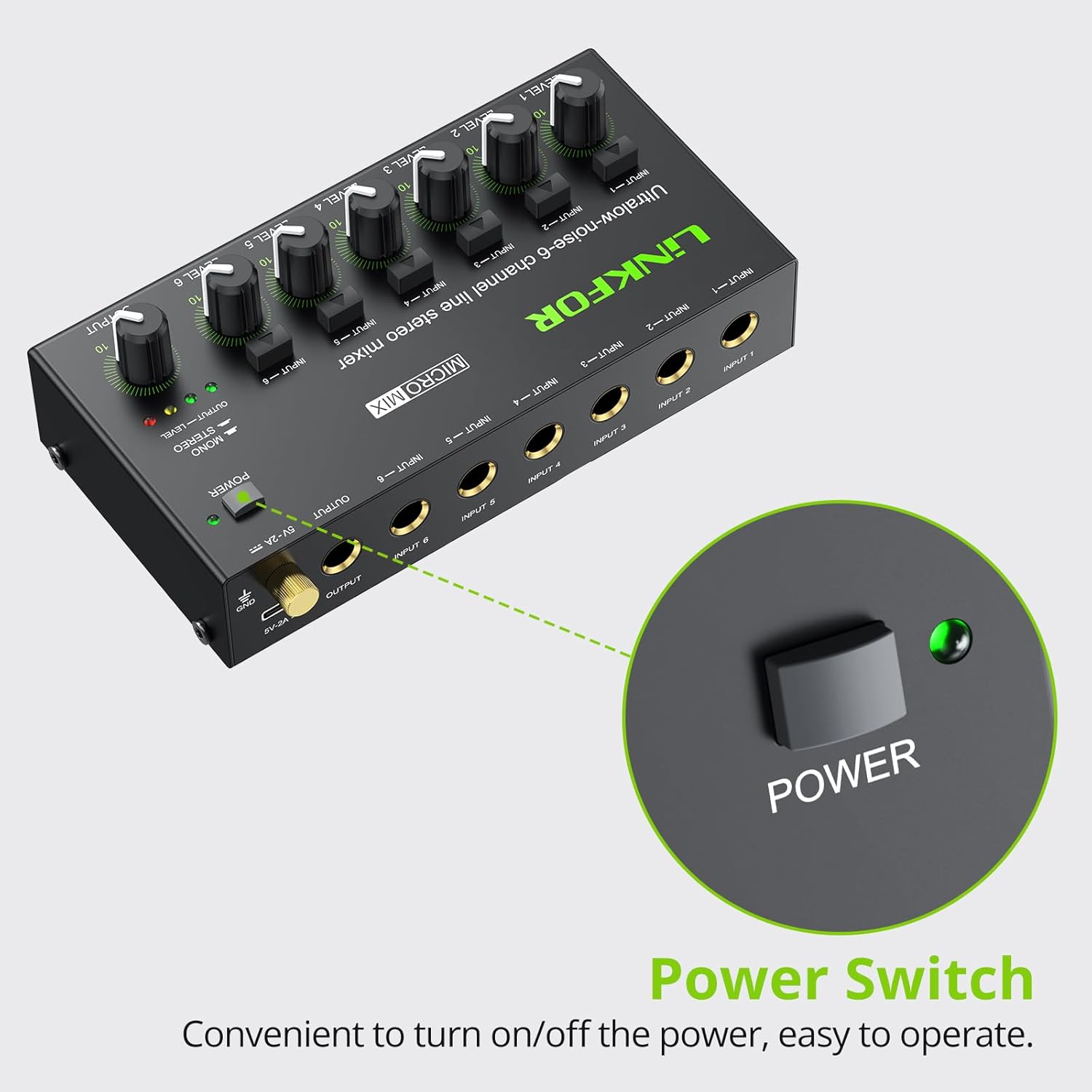
Figure 4: Power switch location.
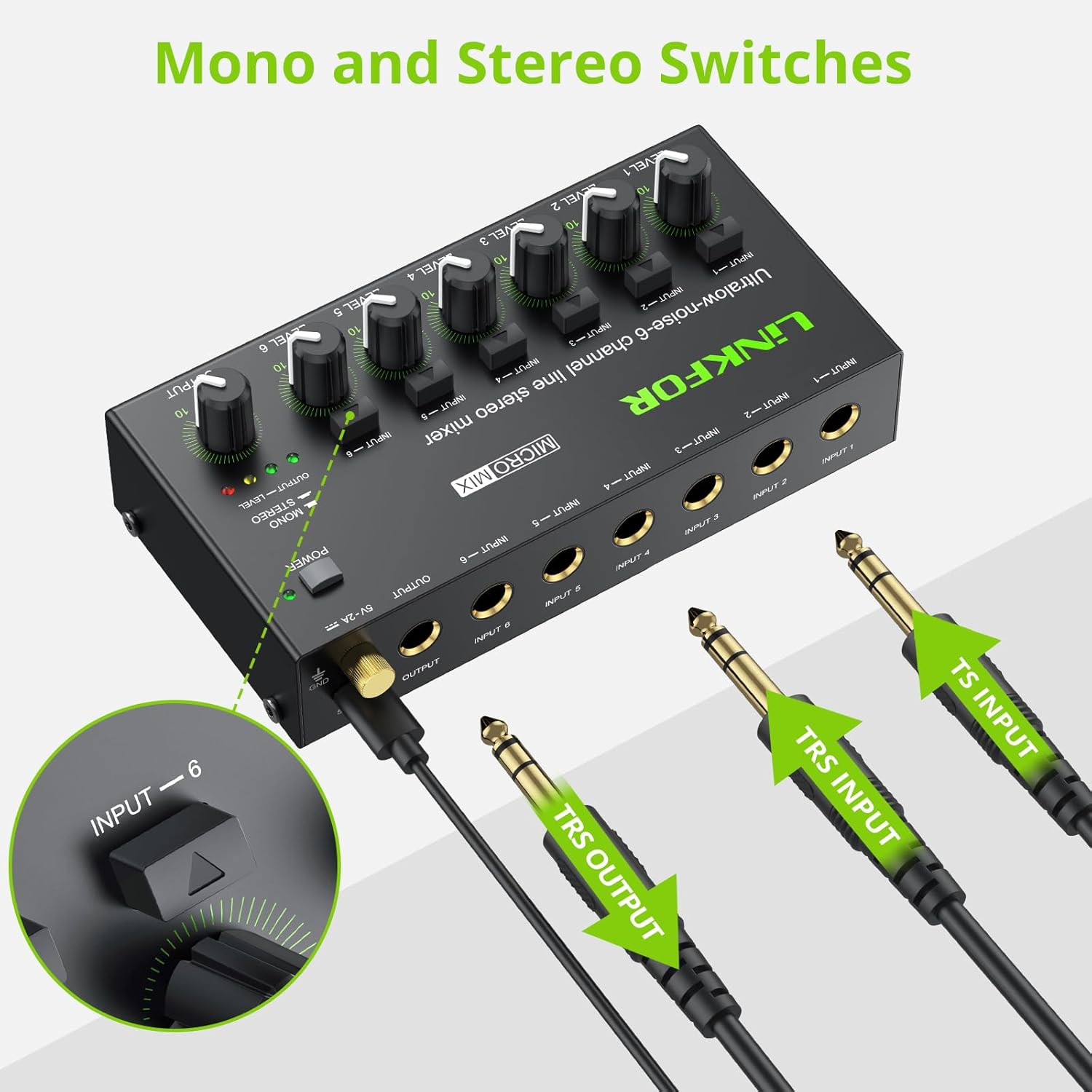
Figure 5: Input and output interfaces.

Figure 6: Connection diagram for inputs and outputs.
6. Betjeningsvejledning
Once your mixer is set up, follow these instructions for operation:
- Justering af inputniveauer: Gradually turn up the LEVEL knob for each active input channel (LEVEL 1-6) until the desired volume is achieved for that specific source.
- Justering af outputniveau: Slowly increase the main OUTPUT knob to control the overall volume of the mixed audio sent to your headphones or amplifier. Monitor the OUTPUT LEVEL indicator lights (green, yellow, red) to prevent clipping (red light indicates signal is too high).
- Mono/stereo-skift: Each input channel has a dedicated button to switch between mono and stereo modes. Press the button above the respective input to toggle between modes as needed for your audio source.
- Mixing Multiple Sources: Adjust the individual LEVEL knobs for each input to create a balanced mix of all connected audio sources.
Video 2: Official LiNKFOR video demonstrating the 6-Channel Audio Mixer's features. This video highlights the specific power switch, separate volume controls for each channel, stereo/mono switching, and ultra-low noise performance during operation.

Figur 7: Eksample of mixer in use with guitar and laptop.
7. Vedligeholdelse
- Rensning: Brug en blød, tør klud til at rengøre mixerens yderside. Brug ikke flydende rengøringsmidler eller opløsningsmidler.
- Opbevaring: Opbevar enheden et køligt, tørt sted væk fra direkte sollys og ekstreme temperaturer, når den ikke er i brug.
- Kabelpleje: Ensure all cables are connected securely and are not bent or kinked excessively to prevent damage.
8. Fejlfinding
| Problem | Mulig årsag | Løsning |
|---|---|---|
| Ingen lydudgang | Power not connected or turned on; Volume knobs too low; Incorrect cable connections. | Check power supply and switch; Increase LEVEL and OUTPUT knobs; Verify all audio cables are correctly and securely connected. |
| Forvrænget lyd | Volume levels too high (clipping); Faulty cables or audio sources. | Reduce LEVEL and/or OUTPUT knobs until red indicator light disappears; Test with different cables or audio sources. |
| Hissing/Buzzing noise | Ground loop interference; Poor quality cables; Nearby electronic interference. | Ensure proper grounding; Use high-quality shielded cables; Move the mixer away from other electronic devices. |
| En kanal virker ikke | Faulty input cable or source; Input level too low. | Test the input with a different cable and source; Increase the specific channel's LEVEL knob. |
9. Specifikationer

Figur 8: Produktdimensioner.
| Feature | Detalje |
|---|---|
| Mærke | LiNKFOR |
| Modelnummer | 6-I-1-UD |
| Antal kanaler | 6 |
| Forbindelsesteknologi | 6.35 mm |
| Strømkilde | Elektrisk med ledning |
| Voltage | 5 volt |
| Produktdimensioner | 32 mm D x 75 mm B x 32 mm H (1.26 mm D x 2.95 mm B x 1.26 mm H) |
| Varens vægt | 8.5 ounces (240 gram) |
10. Garanti og support
For warranty information and technical support, please refer to the documentation included with your purchase or visit the official LiNKFOR webwebsted. Specifikke garantivilkår kan variere afhængigt af region og forhandler.


