Indledning
This manual provides detailed instructions for the setup, operation, and maintenance of your Perixx PERIMICE-713R Wireless Rechargeable Vertical Mouse. Please read this manual thoroughly before using the product to ensure proper functionality and to maximize your user experience.
Pakkens indhold
Bekræft at alle varer er til stede i din pakke:
- 1 x Perixx PERIMICE-713R Wireless Rechargeable Vertical Mouse
- 1 x USB Nano-modtager
- 1 x USB-C til A-opladningskabel
- 1 x brugermanual

Image: Contents of the Perixx PERIMICE-713R retail package, showing the vertical mouse, USB receiver, USB-C charging cable, and the user manual.
Produkt overview
The Perixx PERIMICE-713R is an ergonomic vertical mouse designed for right-handed users, featuring dual charging capabilities and adjustable sensitivity. Its design promotes a natural hand position to reduce wrist strain.

Image: The Perixx PERIMICE-713R vertical mouse shown with its USB-C charging port connected to a cable, highlighting its sleek black design.
Nøglefunktioner:
- Ergonomisk vertikalt design: Promotes a natural handshake grip, reducing wrist pronation.
- Dual Rechargeable Options: Supports both wired USB-C charging and wireless charging (wireless charging pad not included).
- Justerbar DPI: Cycle through 1000, 1600, and 2400 DPI settings for precise control.
- Quiet Clicking: Designed for silent operation, suitable for quiet environments.
- 6-knapsdesign: Includes left/right click, scroll wheel, DPI button, and two thumb buttons for enhanced productivity.
- 2.4 GHz trådløs forbindelse: Reliable connection up to 10 meters with a Nano USB receiver.
Opsætningsvejledning
1. Opladning af musen
The mouse features a built-in rechargeable battery. It can be charged via two methods:
- Kablet opladning: Connect the included USB-C to A cable to the USB-C port on the front of the mouse and to a USB-A port on your computer or a USB wall adapter.
- Trådløs opladning: Place the mouse on a compatible wireless charging pad (not included). Ensure the mouse is correctly positioned for charging to initiate.

Image: Demonstrates connecting the USB-C cable for wired charging of the mouse.

Image: The vertical mouse resting on a wireless charging pad, illustrating its wireless charging capability.
2. Tilslutning af USB-modtageren
- Locate the Nano USB receiver, typically stored in a compartment on the underside of the mouse.
- Remove the receiver and plug it into an available USB-A port on your computer.
- Din computer burde automatisk registrere og installere de nødvendige drivere.

Image: The underside of the mouse, illustrating the power switch and the compartment for storing the USB Nano receiver.
3. Tænd/sluk
On the underside of the mouse, locate the power switch. Slide the switch to the "ON" position to activate the mouse. Slide it to "OFF" when not in use to conserve battery life.
Betjeningsvejledning
Knap funktioner
The PERIMICE-713R features 6 buttons:
- Venstreklikknap: Standard primær klikfunktion.
- Højreklik-knap: Standard sekundær klikfunktion.
- Scrollhjul: Til lodret rulning. Kan også trykkes ned for at bruge midterklik.
- DPI knap: Located behind the scroll wheel, cycles through DPI settings.
- Frem-knap: (Thumb button) Navigates forward in web browsere eller file opdagelsesrejsende.
- Baglæns knap: (Thumb button) Navigates backward in web browsere eller file opdagelsesrejsende.
Justering af DPI (følsomhed)
Press the DPI button to cycle through the available sensitivity settings: 1000 DPI, 1600 DPI, and 2400 DPI. Select the setting that best suits your preference and task requirements.

Image: The DPI button on the mouse, illustrating its function to adjust sensitivity between 1000, 1600, and 2400 DPI.
Ergonomisk greb
Hold the mouse with your hand in a natural handshake position. This vertical orientation is designed to align your wrist and forearm in a more neutral posture, reducing strain compared to traditional horizontal mice.

Image: A user's hand holding the vertical mouse, showcasing the ergonomic 47-degree tilt that promotes a natural wrist posture.
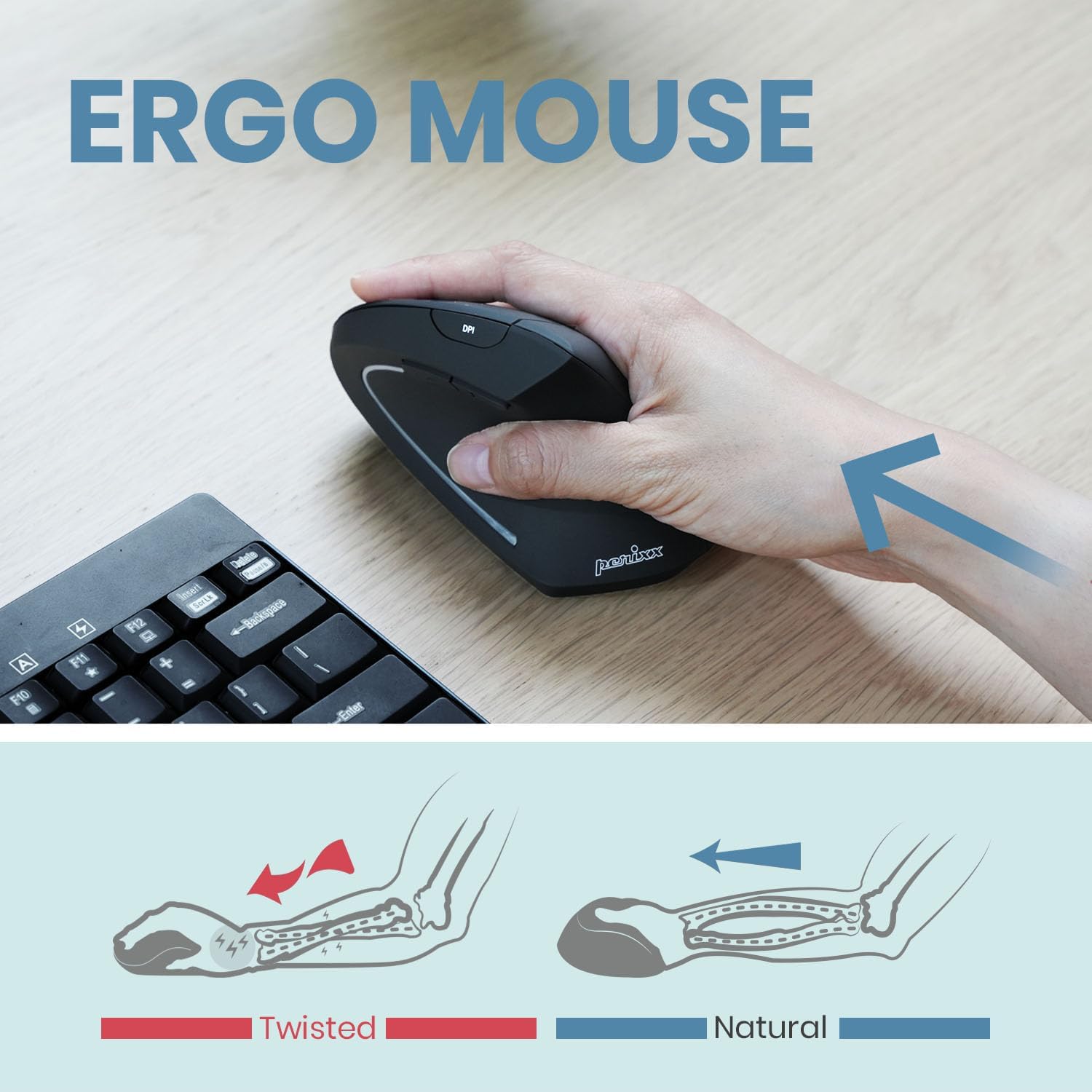
Image: An illustration comparing the "twisted" wrist position often associated with standard mice to the "natural" wrist position achieved with a vertical ergonomic mouse.
Opretholdelse
Rensning
For at rengøre din mus skal du forsigtigt tørre overfladen af med en blød klud.amp cloth. Avoid using harsh chemicals, abrasive cleaners, or excessive moisture, as these can damage the device. Ensure the mouse is powered off before cleaning.
Batteripleje
The mouse contains a Lithium Polymer battery. For optimal battery life:
- Undgå at aflade batteriet helt ofte.
- Oplad musen regelmæssigt, især hvis den skal opbevares i længere tid.
- Udsæt ikke musen for ekstreme temperaturer.
Fejlfinding
Musen reagerer ikke:
- Sørg for, at musen er tændt ved hjælp af knappen på undersiden.
- Kontrollér batteriniveauet, og oplad musen om nødvendigt.
- Verify that the USB Nano receiver is securely plugged into a working USB port on your computer.
- Prøv at tilslutte receiveren til en anden USB-port.
- Genstart din computer.
Intermitterende forbindelse:
- Sørg for, at musen er inden for USB-modtagerens rækkevidde på 10 meter.
- Minimér interferens fra andre trådløse enheder (f.eks. Wi-Fi-routere, trådløse telefoner).
- Sørg for, at der ikke er store metalgenstande mellem musen og modtageren.
Markørbevægelsen er uregelmæssig eller unøjagtig:
- Rengør den optiske sensor på undersiden af musen.
- Ensure you are using the mouse on a suitable surface. Highly reflective or transparent surfaces may affect performance.
- Adjust the DPI setting using the DPI button to find a comfortable sensitivity.
Specifikationer
| Mærke | Perixx |
| Modelnummer | PERIMICE-713R (Item model number: 12361) |
| Forbindelsesteknologi | 2.4 GHz trådløs (via USB-modtager) |
| Bevægelsesdetekteringsteknologi | Optisk |
| DPI-indstillinger | 1000/1600/2400 |
| Antal knapper | 6 |
| Strømkilde | Batteridrevet (1 litiumpolymerbatteri, inkluderet) |
| Opladningsmuligheder | Wired (USB-C) and Wireless (Qi-compatible, pad not included) |
| Operativsystemkompatibilitet | Windows 7, 8, 10, 11, Linux |
| Farve | Sort |
| Varens vægt | 3.17 ounce |
| Produktmål (LxBxH) | 4.92 x 2.44 x 0.04 tommer |
| Certificeringer | FCC, CE, RoHS |
Garanti og support
Perixx products are manufactured to high-quality standards. For warranty information, please refer to the specific warranty card included with your product or visit the official Perixx webwebsted.
For technical support, troubleshooting assistance, or any inquiries regarding your Perixx PERIMICE-713R mouse, please contact Perixx Customer Service:
- E-mail: shop@perixx.com
- Webwebsted: www.perixx.com
Please have your product model number (PERIMICE-713R) and purchase details ready when contacting support.


