Velkomst
Thank you for choosing the BYTECH BICONIC True Wireless Earbuds. This manual provides essential information on how to set up, operate, maintain, and troubleshoot your new earbuds. Please read this manual thoroughly before use to ensure optimal performance and longevity of your device.
Vigtige sikkerhedsinstruktioner
- Udsæt ikke ørepropperne eller opladningsetuiet for ekstreme temperaturer, fugtighed eller væsker.
- Undgå at tabe, udsætte stød for eller skille enheden ad.
- Do not use abrasive cleaners or harsh chemicals to clean the earbuds or case.
- Listen at moderate volume levels to prevent hearing damage. Prolonged exposure to loud sounds can cause irreversible hearing loss.
- Opbevares utilgængeligt for børn og kæledyr.
- Dispose of the device responsibly according to local regulations. Do not dispose of with household waste.
Hvad er inkluderet
Kontroller venligst pakkens indhold for at sikre, at alle varer er til stede:
- BYTECH BICONIC True Wireless Earbuds (Left and Right)
- Opladningsetui
- Ladekabel
- Brugermanual
Produkt overview
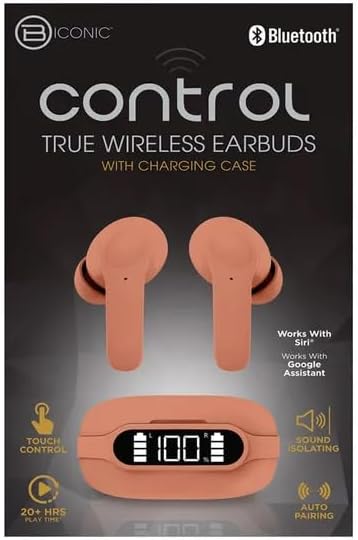
Familiarize yourself with the components of your BYTECH BICONIC True Wireless Earbuds.

Kom godt i gang
Opladning af øretelefoner og etui
The BYTECH BICONIC earbuds come with a rechargeable battery in both the earbuds and the charging case. Ensure both are fully charged before first use.
- Place the earbuds into the charging case, ensuring they are correctly seated in their respective slots (L for left, R for right).
- Connect the provided charging cable to the charging port on the case and the other end to a USB power source (e.g., computer USB port, wall adapter).
- Det digitale display på opladningsetuiet viser batteriniveauet. Sørg for tilstrækkelig tid til en fuld opladning.
- Når det er fuldt opladet, skal du frakoble ladekablet.
Bluetooth-parring
Følg disse trin for at parre dine ørepropper med din Bluetooth-aktiverede enhed:
- Sørg for, at ørepropperne er opladet og i opladningsetuiet.
- Open the charging case. The earbuds will automatically enter pairing mode, and an indicator light on the earbuds will flash.
- On your device (smartphone, tablet, etc.), go to the Bluetooth settings and turn Bluetooth on.
- Søg efter available devices. You should see "BYTECH BICONIC" or a similar name appear in the list.
- Select "BYTECH BICONIC" to connect. Once connected, a voice prompt will confirm the successful pairing, and the indicator lights on the earbuds will stop flashing.
- Ørepropperne genopretter automatisk forbindelse til den sidst parrede enhed, når de tages ud af etuiet, forudsat at Bluetooth er aktiveret på enheden.
Betjeningsvejledning
Tryk på kontrolelementer
The BYTECH BICONIC earbuds feature intuitive touch controls for easy management of your audio and calls.
| Handling | Fungere |
|---|---|
| Enkelt tryk (venstre/højre øreprop) | Afspil/Sæt musik på pause, Besvar/Afslut opkald |
| Dobbelttryk (højre øretelefon) | Næste spor |
| Dobbelttryk (venstre øretelefon) | Forrige spor |
| Triple Tap (venstre/højre øreprop) | Aktivér stemmeassistent (Siri/Google Assistant) |
| Langt tryk (venstre/højre øreprop) | Afvis opkald |
Tænder og slukker
- Tænd: Øretelefonerne tænder automatisk, når de tages ud af opladningsetuiet.
- Sluk: Sæt ørepropperne tilbage i opladningsetuiet, og luk låget. De slukker automatisk og begynder at oplade.
Vedligeholdelse og pleje
Proper care will extend the life of your BYTECH BICONIC True Wireless Earbuds.
- Rensning: Use a soft, dry, lint-free cloth to clean the earbuds and charging case. Do not use liquids or aerosol cleaners.
- Opbevaring: Når ørepropperne ikke er i brug, skal de altid opbevares i deres opladningsetui for at beskytte dem og holde dem opladede.
- Undgå ekstreme forhold: Do not expose the device to extreme heat, cold, or direct sunlight.
- Vandtæthed: These earbuds are not waterproof. Avoid contact with water or excessive moisture.
Fejlfinding
Hvis du støder på problemer med dine ørepropper, kan du bruge følgende almindelige løsninger:
| Problem | Løsning |
|---|---|
| Øretelefoner parrer ikke | Sørg for, at ørepropperne er opladet. Sluk og tænd Bluetooth på din enhed. Glem enheden i Bluetooth-indstillingerne, og par dem igen. |
| Kun én øretelefon virker | Sæt begge ørepropper tilbage i opladningsetuiet, luk låget, vent et par sekunder, og tag dem derefter ud igen. Sørg for, at begge er opladet. |
| Ingen lyd | Check volume levels on both your device and the earbuds. Ensure earbuds are properly connected. Try playing different audio. |
| Ladeetui oplader ikke | Ensure the charging cable is securely connected to both the case and the power source. Try a different USB port or power adapter. |
Tekniske specifikationer
Detailed specifications for your BYTECH BICONIC True Wireless Earbuds:
| Feature | Detalje |
|---|---|
| Modelnummer | BC-AU-BE-144-TN |
| Forbindelsesteknologi | Trådløs (Bluetooth) |
| Formfaktor | In-Ear (Intraurales) |
| Farve | Cafe |
| Særlige funktioner | Rechargeable Battery, Touch Control, Sound Isolating, Auto Pairing |
| Inkluderede komponenter | Kabel |
| Estimated Play Time | 20+ Hours (with charging case) |
Garantioplysninger og kundesupport
BYTECH products are designed and manufactured to the highest quality standards. For information regarding warranty coverage, please refer to the warranty card included with your purchase or visit the official BYTECH webwebsted.
If you require further assistance or have questions not covered in this manual, please contact BYTECH customer support through their official channels. Please have your model number (BC-AU-BE-144-TN) and purchase details ready when contacting support.


