1. Introduktion
Thank you for choosing the Antec GSK850 ATX3.1 850W Full Modular Power Supply Unit (PSU). This manual provides essential information for the proper installation, operation, and maintenance of your new power supply. The GSK850 is designed to deliver stable and efficient power to your computer system, featuring ATX3.1 and PCIe 5.1 compatibility, 80 PLUS Gold certification, and a full modular design for optimized cable management.

Figure 1.1: Antec GSK850 850W Full Modular Power Supply Unit
2. Sikkerhedsoplysninger
Please read and follow all safety instructions carefully before installing or operating the PSU. Failure to do so may result in personal injury or damage to the product or system components.
- Elektrisk fare: Åbn ikke strømforsyningen casing. Høj volumentagDer er ingen dele indeni, selv når enheden er frakoblet.
- Ventilation: Sørg for tilstrækkelig ventilation omkring strømforsyningen. Bloker ikke ventilatoren eller ventilationsåbningerne.
- Fugtighed: Do not expose the PSU to water or excessive humidity.
- Temperatur: Brug strømforsyningen inden for det angivne temperaturområde. Undgå ekstrem varme eller kulde.
- Jording: Always connect the PSU to a grounded power outlet.
- Sluk: Always disconnect the AC power cord from the wall outlet before installing, removing, or servicing the PSU or any connected components.
3. Pakkens indhold
Bekræft at alle varer er til stede i pakken:
- Antec GSK850 ATX3.1 850W Full Modular Power Supply Unit
- Modular Cable Set (see Section 4.2 for details)
- AC strømledning
- Monteringsskruer
- Brugervejledning (dette dokument)
4. Produktet er slutview
4.1 Nøglefunktioner
- ATX3.1 & PCIe 5.1 Compatible: Designed to meet the latest standards for reliability and power efficiency, ensuring compatibility with modern hardware, including NVIDIA GeForce RTX 40 Series graphics cards.
- 80 PLUS guld certificeret: Achieves high power efficiency, reducing energy consumption and heat generation.
- Full Modular Cable Management: Allows users to connect only the necessary cables, improving airflow and reducing clutter inside the PC case.
- Japanske kondensatorer af høj kvalitet: Ensures tight voltage regulation, minimal ripple and noise, and extended lifespan.
- PhaseWave Design (LLC + DC-DC): Giver stabil og effektiv strømforsyning.
- Zero RPM Manager: The fan remains off at low loads for silent operation, activating only when necessary.
- 120mm FDB Silent Fan: Features a fluid-dynamic bearing fan for quiet operation and durability.
- CircuitShield Protection Suite: Comprehensive industrial-grade protections including OCP, OVP, UVP, SCP, OPP, OTP, SIP, and NLO for system safety.
4.2 Modular Cable Management and Compatibility
The full modular design of the GSK850 allows for flexible cable management, enabling you to use only the cables required for your system. This reduces cable clutter, improves internal airflow, and simplifies installation.

Figure 4.1: Modular Cable Connectors and ATX 3.1 / PCIe 5.1 Compatibility

Figure 4.2: Detailed Cable and Connector Information
4.3 Interne komponenter og design
The GSK850 incorporates high-quality components for reliable performance and longevity.

Figure 4.3: High-Quality Japanese Capacitors for enhanced stability and lifespan.

Figure 4.4: PhaseWave Design (LLC + DC-DC) for superior power delivery efficiency.
4.4 Kølesystem
The PSU features an advanced cooling system to maintain optimal temperatures and quiet operation.
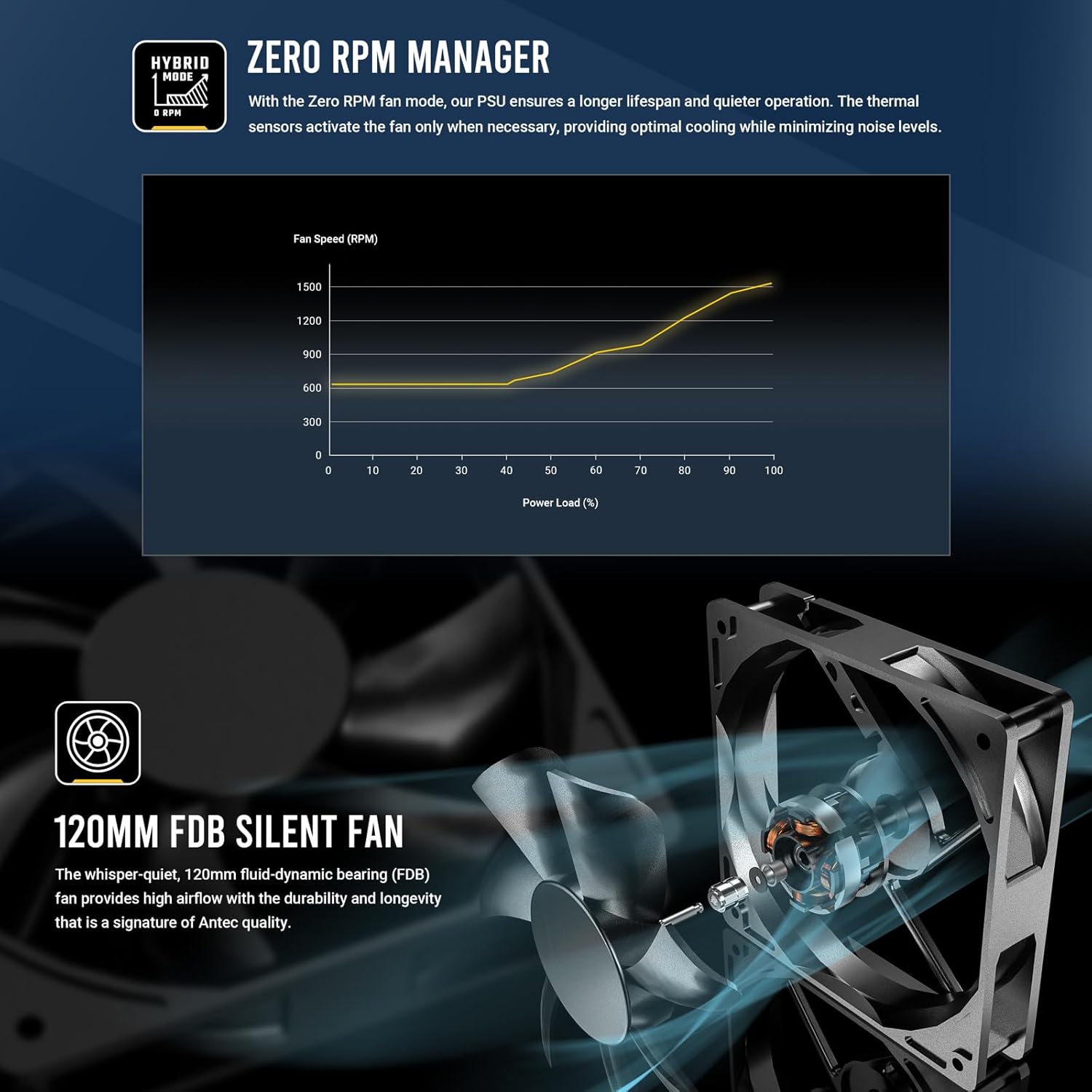
Figure 4.5: Zero RPM Manager fan curve, illustrating silent operation at low loads.

Figure 4.6: The 120mm Fluid-Dynamic Bearing (FDB) fan provides high airflow with low noise.
4.5 Compact Size
The GSK850 is designed with a compact form factor, making it suitable for a wide range of PC cases.

Figure 4.7: Compact dimensions of the GSK850 PSU, showing reduced volume compared to larger units.
5. Opsætning og installation
Follow these steps to install your Antec GSK850 PSU into your computer system:
- Forbered dit system: Sørg for, at din computer er helt slukket og taget stikket ud af stikkontakten. Åbn computerens kabinet.
- Fjern den gamle strømforsyning (hvis relevant): If replacing an existing PSU, disconnect all cables from the old PSU and remove its mounting screws. Carefully slide it out of the case.
- Monter den nye strømforsyning: Slide the Antec GSK850 into the PSU mounting bay of your computer case. Align the screw holes and secure the PSU with the provided mounting screws.
- Tilslut vigtige kabler: Refer to Figure 4.2 for cable types and lengths. Connect the necessary modular cables to the PSU first, then to your motherboard and components:
- 24-bens ATX bundkortkabel: Tilslut til dit bundkorts hovedstrømstik.
- 8-pin (4+4) CPU Power Cable(s): Connect to your motherboard's CPU power connector(s).
- PCIe 5.1 12VHPWR (16-pin) or 8-pin (6+2) PCIe Cables: Connect to your graphics card(s) as required.
- SATA-strømkabler: Connect to SSDs, HDDs, and optical drives.
- Molex-kabler: Connect to any peripherals requiring Molex power.
- Kabelstyring: Route cables neatly behind the motherboard tray or in designated cable management areas to improve airflow and aesthetics.
- Luk kabinettet og tilslut strømmen: Once all connections are secure, close your computer case. Plug the AC power cord into the PSU and then into a grounded wall outlet.
6. Betjeningsvejledning
Operating the Antec GSK850 PSU is straightforward:
- Tænd: After installation, ensure the power switch on the back of the PSU is in the 'ON' (I) position. Then, power on your computer using the case's power button.
- Nul RPM tilstand: The PSU's fan will remain off when the power load is low, providing silent operation. As the system load increases, the fan will automatically activate and adjust its speed to maintain optimal temperatures. This is normal operation and indicates the Zero RPM Manager is functioning correctly.
- Sluk: To power off your system, use the operating system's shutdown function. For complete power disconnection, switch the PSU's power switch to the 'OFF' (O) position and unplug the AC power cord from the wall outlet.
7. Vedligeholdelse
Proper maintenance ensures the longevity and optimal performance of your PSU:
- Fjernelse af støv: Periodically clean dust from the PSU's fan grille and ventilation openings using compressed air. Ensure the PSU is powered off and unplugged before cleaning.
- Kabelinspektion: Occasionally inspect all connected cables for any signs of wear, damage, or loose connections.
- Miljø: Ensure the PSU operates in a clean, dry, and well-ventilated environment.
8. Fejlfinding
If you encounter issues with your Antec GSK850 PSU, refer to the following common troubleshooting steps:
- Ingen strøm:
- Sørg for, at netledningen er korrekt tilsluttet både strømforsyningen og stikkontakten.
- Check that the PSU's power switch on the back is in the 'ON' (I) position.
- Verify all modular cables are securely connected to both the PSU and the components.
- Test stikkontakten med en anden enhed for at sikre, at den har strøm.
- Systemustabilitet/nedbrud:
- Sørg for, at din strømforsyning ertage is sufficient for all your system components.
- Tjek for løse kabelforbindelser.
- The PSU's CircuitShield protection suite (OCP, OVP, UVP, SCP, OPP, OTP, SIP, NLO) will automatically shut down the PSU in case of an electrical fault to protect your components. If this occurs, disconnect power, check for short circuits or faulty components, and then attempt to restart.

Figure 8.1: CircuitShield Protection Suite
- Ventilatoren drejer ikke:
- The GSK850 features Zero RPM mode. The fan will not spin at low loads. This is normal. The fan will activate when the system load increases.
- If the fan does not spin even under high load, ensure there are no obstructions and contact support if the issue persists.
If the problem persists after following these steps, please contact Antec customer support.
9. Specifikationer
| Feature | Specifikation |
|---|---|
| Modelnavn | GSK850 US |
| Mærke | Antec |
| Output Wattage | 850W |
| Formfaktor | ATX |
| Effektivitetscertificering | 80 PLUS guld |
| PFC | Aktiv PFC |
| Afkølingsmetode | Luft (120 mm FDB-blæser) |
| Modulær type | Fuldt modulært |
| Dimensioner (LxBxH) | 5.51 x 3.38 x 5.9 tommer (140 x 86 x 150 mm) |
| Vægt | 5.6 pund |
| Farve | Sort |
| Kompatible enheder | Personlig computer |
| Connector Type | ATX |
10. Garanti og support
The Antec GSK850 ATX3.1 850W Full Modular PSU comes with a 7-års garanti fra købsdatoen. Denne garanti dækker fejl i materialer og udførelse ved normal brug.
For technical support, warranty claims, or further assistance, please visit the official Antec webwebstedet eller kontakt deres kundeserviceafdeling. Gem din købsbevis for at validere garantien.
Antec Officiel Webwebsted: www.antec.com


