1. Introduktion
Thank you for choosing the CHERRY XTRFY MX 3.1 Mechanical Wired Gaming Keyboard. This manual provides comprehensive instructions for setting up, operating, and maintaining your new keyboard to ensure optimal performance and longevity. Designed for gamers and professionals alike, the MX 3.1 features high-quality components and customizable options to enhance your computing experience.

Figure 1.1: CHERRY XTRFY MX 3.1 Keyboard - Top View
The MX 3.1 keyboard combines stunning visuals with a robust aluminum housing and vibrant RGB lighting. It features new CHERRY MX2A switches and a noise-damping structure, elevating your gaming and typing experience. The keyboard is built for durability and precision, offering a comfortable and responsive interface.
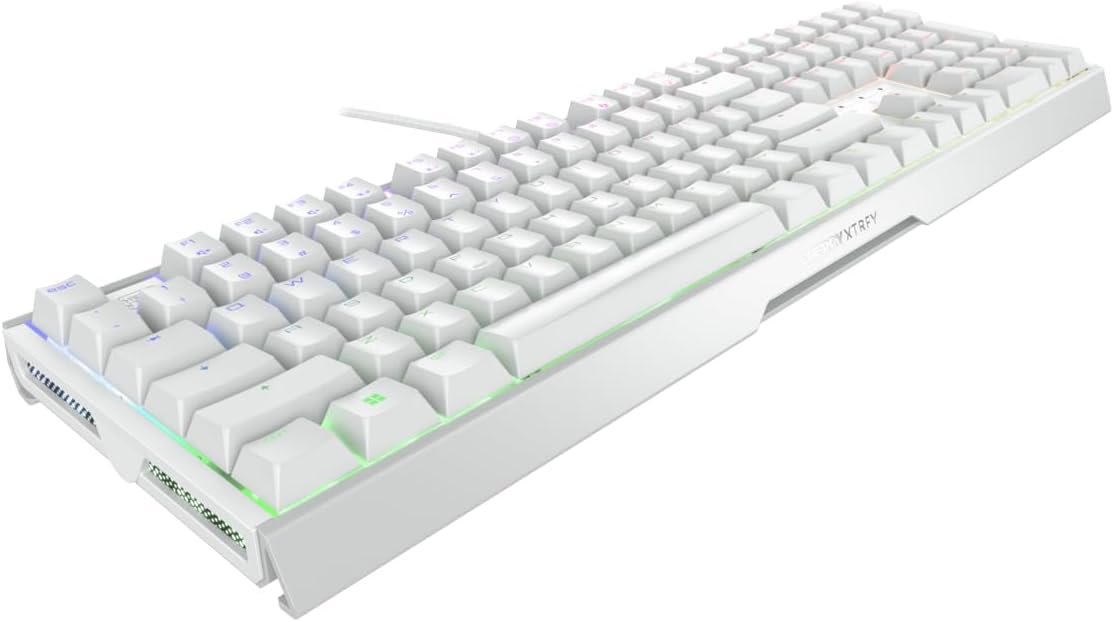
Figure 1.2: CHERRY XTRFY MX 3.1 Keyboard - Angled View
2. Opsætningsvejledning
2.1 Pakkens indhold
- CHERRY XTRFY MX 3.1 Mechanical Wired Gaming Keyboard
- Detachable USB-A Cable
- Screwable Detachable Metal Feet (pre-installed or included separately)
- Quick Start Guide (denne manual)
2.2 Tilslutning af tastaturet
- Unpack the keyboard and all accessories from the packaging.
- Locate the detachable USB-A cable. Connect one end of the cable to the USB-C port on the keyboard.
- Tilslut den anden ende af USB-A-kablet til en ledig USB-port på din computer.
- Tastaturet vil automatisk blive genkendt af dit operativsystem. Der kræves typisk ingen yderligere drivere til grundlæggende funktionalitet.
2.3 Justering af tastaturhøjde
The MX 3.1 keyboard includes screwable detachable metal feet for individual positioning and ergonomic comfort. These feet can be adjusted or removed based on your preferred typing angle.

Figure 2.1: Detachable Metal Feet for Height Adjustment
3. Betjeningsvejledning
3.1 CHERRY MX2A Switches
The CHERRY XTRFY MX 3.1 keyboard features new CHERRY MX2A switches, engineered in Germany for reliable and comfortable typing. These switches incorporate gold crosspoint precision, premium lubricant, and an innovative spring design for smoother actuation, improved acoustics, and a lifespan of 100 million keystrokes.

Figure 3.1: CHERRY MX2A Switch Options
The MX 3.1 is available with different MX2A switch types, allowing you to choose based on your preferred tactile feedback and sound:
- CHERRY MX2A Red Switch: Offers a linear, smooth, and direct keystroke without a noticeable click. Ideal for fast-paced gaming.
- CHERRY MX2A Brown Switch: Provides a targeted and noticeable tactile bump without an audible click, offering a balance between typing and gaming.

Figure 3.2: Detail of a CHERRY MX2A Switch
3.2 Customizable RGB Illumination
The MX 3.1 features 16.8 million color LED illumination, which can be customized to your preference. You can choose from integrated color schemes or create your own unique lighting effects.

Figur 3.3: Tilpasset RGB-belysning
To fully customize the RGB illumination, multimedia controls, shortcuts, text modules, and macros, download and install the official CHERRY software from the CHERRY XTRFY website. The software provides an intuitive interface for advanced personalization.

Figure 3.4: Side RGB Illumination
3.3 Noise Damping Structure
The keyboard incorporates a damping structure designed to reduce noise during fast typing and intense gaming sessions. This feature helps maintain focus and provides a more pleasant acoustic environment.

Figure 3.5: Noise Damping Feature
Integrated mechanisms further improve acoustics and contribute to ergonomic comfort, reducing strain on fingers and wrists during long periods of use.
4. Vedligeholdelse
4.1 Rengøring af tastaturet
- Frakobl tastaturet fra computeren, før du rengør det.
- Brug en blød, fnugfri klud lidt damprengøres med vand eller en mild rengøringsopløsning til at tørre tastaturerne og kabinettet af.
- Brug trykluft til støv og snavs mellem tasterne.
- Undgå at bruge skrappe kemikalier, slibende rengøringsmidler eller overdreven fugt, da disse kan beskadige tastaturets finish eller interne komponenter.
- Sørg for, at tastaturet er helt tørt, før du tilslutter det til computeren igen.
5. Fejlfinding
5.1 Almindelige problemer og løsninger
| Problem | Mulig årsag | Løsning |
|---|---|---|
| Tastaturet reagerer ikke | Loose cable connection, incorrect USB port, driver issue | Ensure USB cable is securely connected. Try a different USB port. Restart your computer. |
| RGB-belysningen virker ikke eller er forkert | Software settings, keyboard mode | Check CHERRY software settings. Ensure keyboard is not in a mode that disables lighting. Reinstall software if necessary. |
| Nøgler registreres ikke eller dobbelttastning | Debris under keycap, switch malfunction | Use compressed air to clear debris. If issue persists, contact support. |
| Function (FN) keys not working | Function lock enabled | Press CTRL + FN to toggle function lock. The FN key will glow red when engaged. |
6. Specifikationer
| Feature | Detalje |
|---|---|
| Mærke | CHERRY XTRFY |
| Modelnummer | G80-3890HJAUS-0 |
| Produktdimensioner | 17.1 cm L x 5.4 cm B x 1.3 cm H (17.1 x 5.4 x 1.3 cm) |
| Varens vægt | 3.21 pund |
| Fabrikant | CHERRY XTRFY |
| Kompatible enheder | PC |
| Forbindelsesteknologi | USB-A |
| Tastaturbeskrivelse | Mechanical Gaming |
| Anbefalede anvendelser | Spil |
| Særlige funktioner | Adjustable RGB, Aluminum Build, Cherry MX2A Switches |
| Farve | Hvid |
| Antal nøgler | 110 |
| Materiale | Aluminium |
7. Garantioplysninger
Specific warranty details for the CHERRY XTRFY MX 3.1 Mechanical Wired Gaming Keyboard are not provided in this manual. For comprehensive warranty terms and conditions, please refer to the official CHERRY XTRFY website or contact their customer support directly. Please retain your proof of purchase for any warranty claims.
8. Kundesupport
If you encounter any issues or have questions regarding your CHERRY XTRFY MX 3.1 keyboard that are not covered in this manual, please visit the official CHERRY XTRFY support page or contact their customer service team. Support resources typically include FAQs, driver downloads, and contact information for technical assistance.
Official CHERRY XTRFY Webwebsted: www.cherryxtrfy.com


