1. Sikkerhedsinstruktioner
Please read and understand all safety instructions before operating the Moukey MTs10-2 Karaoke Machine. Retain this manual for future reference.
- Udsæt ikke enheden for regn, fugt eller ekstreme temperaturer.
- Undgå at placere enheden i nærheden af varmekilder eller i direkte sollys.
- Åbn ikke c'enasing; overlad al service til kvalificeret personale.
- Sørg for korrekt ventilation for at forhindre overophedning.
- Brug kun den medfølgende strømadapter.
- Opbevares utilgængeligt for børn.
- Bortskaf batterier ansvarligt i henhold til lokale regler.
2. Pakkens indhold
Bekræft, at alle nedenstående varer er inkluderet i din pakke:
- Moukey MTs10-2 Karaoke Machine
- Wireless Microphone (x2)
- Justerbar tabletholder
- Fjernbetjening
- Strømadapter
- 3.5 mm AUX-kabel
- TV Cable (RCA to 3.5mm)
- Brugervejledning (dette dokument)

3. Produktet er slutview
3.1 Hovedkomponenter
The Moukey MTs10-2 Karaoke Machine features a robust design with integrated audio components and versatile connectivity options.
- 10-tommer bashøjttaler: Provides powerful bass and full-range sound reproduction.
- 3-tommers diskanthøjttaler: Delivers clear high-frequency audio.
- UHF Wireless Microphones: Two high-fidelity microphones for vocal performance.
- Adjustable Tablet Holder: Securely holds smartphones and tablets for lyric display or video playback.
- Integreret LED lys: Dynamic colorful lights that synchronize with music.
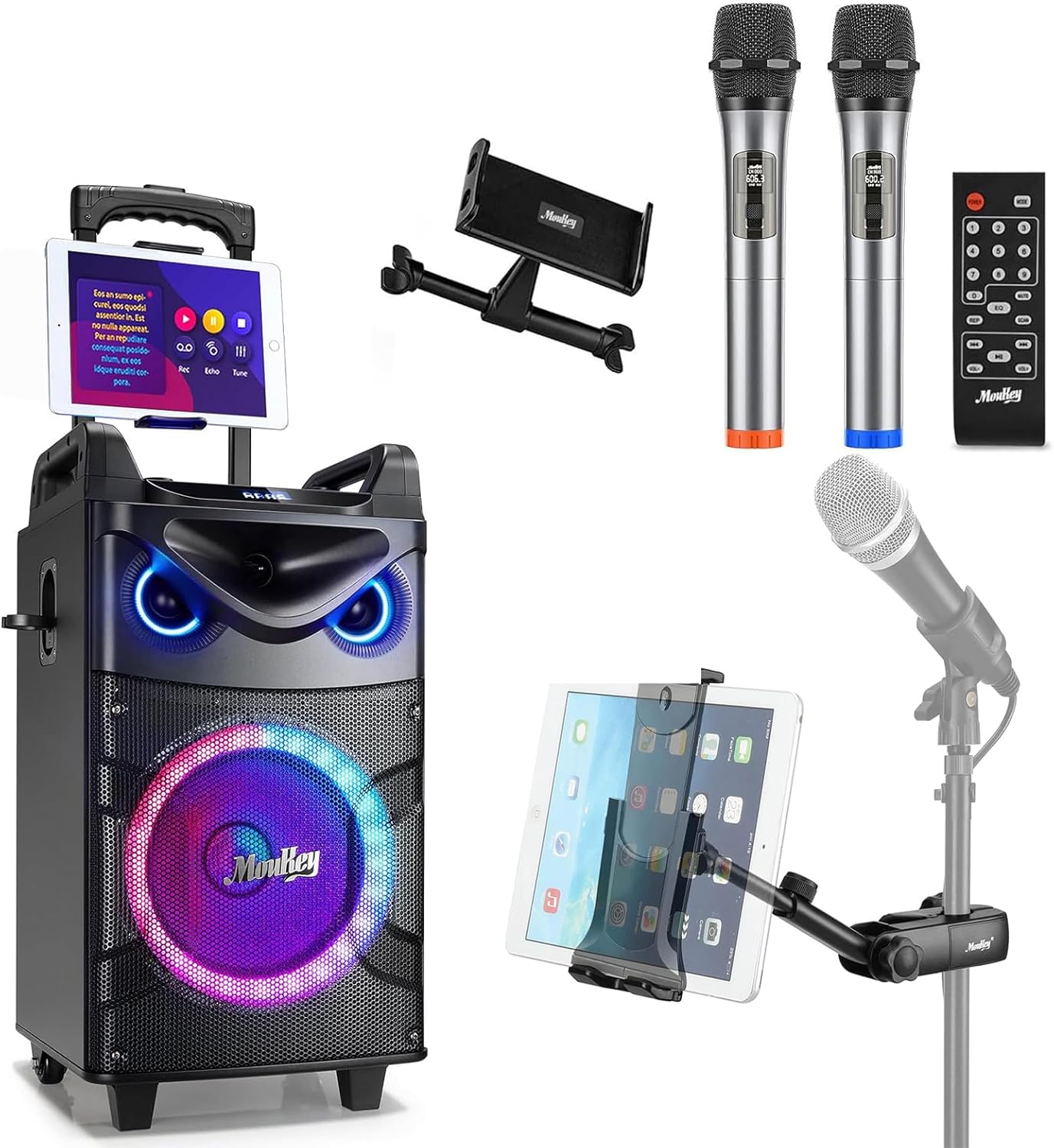

3.2 Kontrolpanel
The control panel located on the top of the unit provides access to all functions and adjustments.
- Lydstyrkeknap: Justerer masterlydstyrken.
- Basjustering: Controls the low-frequency output.
- Diskantjustering: Controls the high-frequency output.
- Mode knap: Switches between input sources (Bluetooth, AUX, USB, TF Card, FM Radio).
- Light FX Button: Cycles through LED light modes.
- USB-port: Til afspilning fra USB-drev.
- TF-kortslot: Til afspilning af TF-kort.
- AUX ind: 3.5 mm indgang til eksterne lydenheder.
- 6.35mm Mic Jacks: Two additional inputs for wired microphones.
- INST/TWS Button: Initiates True Wireless System pairing or instrument input.

4. Opsætning
4.1 Charging the Karaoke Machine
- Connect the provided power adapter to the DC IN port on the back of the karaoke machine.
- Sæt adapteren i en almindelig stikkontakt.
- Opladningsindikatorlampen lyser. En fuld opladning tager typisk cirka 6 timer.
- The machine offers up to 14 hours of playing time on a full charge, depending on usage.

4.2 Installing Microphone Batteries
Each wireless microphone requires two AA batteries (not included).
- Unscrew the bottom cap of each microphone.
- Isæt to AA-batterier, og sørg for at polariteten (+/-) vender korrekt.
- Skru bunddækslet godt på igen.

4.3 Attaching the Tablet Holder
The adjustable tablet holder can be attached to the karaoke machine or a separate microphone stand.
- To the Karaoke Machine: Slide the tablet holder's base into the designated slot on top of the MTs10-2 unit until it clicks into place.
- To a Mic Stand: Brug clamp mechanism on the tablet holder to secure it to a standard microphone stand pole.
- Adjust the flexible ball joint and the 360° rotatable clamp at opnå det ønskede viewing angle for your device.


5. Betjeningsvejledning
5.1 Tænd/sluk
Press and hold the Power button on the control panel to turn the karaoke machine on or off.
5.2 Bluetooth-forbindelse
- Turn on the karaoke machine. It will automatically enter Bluetooth pairing mode, indicated by a flashing 'BLUE' on the display.
- Aktiver Bluetooth på din smartphone eller tablet, og søg efter tilgængelige enheder.
- Select 'Moukey MTs10-2' from the list to pair. A confirmation tone will sound upon successful connection.
5.3 Brug af mikrofon
- Turn on the wireless microphones using their respective power switches. They will automatically connect to the karaoke machine.
- Adjust the microphone volume using the dedicated controls on the machine.
- For wired microphones, plug them into the 6.35mm Mic Jacks on the control panel.
5.4 True Wireless System (TWS) Pairing
The TWS function allows you to connect two MTs10-2 units for a stereo sound experience (second unit sold separately).
- Ensure both MTs10-2 units are powered on and not connected to any Bluetooth device.
- On one unit (the master), press and hold the 'INST/TWS' button until you hear a pairing tone.
- The two units will automatically connect. Once paired, connect your Bluetooth device to the master unit as described in Section 5.2.

5.5 LED-lystilstande
Press the 'Light FX' button on the control panel or remote control to cycle through various colorful LED light modes. The lights can change color with the beat of the music, creating a dynamic atmosphere.

5.6 Lydindgangsmuligheder
The MTs10-2 supports multiple audio input methods:
- Bluetooth: Wireless connection to smartphones, tablets, and other Bluetooth-enabled devices.
- AUX ind: Connect external audio players using the provided 3.5mm AUX cable.
- USB/TF-kort: Insert a USB drive or TF card into the respective slots for direct audio playback.
- FM-radio: Switch to FM radio mode to listen to local stations.

5.7 Justering af lyd
Use the dedicated knobs on the control panel to fine-tune your audio output:
- Lydstyrkeknap: Drej med uret for at øge lydstyrken, mod uret for at sænke den.
- Basjustering: Adjust to enhance or reduce low frequencies.
- Diskantjustering: Adjust to enhance or reduce high frequencies.
6. Vedligeholdelse
Proper maintenance ensures the longevity and optimal performance of your karaoke machine.
- Rensning: Brug en blød, tør klud til at rengøre enhedens yderside. Brug ikke flydende rengøringsmidler eller slibende materialer.
- Opbevaring: Store the machine in a cool, dry place away from direct sunlight and extreme temperatures when not in use.
- Batteripleje: If storing for an extended period, fully charge the internal battery every 3-6 months to maintain its health. Remove AA batteries from microphones if not used for a long time.
- Ventilation: Ensure the speaker grilles and vents are free from dust and obstructions.
7. Fejlfinding
Se tabellen nedenfor for almindelige problemer og deres løsninger.
| Problem | Mulig årsag | Løsning |
|---|---|---|
| Ingen strøm | Battery depleted; Power adapter not connected. | Charge the machine; Ensure power adapter is securely connected to both the unit and a working outlet. |
| Ingen lydudgang | Lydstyrken er for lav; Forkert inputtilstand; Enheden er ikke tilsluttet. | Increase master volume; Press 'Mode' button to select correct input; Re-pair Bluetooth device or check AUX/USB connection. |
| Mikrofon virker ikke | Microphone off; Batteries depleted; Out of range. | Turn on microphone; Replace AA batteries; Ensure microphone is within operating range of the machine. |
| Bluetooth-forbindelsen er ustabil | Device too far; Interference; Other Bluetooth devices connected. | Move device closer to the machine; Avoid obstacles; Disconnect other Bluetooth devices. |
| TWS-parring mislykkedes | One or both units already connected to Bluetooth; Incorrect pairing procedure. | Ensure both units are disconnected from other Bluetooth devices; Follow TWS pairing steps in Section 5.4 carefully. |
8. Specifikationer
| Feature | Specifikation |
|---|---|
| Mærke | Moukey |
| Model | MTs10-2 |
| Woofer størrelse | 10 tommer |
| Diskantstørrelse | 3 tommer |
| Max effekt | 160 watt |
| Strømkilde | Batteridrevet |
| Forbindelsesteknologi | Bluetooth |
| Antal kanaler | 4 |
| Lydindgang | Wired microphones, wireless microphones, musical instruments, audio players |
| Microphone Connector Type | 6.35mm Jack (for wired mics) |
| Tabletholder kompatibilitet | 4.7 to 12.9 inches phones & tablets (horizontal placement) |
| Monteringstype | Floor Standing |
| Farve | Sort |
9. Garanti og support
Moukey products are designed and manufactured to the highest quality standards. For warranty information, technical support, or service inquiries, please refer to the warranty card included in your package or visit the official Moukey webwebsted. Du kan også besøge Moukey-butik på Amazon for yderligere produktinformation og supportressourcer.


