1. Introduktion
This manual provides detailed instructions for the installation, operation, and maintenance of your CAMECHO RM 4K Mirror Dash Cam. This device integrates a high-resolution dash camera with a 10.99-inch full touch screen, offering advanced features such as wireless CarPlay, Android Auto, Wi-Fi connectivity, voice control, and night vision for an enhanced driving experience.

Figur 1.1: CAMECHO RM 4K Mirror Dash Cam overview, showing the screen interface with various app icons and connectivity features.
2. Pakkens indhold
Kontroller venligst, at alle nedenstående varer er inkluderet i din pakke. Hvis der mangler eller er beskadigede varer, bedes du kontakte kundesupport.
- CAMECHO RM Mirror Dash Cam (Front unit)
- Cigarette Lighter Power Cord
- Brugermanual
- 3m AUX Cable
- Bandages (for cable management)
- Bemærk: Bagsiden view camera is sold separately and is not included in the standard package.
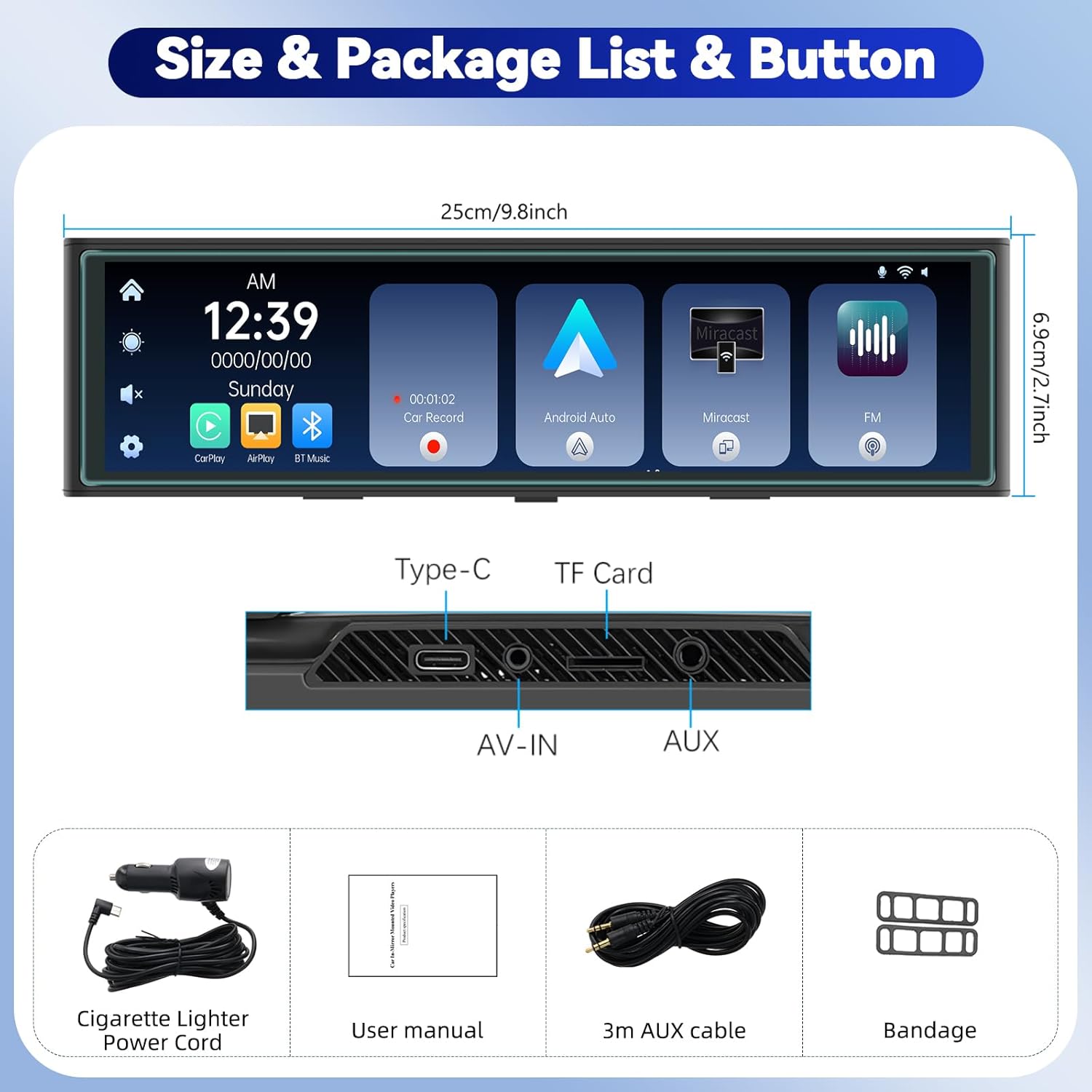
Figur 2.1: Illustration of the CAMECHO RM Mirror Dash Cam and its included accessories.
3. Installation
3.1 Montering af dashcam'et
- Securely attach the CAMECHO RM Mirror Dash Cam over your vehicle's existing rearview mirror using the provided straps or clips. Ensure it is centered and stable.
- Adjust the angle of the front camera lens to capture the desired view af vejen forude.
3.2 Strømtilslutning
- Connect the cigarette lighter power cord to the Type-C port on the top of the dash cam.
- Route the power cable neatly along the windshield trim and dashboard to the vehicle's cigarette lighter socket. Use the provided bandages to secure the cable.
- Insert the cigarette lighter adapter into the vehicle's 12V power outlet.
3.3 Montering af bakkamera (valgfrit)
Hvis du har købt en separat bagende view camera, connect it to the AV-IN port on the dash cam. Route the cable to the rear of your vehicle and mount the camera according to its specific instructions, typically near the license plate or rear window. Ensure proper wiring for reverse trigger if desired.

Figur 3.1: Visual guide for routing the power cable and installing the dash cam.
4. Betjeningsvejledning
4.1 Grundlæggende betjening
- Tænd/sluk: The device will automatically power on when the vehicle starts and power off when the engine is turned off. You can also manually power it on/off using the power button (location not specified, assume side/top).
- Skærmnavigation:
- Tilpasse Viewvinkel: Slide your finger up or down on the screen to adjust the vertical viewkameraets vinkel.
- Skifte Views: Stryg til venstre eller højre på skærmen for at skifte mellem frontkamera view, bakkamera view (if connected), or a split-screen display of both.
- Videooptagelse: The dash cam automatically begins recording when powered on. The front camera records in 4K resolution, with options for 1080P/2K/4K. If a rear camera is connected, it records in 1080P.
- Loop-optagelse: Videos are recorded in segments of 1, 3, or 5 minutes. When the memory card is full, the oldest unlocked files will be overwritten by new recordings to ensure continuous operation.
- Nattesyn: The device features enhanced night vision for clear recording in low-light conditions.
4.2 Trådløs CarPlay og Android Auto
The CAMECHO RM supports wireless CarPlay for iPhone and Android Auto for Android phones, allowing seamless integration of your smartphone's features onto the dash cam screen.
- Sørg for, at Bluetooth og Wi-Fi er aktiveret på din smartphone.
- On the dash cam, navigate to the CarPlay or Android Auto interface.
- Pair your phone via Bluetooth with the dash cam.
- Once paired, the device will establish a Wi-Fi connection for CarPlay or Android Auto functionality.
- You can now use voice control for navigation, music playback, making calls, and accessing other compatible applications.

Figur 4.1: Wireless CarPlay and Android Auto functionality demonstration.
4.3 Airplay & Android Cast (Screen Mirroring)
Mirror your smartphone's screen directly onto the dash cam display.
- For iOS devices (Airplay): Connect your iPhone to the dash cam via Wi-Fi and select the Airplay option on the dash cam.
- For Android devices (Android Cast): Connect your Android phone to the dash cam via Wi-Fi and select the Android Cast option.

Figur 4.2: Screen mirroring feature for both Android and iOS devices.
4.4 FM Transmitter & Bluetooth Music
Transmit audio from the dash cam to your car's speakers or play music via Bluetooth.
- FM Transmitter:
- On the dash cam, select the FM Transmitter option and choose an unoccupied FM frequency.
- Tune your vehicle's FM radio to the same frequency.
- Audio from the dash cam will now play through your car's speakers.
- Bluetooth musik:
- Aktiver Bluetooth på din mobiltelefon.
- On the dash cam, select the [Bluetooth Music] valgmulighed.
- Gå til [BT Manage] on the dash cam interface to connect to your phone.
- Once connected, you can play music from your phone and make hands-free calls.
- AUX -forbindelse: Connect the provided 3m AUX cable from the dash cam's AUX output to your car's AUX input for direct audio transmission.
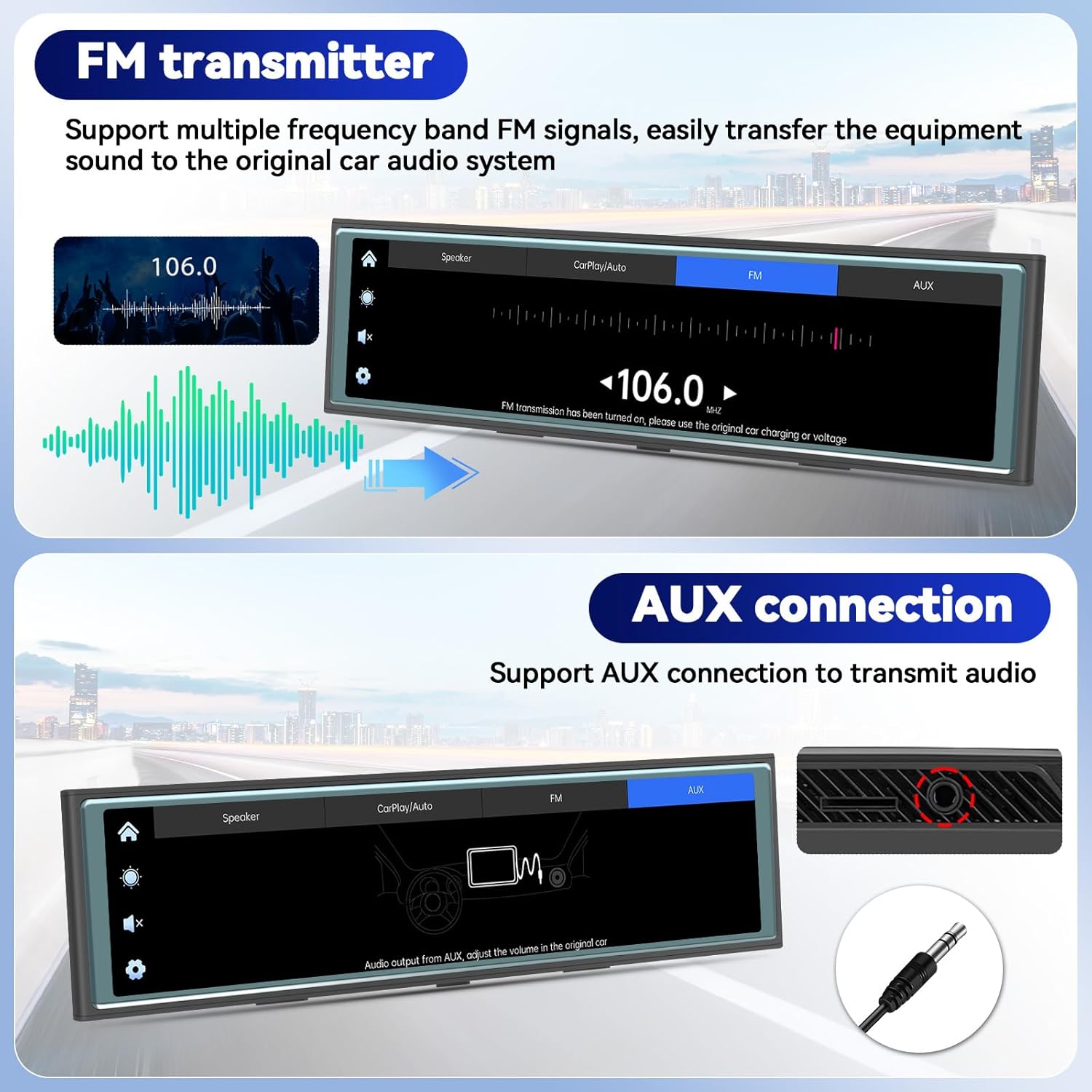
Figur 4.3: FM Transmitter and AUX connection options.
4.5 Wi-Fi & App Control (Viidure App)
Manage your dash cam recordings and settings using the "Viidure" app on your smartphone.
- Download appen: Scan the QR code displayed on the dash cam screen or visit https://www.6zhentan.com/app/d0001/index.html to download the "Viidure" app for iOS or Android.
- Opret forbindelse via Wi-Fi:
- On the dash cam, navigate to the Wi-Fi settings.
- On your smartphone, connect to the dash cam's Wi-Fi network (SSID and password will be displayed on the dash cam screen, e.g., "LongGoWiFiHome", password "12345678").
- App funktioner: Når du er tilsluttet, kan du view live footage, play back recorded videos, download videos to your phone, edit clips, and share them.

Figur 4.4: Wi-Fi connectivity and Viidure app download/usage guide.
5. Vedligeholdelse
- Rensning: Brug en blød, tør klud til at rengøre skærmen og kameralinserne. Undgå slibende rengøringsmidler eller opløsningsmidler.
- Hukommelseskort: Regularly format the TF card (TransFlash card) within the dash cam's settings to ensure optimal performance and prevent data corruption. Replace the memory card if it shows signs of degradation or error.
- Firmwareopdateringer: Check the official CAMECHO website or the Viidure app periodically for available firmware updates to ensure your device has the latest features and bug fixes.
6. Fejlfinding
| Problem | Mulig årsag | Løsning |
|---|---|---|
| Enheden tænder ikke. | No power supply; loose connection; faulty power cord. | Check cigarette lighter connection; ensure vehicle's 12V outlet is functional; try a different power source if available. |
| Optagelsen stopper eller fryser. | Memory card full or corrupted; incompatible memory card; faulty memory card. | Format the memory card; replace with a high-speed, reputable brand memory card. |
| CarPlay/Android Auto opretter ikke forbindelse. | Bluetooth/Wi-Fi off on phone; incorrect pairing; interference. | Ensure phone's Bluetooth and Wi-Fi are on; re-pair the devices; try restarting both the phone and dash cam. |
| No audio from car speakers via FM. | Incorrect FM frequency; car radio not tuned correctly. | Verify dash cam and car radio are on the exact same, clear FM frequency. |
7. Specifikationer
| Feature | Detalje |
|---|---|
| Modelnavn | RM |
| Skærmstørrelse | 10.99 tommer |
| Skærmtype | 2.5D Full Touch Screen |
| Forreste kameraopløsning | 4K (selectable 1080P/2K/4K) |
| Bagkameraopløsning | 1080P (requires separate purchase) |
| Forbindelse | Bluetooth, WiFi |
| Særlige funktioner | CarPlay, Android Auto, Airplay, Android Cast, FM Transmitter, Loop Recording, Night Vision, App Control |
| Strømindgang | Cigarette Lighter Power Cord (12V) |
| Opbevaring | TF Card Slot (card not included, capacity not specified) |
| Produktdimensioner | 1 x 1 x 1 tommer |
| Varens vægt | 2.16 pund |
| Fabrikant | Camecho |
Note: Product dimensions from specifications (1x1x1 inches) appear to be generic. Actual dimensions from product images are approximately 9.8 inches (25cm) length and 2.7 inches (6.9cm) height.
8. Garanti og support
8.1 Garantioplysninger
For detailed warranty information regarding your CAMECHO RM Mirror Dash Cam, please refer to the warranty card included in your product packaging or consult your purchase documentation. Warranty terms and conditions may vary by region and retailer.
8.2 Kundesupport
If you encounter any issues or have questions about your CAMECHO product, please contact our customer support team:
- E-mail: camechovip@126.com
- For additional resources and FAQs, please visit the official CAMECHO webwebsted.

Figur 8.1: CAMECHO customer support contact information.


