Indledning
Tak, fordi du har valgt Mediashop Kendox Life Tracker Smartwatch. Denne manual indeholder vigtige oplysninger om opsætning, betjening og vedligeholdelse af din enhed. Læs den omhyggeligt for at sikre optimal ydeevne og levetid for dit smartwatch.

Billede: Kendox Life Tracker Smartwatch med et elegant sort design og et digitalt display, der viser tid, dato, batteri, skridt og vitale tegn som temperatur.
Pakkens indhold
Sørg for, at alle varer er til stede i din pakke:
- 1x Kendox Life Tracker Sundhedsur
- 1x ladekabel
Opsætningsvejledning
1. Opladning af enheden
Oplad din Kendox Life Tracker helt inden første brug. Tilslut det medfølgende opladningskabel til opladningsporten på bagsiden af smartwatchet, og sæt den anden ende i en USB-strømkilde (f.eks. computer, vægadapter).

Billede: Et nærbillede view af opladningskablet, der er tilsluttet opladningsporten på Kendox Life Tracker Smartwatch.
2. Appinstallation og parring
For at udnytte dit smartwatchs fulde potentiale skal du downloade den medfølgende app på din smartphone. Kendox Life Tracker er kompatibel med både iOS- og Android-enheder.
- Søg efter den officielle "Kendox Life Tracker"-app i Apple App Store (til iOS) eller Google Play Store (til Android).
- Installer appen og åbn den.
- Følg instruktionerne på skærmen i appen for at parre dit smartwatch via Bluetooth. Sørg for, at Bluetooth er aktiveret på din smartphone.

Billede: Logoer til Android og iPhone, der angiver kompatibilitet med begge operativsystemer.
Betjeningsvejledning
Navigering i grænsefladen
Kendox Life Tracker har en 4.3 cm HD-skærm. Stryg til venstre/højre eller op/ned for at navigere gennem forskellige skærme og menuer. Tryk for at vælge en indstilling.
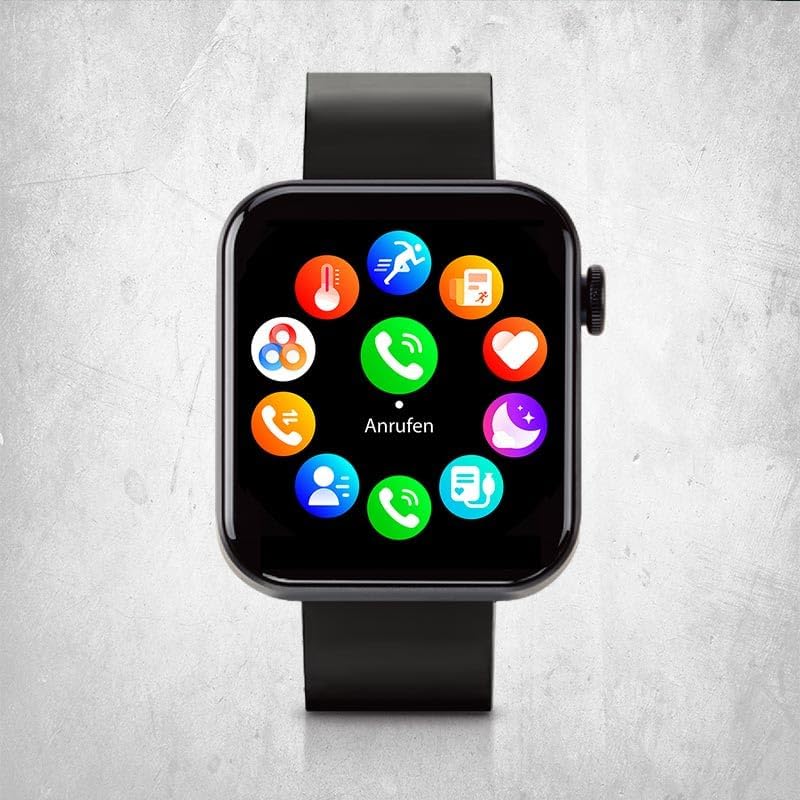
Billede: Smartwatch-skærmen, der viser en cirkulær menu med forskellige appikoner, herunder opkald, beskeder og sundhedssporing.
Nøgleegenskaber og funktioner
24/7 visning af vitale værdier
Overvåg løbende din kropstemperatur, puls, blodtryk og iltniveau i blodet. Få adgang til disse aflæsninger direkte på dit ur eller via appen for detaljerede historiske data.

Billede: Et nærbillede af smartwatchet på et håndled, der viser et hjerteikon og en pulsmåling på 91 slag i minuttet.
Intelligente sportstilstande
Vælg mellem 18 forskellige sportstilstande for at spore dine fitnessaktiviteter. Uret registrerer skridt, distance, kalorieforbrug, kilometertal og træningsvarighed for omfattende fitnesssporing.

Billede: Smartwatchet på en persons håndled, der viser en timer under træning, hvilket indikerer sporing af aktiv sportstilstand.
Smarte funktioner (opkald og beskeder)
Foretag og modtag opkald og beskeder direkte fra dit ur, når det er tilsluttet din smartphone. Nyd andre alsidige funktioner som vejrinformation, lommelygte, vækkeur og påmindelser.

Billede: Et nærbillede af smartwatchet på et håndled, der viser et numerisk tastatur til at ringe til et telefonnummer.
Søvnanalyse i realtid
Optimer dine søvnvaner med realtidsovervågning af søvnfaser og -mønstre. Kendox Life Tracker hjælper med at sikre en afslappende søvn og forbedret velvære ved at give indsigt i din søvnkvalitet.
Opretholdelse
Rengøring af dit smartwatch
Regelmæssig rengøring hjælper med at bevare din enheds udseende og funktionalitet.
- Tør skærmen og kabinettet af med en blød, fnugfri klud.
- Ved genstridige pletter, let dampRengør kluden med vand. Undgå at bruge skrappe kemikalier eller slibende materialer.
- Sørg for, at opladningskontakterne er rene og tørre, før du oplader.
Vandmodstand
Kendox Life Tracker er svedafvisende og vandtæt. Det anbefales dog ikke til dykning eller aktiviteter i vand under højt tryk. Tør altid uret grundigt efter udsættelse for vand.
Fejlfinding
| Problem | Mulig årsag | Løsning |
|---|---|---|
| Uret tænder ikke | Lavt batteri; enheden er frosset. | Oplad uret i mindst 30 minutter. Hvis det stadig ikke reagerer, skal du udføre en soft nulstilling ved at trykke på sideknappen og holde den nede i 10-15 sekunder. |
| Kan ikke parres med smartphone | Bluetooth slukket; uret er ikke i parringstilstand; app-problemer. | Sørg for, at Bluetooth er aktiveret på din telefon. Genstart både uret og telefonen. Geninstaller appen, hvis det er nødvendigt. Kontroller appens tilladelser. |
| Unøjagtige aflæsninger af vitale tegn | Forkert pasform; sensorblokering; bevægelse under måling. | Sørg for, at uret sidder tæt på dit håndled. Rengør sensoren på bagsiden af uret. Forbliv stille under målingerne. Bemærk, at denne enhed ikke er et medicinsk instrument. |
| Notifikationer ikke modtaget | Apptilladelser; Bluetooth-forbindelse mistet; notifikationsindstillinger. | Tjek tilladelserne for notifikationer i appen og på din telefon. Bekræft Bluetooth-forbindelsen. Sørg for, at notifikationer er aktiveret i indstillingerne for ur-appen. |
Specifikationer
| Feature | Detalje |
|---|---|
| Modelnummer | 9010041056028 |
| Mærke | Mediebutik |
| Vise | 4.3 cm digitalt HD-display |
| Forbindelse | Bluetooth |
| Operativsystem | Bær OS |
| Kompatible enheder | Smartphones (iOS og Android), tablets, pc'er, bærbare computere |
| Dimensioner | 21 x 4.3 x 8 cm |
| Vægt | 120 gram |
| Vandmodstand | Svedafvisende og vandtæt (ikke til dykning) |
| Batterilevetid | Op til 7 dage (afhængigt af brug) |

Billede: En infografik, der fremhæver vigtige specifikationer såsom den 4.3 cm store HD-skærm, op til 7 dages batterilevetid, svedafvisende teknologi, vandtæthed, fleksibel silikonerem og integreret lommelygte.
Garanti og support
For garantioplysninger og kundesupport henvises til den officielle Mediashop webwebstedet eller kontakt deres kundeservice direkte. Gem din købsbevis til eventuelle garantikrav.
Fabrikant: Mediebutik
ASIN: B0DCBF6JTG
Model: 9010041056028
For yderligere hjælp, besøg Mediashop-butik på Amazon.


