Indledning
This manual provides detailed instructions for the setup, operation, and maintenance of your TECKNET Wireless Headset HS004. This Bluetooth headset features a noise-cancelling microphone, dual device connectivity, and is designed for various communication needs, including calls, online meetings, and e-learning. Please read this manual thoroughly before using the product to ensure optimal performance and longevity.
Pakkens indhold
Bekræft at alle varer er til stede i din pakke:
- TECKNET Wireless Headset HS004
- USB dongle
- USB-C ladekabel
- Brugermanual
Produkt overview
Familiarize yourself with the components of your TECKNET Wireless Headset HS004.

Figur 1: TECKNET Wireless Headset HS004 and included USB dongle. This image shows the overall design of the headset, featuring an adjustable headband, an on-ear earcup, and a boom microphone.

Figur 2: Detaljeret view of the headset's controls. This image highlights the LED indicator, Volume Up button, Volume Down button, USB-C charging port, and the Multi-functional button located on the earcup.

Figur 3: Illustration of the microphone's 330-degree rotation capability. This feature allows the microphone to be positioned on either the left or right ear for user preference.
Opsætning
1. Opladning af headsettet
Before first use, fully charge the headset. Connect the USB-C charging cable to the headset's USB-C port and the other end to a USB power source (e.g., computer USB port, wall adapter). The LED indicator will show charging status. A full charge takes approximately 2 hours.
2. Tænd/sluk
- Tænd: Press and hold the Multi-functional button for approximately 3 seconds until the LED indicator flashes blue.
- Sluk: Press and hold the Multi-functional button for approximately 3 seconds until the LED indicator flashes red and then turns off.
3. Forbindelse via Bluetooth (til mobile enheder)
- Sørg for, at headsettet er slukket.
- Press and hold the Multi-functional button for approximately 5-7 seconds until the LED indicator flashes red and blue alternately, indicating pairing mode.
- Aktiver Bluetooth på din mobilenhed (smartphone, tablet) og søg efter tilgængelige enheder.
- Select "TECKNET HS004" (or similar name) from the list of devices.
- Når der er forbindelse, blinker LED-indikatoren langsomt blåt.
4. Connecting via USB Dongle (for PC/Laptop)
- Sæt USB-donglen i en ledig USB-port på din computer.
- Tænd headsettet. Det vil automatisk forsøge at oprette forbindelse til USB-donglen.
- Once connected, the LED indicator on both the headset and the dongle will turn solid blue.
- You may need to select the headset as the default audio input/output device in your computer's sound settings.

Figur 4: The headset demonstrating dual device connectivity, simultaneously paired with a laptop via USB dongle and a smartphone via Bluetooth 5.2.
5. Dobbelt enhedsforbindelse
The headset supports connecting to two devices simultaneously (e.g., a laptop via dongle and a smartphone via Bluetooth). After connecting to the first device, follow the Bluetooth pairing steps to connect to the second device. The headset will intelligently switch between devices for calls or media playback.
Betjeningsvejledning
Grundlæggende kontrol
| Knap/handling | Fungere |
|---|---|
| Multifunktionel knap (Tryk og hold) | Power On/Off (3 seconds), Enter Pairing Mode (5-7 seconds) |
| Multifunktionel knap (Single Press) | Answer/End Call, Play/Pause Music |
| Multifunktionel knap (Double Press) | Genopkald sidste nummer |
| Volumen op-knap (+) | Øg lydstyrken |
| Volumen ned-knap (-) | Sænk lydstyrken |
| Mikrofon mute (Specific button or action) | Mute/Unmute microphone. Note: The mute function currently works only with mobile phones. |
Mikrofonbrug
The headset features a 330° rotatable microphone boom, allowing you to position it on either your left or right ear for optimal comfort and sound capture. The microphone is designed with noise-cancelling technology to reduce background distractions during calls.

Figur 5: The headset's microphone, illustrating its noise-cancelling capabilities by showing sound waves being focused.
Opladning og batterilevetid
The TECKNET Wireless Headset HS004 is equipped with a long-lasting battery. A full charge provides up to 20 hours of continuous talk time and up to 200 hours of standby time. Charging takes approximately 2 hours via the USB-C port.

Figur 6: Visual representation of the headset's battery performance: 20 hours talking time, 200 hours standby time, and 2 hours charging time.
Komfort og pasform
The headset is designed for extended wear with premium comfort features. It is ultra-lightweight (approximately 5.3 ounces) and features soft ear cups and an adjustable headband. The gripper T-pad ensures stability, while the skin-friendly ear pads contribute to lasting comfort during long calls or work sessions.
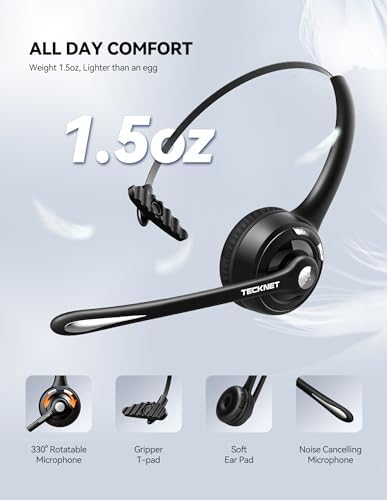
Figur 7: The headset emphasizing its lightweight design and comfort features, including a 330° rotatable microphone, gripper T-pad, soft ear pad, and noise-cancelling microphone.
Specifikationer
| Feature | Detalje |
|---|---|
| Modelnavn | HS004 |
| Varemodelnummer | EBH01007BA02 |
| Forbindelsesteknologi | Trådløs (Bluetooth) |
| Trådløs kommunikationsteknologi | Bluetooth 5.2 |
| Bluetooth rækkevidde | 10 meter (33 fod) |
| Opladningstid | 2 timer |
| Batterilevetid (taletid) | Op til 20 timer |
| Batterilevetid (standbytid) | Op til 200 timer |
| Kompatible enheder | iPhones, smartphones, desktops, laptops, tablets, cellphones |
| Mikrofon | Noise Cancelling, 330° Rotatable |
| Vægt | 5.3 ounce |
| Øreplacering | On Ear |
| Kontrolmetode | Touch (Multi-functional button, Volume buttons) |
Fejlfinding
Hvis du støder på problemer med dit headset, kan du bruge følgende almindelige løsninger:
- Headsettet tænder ikke: Ensure the headset is fully charged. Connect it to a power source using the USB-C cable and allow it to charge for at least 30 minutes before attempting to power on again.
- Kan ikke parres med enhed:
- Sørg for, at headsettet er i parringstilstand (LED'en blinker skiftevis rødt og blåt).
- Sørg for, at Bluetooth er aktiveret på din enhed, og at den er inden for 10 meter (33 fod) fra headsettet.
- Try turning off and on your device's Bluetooth, then re-attempt pairing.
- If previously paired, remove the headset from your device's Bluetooth list and try pairing again.
- Ingen lyd eller dårlig lydkvalitet:
- Kontroller lydstyrkeniveauerne på både headsettet og din tilsluttede enhed.
- Ensure the headset is properly connected to your device (Bluetooth or USB dongle).
- If using the USB dongle, verify that the headset is selected as the default audio device in your computer's sound settings.
- Move closer to your connected device to ensure you are within Bluetooth range.
- Reboot both the headset and your connected device.
- Mikrofonen virker ikke:
- Sørg for, at mikrofonen ikke er slået fra.
- Check that the microphone boom is positioned correctly towards your mouth.
- If using with a computer, verify that the headset microphone is selected as the default input device in your sound settings.
Opretholdelse
To ensure the longevity and optimal performance of your TECKNET Wireless Headset HS004, follow these maintenance guidelines:
- Rensning: Use a soft, dry cloth to clean the headset. Avoid using harsh chemicals, cleaning solvents, or strong detergents.
- Opbevaring: Opbevar headsettet et køligt, tørt sted væk fra direkte sollys og ekstreme temperaturer.
- Opladning: Do not overcharge the battery. Disconnect the charging cable once the headset is fully charged.
- Vandeksponering: The headset is not water-resistant. Avoid exposure to water or excessive moisture.
- Håndtering: Handle the headset with care. Avoid dropping it or subjecting it to strong impacts.
Garanti og support
TECKNET products are designed for reliability and performance. For warranty information and technical support, please refer to the official TECKNET website or contact their customer service. While specific warranty details are not provided in this manual, TECKNET generally offers support for their products.
For yderligere hjælp, besøg TECKNET-butik på Amazon or contact TECKNET customer support directly.


