Indledning
Creality Space PI Filament Dryer Box er designet til at forbedre 3D-printkvaliteten ved effektivt at fjerne fugt fra forskellige filamenttyper. Denne enhed har en indbygget ventilator, en 3.7-tommer berøringsskærm og 360° PTC-opvarmningsteknologi for at sikre optimale tørreforhold for dine 3D-printfilamenter.
Korrekt tørring af filament forhindrer almindelige printproblemer såsom strengdannelse, tilstopning, dårlig vedhæftning og lagforskydning, hvilket fører til forbedret printpålidelighed og -kvalitet.
Produktegenskaber
- PTC 360° varmluftvarmesystem: Sikrer hurtig og jævn opvarmning med en indbygget ventilator til 360° cirkulation af varm luft, der effektivt tørrer fugtige filamenter.
- Avanceret PTC-opvarmningsteknologi: Bruger en 80W PTC-varmer til ensartet tørring og tilbyder en holdbar, energieffektiv og miljøvenlig løsning.
- 3.7-tommer LCD-berøringsskærm: Giver nem betjening og overvågning af temperatur, luftfugtighed og nedtælling til tørring i realtid.
- Smart tidsstyring: Brugerdefinerbar 48-timers timerfunktion for grundig tørring. Inkluderer en hukommelsesfunktion til at gemme indstillinger efter strømafbrydelser.
- Alsidig filamentkompatibilitet: Understøtter op til 12 typer filamenter, herunder PLA, PETG, ABS, nylon, PLA-CF, PA-CF, ASA. Justerbart temperaturområde fra 45°C til 70°C. Kompatibel med filamenter med en diameter på 1.75 mm, 2.85 mm og 3 mm.
Pakkens indhold
- Creality Space PI filamenttørrer
- Strømadapter
- Brugervejledning (dette dokument)
Opsætningsinstruktioner
- Udpak tørretumbleren: Tag forsigtigt Creality Space PI filamenttørreren ud af emballagen. Undersøg den for eventuelle skader.
- Placering: Placer tørretumbleren på en stabil, flad overflade i nærheden af din 3D-printer, og sørg for tilstrækkelig ventilation omkring enheden.
- Strømtilslutning: Tilslut den medfølgende strømadapter til tørretumblerens strømindgang, og sæt den derefter i en passende stikkontakt.
- Indlæsning af filament:
- Åbn låget på tørretumbleren.
- Placer din(e) filamentspole(r) på rullerne inde i tørretumbleren. Tørretumbleren kan rumme to standardspoler.
- Hvis du udskriver direkte fra tørretumbleren, skal du føre filamentet gennem en af PTFE-røråbningerne, der er placeret øverst på forsiden af enheden. Sørg for, at silikoneproppen sidder korrekt, når den ikke er i brug, for at opretholde et forseglet miljø.
- Luk låget forsvarligt.

Billede: Creality Space PI filamenttørrerboksen med en filamentspole isat, der viser hovedenheden og displayet.
Betjeningsvejledning
- Tænd: Sæt tænd/sluk-knappen på bagsiden af enheden i positionen 'ON'. LCD-berøringsskærmen lyser op.
- Brug af berøringsskærmen: Den 3.7-tommer LCD-berøringsskærm viser temperatur, luftfugtighed og nedtælling til tørring i realtid.

Billede: LCD-berøringsskærmen viser nedtælling til tørring, temperatur og luftfugtighed i realtid.
- Valg af filamenttype og indstillinger:
- Tørretumbleren tilbyder forudindstillede temperaturindstillinger med én knap til 12 forskellige filamenttyper.
- Du kan også manuelt justere temperaturen mellem 45 °C og 70 °C og tørretiden fra 0 til 48 timer ved hjælp af skærmindstillingerne.
- Se tabellen med anbefalede indstillinger nedenfor for almindelige filamenttyper:
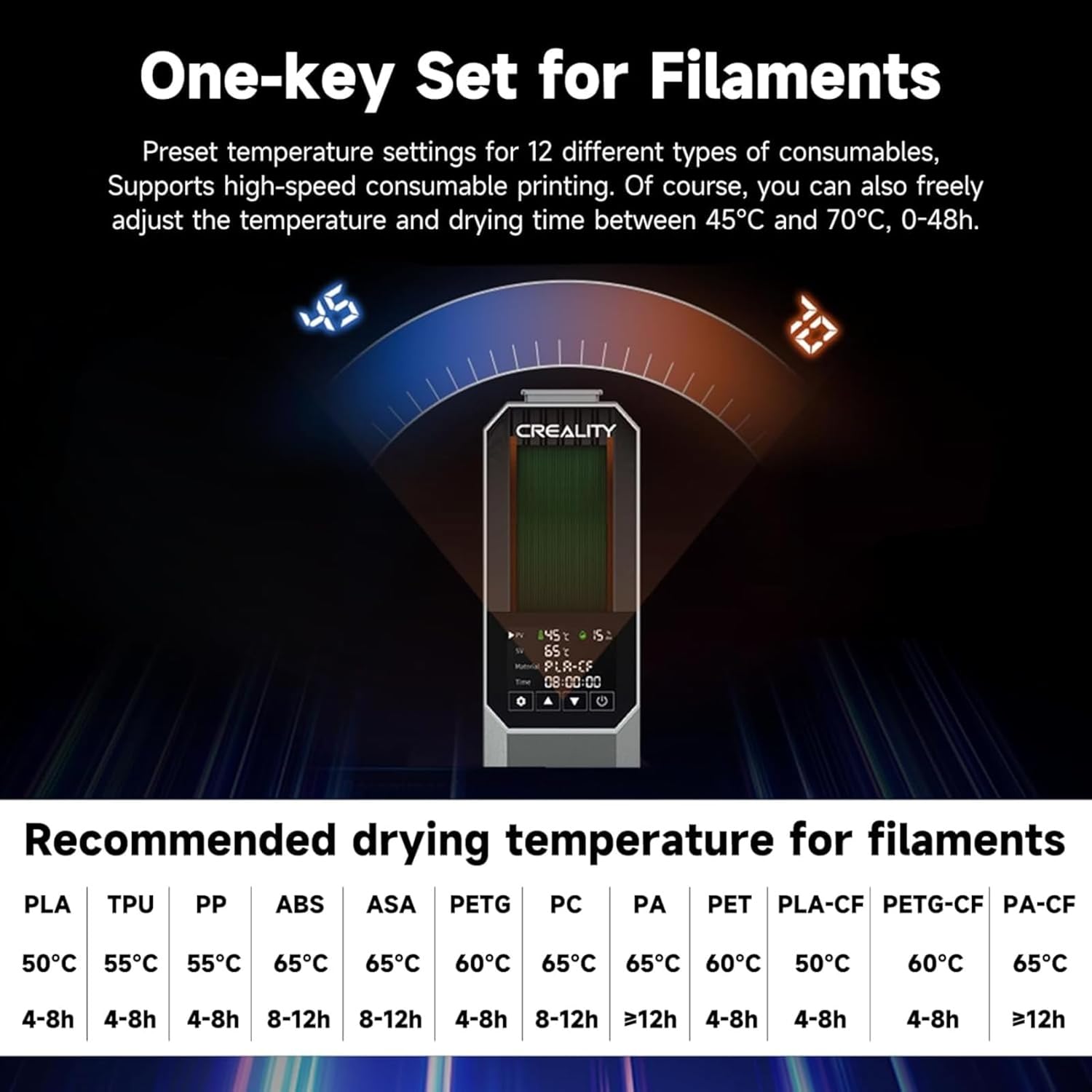
Billede: Anbefalede tørretemperaturer og -tider for forskellige filamenttyper.
Anbefalede tørreindstillinger Filament type Temperatur Tørretid PLA 50°C 4-8 timer TPU 55°C 4-8 timer PP 55°C 4-8 timer ABS 65°C 8-12 timer ASA 65°C 8-12 timer PETG 60°C 4-8 timer PC 65°C 8-12 timer PA 65°C >12 timer KÆLEDYR 60°C 4-8 timer PLA-CF 50°C 4-8 timer PETG-CF 60°C 4-8 timer PA-CF 65°C >12 timer - Start tørring: Når indstillingerne er konfigureret, skal du starte tørreprocessen. Tørretumbleren vil begynde at opvarme og cirkulere luft.
- Sluk-hukommelsesfunktion: I tilfælde af en magt outage, tørretumbleren vil huske dine seneste materiale- og temperaturindstillinger, hvilket muliggør hurtig genoptagelse af tørringen, når strømmen er genoprettet.

Billede: Skildring af 360° varmluftvarmesystemet, der cirkulerer luft omkring filamentspolen.

Billede: Hukommelsesfunktionen til sluk og opbevaring af indstillinger efter en tænd/sluk-cyklus.
Opretholdelse
- Rensning: Sørg for, at enheden er slukket og taget ud af stikkontakten, inden rengøring. Brug en blød, tør klud til at tørre ydersiden af. Undgå at bruge slibende rengøringsmidler eller opløsningsmidler.
- Tørremiddel: Tørretumbleren kan indeholde tørremiddelpakker. Mens enheden aktivt opvarmer, hjælper disse pakker primært med at opretholde tørhed, når enheden er slukket. Udskift tørremiddelpakkerne med jævne mellemrum, hvis de bliver mættede.
- Opbevaring: Når tørretumbleren ikke er i brug i længere perioder, skal den opbevares køligt og tørt.
Fejlfinding
- Problem: Filamentet er stadig vådt efter tørring.
- Løsning: Sørg for, at tørretemperaturen og -tiden er passende for filamenttypen. Nogle meget hygroskopiske filamenter (f.eks. nylon, PC) kan kræve længere tørretider (f.eks. >12 timer) eller højere temperaturer. Kontroller, at låget er forsvarligt lukket, og at silikonepropperne til filamentudgangene er på plads, når filamentet ikke aktivt tilføres, for at forhindre genindtrængning af fugt.
- Problem: Tørretumbleren varmer ikke op.
- Løsning: Kontroller, om strømkablet er korrekt tilsluttet, og at tænd/sluk-knappen er i 'ON'-positionen. Sørg for, at stikkontakten fungerer. Hvis problemet fortsætter, skal du kontakte kundesupport.
- Problem: Filamentet sætter sig fast ved indføring gennem udgangen.
- Løsning: Sørg for, at filamentet er korrekt justeret med PTFE-rørets åbning. Nogle brugere har rapporteret, at gummiringen øverst muligvis ikke fastgør PTFE-slangen tilstrækkeligt. Overvej at udskrive eller anskaffe en mere sikker PTFE-hurtigprop og -port, hvis dette bliver et tilbagevendende problem.

Billede: Visuel sammenligning, der demonstrerer den forbedrede printkvalitet, der opnås med tørret filament.
Specifikationer
| Feature | Detalje |
|---|---|
| Model | Rum-PI |
| Produktdimensioner | 7.87" D x 11.81" B x 3.93" H (20 x 30 x 10 cm) |
| Varens vægt | 3.7 pund (1.68 kg) |
| Varmeteknologi | PTC 360° varmluftopvarmning |
| Varmekraft | 80W |
| Temperaturområde | 45°C - 70°C |
| Timer funktion | 0-48 timer |
| Vise | 3.7-tommer LCD-berøringsskærm |
| Kompatibilitet med filamentdiameter | 1.75 mm, 2.85 mm, 3 mm |
| Materiale | ABS |
| Farve | Grå |
| Fabrikant | SainSmart |

Billede: Tørretumbleren demonstrerer kompatibilitet med flere filamentdiametre (1.75 mm og 2.85 mm).
Garanti og support
For detaljerede garantioplysninger henvises til garantikortet, der følger med dit produkt, eller besøg den officielle SainSmart-side. webGarantibetingelserne dækker typisk fabrikationsfejl i en bestemt periode fra købsdatoen.
Hvis du støder på problemer eller har brug for teknisk assistance, bedes du kontakte SainSmart kundesupport via deres officielle webwebstedet eller kontaktoplysningerne i din produktdokumentation.
Fabrikant: SainSmart


