Indledning
The Xtorm FS405 Fuel Series Solar Powerbank 20W – 10.000 mAh is designed to provide portable power for your electronic devices, offering the flexibility to charge via USB-C or its integrated solar panel. This power bank is built for outdoor adventures, featuring a durable, splash-resistant design and a powerful LED flashlight.
Sikkerhedsoplysninger
- Udsæt ikke powerbanken for ekstreme temperaturer (over 45 °C eller under -10 °C).
- Undgå at tabe, skille ad eller forsøge at reparere enheden selv.
- Keep away from water, except for the specified splash resistance (IPX4). Do not submerge.
- Brug kun certificerede opladningskabler og adaptere.
- Opbevares utilgængeligt for børn.
- Bortskaf produktet ansvarligt i henhold til lokale regler.
Pakkens indhold
Tjek venligst pakken for følgende varer:
- Xtorm FS405 Solar Powerbank
- USB-C ladekabel (0.30m)
- Brugermanual
Produkt overview

Front View: Shows the main solar charging panel and the Xtorm logo. The robust casing er synlig rundt om kanterne.

Tilbage View (LED Off): Displays the textured back casing and the integrated LED light panel in its off state.
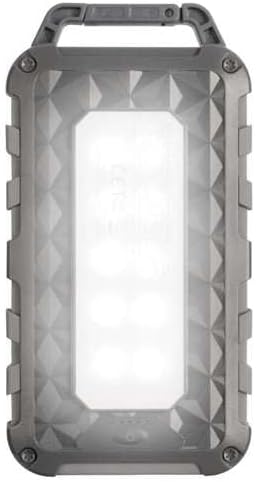
Tilbage View (LED On): Shows the powerful LED light panel fully illuminated, indicating the flashlight function is active.

Top View: Highlights the sturdy integrated carabiner handle, designed for easy attachment to bags or gear.
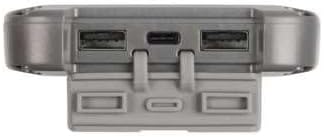
Bund View: Displays the USB-C PD input/output port and two USB-A Quick Charge 3.0 output ports, protected by a cover.
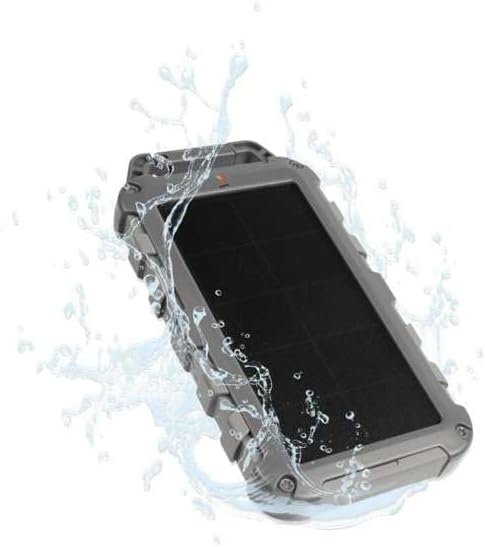
Durability Feature: Illustrates the power bank's splash-resistant design, suitable for outdoor conditions (IPX4 rated).
Opsætning
Indledende opladning
Before first use, it is recommended to fully charge the Xtorm FS405 Solar Powerbank via the USB-C port for optimal performance.
- Tilslut det medfølgende USB-C-kabel til USB-C-porten på powerbanken.
- Tilslut den anden ende af USB-C-kablet til en kompatibel USB-vægadapter (medfølger ikke) eller en computers USB-port.
- The LED indicators on the power bank will show the charging status. A full charge via USB-C typically takes approximately 2 hours.
Betjeningsvejledning
Opladning af Power Bank
The Xtorm FS405 can be charged using two methods:
1. Via USB-C (Recommended for Fast Charging)
- Connect the power bank to a USB-C power source using the included cable.
- The power bank will begin charging. This method provides the fastest charging speed for the power bank itself.
2. Via Solar Panel
The integrated solar panel allows for convenient charging when outdoors. For best results, place the power bank directly under strong sunlight.
- Place the solar panel facing direct sunlight.
- A small indicator light (usually green) will illuminate when solar charging is active.
- Note on Solar Charging Speed: Solar charging is a supplementary method and is significantly slower than USB-C charging. Factors like season, location, time of day, and cloud cover heavily influence charging speed.
Approximate solar charging times for a full charge:
- Spring/Summer (mostly sunny day): Cirka 10 dage
- Autumn/Winter (mostly sunny day): Cirka 20 dage
Solar charging is not effective on mostly cloudy days.
Opladning af eksterne enheder
The power bank features one USB-C PD (Power Delivery) output and two USB-A Quick Charge 3.0 outputs.

Mulighed for hurtig opladning: The power bank can charge compatible smartphones, such as an iPhone 14 or 12/13, up to 50% in approximately 30 minutes using the 20W USB-C PD output.
- Connect your device's charging cable to one of the available output ports (USB-C or USB-A) on the power bank.
- Tilslut den anden ende af kablet til din enhed.
- Powerbanken vil automatisk begynde at oplade din enhed.
- LED-indikatorerne på powerbanken viser det resterende batteriniveau.
The 10,000mAh capacity is sufficient to charge most smartphones at least 2 times.
Brug af LED-lommelygten
The Xtorm FS405 includes a powerful integrated LED flashlight on its back.
- Locate the power button (usually on the side or near the ports).
- Press and hold the power button for a few seconds to turn the flashlight ON.
- Press and hold the power button again to turn the flashlight OFF.
Opretholdelse
- Rengør powerbanken med en blød, tør klud. Brug ikke skrappe kemikalier eller slibende materialer.
- Opbevar powerbanken på et køligt, tørt sted, når den ikke er i brug.
- For long-term storage, charge the power bank to about 50-70% every 3-6 months to preserve battery health.
- Ensure the port covers are properly sealed when exposed to water splashes.
Fejlfinding
Power Bank oplader ikke
- Tjek kabel: Ensure the USB-C cable is securely connected to both the power bank and the power source. Try a different cable.
- Tjek strømkilden: Verify that the wall adapter or USB port is functioning correctly.
- Solopladning: For solar charging, ensure the panel is in direct, strong sunlight. Remember solar charging is slow and not effective in low light or cloudy conditions.
Enheden oplades ikke fra powerbanken
- Tjek Power Bank-opkrævning: Sørg for, at powerbanken har tilstrækkelig opladning.
- Tjek kabler: Use the original charging cable for your device and ensure it's properly connected to both the power bank and your device. Try a different cable.
- Kompatibilitet: Verify that your device is compatible with USB charging.
- Genstart: Frakobl og tilslut enheden igen.
Lommelygte virker ikke
- Tjek Power Bank-opkrævning: Sørg for, at powerbanken har noget opladning tilbage.
- Korrekt betjening: Ensure you are pressing and holding the power button correctly to activate the flashlight.
Specifikationer
| Feature | Detalje |
|---|---|
| Model | FS405 |
| Mærke | Xtorm |
| Serie | Fuel Series 4 |
| Batterikapacitet | 10,000 mAh (litiumpolymer) |
| Max effekt | 20 W |
| Output 1 (USB-C PD) | 20 W |
| Output 2 (USB-A QC 3.0) | 18 W |
| Output 3 (USB-A QC 3.0) | 18 W |
| Antal udgange | 3 |
| Input type | USB-C PD |
| Solpanelstrøm | 1 W (SunPower cells) |
| Dimensioner (L x B x H) | 17 cm x 9 cm x 2 cm |
| Vægt | 289 g |
| Materiale | PC, ABS |
| Vandmodstand | IPX4 (stænksikker) |
| Integreret lommelygte | Ja |
| Battery Charge Time (USB-C) | Ca. 2 timer |
Garanti og support
For garantioplysninger og kundesupport henvises til den officielle Xtorm-side. webwebstedet eller kontakt din lokale forhandler. Gem din købsbevis i tilfælde af garantikrav.
Online support: www.xtorm.eu


