Chilkey ND75

Chilkey ND75 Aluminium 75% Trådløst Mekanisk Tastatur Brugermanual

Model: ND75

1. Introduktion

This manual provides detailed instructions for the setup, operation, and maintenance of your Chilkey ND75 Aluminum 75% Wireless Mechanical Keyboard. Please read this manual thoroughly before using the product to ensure optimal performance and longevity.

The Chilkey ND75 is a high-performance 75% layout mechanical keyboard featuring a full aluminum alloy case, multi-mode connectivity (Bluetooth 5.0, 2.4GHz wireless, USB-C wired), hot-swappable switches, per-key RGB backlighting, and an integrated LCD screen for enhanced functionality.
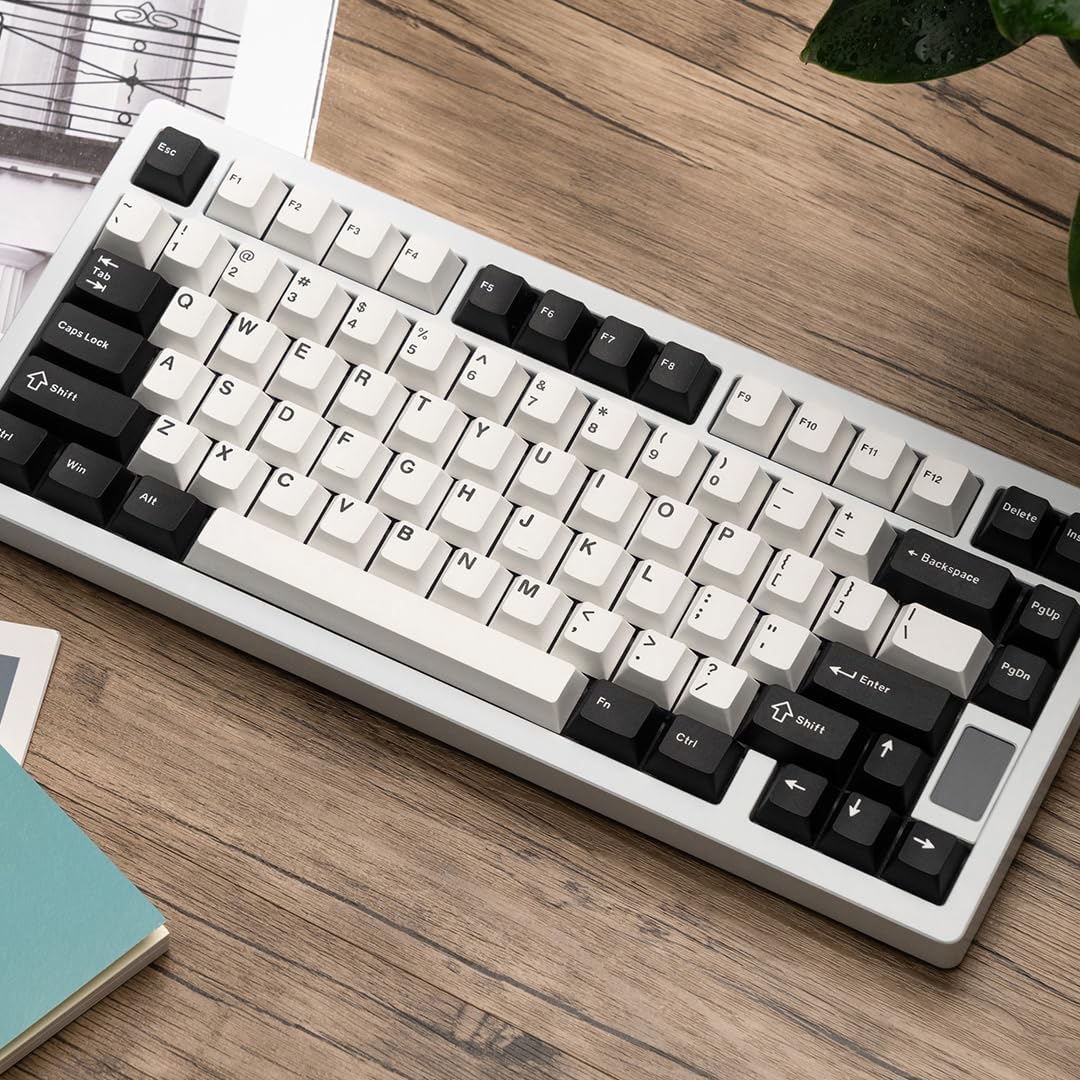
Chilkey ND75 Aluminum 75% Wireless Mechanical Keyboard in white with black and white keycaps, viewed from an angle on a wooden desk.

Image: The Chilkey ND75 keyboard, showcasing its 75% layout and aluminum casing.

2. Pakkens indhold

Bekræft at alle varer er til stede i din pakke:

  • Chilkey ND75 Aluminum Mechanical Keyboard
  • USB-C kabel
  • Switch Puller / Keycap Puller Tool
  • Brugervejledning (dette dokument)
  • Additional hardware (e.g., screwdriver, spare mounting system components if applicable)

Note: The product includes 2 Lithium Polymer batteries (pre-installed).

3. Opsætning

3.1 Første tilslutning

The ND75 keyboard supports three connection modes: Bluetooth 5.0, 2.4GHz wireless, and USB-C wired.

3.1.1 Kablet tilstand (USB-C)

  1. Tilslut det medfølgende USB-C-kabel til tastaturets USB-C-port.
  2. Tilslut den anden ende af USB-C-kablet til en ledig USB-port på din computer.
  3. Tastaturet vil automatisk blive registreret og klar til brug.

3.1.2 2.4 GHz trådløs tilstand

  1. Locate the 2.4GHz USB receiver. This is typically stored in a compartment on the keyboard or included separately.
  2. Remove the Right Shift keycap to access the wireless switch. Ensure the switch is in the 2.4GHz position.
  3. Insert the 2.4GHz USB receiver into an available USB port on your computer.
  4. Tastaturet burde oprette forbindelse automatisk. Hvis ikke, tryk på Fn + 4 to activate 2.4GHz pairing mode.

3.1.3 Bluetooth 5.0-tilstand

  1. Remove the Right Shift keycap to access the wireless switch. Ensure the switch is in the Bluetooth position.
  2. Aktiver Bluetooth på din computer eller enhed, og søg efter nye enheder.
  3. On the keyboard, press and hold Fn + 1, Fn + 2, eller Fn + 3 for 3-5 seconds to enter pairing mode for one of the three available Bluetooth channels. The LCD screen will indicate pairing status.
  4. Select "Chilkey ND75" from the list of available Bluetooth devices on your computer/device to complete pairing.
  5. You can switch between paired Bluetooth devices using Fn + 1, Fn + 2, eller Fn + 3.

3.2 Mounting System Adjustment

The ND75 keyboard features a screwless quick assembly structure and supports three different mounting systems: Split O-Ring Mounting, Silica Gel Particle Mounting, and Top Mounting. These can be adjusted to customize typing feel.

Image showing the three mounting systems: Top Mount, Split O-Ring Mount, and Silica Gel Particle Mount.

Billede: Nærbillede view of the keyboard's internal structure highlighting the three mounting systems: Top Mount, Split O-Ring Mount, and Silica Gel Particle Mount. Each system offers a distinct typing experience.

Refer to the detailed instructions provided with the additional hardware for specific guidance on disassembling and reassembling the keyboard to change mounting systems.

4. Betjeningsvejledning

4.1 LCD-skærmfunktioner

The integrated LCD screen provides real-time information and allows for quick adjustments without software. Functions include:

Image showing the ND75 keyboard with an exploded view of the LCD screen interface, displaying various settings like connection, RGB, system, volume, and custom GIF options.

Image: The ND75 keyboard with an overlay illustrating the various functions accessible via the LCD screen, including configuration, connection modes, RGB settings, system information, and volume control.

Navigate the LCD screen menu using the dedicated knob or specific key combinations (refer to the quick guide provided with the keyboard).

4.2 RGB-baggrundsbelysning

The ND75 keyboard features per-key RGB backlighting with 19 preset lighting effects. Custom light colors can also be defined.

Image of the ND75 keyboard with vibrant per-key RGB backlighting enabled, showcasing various colors.

Image: The ND75 keyboard illuminated with per-key RGB backlighting, demonstrating the range of colors and effects available.

Adjust lighting effects and colors directly via the LCD screen or using specific Fn key combinations. Consult the quick guide for a list of shortcuts.

4.3 Hot-swap-kontakter

The ND75 keyboard is equipped with a hot-swappable PCB, allowing users to replace switches without soldering. It supports both 3-pin and 5-pin switches.

Image showing a switch being removed from the keyboard PCB using a switch puller tool, demonstrating the hot-swappable feature.

Image: A switch puller tool is used to remove a mechanical switch from the keyboard, illustrating the hot-swappable functionality.

Sådan udskifter du en kontakt:

  1. Carefully remove the keycap using the keycap puller tool.
  2. Use the switch puller tool to gently grip the top and bottom clips of the switch.
  3. Træk kontakten lige op for at fjerne den fra printkortet.
  4. Juster stifterne på den nye kontakt med hullerne på printkortet.
  5. Tryk den nye kontakt godt fast på plads, indtil den klikker. Sørg for, at stifterne ikke er bøjede.
  6. Udskift tastaturdækslet.

Caution: Apply gentle, even pressure when inserting switches to avoid bending pins or damaging the PCB.

4.4 Softwaretilpasning

The ND75 keyboard supports independent driver/software for advanced customization, including key remapping, macro creation, and further RGB lighting control. The software can be downloaded from the official Chilkey webwebsted.

Note: Some users have reported that the software can be clunky. Refer to the official Chilkey Discord community or support channels for assistance with software usage.

5. Vedligeholdelse

5.1 Rengøring af tastaturet

5.2 Pleje af batterier

The keyboard contains two Lithium Polymer batteries. To prolong battery life:

6. Fejlfinding

6.1 Tastaturet reagerer ikke

6.2 Nøgler registreres ikke eller dobbelttastes

6.3 Problemer med RGB-belysning

6.4 Software Not Detecting Keyboard

7. Specifikationer

ModelND75
Layout75 %
Etui materialeFull Aluminum Alloy (CNC with electrophoretic surface treatment)
ForbindelseBluetooth 5.0, 2.4 GHz trådløs, USB-C kablet
AfbrydereHot-swappable (supports 3-pin/5-pin switches), Pre-lubed Linear Switches
tasterneDoubleshot PBT, Cherry Profile
BaggrundsbelysningPer-key RGB (19 preset effects, custom colors)
ViseFunctional LCD Screen (custom GIF, connection mode, battery, RGB, volume, language)
MonteringssystemerSplit O-Ring, Silica Gel Particle, Top Mount
Lyd DampslutningFour layers (Poron plate foam, IXPE switch foam, PET acoustic pad, Poron PCB foam)
Batteri2 x litiumpolymer (inkluderet)
Produktdimensioner12.68 x 5.5 x 1.38 tommer (322 mm L x 159.8 mm B x 35.2 mm H)
Varens vægt4.6 pund
FabrikantOOCTPK
Anbefalede anvendelserBusiness, Education, Everyday Use, Gaming, Multimedia, Personal, Photo Editing, Programming, Student, Video Editing
Diagram showing the dimensions of the Chilkey ND75 keyboard in millimeters and inches.

Image: Technical drawing illustrating the precise dimensions of the ND75 keyboard.

eksploderede view diagram of the Chilkey ND75 keyboard components, showing layers like doubleshot PBT keycaps, switches, aluminum top case, plate, various foams, PCB, lithium batteries, and backplate.

Billede: Eksploderet view diagram detailing the internal layers and components of the ND75 keyboard, including keycaps, switches, case, and sound dampmaterialer.

8. Garanti og support

For warranty information, technical support, or further assistance, please refer to the official Chilkey website or contact their customer service. You may also find helpful resources and community support on the official Chilkey Discord server.

Manufacturer: OOCTPK

Relaterede dokumenter - ND75

Preview Chilkey Glacier LW 8K L Hovedvejledning: Opsætning, funktioner og sikkerhed
Omfattende hovedvejledning til Chilkey Glacier LW 8K L-musen, der dækker opsætning, trådløs og Bluetooth-forbindelse, CHILKEY HUB-softwarekonfiguration, sikkerhedsretningslinjer og komfortanbefalinger.
Preview Schlage ND-seriens timingvejledning: Installations- og driftsvejledning
Detaljeret vejledning til tidsstyring af Schlage ND-seriens låse, der dækker installationstrin, betjeningskontroller og fejlfinding for forskellige modeller. Sikrer korrekt låsefunktion og forhindrer skader.
Preview ND75 LP Tri-mode tastatur brugermanual
Betjeningsmanual og FCC-overensstemmelseserklæring for ND75 LP Tri-mode-tastaturet fra Wuhan Ruobing Technology Co., Ltd. Indeholder produktspecifikationer, nøglefunktioner, tilslutningsinstruktioner og forholdsregler.
Preview Schlage ND-Series Lock Installationsvejledning
Omfattende installationsvejledning til Schlage ND-seriens cylindriske låse (P517-381). Dækker dørforberedelse, låsetiming, justering af dørtykkelse og trinvis montering af udvendige og indvendige komponenter. Indeholder fejlfindingstips og kontaktoplysninger til Schlage support.
Preview Schlage ND-serien servicemanual
Omfattende servicemanual til Schlage ND-seriens cylindriske låse i klasse 1, med detaljerede oplysninger om dele, samlinger, eksploderet illustration views, og bestillingsoplysninger for modeller fremstillet efter november 2003.