1. Introduktion
Thank you for choosing the Inateck Bluetooth Keyboard KB01104. This ultra-thin keyboard features an integrated touchpad, multi-device Bluetooth connectivity, and support for various operating systems including Windows, iPad OS, Android, and iOS. It also incorporates an AI function and is compatible with the Inateck Origin application for enhanced functionality. This manual provides detailed instructions for setup, operation, and maintenance to ensure optimal performance.
2. Pakkens indhold
- Inateck Bluetooth Keyboard KB01104
- USB opladningskabel
- Brugervejledning (dette dokument)
3. Produktet er slutview
The Inateck KB01104 keyboard is designed for portability and versatility. It features a QWERTZ layout, a large touchpad, and backlit keys. The power switch and Bluetooth indicators are located on the top right side of the keyboard.

Front view of the Inateck KB01104 Bluetooth Keyboard, showing the QWERTZ layout, integrated touchpad, and backlit keys.
4. Opsætningsvejledning
4.1. Opladning af tastaturet
Before first use, fully charge the keyboard using the provided USB charging cable. Connect the cable to the keyboard's charging port and a standard USB power source. The charging indicator light will show the charging status.
4.2. Tænd/sluk
Locate the power switch on the top right side of the keyboard. Slide the switch to the 'ON' position to power on the keyboard. Slide it to 'OFF' to power it down.
4.3. Bluetooth-parring
The KB01104 supports up to three Bluetooth connections, allowing seamless switching between devices.
- Tænd for tastaturet.
- Tryk og hold på Fn tasten og en af Bluetooth-kanaltasterne (1, 2, eller 3) for 3-5 seconds until the corresponding Bluetooth indicator light flashes rapidly. This indicates the keyboard is in pairing mode.
- On your device (tablet, smartphone, computer), go to Bluetooth settings and search for available devices.
- Select "Inateck KB01104" from the list of found devices to connect.
- Når den er tilsluttet, holder indikatorlampen op med at blinke og lyser konstant i et par sekunder, før den slukker.
- Repeat these steps for up to two additional devices using the remaining Bluetooth channels.

Diagram illustrating the Inateck KB01104 Bluetooth Keyboard connecting to a tablet, iPhone, PC, and laptop via its three Bluetooth channels.
5. Betjeningsvejledning
5.1. Skift mellem tilsluttede enheder
For at skifte mellem dine parrede enheder skal du blot trykke på Fn tast sammen med den tilsvarende Bluetooth-kanaltast (1, 2, eller 3) som din ønskede enhed er parret med. Tastaturet opretter automatisk forbindelse til den valgte enhed.
5.2. Brug af touchpad
The integrated touchpad provides precise navigation and supports multi-touch gestures. It features an anti-error contact function to prevent accidental inputs.
- Tryk med en enkelt finger: Venstre klik.
- To-finger tryk: Højreklik.
- To-finger rulning: Rul op eller ned.
- Knib for at zoome: Zoom in or out (supported on compatible operating systems).

Image showing a hand interacting with the large touchpad of the Inateck KB01104 keyboard, highlighting palm rejection and multi-touch gesture capabilities.
5.3. Baggrundslysstyring
The keyboard features a 7-color backlight with 3 adjustable brightness levels.
- Trykke Fn + Pæreikonnøgle to cycle through backlight colors.
- Trykke Fn + Up Arrow key for at øge lysstyrken.
- Trykke Fn + Down Arrow key for at mindske lysstyrken.
The Inateck KB01104 keyboard displaying its 7-color adjustable backlight feature with three brightness levels, shown alongside a tablet.
5.4. Inateck App and AI Function
The Inateck KB01104 integrates with the Inateck Origin application, offering advanced features such as data transfer and AI capabilities. Ensure the Inateck Origin app is installed on your device for full functionality.
- Activating AI Model: Trykke Fn + R to activate the AI model within the Inateck app. This enables features like pop-up translation and AI-powered Q&A.
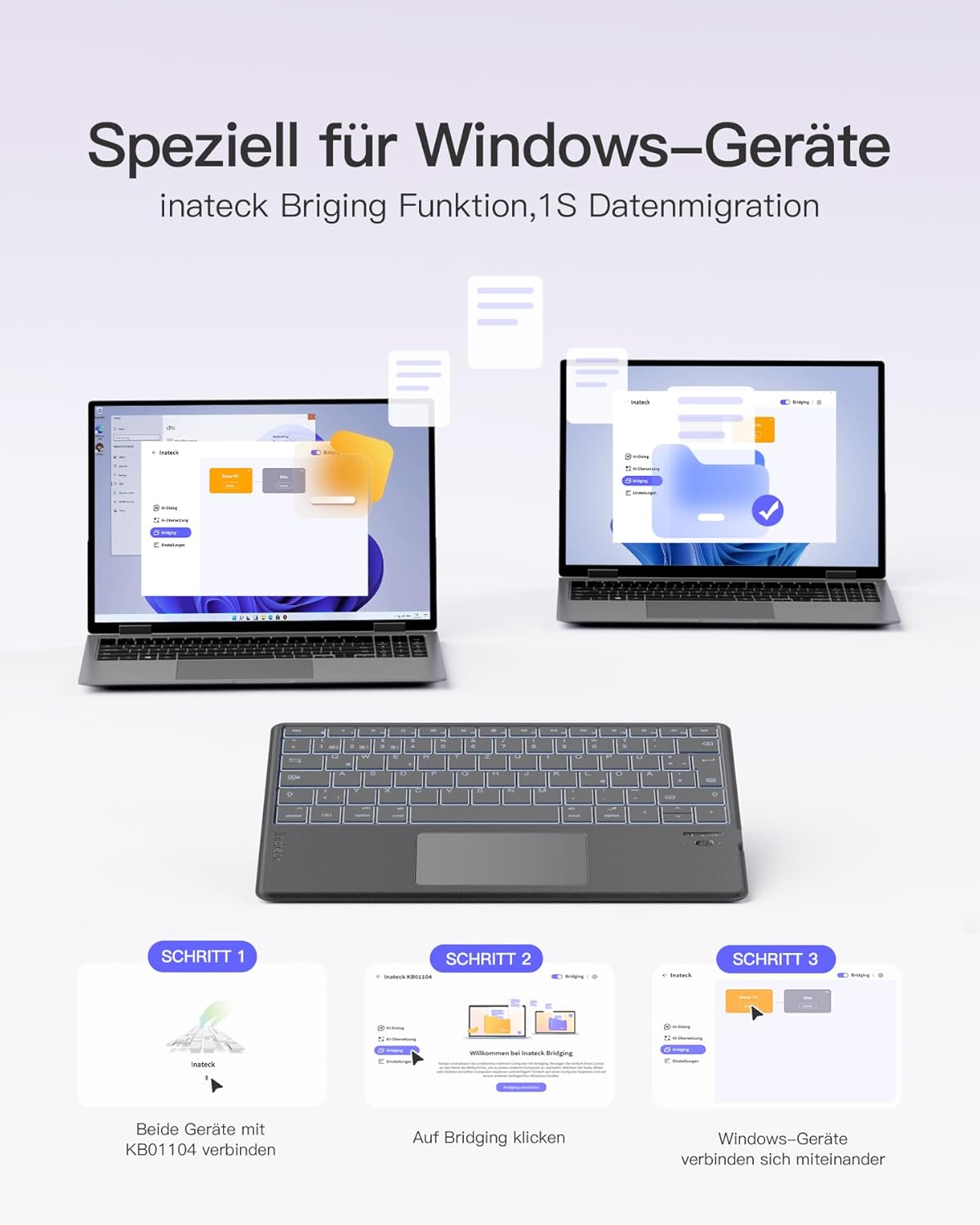
- Data Migration (Windows): The Inateck Bridging function allows for quick data migration between Windows devices. Connect both devices to the KB01104 and use the app to initiate the transfer.

Screenshot of the Inateck Origin app interface on a tablet, demonstrating its features in conjunction with the Inateck KB01104 keyboard.
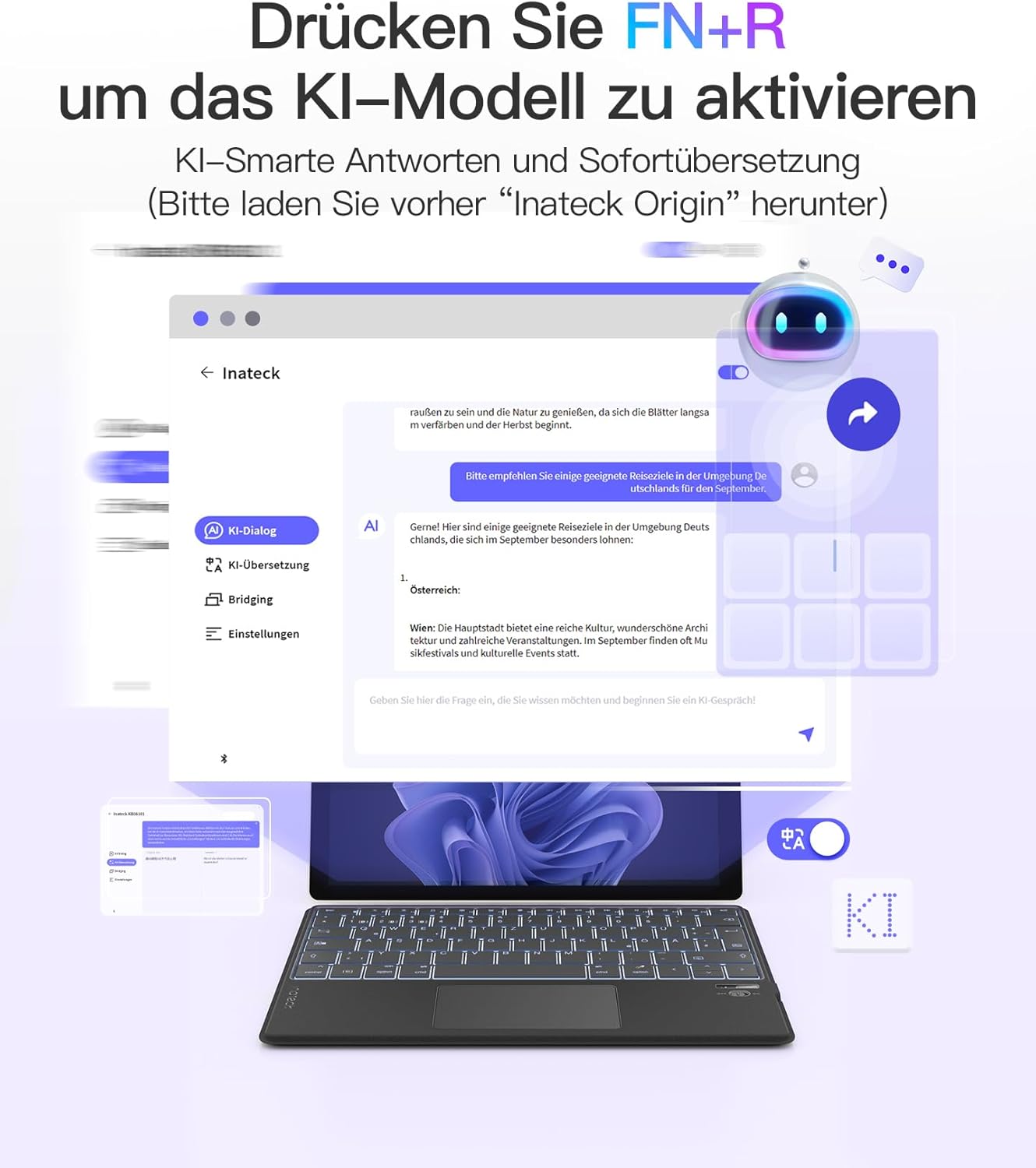
Illustration showing how to activate the AI model function on the Inateck KB01104 keyboard by pressing FN+R, with examples of AI-powered translation and Q&A.

Visual guide demonstrating the Inateck Bridging function for 1-second data migration between Windows devices using the KB01104 keyboard.
5.5. Systemkompatibilitet
The Inateck KB01104 is compatible with a wide range of operating systems and devices:
- Windows
- iPad OS
- Android
- iOS
- Compatible devices include: iPad 10/9/8, iPad Air, 12.9"/11"/10.5" iPad Pro, iPad Mini 7/6/5.

Icons representing the Inateck KB01104 keyboard's compatibility with Windows, iPad OS, Android, and iOS operating systems.
6. Specifikationer
| Mærke | Inateck |
| Modelnummer | KB01104 |
| Forbindelsesteknologi | Bluetooth |
| Særlige funktioner | AI Function, Ultra-thin design, 7-color Backlight |
| Kompatible enheder | Windows, iPad OS, Android, iOS, iPad 10/9/8, iPad Air, 12.9"/11"/10.5" iPad Pro, iPad Mini 7/6/5 |
| Batterisammensætning | Lithium-ion (1 inkluderet) |
| Tastaturbeskrivelse | Fleksibel |
| Anbefalede anvendelser | Business, Student |
| Inkluderede komponenter | USB kabel |
7. Vedligeholdelse
To ensure the longevity and optimal performance of your Inateck KB01104 keyboard, follow these maintenance guidelines:
- Rensning: Use a soft, dry, lint-free cloth to wipe the keyboard surface and touchpad. For stubborn dirt, slightly dampRengør kluden med vand eller en mild rengøringsopløsning. Undgå for meget fugt.
- Opbevaring: Opbevar tastaturet et køligt, tørt sted væk fra direkte sollys og ekstreme temperaturer.
- Undgå væsker: Udsæt ikke tastaturet for væsker, da dette kan beskadige de interne komponenter.
- Håndteres med forsigtighed: The keyboard is ultra-thin; avoid bending or applying excessive force to prevent damage.
8. Fejlfinding
If you encounter issues with your Inateck KB01104 keyboard, refer to the following common solutions:
- Tastatur forbinder ikke:
- Sørg for, at tastaturet er tændt og fuldt opladet.
- Bekræft, at Bluetooth er aktiveret på din enhed.
- Put the keyboard into pairing mode again (Fn + 1/2/3 for 3-5 seconds) and re-attempt pairing from your device's Bluetooth settings.
- Glem enheden i din enheds Bluetooth-indstillinger, og prøv at parre igen.
- Ensure your device is within the effective Bluetooth range (typically 10 meters).
- Taster reagerer ikke eller skriver forkert:
- Check if the keyboard is connected to the correct device channel.
- Genstart både tastaturet og din tilsluttede enhed.
- Ensure the keyboard's battery is not critically low.
- Touchpad'en virker ikke:
- Ensure the touchpad is not accidentally disabled (check for a function key combination to toggle it).
- Rengør touchpad-overfladen for at fjerne snavs eller affald.
- Genstart tastaturet og din enhed.
- Baggrundsbelysningen virker ikke eller sidder fast:
- Sørg for, at tastaturet er tændt.
- Try adjusting the brightness or changing colors using the Fn + Arrow/Light Bulb keys.
- Charge the keyboard, as low battery might affect backlight functionality.
9. Garanti og support
For warranty information, technical support, or further assistance, please refer to the manufacturer's official website or your purchase documentation. Contact details for customer service are typically provided with your product packaging or on the Inateck webwebsted.


