1. Introduktion
Thank you for choosing the AutoSky Portable Tire Inflator, Model AAC-301. This device is designed to provide convenient and efficient inflation for various items, including car tires, motorcycle tires, bicycle tires, and sports balls. It also features an integrated power bank and an emergency LED flashlight for added utility. Please read this manual thoroughly before use to ensure proper operation and to maximize the product's lifespan.
2. Sikkerhedsoplysninger
- Opbevares utilgængeligt for børn.
- Brug ikke pumpen i våde omgivelser eller i nærheden af brandfarlige væsker eller gasser.
- Undgå langvarig kontinuerlig drift for at forhindre overophedning. Lad enheden køle af mellem brug, hvis det er nødvendigt.
- Sørg for den korrekte trykindstilling for den genstand, der skal oppustes, for at forhindre overoppustning og potentiel skade eller personskade.
- Ret ikke oppustningsdysen mod mennesker eller dyr.
- Opbevar enheden på et køligt, tørt sted, når det ikke er i brug.
- Brug kun det medfølgende tilbehør og opladningskabel.
3. Pakkens indhold

Image: Contents of the AutoSky Portable Tire Inflator package, including the inflator unit, air hose, charging cable, needle, nozzle, and carry bag.
The AutoSky Portable Tire Inflator package includes the following items:
- AutoSky Portable Inflator Unit (Model AAC-301)
- Luftslange
- Opladningskabel (USB)
- 1 Needle (for balls)
- 1 Nozzle (for bicycle valves)
- Carry Bag
- Brugervejledning (dette dokument)
4. Produktfunktioner

Billede: Forside view of the AutoSky Portable Tire Inflator, showing the digital display, control buttons, and inflation port.
- Fast & Reliable Inflation: Efficiently inflates various items with automatic shut-off at preset pressure.
- Integreret powerbank: Charges smartphones, tablets, and other USB-powered devices.
- Nødlys LED-lommelygte: Features steady, strobe, and SOS modes for illumination and signaling.
- Digital Display & Easy Controls: Intuitive interface for setting desired pressure and selecting inflation modes.
- Kompakt og bærbart design: Let og nem at opbevare og bære.
- Alsidig kompatibilitet: Suitable for cars, motorcycles, bicycles, and balls.
5. Opsætning
5.1 Indledende opladning
Before first use, fully charge the inflator. Connect the provided USB charging cable to the charging port on the device and to a suitable USB power adapter (not included). The battery indicator on the digital display will show charging progress. A full charge typically takes several hours.
5.2 Montering af luftslange og dyser
Screw one end of the air hose securely onto the inflator's air outlet. For different inflation needs, attach the appropriate nozzle or needle to the other end of the air hose.
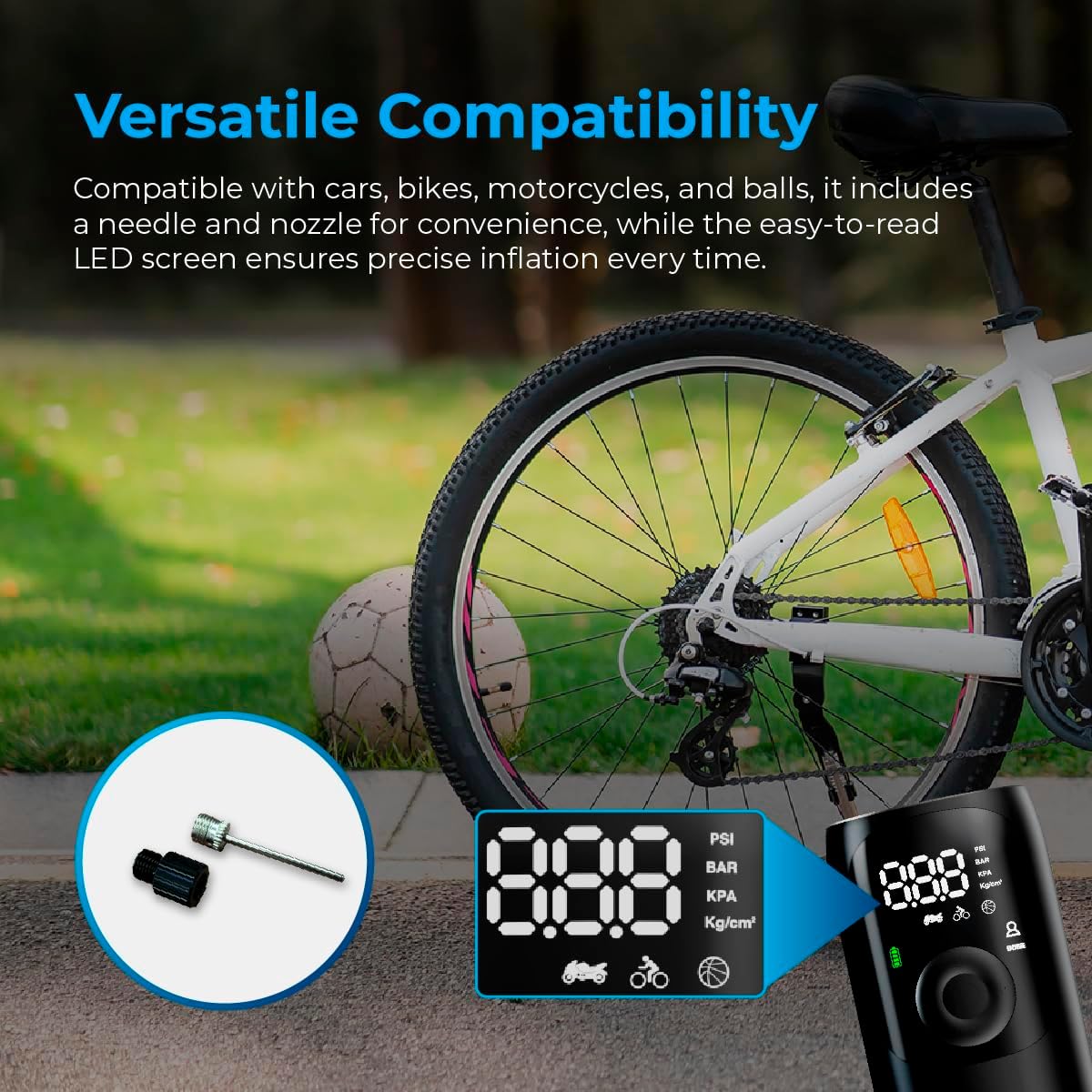
Image: Close-up of the AutoSky Portable Tire Inflator showing the included needle and nozzle accessories for different inflation types.
6. Betjeningsvejledning
6.1 Tænd/sluk
Press and hold the power button for 3 seconds to turn the compressor on or off.
6.2 Oppustningsproces
- Forbinde: Connect one end of the air hose to the inflator and the other end to the valve of the item you wish to inflate. Attach the appropriate nozzle or needle if required.
- Tænd og vælg tilstand: Press and hold the power button for 3 seconds to turn on the compressor. Press the 'M' button to cycle through the inflation modes (Car, Motorcycle, Bicycle, Ball) until the desired mode is selected. The display will show the recommended pressure range for each mode.
- Sæt tryk: Brug knapperne '+' og '-' til at justere måltrykket. Se producentens anbefalinger for korrekt tryk.
- Start inflation: Press the power button again to start the inflation process. The compressor will automatically stop once the preset pressure is reached.
- Afbryde: Carefully disconnect the air hose from the item and the inflator.

Image: Visual guide demonstrating the three main steps for using the inflator: connecting the hose, setting the pressure, and starting inflation.

Image: Display of the AutoSky Portable Tire Inflator highlighting different inflation modes (car, motorcycle, bicycle, ball) and their respective pressure ranges (PSI).
6.3 Brug som powerbank
To use the inflator as a power bank, connect your USB-powered device (e.g., smartphone, tablet) to the USB output port on the inflator using your device's charging cable. The inflator will automatically begin charging your device.

Image: The AutoSky Portable Tire Inflator functioning as both a power bank, charging a smartphone, and an LED flashlight illuminating a dark area.
6.4 Brug af LED-lommelygten
With the device powered on, press the flashlight button (usually indicated by a light bulb icon) to cycle through the flashlight modes: Steady On, Strobe, and SOS. Press again to turn off the flashlight.
7. Vedligeholdelse
- Rensning: Tør ydersiden af pumpen af med en blød, tør klud. Brug ikke skrappe kemikalier eller slibende rengøringsmidler.
- Opbevaring: Store the device and its accessories in the provided carry bag in a cool, dry place, away from direct sunlight and extreme temperatures.
- Batteripleje: To maintain battery health, charge the device at least once every three months, even if not in use.
- Slangeinspektion: Regularly inspect the air hose for any signs of wear, cracks, or damage. Replace if necessary.
8. Fejlfinding
| Problem | Mulig årsag | Løsning |
|---|---|---|
| Inflatoren tænder ikke. | Lavt batteri eller ikke opladet. | Charge the device fully. Ensure the power button is held for 3 seconds. |
| Inflationen er langsom eller virker ikke. | Air hose not securely connected; incorrect nozzle; leak in hose/valve. | Ensure all connections are tight. Check for leaks. Verify correct nozzle is used. |
| Device overheats and shuts off. | Langvarig kontinuerlig drift. | Allow the inflator to cool down for at least 15-20 minutes before resuming use. |
| Unøjagtig trykaflæsning. | Valve connection not secure. | Ensure the air hose is firmly attached to the item's valve. |
9. Specifikationer
- Model: AAC-301
- Produktdimensioner: 6 x 3 x 15.7 cm
- Varens vægt: 572 g (0.57 kg)
- Strømkilde: Batteridrevet (1 lithium-ion-batteri inkluderet)
- Maksimalt tryk: Up to 150 PSI (as indicated by device modes)
- Farve: Sort
- Fabrikant: Promaster Electronic LLC

Image: The AutoSky Portable Tire Inflator next to a car tire, emphasizing its portability, power bank function, auto shut-off, and preset pressure capabilities.
10. Garanti og support
For warranty information and customer support, please refer to the warranty card included in your product packaging or contact AutoSky customer service directly. Contact details can typically be found on the official AutoSky webwebstedet eller på produktemballagen.
Fabrikant: Promaster Electronic LLC
Dato først tilgængelig: 3. august 2024


