1. Introduktion
Thank you for choosing the HORLAT 2025-Upgrade-W11 Projector. This advanced projector features a built-in Android operating system, supporting 4K content, WiFi 6, and Bluetooth 5.2. It delivers a Full HD 1080P native resolution with 28000 lumens brightness, offering a superior viewing experience for home entertainment, gaming, and presentations. This manual will guide you through the setup, operation, and maintenance of your new projector.
2. Sikkerhedsoplysninger
Læs venligst alle sikkerhedsinstruktioner omhyggeligt, inden du bruger projektoren. Gem denne manual til senere brug.
- Strømforsyning: Brug kun den angivne strømadapter. Sørg for, at lydstyrkentage er kompatibel med din region.
- Ventilation: Do not block any ventilation openings. Ensure adequate airflow around the projector to prevent overheating.
- Væskeeksponering: Udsæt ikke projektoren for regn, fugt eller andre væsker.
- Rensning: Tag stikket ud af projektoren før rengøring. Brug en blød, tør klud. Brug ikke flydende rengøringsmidler eller rengøringsmidler på sprayform.
- Placering: Placer projektoren på en stabil, plan overflade. Undgå at placere den i direkte sollys eller i nærheden af varmekilder.
- Øjensikkerhed: Se ikke direkte ind i projektorlinsen, når lamp er tændt.
- Service: Forsøg ikke at reparere dette produkt selv. Overlad al service til kvalificeret servicepersonale.
3. Pakkens indhold
Bekræft at alle varer er inkluderet i din pakke:
- HORLAT 2025-Upgrade-W11 Projector x1
- AV-kabel x1
- HDMI-kabel x1
- Fjernbetjening x1
- Strømkabel x1
- Brugervejledning x1
4. Produktet er slutview
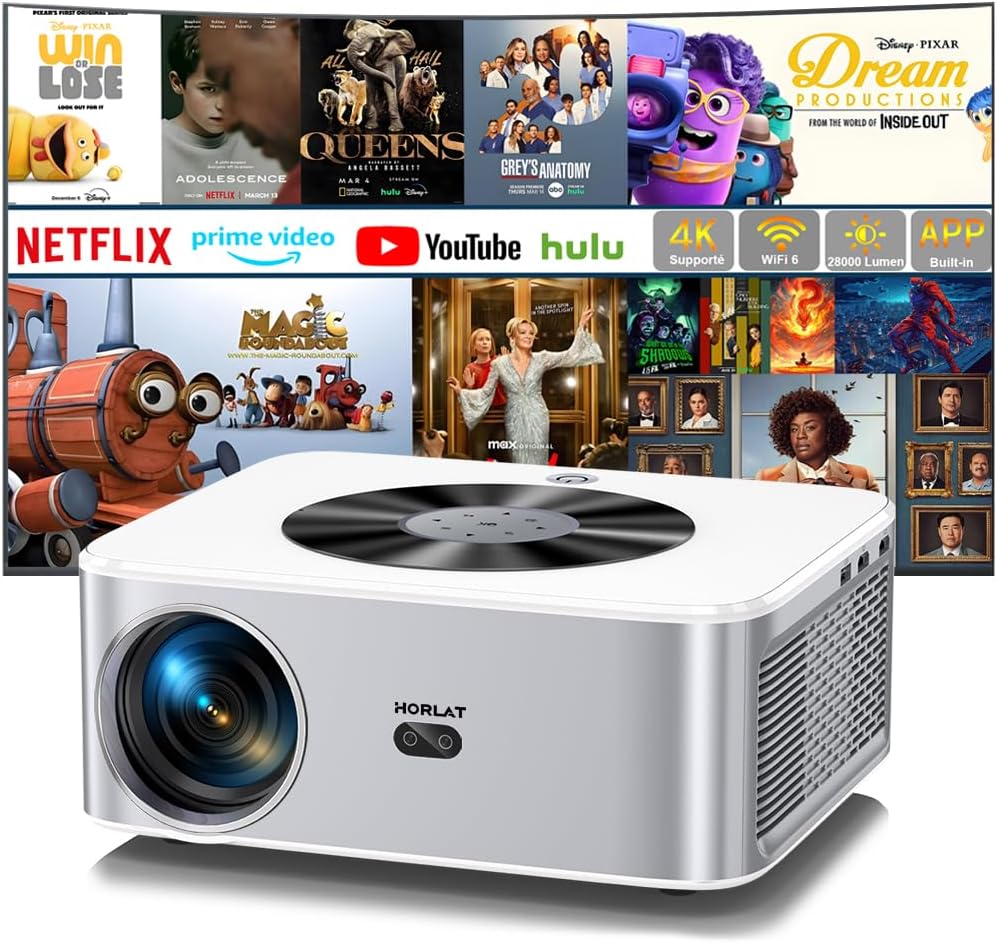
Figur 4.1: Forside view of the HORLAT 2025-Upgrade-W11 Projector, highlighting its compact design and key features.
The HORLAT 2025-Upgrade-W11 projector is designed for ease of use and high performance. It features a sleek, modern design with intuitive controls.
4.1. Smart Touch Panel

Figure 4.2: The intelligent touch panel on top of the projector for easy navigation and control.
The projector is equipped with an intelligent touch panel on its top surface, allowing for direct control and navigation without the remote. This LED Blu-Ray touch screen provides quick access to essential functions.
4.2. Porte og tilslutningsmuligheder

Figure 4.3: Available ports and compatible devices for the HORLAT projector.
Projektoren tilbyder flere tilslutningsmuligheder:
- HDMI: For connecting laptops, gaming consoles, and other HDMI-enabled devices.
- USB (x2): For playing media directly from USB drives or connecting USB peripherals. Supports Excel/Word/PDF file vise.
- AV: For connecting older devices with AV output.
- 3.5 mm lydstik: Til tilslutning af eksterne højttalere eller hovedtelefoner.
- Bluetooth 5.2: Bidirectional Bluetooth for connecting external speakers or using the projector as a Bluetooth speaker.
- Wi-Fi 6: For high-speed wireless network connectivity and screen mirroring.
5. Opsætning
5.1. Placering

Figur 5.1: Anbefalede projektionsafstande for forskellige skærmstørrelser.
Choose a suitable location for your projector. The HORLAT projector supports various mounting options including ceiling mount, table mount, and tripod mount. Ensure the projection surface is flat and clear. The optimal projection distance will vary based on your desired screen size, ranging from 40 inches to 300 inches.
5.2. Strømtilslutning
- Tilslut strømkablet til projektorens strømindgang.
- Sæt den anden ende af strømkablet i en stikkontakt.
- Tryk på tænd/sluk-knappen på projektoren eller fjernbetjeningen for at tænde den.
5.3. Initial Setup (Android TV)
Upon first power-on, you will be guided through the initial Android TV setup. Follow the on-screen instructions to:
- Vælg dit sprog.
- Connect to a Wi-Fi network (Wi-Fi 6 supported for lower latency and smoother experience).
- Log in with your Google account to access the App Store and download applications like Netflix, Prime Video, YouTube, etc.

Figure 5.2: The Android TV interface with pre-installed and downloadable applications.
5.4. Fokus- og Keystone-korrektion

Figure 5.3: Automatic and manual keystone correction features for a perfectly rectangular image.
The HORLAT projector supports automatic keystone correction, as well as digital ±50° 4D/4P correction. This allows you to adjust the image to be perfectly rectangular even if the projector is not placed directly in front of the screen.
- Auto Keystone: The projector will automatically correct the image shape.
- 4P/4D Keystone: Use the remote control to manually adjust each corner of the projected image for precise alignment.
- Fokus: Juster fokusringen på projektorlinsen, indtil billedet er skarpt og klart.
6. Betjening
6.1. Tilslutning af eksterne enheder
You can connect various devices to your projector:
- HDMI: Connect your device to the HDMI port using an HDMI cable. Select the corresponding HDMI input source from the projector's menu.
- USB: Insert a USB drive into one of the USB ports. The projector will prompt you to open the media browser to access files (Excel, Word, PDF, videos, images).
- AV: Connect your AV device using the provided AV cable. Select the AV input source.
6.2. Android TV-funktioner
The built-in Android operating system allows you to enjoy a wide range of entertainment:
- Streaming apps: Access popular streaming services like Netflix, YouTube, and Prime Video directly from the projector. Download more apps from the App Store.
- Navigation: Use the remote control or the smart touch panel to navigate the Android TV interface.
6.3. Wireless Connectivity (Wi-Fi 6 & Bluetooth)

Figure 6.1: Seamless screen mirroring and streaming with advanced WiFi 6 technology.
The projector supports advanced wireless features:
- Wi-Fi 6: Connect to your home Wi-Fi network for internet access and online streaming. Enjoy lower latency and a smoother experience for screen mirroring from your smartphone (Eshare, Android, iOS compatible).
- Bluetooth 5.2 (Bidirectional):
- Connect to External Speakers: Pair the projector with Bluetooth speakers for enhanced audio.
- Use as Bluetooth Speaker: Connect your smartphone or other Bluetooth audio source to the projector to use its built-in 5W Hi-Fi stereo speaker as a standalone Bluetooth speaker.
6.4. Zoomfunktion

Figure 6.2: Adjusting image size using the digital zoom function.
The projector features a 50% zoom function, allowing you to reduce the image size from 100% to 50% using the remote control without physically moving the projector. This is useful for fine-tuning the image to fit your screen or wall.
6.5. Brightness and Image Quality

Figure 6.3: The projector's high brightness allows for clear viewing even in daylight conditions.
With 28000 lumens and a high refractive index blue-coated lens, the HORLAT projector delivers vibrant and clear images. The latest LCD technology provides an 80% NTSC color gamut and 18 million color range, ensuring natural transitions between light and dark scenes for a realistic viewing experience. While optimal viewing is in a dark environment, the projector's brightness allows for visible images even in ambient light.
7. Vedligeholdelse
Korrekt vedligeholdelse sikrer projektorens levetid og optimale ydeevne.
- Rengøring af linser: Brug en blød, fnugfri klud, der er specielt designet til optiske linser, til forsigtigt at tørre projektorlinsen af. Brug ikke slibende rengøringsmidler eller overdreven kraft.
- Rengøring af støvfilter: Regularly check and clean the dust filter (if applicable) to maintain proper airflow and prevent overheating. Refer to the product diagram for filter location.
- Udvendig rengøring: Tør projektorens yderside af med en blød, tør klud. Ved genstridige mærker,ampen the cloth slightly with water, then wipe dry.
- Opbevaring: Når projektoren ikke er i brug i længere perioder, skal den opbevares køligt og tørt, beskyttet mod støv og ekstreme temperaturer.
8. Fejlfinding
| Problem | Mulig årsag | Løsning |
|---|---|---|
| Intet billede eller sløret billede | Loose cable connection, incorrect input source, out of focus, keystone not adjusted. | Check HDMI/AV cable connections. Select correct input source. Adjust focus ring. Use keystone correction (auto/4P/4D). |
| Ingen lyd eller lav lyd | Volume too low, incorrect audio output setting, external speaker not connected/paired. | Increase projector volume. Check audio output settings (internal speaker/Bluetooth). Ensure Bluetooth speaker is paired and charged. |
| Kan ikke oprette forbindelse til Wi-Fi | Incorrect password, Wi-Fi signal too weak, router issue. | Dobbelttjek Wi-Fi-adgangskoden. Flyt projektoren tættere på routeren. Genstart router og projektor. |
| Streaming apps (e.g., Netflix) pause or return to menu | Network instability, app specific issue, system update required. | Ensure stable internet connection. Clear app cache/data. Check for system updates. If Netflix, try using mouse mode if remote navigation is difficult. |
| Projektoren overopheder eller slukker | Blokeret ventilation, langvarig brug i varme omgivelser. | Sørg for, at ventilationsåbningerne er frie. Brug den i et godt ventileret område. Lad projektoren køle af. |
| Fjernbetjening virker ikke | Dead batteries, obstruction, not paired (if Bluetooth remote). | Replace batteries. Ensure no obstruction between remote and projector. Re-pair remote if necessary. |
9. Specifikationer
| Feature | Beskrivelse |
|---|---|
| Mærke | HORLAT |
| Model | 2025-Upgrade-W11 |
| Display Type | LCD |
| Indfødt opløsning | 1920 x 1080 pixel (Fuld HD) |
| Understøttet opløsning | 4K support |
| Lysstyrke | 28000 lumen |
| Operativsystem | Android TV (Built-in Netflix/Youtube/Prime Video) |
| Forbindelsesteknologi | Wi-Fi 6, Bluetooth 5.2 |
| Hardware-interface | HDMI, USB (x2), AV, 3.5mm Audio |
| VÆDDER | 1G |
| Opbevaring | 8G |
| Særlige funktioner | 4K Support, Android TV, 28000 Lumens, Auto/4P/4D Keystone Correction, 50% Zoom, Bidirectional Bluetooth, USB Presentation |
| Anbefalede anvendelser | Erhverv, Hjemmebiograf, Gaming, Uddannelse |
| Monteringstype | Ceiling Mount, Table Mount, Tripod Mount |
10. Garanti og support
HORLAT provides a warranty and lifetime technical support for this product. If you encounter any issues with installation, operation, returns, or exchanges, please contact our after-sales team.
E -mail til kundesupport: Support01@lthjm.com
Our professional and efficient support team is available 24 hours to assist you.


