Indledning
Thank you for choosing the iTOMA 515 Alarm Clock. This device combines an alarm clock with an FM radio, a dimmable LED display, and dual alarm functionality, designed for convenience and reliability. This manual provides detailed instructions for setup, operation, and maintenance to ensure optimal performance.
Pakkens indhold
- 1 x iTOMA 515 Alarm Clock
- 1 x brugermanual
Bemærk: En strømadapter er ikke inkluderet og skal købes separat.
Produkt overview
Familiarize yourself with the main components and controls of your iTOMA 515 Alarm Clock.
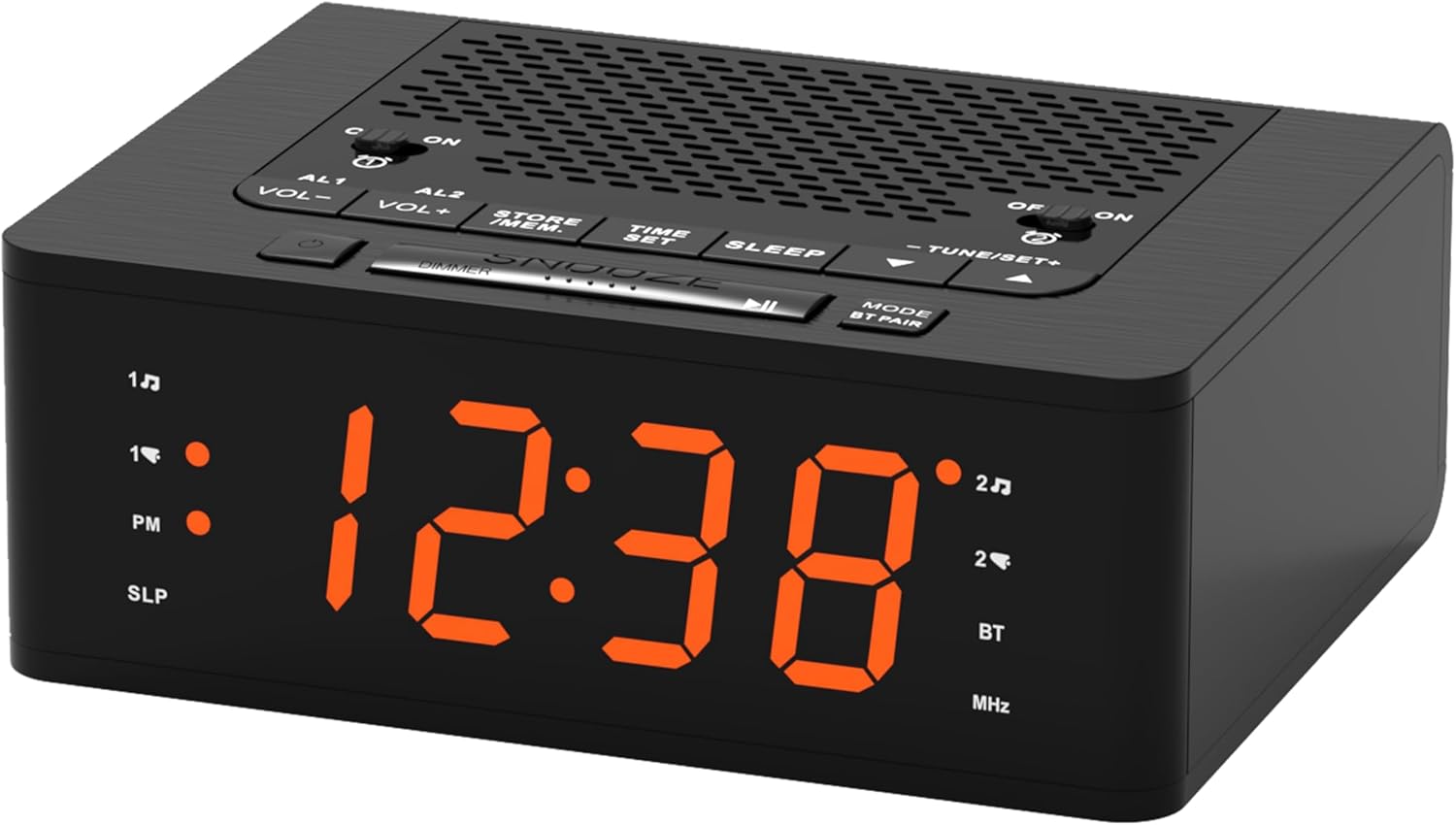
Billede: Front view of the iTOMA 515 Alarm Clock, showcasing the orange LED display and top-mounted control buttons.

Billede: Top view of the alarm clock, highlighting the various control buttons for volume, alarm settings, time, sleep, and tuning.
Kontrolknapper:
- AL1 / AL2: Alarm 1 / Alarm 2 setting buttons.
- VOL+ / VOL-: Justerer lydstyrken.
- STORE / MEM: Saves and recalls FM radio presets.
- TID SET: Går i tidsindstillingstilstand.
- SOVE: Activates sleep timer for FM radio.
- TUNE+ / TUNE-: Adjusts FM radio frequency.
- SNOOZE / DIMMER: Snoozes alarm; adjusts display brightness.
- MODE / BT PAIR: Switches between modes (FM, Bluetooth); initiates Bluetooth pairing.
- ON / OFF (for AL1/AL2): Toggles alarms on or off.
Opsætning
1. Strømtilslutning
- Connect a compatible DC 5V power adapter (not included) to the DC IN port on the back of the alarm clock.
- Plug the adapter into a standard wall outlet. The display will light up.
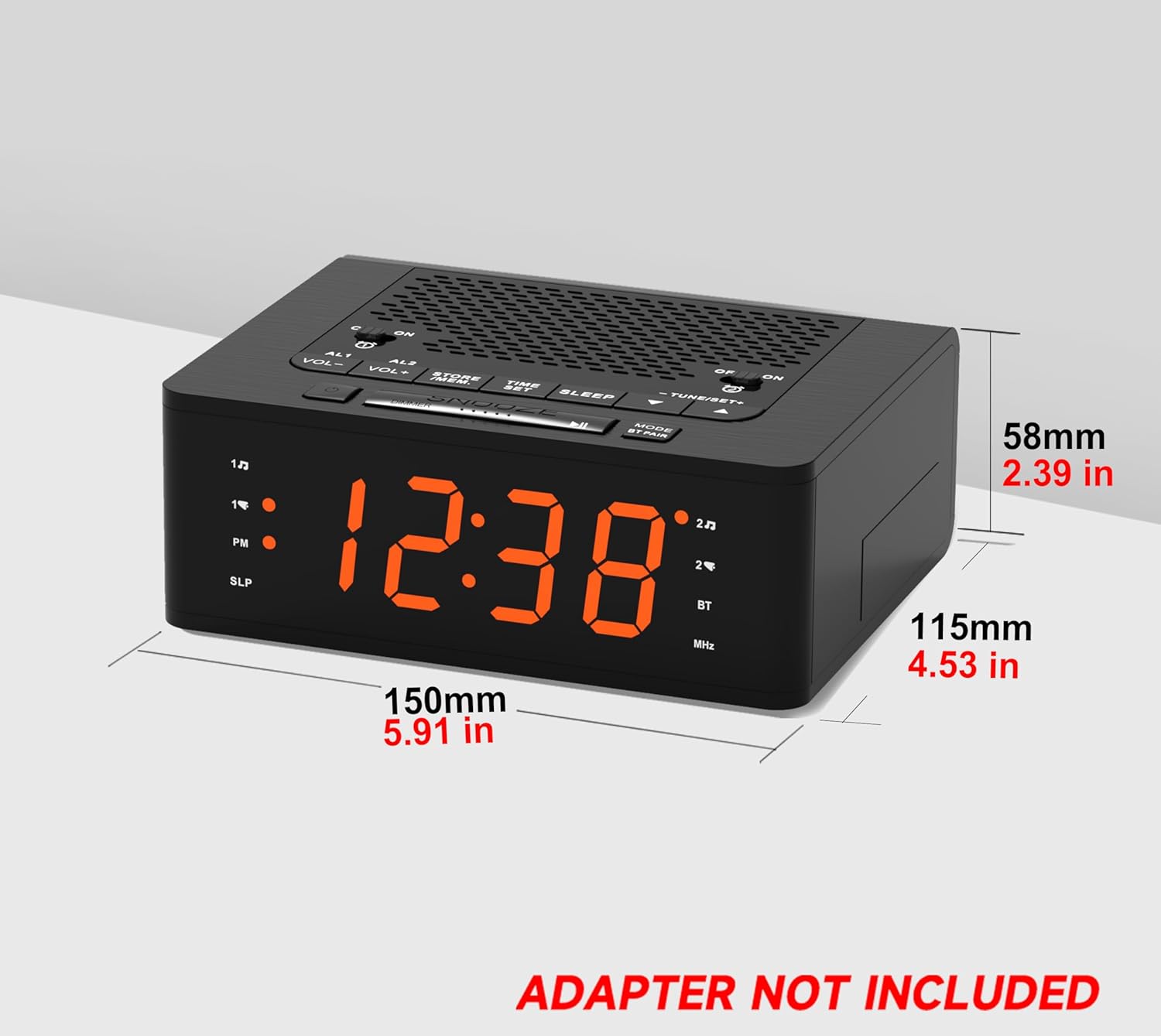
Billede: Side view of the iTOMA 515 Alarm Clock with dimensions indicated, and a clear note stating "ADAPTER NOT INCLUDED".
2. Indstilling af starttidspunkt
- Tryk og hold på TIDSINDSTILLING knappen, indtil timecifrene begynder at blinke.
- Brug TUNE+ or TUNE- knapperne til at justere timetallet. Vær opmærksom på PM-indikatoren, hvis du bruger 12-timers format.
- Trykke TIDSINDSTILLING igen for at bekræfte timen og gå videre til minutjustering.
- Brug TUNE+ or TUNE- knapper for at justere minutterne.
- Trykke TIDSINDSTILLING once more to confirm the minutes and exit time setting mode.
3. Valg af 12/24 timers format
While the time is flashing during setup, press the MODE button to toggle between 12-hour and 24-hour display formats.
Betjeningsvejledning
1. Display Brightness Control (Dimmer)
The iTOMA 515 features a 4-level dimmable LED display.
- Tryk på SNOOZE / DIMMER button repeatedly to cycle through the brightness levels: Level 3 (brightest), Level 2, Level 1, and OFF.
- Select the brightness level that suits your preference for optimal visibility without disturbance.

Billede: The alarm clock display transitioning through four brightness levels (L3, L2, L1, OFF) to illustrate the dimmer function.
2. Setting Alarms (AL1 & AL2)
The clock supports two independent alarms. You can set the alarm time, sound source (buzzer or FM radio), and alarm week mode.
- Tryk på og hold en af AL1 or AL2 knappen, indtil alarmens timecifre blinker.
- Brug TUNE+ or TUNE- knapper for at justere alarmtiden.
- Tryk på det tilsvarende AL1 or AL2 knappen igen for at bekræfte timeindstillingen og gå videre til minutjustering.
- Brug TUNE+ or TUNE- knapper til at justere alarmens minutter.
- Tryk på AL1 or AL2 button again to select the alarm sound source: Summer or FM radio.
- Tryk på AL1 or AL2 button again to select the alarm week mode: d1-7 (every day), d1-5 (weekdays only), or d6-7 (weekends only).
- Tryk på AL1 or AL2 button one last time to save the settings and exit.

Billede: The alarm clock display with indicators for two separate alarms, showing AM 7:00 (Wake Up Time) and PM 7:00 (Coffee Time) as examples.
3. Turning Alarms ON/OFF
To activate or deactivate an alarm, use the dedicated ON/OFF buttons located on the top panel for AL1 and AL2.
4. Snooze-funktion
Når en alarm lyder, skal du trykke på den store SLUM button on the top of the clock to temporarily silence the alarm for an additional 9 minutes of sleep. The alarm will sound again after this period.

Billede: A hand reaching to press the large SNOOZE button on the top of the alarm clock, indicating its function for an extra 9 minutes of sleep.
5. Betjening af FM-radio
The iTOMA 515 features an FM radio with 20 preset stations and adjustable volume.
- Tryk på MODE button to switch to FM radio mode. The frequency will appear on the display.
- Automatisk scanning: Tryk og hold på TUNE+ or TUNE- knappen for automatisk at scanne efter den næste tilgængelige station.
- Manuel indstilling: Tryk kort på TUNE+ or TUNE- button to manually adjust the frequency in small increments.
- Juster lydstyrken: Brug VOL+ or VOL- knapper til at justere radioens lydstyrke (16 niveauer).
- Gem forudindstillinger: To save a station, tune to your desired frequency, then press and hold the STORE / MEM knappen indtil et forudindstillet nummer blinker. Brug TUNE+ or TUNE- to select the preset number (P01-P20), then press STORE / MEM igen for at gemme.
- Genkald forudindstillinger: In FM mode, briefly press the STORE / MEM button to cycle through your saved preset stations.

Billede: The alarm clock displaying an FM radio frequency (87.5 MHz), with icons indicating sleep timer, presets, and volume levels.
6. FM Radio Sleep Timer
Sleep-timeren giver dig mulighed for at falde i søvn til radioen, som automatisk slukker efter et bestemt tidsrum.
- Mens FM-radioen spiller, skal du trykke på SOVE button repeatedly to cycle through the sleep timer options (e.g., 90, 80, 70... 10 minutes, OFF).
- Radioen vil spille i den valgte varighed og derefter slukke automatisk.
7. Bluetooth-parring
The iTOMA 515 supports Bluetooth connectivity for audio streaming.
- Tryk på MODE / BT PAIR button to switch to Bluetooth mode. The display will show "BT" and flash, indicating it's in pairing mode.
- Aktiver Bluetooth på din mobilenhed, og søg efter tilgængelige enheder.
- Select "iTOMA 515" from the list of devices to pair.
- Once paired, the "BT" indicator on the clock will stop flashing and remain solid. You can now stream audio from your device to the alarm clock.
Billede: The iTOMA 515 Alarm Clock positioned next to a smartphone, illustrating its capability to play music via Bluetooth connection.
Opretholdelse
To ensure the longevity and proper functioning of your iTOMA 515 Alarm Clock, follow these simple maintenance guidelines:
- Rensning: Use a soft, dry cloth to wipe the exterior of the clock. Avoid using abrasive cleaners, waxes, or solvents as they may damage the finish.
- Placering: Placer uret på en stabil, flad overflade væk fra direkte sollys, varmekilder og overdreven fugtighed.
- Ventilation: Ensure the ventilation openings on the top and sides of the unit are not blocked to prevent overheating.
- Strømafbrydelse: If the clock will not be used for an extended period, unplug it from the power outlet.
Fejlfinding
If you encounter issues with your iTOMA 515 Alarm Clock, refer to the following common problems and solutions:
| Problem | Mulig årsag | Løsning |
|---|---|---|
| Urdisplayet er slukket eller fungerer ikke. | Ingen strømforbindelse eller defekt adapter. | Ensure the power adapter is securely plugged into the clock and a working wall outlet. Verify the adapter is functional. |
| Kan ikke indstille tid eller alarm. | Incorrect button sequence or not in setting mode. | Tryk og hold på TIDSINDSTILLING eller respektive ALARM button until digits flash. Follow the instructions carefully. |
| FM-radiomodtagelsen er dårlig. | Svagt signal eller interferens. | Adjust the position of the clock. Extend the FM antenna fully if available (not explicitly mentioned but common for radios). Try scanning for stations again. |
| Alarmen lyder ikke. | Alarm is off or volume is too low. | Ensure the alarm's ON/OFF button is set to ON. Check the alarm volume setting. |
| Cannot switch off military time (24-hour format). | Incorrect setting during time adjustment. | During time setting (when hour digits flash), press the MODE knappen for at skifte mellem 12-timers og 24-timers formater. |
| Bluetooth-enheden kan ikke parres. | Clock not in pairing mode or device too far. | Ensure the clock is in Bluetooth pairing mode (BT flashing). Move your device closer to the clock. Try restarting both devices. |
Specifikationer
- Mærke: iTOMA
- Model: 515
- Skærmtype: LED (orange)
- Skærmens lysstyrke: 4 levels (L3, L2, L1, OFF)
- Strømkilde: Mains powered (DC 5V adapter, not included)
- Produktdimensioner: 15 cm (L) x 11.5 cm (B) x 5.8 cm (H) / 5.91 tommer (L) x 4.53 tommer (B) x 2.39 tommer (H)
- Varens vægt: 420 g
- FM-radiofrekvens: 87.5 - 108 MHz
- FM-forudindstillinger: Op til 20 stationer
- Radiolydstyrke: 16 justerbare niveauer
- Sleep timer: 10-90 minutter
- Alarmtyper: Buzzer, FM Radio
- Alarm Week Modes: Every day (d1-7), Weekdays (d1-5), Weekends (d6-7)
- Forbindelse: Bluetooth
Garantioplysninger
iTOMA products are manufactured to high-quality standards. For specific warranty details, please refer to the warranty card included with your purchase or contact iTOMA customer support. Keep your purchase receipt as proof of purchase for any warranty claims.
Støtte
For further assistance, technical support, or inquiries regarding your iTOMA 515 Alarm Clock, please visit the official iTOMA webwebstedet eller kontakt deres kundeserviceafdeling. Kontaktoplysninger kan typisk findes på produktemballagen eller mærkets officielle online tilstedeværelse.


