1. Vigtige sikkerhedsoplysninger
Please read all instructions carefully before using the SANSUI ES-24C1 monitor. Keep this manual for future reference.
- Do not expose the monitor to rain or moisture to prevent fire or electric shock hazards.
- Åbn ikke skærmen casing. Der er ingen dele indeni, som kan serviceres af brugeren. Overlad al service til kvalificeret personale.
- Placer skærmen på en stabil, plan overflade for at forhindre den i at falde.
- Sørg for tilstrækkelig ventilation omkring skærmen. Bloker ikke ventilationsåbningerne.
- Brug kun den strømadapter, der følger med skærmen.
- Tag stikket til skærmen ud af stikkontakten under tordenvejr eller når den ikke bruges i længere perioder.
2. Pakkens indhold
Bekræft at alle varer er til stede i pakken:
- SANSUI ES-24C1 24-inch Curved Monitor
- Monitorstativ (base og hals)
- Strømadapter
- HDMI kabel
- Brugermanual
3. Produktet er slutview
The SANSUI ES-24C1 is a 24-inch Full HD (1920x1080) curved monitor featuring a 100Hz refresh rate, 1ms MPRT response time, and built-in speakers. It is designed for both home and office use, offering a 1500R curvature for an immersive viewoplevelse.

Billede: Overview of the SANSUI ES-24C1 monitor highlighting its key features and curved design.

Image: Summary of the monitor's main features including 100Hz, 1ms MPRT, USB Type-C, HDR, 100% sRGB, 3000:1 contrast, 250 Nits, built-in speakers, and VESA mount.
Porte og kontroller

Billede: Nærbillede view of the monitor's rear ports, including HDMI, USB Type-C, and Audio Out.
- USB Type-C: 1 port for video input (does not support charging).
- HDMI 1.4: 1 port for video input.
- 3.5 mm lydstik: Til tilslutning af eksterne hovedtelefoner eller højttalere.
- DC IN: Strømindgangsport.
- Five-Way Joystick: Located on the back for OSD menu navigation.
4. Opsætning
4.1 Samling af skærm
Følg disse trin for at samle skærmstativet:
- Fastgør stativets hals til skærmpanelet.
- Secure the stand base to the neck.
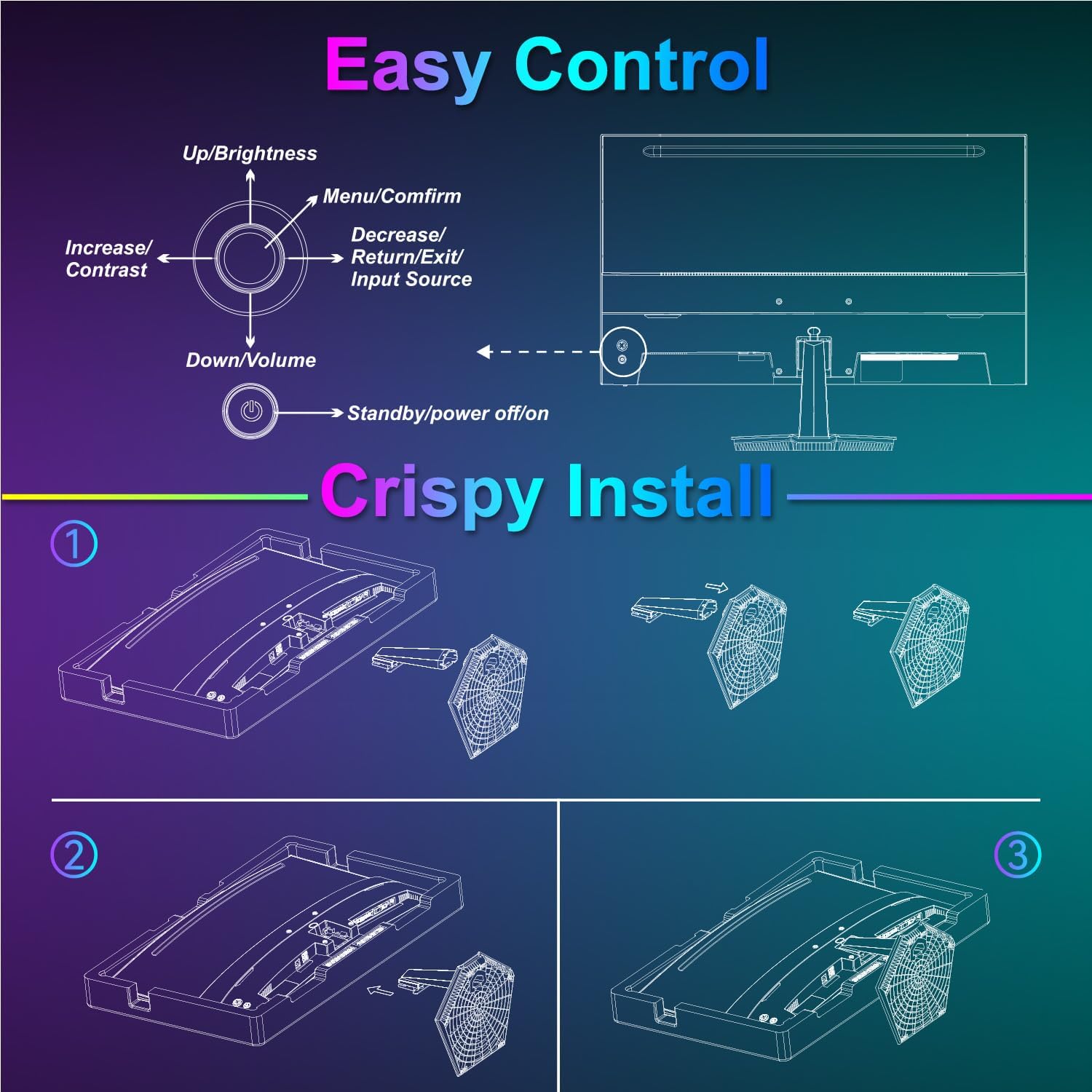
Image: Diagram illustrating the step-by-step assembly of the monitor stand.
4.2 Tilslutning til enheder
Connect your monitor to a computer or other video source using the appropriate cable.
- HDMI: Connect one end of the HDMI cable to the monitor's HDMI port and the other end to your device's HDMI output.
- USB Type-C: Connect one end of the USB Type-C cable to the monitor's USB Type-C port and the other end to your device's compatible USB Type-C output.
- Lyd: Hvis du bruger eksterne lydenheder, skal du tilslutte dem til 3.5 mm lydstikket.

Image: Visual representation of various devices connecting to the monitor via HDMI and USB Type-C.
4.3 Tænd/sluk
Connect the power adapter to the monitor's DC IN port and then plug it into a power outlet. Press the power button located on the back of the monitor to turn it on or off.
5. Betjeningsvejledning
5.1 OSD-menu navigation
The On-Screen Display (OSD) menu is controlled using the five-way joystick on the back of the monitor. Press the joystick to open the menu, then move it up/down/left/right to navigate and select options.

Image: Diagram showing the five-way joystick and its functions for OSD menu navigation.
5.2 Skærmindstillinger
Adjust various display parameters to optimize your viewoplevelse.
- Lysstyrke/kontrast: Juster de overordnede luminans- og kontrastniveauer.
- Farveindstillinger: Finjuster farvetemperatur, farvetone og mætning.
- HDR: Enable or disable High Dynamic Range for enhanced contrast and color.
- Low Blue Light/Anti-Flicker: Reducer øjenbelastning ved længerevarende brug.
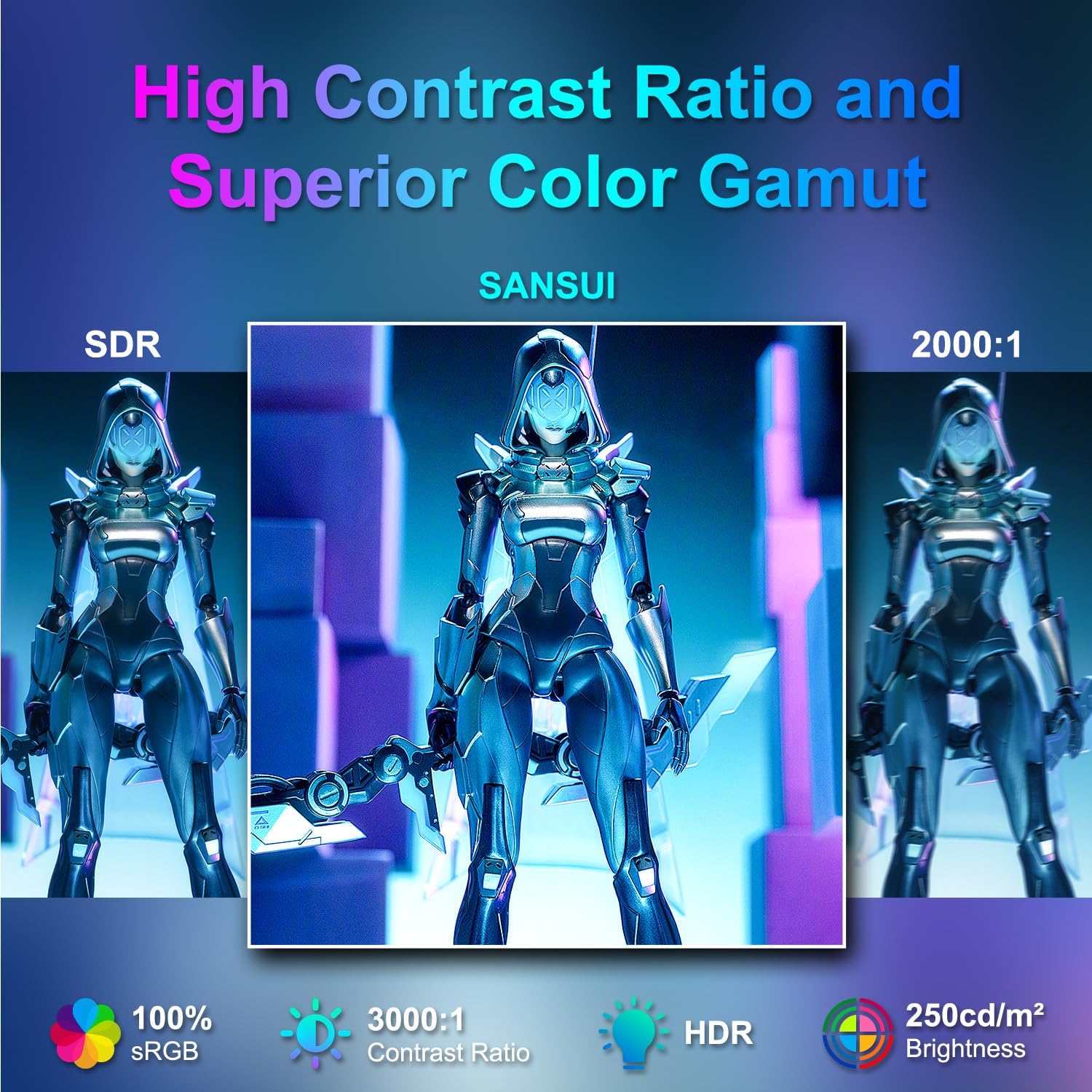
Image: Visual comparison demonstrating high contrast ratio and superior color gamut of the SANSUI monitor.

Image: Highlights of display features like 3000:1 contrast ratio, 100% sRGB, and 250 Nits brightness.

Image: Comparison of display quality with and without HDR enabled.

Image: Illustration of Low Blue Light and Flicker-Free technologies for reduced visual fatigue.
5.3 Spilfunktioner
The ES-24C1 monitor includes features optimized for gaming performance.
- 100 Hz opdateringshastighed: Provides smoother motion and reduced input lag.
- 1 ms MPRT-svartid: Minimerer bevægelsesslør og ghosting.
- Adaptiv synkronisering: Synchronizes the monitor's refresh rate with the GPU's frame rate to eliminate screen tearing and stuttering.
- Spiltilstande: Pre-set display modes optimized for different game genres (e.g., FPS, RTS, RPG).
- AI Crosshair: An on-screen crosshair overlay for improved aiming accuracy.
- Game Timer: An on-screen timer for tracking in-game events.

Image: Demonstrates the difference in smoothness between 60Hz, 75Hz, and 100Hz refresh rates, highlighting low blue light and Adaptive FreeSync.

Image: Illustrates the benefits of 100Hz refresh rate and 1ms MPRT response time in reducing screen tearing and improving fluidity.
5.4 Multi-Window Modes (PIP/PBP)
The monitor supports Picture-in-Picture (PIP) and Picture-by-Picture (PBP) modes, allowing you to view content from multiple input sources simultaneously.
- PBP (billede-for-billede): Divides the screen into two halves, displaying content from two different sources side-by-side.
- PIP (billede-i-billede): Displays content from a secondary source in a smaller window overlaid on the main display.

Billede: Eksamples of Duplicated Mode, Second Screen Mode, and Single Display Screen Mode for enhanced productivity.
6. Vedligeholdelse
6.1 Rengøring
- Tag altid stikket ud af skærmen før rengøring.
- Brug let en blød, fnugfri klud damprengøres med vand eller et mildt, ikke-slibende rengøringsmiddel, der er specielt designet til elektronik.
- Sprøjt ikke rengøringsmiddel direkte på skærmen.
6.2 Pleje
- Undgå at placere tunge genstande på skærmen eller dens kabler.
- Hold skærmen væk fra direkte sollys, varmekilder og ekstreme temperaturer.
- Do not expose the monitor to strong magnetic fields.
7. Fejlfinding
If you encounter issues with your SANSUI ES-24C1 monitor, refer to the following common problems and solutions:
- Ingen strøm: Sørg for, at strømadapteren er korrekt tilsluttet både skærmen og en fungerende stikkontakt. Kontroller, om strømindikatoren lyser.
- Intet signal: Verify that the video cable (HDMI or USB Type-C) is correctly connected to both the monitor and your device. Ensure the correct input source is selected in the OSD menu.
- Flimrende skærm: Kontrollér videokablet for skader eller løse forbindelser. Prøv et andet videokabel eller en anden port. Sørg for, at dine grafikkortdrivere er opdaterede.
- Dårlig billedkvalitet: Adjust brightness, contrast, and color settings in the OSD menu. Ensure the display resolution and refresh rate are set correctly in your device's display settings.
- Ingen lyd fra højttalerne: Check the volume settings on both the monitor and your connected device. Ensure the audio cable (if used) is properly connected.
8. Specifikationer
Detailed technical specifications for the SANSUI ES-24C1 24-inch Curved Monitor:
| Feature | Specifikation |
|---|---|
| Modelnummer | ES-24C1 |
| Skærmstørrelse | 24 tommer |
| Paneltype | Buet (1500R) |
| Opløsning | 1920 x 1080 (FHD) |
| Opdateringshastighed | 100 Hz |
| Svartid | 1 ms (MPRT) |
| Kontrastforhold | 3000:1 |
| Lysstyrke | 250 nit |
| Display farver | 16.7 mio |
| Farveskala | 100 % sRGB |
| Viewi vinkel | 178° (H/V) |
| Videoindgange | 1x HDMI 1.4, 1x USB Type-C |
| Lydudgang | 1 x 3.5 mm lydstik |
| Højttalere | 2x 2W Built-in Speakers |
| VESA Mount | 75 x 75 mm |
| Tilt justering | -5° til 15° |
| Produktdimensioner | 21 x 38 x 49 tommer |
| Varens vægt | 7.78 pund |

Image: Detailed dimensions and ergonomic features like 178° wide viewing angle and -5°~15° tilt.

Image: Visual representation of the 178° wide viewvinkel.

Image: Tips for VESA mounting (75x75mm, M4*8mm screw size) and tilt adjustment.

Billede: Bagside view of the monitor detailing port locations and key specifications.
9. Garanti og support
SANSUI provides a limited warranty for this product. For detailed warranty information, please refer to the warranty card included in your package or visit the official SANSUI website. For technical support or service inquiries, please contact SANSUI customer service.
Online support: Visit the SANSUI Store on Amazon
10. Officiel produktvideo
Watch the official product video for a visual guide to the SANSUI ES-24C1 monitor's features and benefits.
Video: SANSUI 24" 100Hz Curved Monitor USB C with Speakers. This video provides an overview of the monitor's design, key features, and connectivity options.


