1. Introduktion
This manual provides essential instructions for setting up, operating, and maintaining your HONOR 200 5G ELI-NX9 smartphone. Please read this guide thoroughly to ensure proper use and to maximize the device's capabilities. Keep this manual for future reference.
2. Sikkerhedsoplysninger
To prevent injury to yourself or others, and to avoid damage to your device, read all safety information before using the product. This includes:
- Udsæt ikke enheden for ekstreme temperaturer eller direkte sollys.
- Undgå at bruge enheden i våde eller støvede omgivelser.
- Use only HONOR-approved chargers and accessories.
- Forsøg ikke selv at adskille eller reparere enheden.
- Observe all local laws and regulations regarding mobile phone use, especially while driving.
3. Enhed overview
Familiarize yourself with the physical components of your HONOR 200 5G ELI-NX9.

Figur 3.1: Forside og bagside view of the HONOR 200 5G ELI-NX9 smartphone. The front displays the large screen with a punch-hole camera, while the back features a distinctive camera module and the HONOR branding.

Figur 3.2: Bag view of the HONOR 200 5G ELI-NX9, highlighting the oval-shaped triple camera system and the textured Moonlight White finish.
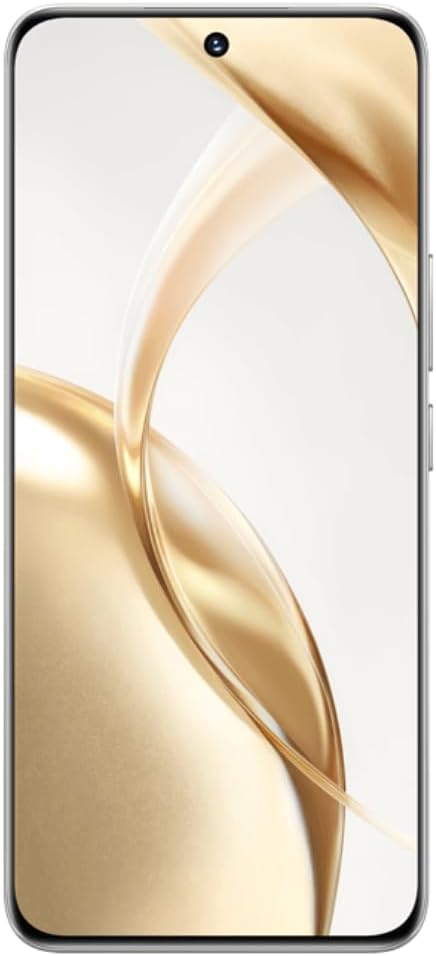
Figur 3.3: Front view of the HONOR 200 5G ELI-NX9, showcasing its large, curved display and the centered punch-hole front camera.

Figur 3.4: Side profile of the HONOR 200 5G ELI-NX9, illustrating the slim design and the placement of the power and volume buttons on the right edge.
3.1 Pakkens indhold
Sørg for, at din pakke indeholder følgende varer:
- HONOR 200 5G ELI-NX9 Smartphone
- USB kabel
- Quick Start Guide (denne manual)
- SIM-udskubningsværktøj
- Garantikort
- Strømadapter (kan variere afhængigt af region)
4. Opsætning
4.1 Isætning af SIM-kort
The HONOR 200 5G ELI-NX9 supports Dual SIM functionality.
- Find SIM-kortbakken på siden af din enhed.
- Sæt SIM-kortudkastningsværktøjet i det lille hul ved siden af bakken, og skub forsigtigt, indtil bakken springer ud.
- Place your Nano-SIM cards into the designated slots on the tray, ensuring the gold contacts face down.
- Sæt forsigtigt SIM-kortbakken tilbage i enheden.
4.2 Tænd/sluk
- For at tænde: Press and hold the Power button (located on the right side) until the HONOR logo appears.
- For at slukke: Tryk og hold tænd/sluk-knappen nede, og vælg derefter "Sluk" fra mulighederne på skærmen.
- For at genstarte: Tryk og hold tænd/sluk-knappen nede, og vælg derefter "Genstart" fra valgmulighederne.
4.3 Indledende enhedskonfiguration
Upon first power-on, follow the on-screen prompts to set up your device:
- Vælg dit sprog og område.
- Opret forbindelse til et Wi-Fi-netværk.
- Accepter slutbrugerlicensaftalen.
- Log ind med din Google-konto, eller opret en ny.
- Konfigurer skærmlås (pinkode, mønster, adgangskode, fingeraftryk, ansigtslåsning).
- Gendan data fra en tidligere enhed (valgfrit).
5. Betjening af din enhed
5.1 Grundlæggende navigation
Your HONOR 200 5G ELI-NX9 uses a touch-sensitive display for interaction:
- Tryk på: Vælg et element, eller åbn et program.
- Stryg: Naviger gennem skærme eller lister.
- At klemme: Zoom ind eller ud på billeder og web sider.
- Langt tryk: Få adgang til kontekstmenuer eller flyt ikoner.
5.2 Kamerafunktioner
The device features a powerful camera system:
- Bagkameraer: 50 MP Main, 50 MP Telephoto, 12 MP Ultra-Wide/Macro.
- Forreste kamera: 50 MP for high-resolution selfies.
- AI Portrait Engine: Enhances facial features and applies various portrait effects.
- Nattilstand: Optimizes photos in low-light conditions for clearer images.
- Videooptagelse: Supports 1080p video capture.
5.3 Display and Multimedia
Experience vibrant visuals on the 6.7-inch OLED display:
- Opløsning: 1200 x 2664 pixels for sharp images and text.
- Farvedybde: 1 Billion colors for rich and accurate reproduction.
- HDR-understøttelse: Enhanced contrast and color for compatible content (Netflix, Amazon HDR certified).
5.4 Ydeevne og batteri
- Processor: Qualcomm Snapdragon 7 Gen 3 (4 nm) Octa-core for efficient multitasking and gaming.
- Hukommelse: 12 GB RAM ensures smooth operation.
- Opbevaring: 512 GB internal storage for apps, photos, and videos.
- Batteri: 5200 mAh Silicon-Carbon battery provides extended usage.
- Hurtig opladning: Understøtter 100W hurtigopladning.
6. Vedligeholdelse
6.1 Rengøring af din enhed
For at holde din enhed i optimal stand:
- Tør skærmen og kabinettet af med en blød, fnugfri klud.
- Undgå at bruge skrappe kemikalier, slibende rengøringsmidler eller aerosolspray.
- Udsæt ikke enheden for overdreven fugt.
6.2 Softwareopdateringer
Regularly check for and install software updates to enhance performance, security, and introduce new features. Navigate to Indstillinger > System og opdateringer > Softwareopdatering.
6.3 Pleje af batterier
For at forlænge batterilevetiden:
- Undgå at aflade batteriet helt ofte.
- Lad ikke enheden oplade i længere perioder, efter den har nået 100%.
- Hold enheden inden for de anbefalede driftstemperaturer.
7. Fejlfinding
Hvis du støder på problemer med din enhed, kan du prøve følgende løsninger:
7.1 Fælles problemer
- Enheden tænder ikke: Sørg for, at batteriet er opladet. Tilslut det til en oplader i mindst 10 minutter, og prøv derefter at tænde det.
- Apps der går ned eller fryser: Luk og genåbn appen. Ryd appens cache (Indstillinger > Apps > [Appnavn] > Lager > Ryd cacheGenstart enheden.
- Problemer med netværksforbindelse: Kontroller, om flytilstand er slået fra. Genstart enheden. Nulstil netværksindstillinger (Settings > System & updates > Reset > Reset network settings).
- Langsom ydeevne: Luk unødvendige baggrundsapps. Ryd lagerplads. Genstart enheden.
7.2 Fabriksindstilling
Hvis problemerne fortsætter, skal du muligvis udføre en fabriksnulstilling. Advarsel: Dette vil slette alle data på din enhed. Sikkerhedskopier vigtige data, før du fortsætter.
- Gå til Settings > System & updates > Reset > Reset phone.
- Bekræft din beslutning, og indtast din adgangskode til skærmlåsen, hvis du bliver bedt om det.
- Enheden genstarter og gendanner fabriksindstillingerne.
8. Specifikationer
Key technical specifications for the HONOR 200 5G ELI-NX9:
| Mærke | ÆRE |
| Model | Honor 200 5G (ELI-NX9) |
| Operativsystem | Android 14 |
| Processor | Qualcomm Snapdragon 7 Gen 3 (4 nm), Octa-core (1x2.63 GHz, 4x2.4 GHz, 3x1.8 GHz) |
| VÆDDER | 12 GB |
| Intern opbevaring | 512 GB |
| Vise | 6.7 inches OLED, 1B colors, 1200 x 2664 pixels, 120Hz |
| Bagkamera | 50 MP (main), 50 MP (telephoto), 12 MP (ultrawide/macro) |
| Forreste kamera | 50 MP |
| Batterikapacitet | 5200 mAh |
| Opladning | 100W hurtig opladning |
| SIM-understøttelse | Dobbelt SIM |
| Cellulær teknologi | 5G |
| Varemodelnummer | Honor 200 5G |
| UPC | 6936520843787 |
| IMEI (Exampdet) | 868420070415840 (Note: Actual IMEI is unique to each device) |

Figur 8.1: Example product label showing model (ELI-NX9), ROM/RAM, color, IMEI, and UPC. This information is unique to each device.
9. Garanti og support
Your HONOR 200 5G ELI-NX9 comes with a limited warranty. Please refer to the separate warranty card included in your package for detailed terms and conditions.
For further assistance, technical support, or to find service centers, please visit the official HONOR webwebstedet eller kontakt deres kundeservice i din region. Gem din købsbevis til garantikrav.
Official HONOR Webwebsted: www.hihonor.com


