CHERRY XTRFY M64 Pro 8K trådløs gamingmus brugermanual
Model: CX-M64W-PRO-BLACK
Indledning
The CHERRY XTRFY M64 Pro 8K Wireless Gaming Mouse is engineered for competitive gaming, offering ultra-fast 8000 Hz polling rate technology and an ergonomic design. This manual provides comprehensive instructions for setting up, operating, maintaining, and troubleshooting your M64 Pro 8K mouse to ensure optimal performance.
Nøglefunktioner omfatter:
- Ultra-fast 8000 Hz polling rate for extremely low click latency.
- Reinvented ergonomic shape for enhanced grip and control.
- Lightweight design at approximately 55 grams.
- High-performance Pixart 3395 sensor.
- Up to 90 hours of battery life in Standard Gaming Mode.
- Flexible CHERRY XTRFY EZcord charging cable for unhindered play during charging.
Opsætning
Follow these steps to set up your CHERRY XTRFY M64 Pro 8K Wireless Gaming Mouse:
- Unboxing: Carefully remove the mouse, wireless dongle, and charging cable from the packaging.

Image: The M64 Pro 8K mouse's wireless dongle and USB-C charging cable.
- Opladning af musen:
- Connect the USB-C end of the EZcord charging cable to the mouse's charging port (located at the front).
- Tilslut USB-A-enden af kablet til en ledig USB-port på din computer eller en USB-vægadapter.
- Allow the mouse to charge fully before first use. The LED indicator on the mouse will show charging status.
- Connecting the Wireless Dongle:
- Plug the wireless USB dongle into an available USB port on your computer. For optimal performance, use a USB 2.0 or 3.0 port directly on your motherboard or a powered USB hub.
- The mouse should automatically connect to the dongle. If not, ensure the mouse is powered on.
- Softwareinstallation (valgfrit men anbefalet):
- Visit the official CHERRY XTRFY webwebsted (cherryxtrfy.com) to download the latest software/drivers for the M64 Pro 8K.
- This software allows for customization of DPI settings, button assignments, polling rate, and other advanced features.
Betjeningsvejledning
Understanding the functions and controls of your M64 Pro 8K mouse:
Mouse Layout and Buttons
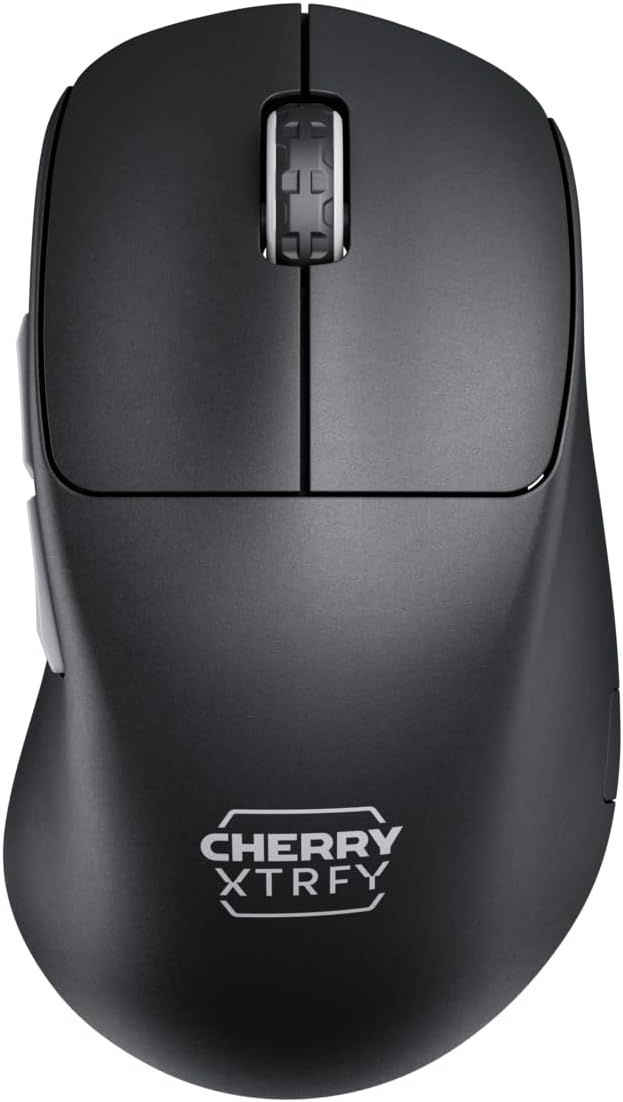
Billede: Top view of the M64 Pro 8K mouse, showing the left and right click buttons and scroll wheel.
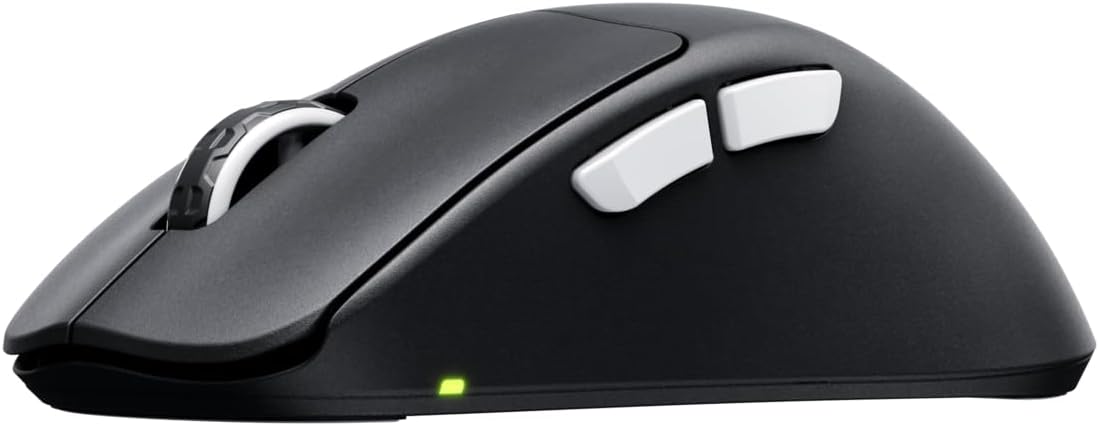
Billede: Side view of the M64 Pro 8K mouse, highlighting the two side buttons.
- Venstreklikknap: Primær handlingsknap.
- Højreklik-knap: Sekundær handlingsknap.
- Scrollhjul: For scrolling through content. Also functions as a middle click button.
- Sideknapper (frem/bagud): Bruges typisk til navigation i web browsers or assigned to in-game actions.
- DPI Button (Bottom of mouse): Allows for on-the-fly adjustment of DPI settings.
- Polling Rate Switch (Bottom of mouse): Adjusts the polling rate (e.g., 1000 Hz, 8000 Hz).
- Power Switch (Bottom of mouse): Tænder eller slukker for musen.

Billede: Bund view of the M64 Pro 8K mouse, showing the DPI, polling rate, and power switches.
DPI justering
The M64 Pro 8K allows for quick DPI (Dots Per Inch) adjustments. Press the dedicated DPI button on the bottom of the mouse to cycle through preset DPI levels. The LED indicator will change color to indicate the current DPI setting. For custom DPI steps, use the CHERRY XTRFY software.
Polling Rate (8K Hz Technology)
The M64 Pro 8K features an 8000 Hz polling rate, meaning it reports its position to your computer 8000 times per second. This significantly reduces input lag and provides smoother cursor movement, especially on high refresh rate monitors. Use the polling rate switch on the bottom of the mouse to select your desired rate. Note that higher polling rates may consume more battery and require more system resources.
Video: En officiel produktvideoasing the M64 Pro Wireless 8K mouse, highlighting its ergonomic shape and ultra-fast 8K polling rate technology.
Batteristyring
The M64 Pro 8K is equipped with a 350-mA battery, offering up to 90 hours of playtime in Standard Gaming Mode. The mouse can be charged using the included EZcord cable. You can continue to use the mouse while it is charging, providing uninterrupted gameplay. Monitor the battery indicator light for low battery warnings.
Opretholdelse
Proper maintenance ensures the longevity and optimal performance of your M64 Pro 8K mouse:
- Rensning: Brug en blød, tør og fnugfri klud til at tørre musen af. Tør musen let af, hvis der er genstridigt snavs.ampRengør kluden med vand eller en mild rengøringsopløsning. Undgå skrappe kemikalier eller slibende materialer.
- Sensorpleje: Hold den optiske sensor i bunden af musen ren og fri for støv og snavs. Brug en vatpind eller trykluft om nødvendigt.
- Musefødder (skøjter): The mouse feet are designed for smooth gliding. If they become worn, replacements may be available from CHERRY XTRFY.
- Opbevaring: Når musen ikke er i brug i længere perioder, skal den opbevares køligt og tørt, væk fra direkte sollys og ekstreme temperaturer.
Fejlfinding
Hvis du støder på problemer med din M64 Pro 8K-mus, kan du prøve følgende løsninger:
| Problem | Mulig løsning |
|---|---|
| Mouse not responding/connecting wirelessly. |
|
| Markørbevægelsen er uregelmæssig eller hoppende. |
|
| Mouse disconnects frequently (especially at 8K Hz). |
|
| Buttons or scroll wheel not functioning correctly. |
|
| Batteriets levetid er kortere end forventet. |
|
Specifikationer
| Feature | Detalje |
|---|---|
| Modelnummer | CX-M64W-PRO-SORT |
| Mærke | CHERRY XTRFY |
| Farve | Sort |
| Forbindelsesteknologi | Wireless (USB Dongle), USB (for charging/wired use) |
| Bevægelsesdetekteringsteknologi | Laser (Pixart 3395 sensor) |
| Afstemningsfrekvens | Op til 8000 Hz |
| Varens vægt | Cirka 55 gram (1.94 ounce) |
| Batteritype | 1 lithium-ion batteri (medfølger) |
| Batterilevetid | Op til 90 timer (Standard Gaming Mode) |
| Pakkedimensioner | 4.7 x 2.5 x 1.5 tommer |
| Oprindelsesland | Kina |
Garanti og support
CHERRY XTRFY products are built to high standards. For warranty information and technical support, please refer to the official CHERRY XTRFY webhjemmeside eller kontakt deres kundeservice direkte.
- Officiel Webwebsted: For drivers, software, FAQs, and support resources, visit cherryxtrfy.com.
- Kundeservice: Contact information for support can typically be found on the official webwebstedet under afsnittet "Support" eller "Kontakt os".
- Garanti: The product comes with a standard manufacturer's warranty. Please retain your proof of purchase for warranty claims. Specific warranty terms and duration may vary by region.


