Keychron K10 Pro Wireless Custom Mechanical Keyboard Brugervejledning
Model: K10 Pro | Mærke: Keychron
Indledning
The Keychron K10 Pro is a wireless full-size mechanical keyboard designed for an enhanced typing experience. It features QMK programmability, hot-swappable switches, and a 1000 Hz polling rate for responsive performance. This manual provides detailed instructions for setting up, operating, and maintaining your Keychron K10 Pro keyboard.
1. Opsætning
1.1 Pakkens indhold
Før du begynder, skal du kontrollere, at alle varer er inkluderet i din pakke:

Figur 1: Eksploderet view of the Keychron K10 Pro, showing keycaps, switches, frame, sound-absorbing foam, PCB, silicone bottom pad, and bottom case.
- 1x Fuldt samlet tastatur (inklusive printplade, stålplade, lydabsorberende skum)
- 1 x silikone bundpude
- 8 sæt stabilisatorer (PCB-skruning)
- 1 sæt taster (dobbelt-skud PBT)
- 1 Set of Switches (Keychron K Pro Silent Red Switch)
- 1x Type-A til Type-C kabel
- 1x Aftrækker
- 1x Keycap aftrækker
- 1 x skruetrækker
1.2 Forbindelsestilstande
The Keychron K10 Pro supports both wireless (Bluetooth 5.1) and wired (USB-C) connections.

Figure 2: The Keychron K10 Pro offers both Bluetooth 5.1 wireless and USB wired connectivity options, allowing seamless switching between multiple devices like laptops, phones, and tablets.
1.2.1 Wireless Mode (Bluetooth)
- Locate the mode switch on the back of the keyboard and slide it to the "BT" position.
- Tryk og hold på Fn + 1 (eller Fn + 2 / Fn + 3)-tastekombinationen i 4 sekunder, indtil indikatorlampen blinker hurtigt og angiver parringstilstand.
- Aktiver Bluetooth på din enhed (bærbar computer, telefon, tablet), og søg efter "Keychron K10 Pro".
- Select the keyboard to complete the pairing process. You can pair up to 3 devices and switch between them using Fn + 1, Fn + 2, eller Fn + 3.
1.2.2 Kablet tilstand (USB-C)
- Locate the mode switch on the back of the keyboard and slide it to the "Cable" position.
- Connect the provided Type-A to Type-C cable from your computer's USB port to the keyboard's USB-C port.
- The keyboard will automatically be recognized by your system.
1.3 Operativsystemkompatibilitet
The K10 Pro is fully compatible with macOS, Windows, and Linux operating systems. Use the OS switch on the back of the keyboard to select the appropriate layout for your system.
1.4 QMK Firmware and Keychron Launcher
The keyboard is QMK programmable, allowing for extensive customization of key assignments, macros, shortcuts, and combos. Use the Keychron Launcher online application for easy configuration.
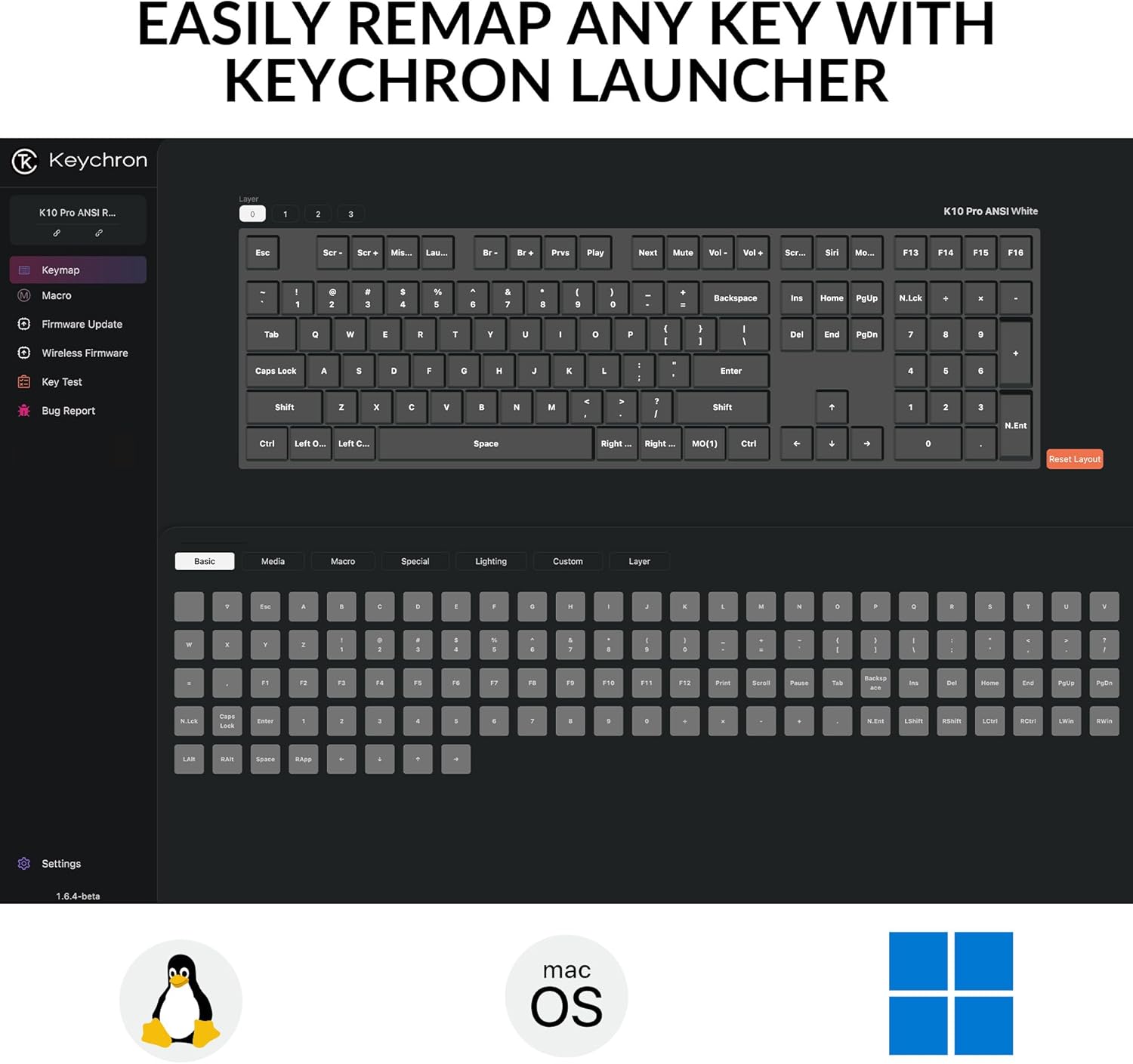
Figure 3: The Keychron Launcher online application provides a user-friendly interface for remapping keys, creating macros, and customizing keyboard functions across different operating systems like Linux, macOS, and Windows.
- Få adgang til Keychron Launcher via en web browser (Chrome, Edge, Opera) at launcher.keychron.com.
- With onboard memory, your customized settings will sync across both wired and wireless modes.
2. Betjening af tastaturet
2.1 Nøglefunktioner og layout
The K10 Pro features a 100% full-size layout. Many keys have secondary functions accessible via the Fn tast. Se forklaringen på tasterne for specifikke funktioner.

Figure 4: The Keychron K10 Pro features a 100% full-size layout, providing all standard keys including a numeric keypad, function row, and navigation cluster.
2.2 Backlight Control
The keyboard features a white backlight. You can adjust the brightness and lighting effects using dedicated key combinations. Consult the keyboard's quick start guide or Keychron Launcher for specific backlight controls.
The south-facing white backlight illuminates beautifully from the typist’s angle.
2.3 Batteristyring
The K10 Pro is equipped with a 4000 mAh rechargeable Li-polymer battery.
- Batterilevetid: Up to 260 hours of continuous typing with the backlight off, or 130 hours on the lowest brightness setting.
- Opladning: Connect the keyboard via the USB-C cable to a power source (computer USB port or wall adapter). The charging indicator light will show the charging status.
3. Vedligeholdelse
3.1 Rengøring af tastaturet
- Frakobl tastaturet fra alle strømkilder før rengøring.
- Brug en blød, fnugfri klud lidt damprengøres med vand eller en mild rengøringsopløsning til at tørre tastaturerne og rammen af.
- For en dybere rengøring skal du bruge trykluft til at fjerne støv og snavs mellem tasterne.
3.2 Keycap and Switch Replacement (Hot-Swappable)
The K10 Pro features hot-swappable switches, allowing you to easily change switches without soldering. It also comes with durable double-shot PBT keycaps.
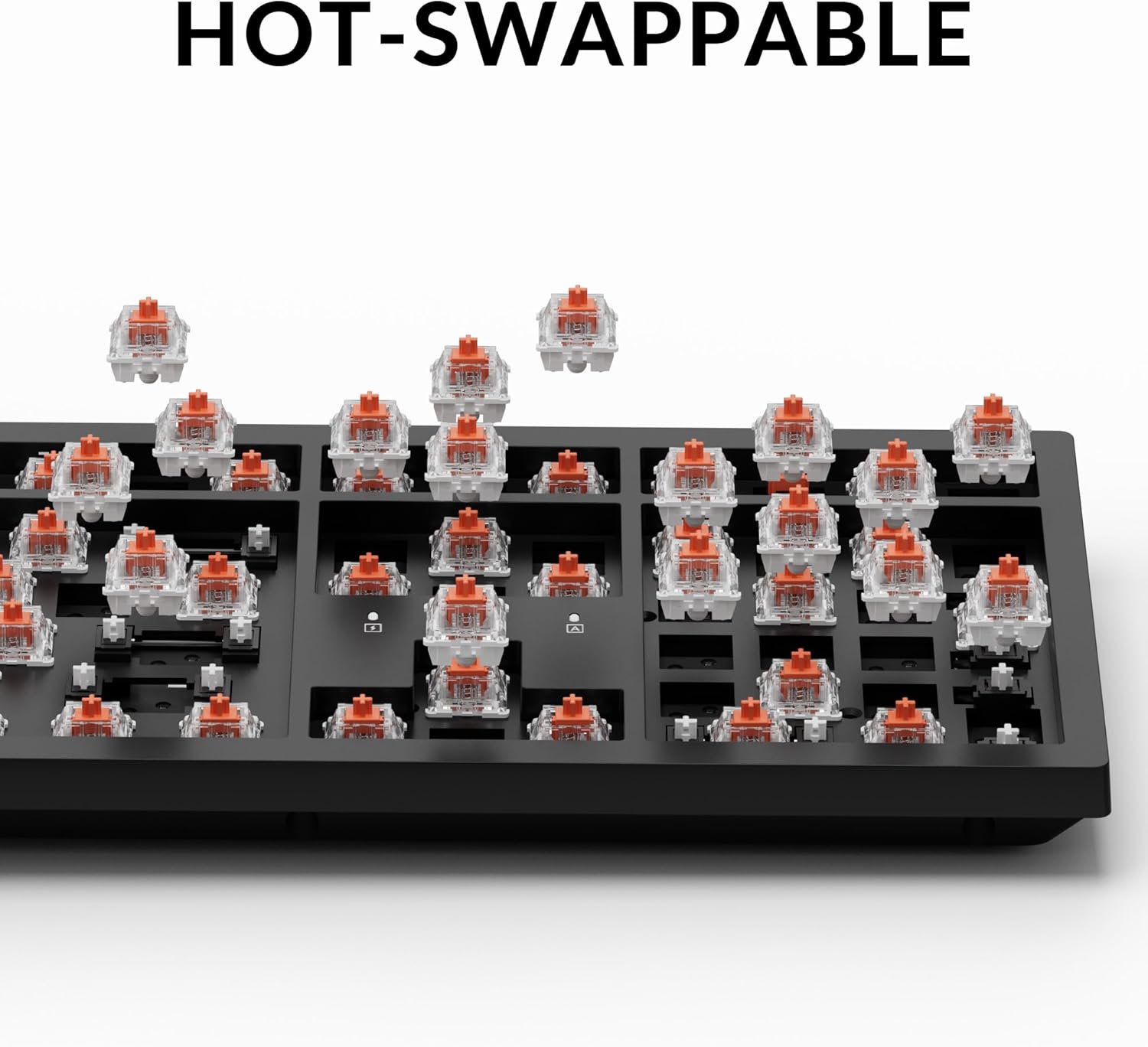
Figure 5: The hot-swappable design of the Keychron K10 Pro allows users to easily remove and replace individual switches without soldering, offering customization and simplified maintenance.

Figure 6: The Keychron K10 Pro features durable double-shot PBT keycaps with an OSA profile, designed for oil resistance and lasting comfort during extended typing sessions.
3.2.1 Fjernelse af tastehætter
- Brug den medfølgende tastaftrækker.
- Gently hook the puller onto the keycap and pull straight up to remove it.
3.2.2 Fjernelse af kontakter
- Når du har fjernet tastaturhætten, skal du bruge den medfølgende aftrækker.
- Align the prongs of the switch puller with the two clips on the top and bottom of the switch.
- Klem klemmerne, og træk forsigtigt kontakten lige op.
3.2.3 Installation af kontakter og taster
- Ensure the new switch pins are straight. Align the pins with the holes on the PCB.
- Tryk forsigtigt kontakten ned, indtil den klikker på plads. Brug ikke magt.
- Place the keycap onto the switch stem and press down firmly until it is seated.
4. Fejlfinding
4.1 Forbindelsesproblemer
- Bluetooth forbinder ikke:
- Sørg for, at tastaturets tilstandsknap er indstillet til "BT".
- Verify the keyboard is in pairing mode (indicator light flashing).
- Forget the device on your computer/phone and try pairing again.
- Sørg for, at tastaturet er opladet.
- Kablet forbindelse virker ikke:
- Sørg for, at tastaturets tilstandsknap er indstillet til "Kabel".
- Prøv et andet USB-C-kabel eller en anden USB-port på din computer.
4.2 Keys Not Responding / Incorrect Input
- Individuelle nøgler:
- Hvis en specifik tast ikke virker, kan det være en defekt kontakt. Brug hot-swap-funktionen til at udskifte kontakten.
- Ensure the keycap is properly seated.
- Incorrect layout:
- Check the OS switch on the back of the keyboard and ensure it matches your operating system (Mac/Windows).
- Tilpasningsproblemer:
- If custom key assignments are not working, revisit the Keychron Launcher (launcher.keychron.com) to verify your settings and ensure they are saved to the onboard memory.
4.3 Problemer med baggrundsbelysning
- Baggrundsbelysning slukket:
- Sørg for, at tastaturet er opladet.
- Check backlight control key combinations (refer to quick start guide).
5. Specifikationer
Detailed technical specifications for the Keychron K10 Pro keyboard:

Figure 7: Specifications for the Keychron K Pro Silent Red Switches, detailing their linear type, operation force (45±10 gf), pre-travel (2±0.4 mm), total travel (4±0.4 mm), operation life (up to 80M cycles), and a vertical, light pressing force with soft rebound feeling.
| Feature | Detalje |
|---|---|
| Model | K10 Pro |
| Layout | 100% Full-Size (108 Keys) |
| Afbrydere | Keychron K Pro Silent Red (Hot-swappable) |
| tasterne | Double-shot PBT, OSA Profile |
| Forbindelse | Bluetooth 5.1 & USB-C |
| Afstemningsfrekvens | 1000Hz (Wired Mode) / 90Hz (Wireless Mode) |
| Batteri | 4000 mAh Rechargeable Li-polymer |
| BT Working Time | Up to 130 hours (lowest brightness) / 260 hours (backlight off) |
| Kompatibelt system | macOS/Windows/Linux |
| Rammemateriale | ABS |
| MCU | Ultra-low-power Arm Cortex-M4 32-bit STM32L432 (128KB Flash) |
| Stabilisatorer | PCB-mounted Screw-in Stabilizers |
| Varens vægt | 4.39 pounds (1495 g / 3.29 lbs) |
| Pakkedimensioner | 18.6 x 7.4 x 2.2 tommer |
6. Garanti og support
Keychron products are designed for durability and performance. For warranty information, technical support, or further assistance, please visit the official Keychron webwebstedet eller kontakt deres kundeservice. Gem din købskvittering til garantikrav.
Officiel nøglering Webwebsted: www.keychron.com


