1. Introduktion
This manual provides essential instructions for the installation, operation, and maintenance of your GLEDOPTO ESP32 WLED Digital LED Controller (Model GL-C-015WL-D). Please read this manual thoroughly before using the product to ensure proper function and safety.
2. Vigtige sikkerhedsoplysninger
- The controller chip is ESP32. Verify firmware version information carefully before upgrading. Incorrect firmware upgrades can damage the product.
- Sørg for, at input voltage (5-24V DC) matches your power supply and LED strip requirements.
- Do not exceed the maximum output current of 10A per channel or 15A total.
- Operate the device within the specified temperature range of -20 to 45 °C.
- Dette produkt er kun designet til indendørs brug.
- Afbryd strømmen, før du udfører nogen form for ledningsføring eller vedligeholdelse.
3. Produktet er slutview
3.1 Pakkens indhold
- 1 x GLEDOPTO ESP32 WLED Digital LED Controller with Mic / UART (Model: GL-C-015WL-D)
- 1 x brugermanual
- 1 x 3cm Damper
3.2 Nøglefunktioner
- ESP32 Chip: High-performance processing and stable network connectivity.
- Integreret mikrofon: Captures ambient sounds for music synchronization and dynamic lighting effects.
- UART Download Port: Facilitates firmware upgrades and debugging without complex hardware operations.
- Simple Wiring & Expandability: Easy connection ports and an added IO33 port for customization.
- Rich Dynamic Modes: Over 100 dynamic lighting effects available.
- Bred kompatibilitet: Supports various addressable LED strips including WS2811, WS2812, WS2812B, FL19038, SK6812, SM16703P, SM16703SP3, TM1814, WS2813, WS2815, and FCOB.
- Lavt strømforbrug: Integrated switching regulator for ESP32 power and a MOSFET relay to disable output power when WLED is off.
4. Specifikationer
| Modelnummer | GL-C-015WL-D |
| Input bindtage | DC 5-24V |
| Max Addressable ICs | 800 |
| Udgangsstrøm pr. kanal | 10A Maks |
| Samlet udgangsstrøm | 15A Maks |
| Dimensioner | 108 x 45 x 18 mm |
| Driftstemperatur | -20 til 45 °C |
| Supported LED Strip ICs | WS2811, WS2812, WS2812B, FL19038, SK6812, SM16703P, SM16703SP3, TM1814, WS2813, WS2815, FCOB, etc. |
| Forbindelse | WiFi (ESP32) |
| Særlige funktioner | Dimmable, Microphone Function, UART Port |
5. Opsætning og installation
5.1 Controllerlayout

5.2 Ledningsinstruktioner
Follow these steps for proper wiring of your LED strip to the controller:

- Connect the positive (+) terminal of your power supply to the V+ input on the controller.
- Connect the negative (-) terminal of your power supply to the V- input on the controller.
- Connect the VCC wire from your LED strip to the V output terminal on the controller.
- Connect the DATA wire from your LED strip to the D (GPIO16) output terminal on the controller. This is the default output. The other D (GPIO2) can be used after configuration in the app.
- Connect the GND wire from your LED strip to the G output terminal on the controller.
5.3 Quick Connect Port Design
The controller features a quick connect port design for convenient wiring:

- Open the connector upwards.
- Insert the stripped wire into the port.
- Press down on the connector to secure the wire.
6. Betjening
6.1 Knapfunktioner
The controller has two physical buttons for basic control:

- Genstart knap: Pressing this button will temporarily power off the controller module. Releasing it will power it back on. This is useful for restarting the controller after configuring the microphone or other settings.
- Opt Button:
- Kort tryk: Tænder eller slukker for enheden.
- Long Press (1 second): Switches between available colors or effects.
- Langt tryk (10 sekunder): Resets the WLED controller and activates the WLED-AP hotspot for initial setup or re-configuration.
6.2 App kontrol
The GLEDOPTO controller is primarily managed through the WLED application, offering extensive control over your LED strips.
6.2.1 Dynamiske effekter
The WLED app provides access to over 100 dynamic lighting effects, allowing for personalized ambiance.

6.2.2 Segmented Color Control
Customize individual segments of your LED strip to display different colors simultaneously.

6.2.3 Microphone Function
The built-in microphone allows the LED lights to synchronize with music or ambient sounds, creating immersive audio-reactive lighting experiences.


6.3 Alexa-integration
The controller supports integration with Amazon Alexa for voice control. Follow these steps to connect:
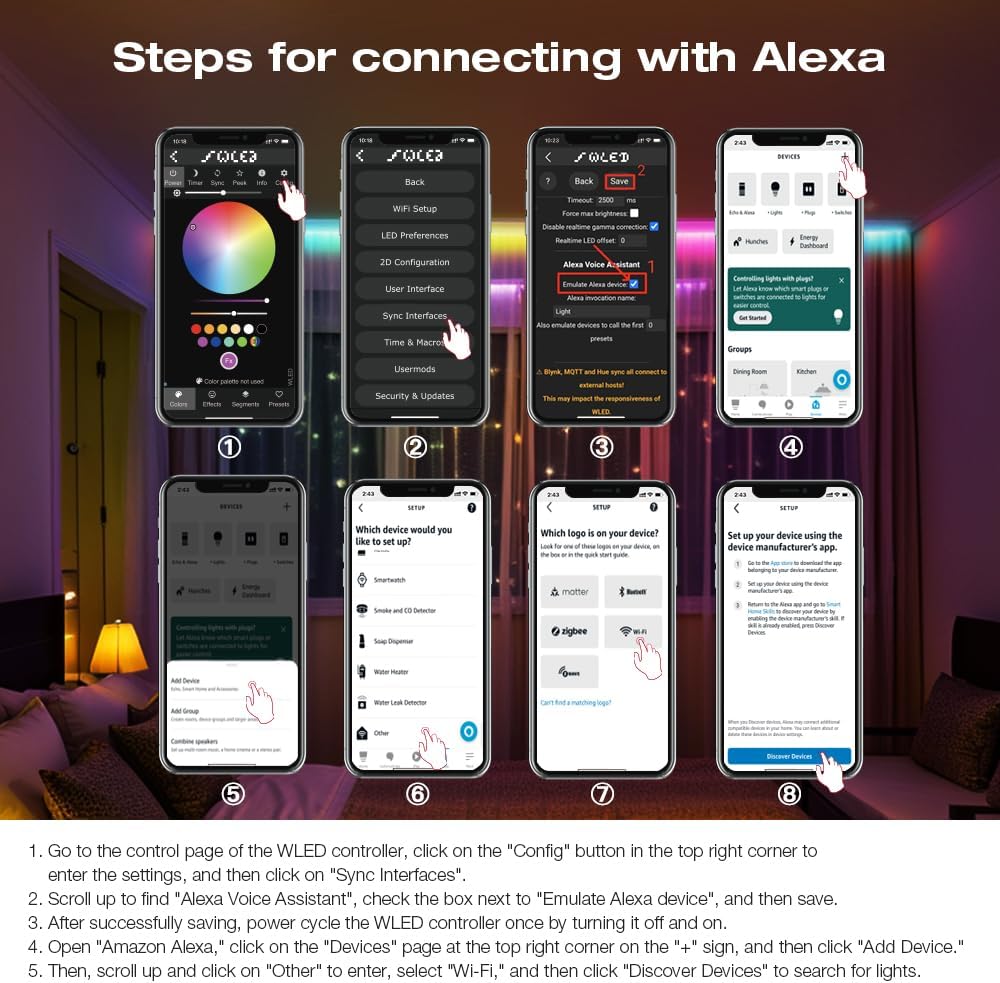
- Go to the control page of the WLED controller in the app, click on the "Config" button in the top right corner to enter the settings, and then click on "Sync Interfaces".
- Scroll up to find "Alexa Voice Assistant", check the box next to "Emulate Alexa device", and then save.
- After successfully saving, power cycle the WLED controller once by turning it off and on.
- Open the Amazon Alexa app, click on the "Devices" page at the top right corner on the "+" sign, and then click "Add Device".
- Then, scroll up and click on "Other" to enter, select "Wi-Fi", and then click "Discover Devices" to search for lights.
7. Firmwareopdateringer
The integrated UART port allows for convenient firmware updates. Refer to the official WLED documentation or GLEDOPTO support resources for detailed instructions on how to perform firmware updates. Always ensure you are using the correct firmware version for your ESP32 chip to prevent damage.
8. Vedligeholdelse
- Keep the controller clean and free from dust. Use a dry, soft cloth for cleaning.
- Undgå at udsætte controlleren for fugt eller ekstreme temperaturer.
- Sørg for korrekt ventilation omkring enheden for at forhindre overophedning.
9. Fejlfinding
- Controlleren tænder ikke: Kontroller strømforsyningens tilslutninger, og sørg for, at indgangsvolumen er korrekttage is within the 5-24V DC range.
- LED strip not lighting up: Verify all wiring connections (VCC, DATA, GND) are secure and correct. Ensure the LED strip type is supported by the controller.
- Ingen Wi-Fi-forbindelse: Perform a long press (10 seconds) on the Opt button to reset the controller and activate the WLED-AP hotspot for re-configuration. Ensure your router is operating on a 2.4GHz band.
- Alexa integration issues: Double-check that "Emulate Alexa device" is enabled in the WLED app settings and that you have power cycled the controller after saving. Ensure the Alexa app is discovering devices on the correct network.
- Incorrect colors or effects: Verify the LED strip type and IC settings in the WLED app.
10. Garanti og support
For warranty information and technical support, please refer to the GLEDOPTO official webwebstedet eller kontakt din forhandler. Gem din købskvittering til garantikrav.


