Indledning
The Ozeino OW810 Wireless Gaming Headset delivers an immersive audio experience for gamers across multiple platforms. Featuring lossless audio, a flip microphone with ENC noise cancellation, and versatile connectivity options including 2.4GHz USB-A/USB-C and Bluetooth 5.3, this headset is designed for extended gaming sessions with up to 40 hours of battery life. It is compatible with PS5, PS4, PC, Mac, Laptop, Switch, Mobile, and Tablets.

Figure 1: Ozeino OW810 Wireless Gaming Headset (Yellow) with USB-A/USB-C dongle.
Opsætning
The Ozeino OW810 headset offers multiple connection methods for broad compatibility.
1. 2.4 GHz trådløs forbindelse (anbefales til spil)
This mode provides ultra-low latency (less than 30ms) for optimal gaming performance.
- For PC, PS5, PS4, Mac, Laptop, Switch:
- Locate the 2.4GHz USB dongle. This dongle includes both a standard USB-A connector and a detachable USB-C connector.
- Plug the appropriate connector (USB-A or USB-C) into your device's USB port.
- Power on the headset. The headset will automatically connect to the dongle.
- Sørg for, at headsettet er valgt som standardenhed for lydinput og -output i dine systemindstillinger.
- For Mobile Phones/Tablets (with USB-C port):
- Detach the USB-C connector from the USB-A dongle.
- Plug the USB-C connector into your mobile device.
- Power on the headset. The headset will automatically connect.

Figure 2: Connectivity options for the Ozeino OW810 headset, including USB-A for PS5/PS4/PC/Laptop and USB-C for Phone/Tablet/Switch.
2. Bluetooth-forbindelse
Ideal for mobile phones, laptops, and Switch (audio only, microphone function not supported in Bluetooth mode).
- Tænd headsettet.
- Press and hold the Bluetooth button on the headset until the indicator light flashes, indicating pairing mode.
- On your device, go to Bluetooth settings and select "OW810" from the list of available devices to pair.
3. 3.5mm Wired Mode
This mode supports music and calls only, and is compatible with PC, Laptop, PS5, and PS4.
- Connect one end of the included 3.5mm audio cable to the headset's 3.5mm jack.
- Connect the other end to your device's 3.5mm audio port.
Note: The Ozeino OW810 wireless gaming headset is NOT compatible with Xbox consoles.
Betjeningsvejledning
Kontrol og funktioner
The headset features intuitive controls for easy access to various functions during gameplay or media consumption.
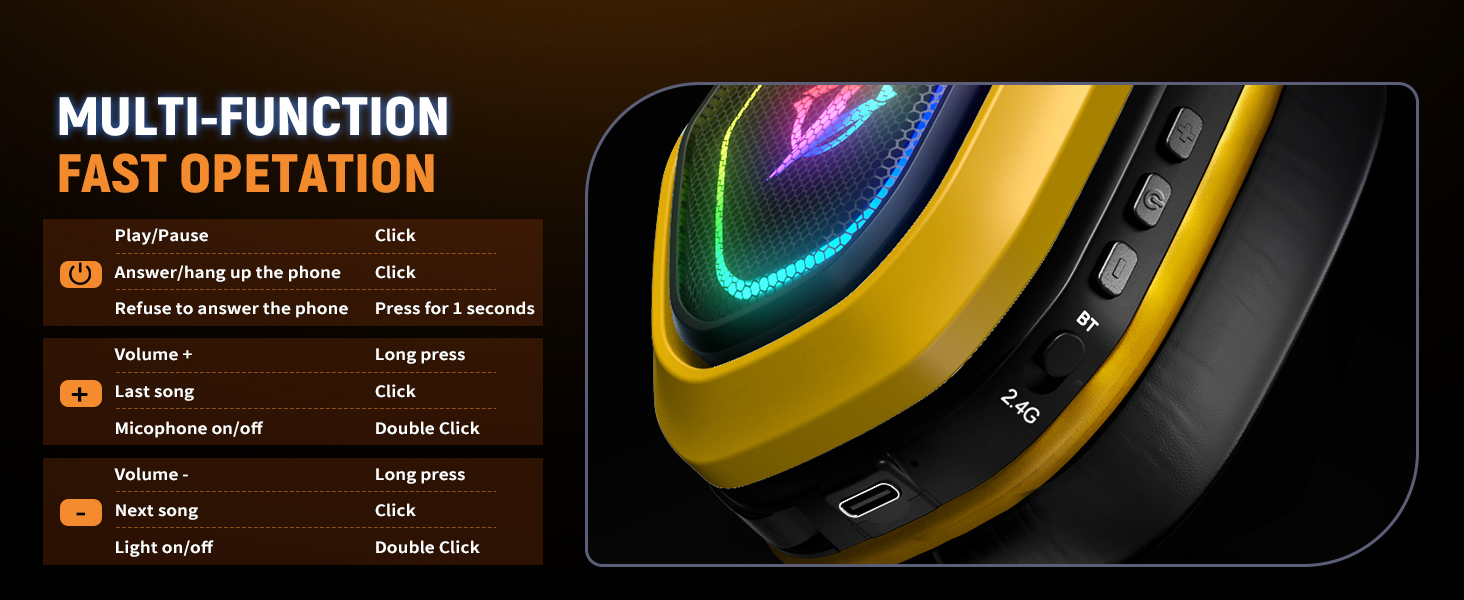
Figure 3: Multi-function button layout for quick operation.
| Handling | Fungere |
|---|---|
| Klik på tænd / sluk -knap | Afspil/pause lyd |
| Click Power Button (Incoming Call) | Besvar/læg på telefonopkald |
| Press Power Button for 1 second (Incoming Call) | Refuse to answer phone call |
| Tryk længe på Lydstyrke + | Øg lydstyrken |
| Klik på Lydstyrke + | Forrige sang |
| Double Click Mic Button | Mikrofon til / fra |
| Long press Volume - | Sænk lydstyrken |
| Click Volume - | Næste sang |
| Double Click Light Button | Lys On/Off |
Lydfunktioner
Experience immersive sound with 7.1 surround sound and deep bass, enhancing your gaming and media experience. The 50mm drivers deliver clear audio, allowing you to pinpoint in-game sounds like footsteps and reloads.

Figure 4: Visualizing 7.1 Surround Sound and Deep Bass capabilities.
The flip microphone features Environmental Noise Cancellation (ENC) technology, ensuring your voice is transmitted clearly to your teammates by reducing background noise.

Figure 5: The microphone features 95% noise cancellation for clear communication.
Batterilevetid og opladning
The OW810 headset is equipped with an 800mAh battery, providing extended usage times.
- Fuld opladningstid: Cirka 3 timer.
- Battery Life (Lights On): 20+ hours.
- Battery Life (Lights Off): 40+ hours.
- Påmindelse om lavt strømforbrug: 10-15 minutes before depletion.
Use the included 1.2M charging cable to charge the headset via a USB power source.

Figure 6: Battery lasting data for reference, showing charging time and usage hours with lights on/off.
Opretholdelse
Proper care will extend the life and performance of your Ozeino OW810 headset.
- Rensning: Brug en blød, tør klud til at tørre headsettet af. For ørekopper, en let tør kludamp En klud kan bruges, men sørg for, at der ikke kommer fugt ind i højttalergitrene. Undgå skrappe kemikalier eller slibende rengøringsmidler.
- Opbevaring: Store the headset in a cool, dry place away from direct sunlight and extreme temperatures. When not in use, it is recommended to store it in a protective case to prevent dust accumulation and physical damage.
- Pleje af ørekopper: The headset features breathable ear muffs made from premium memory foam for superior comfort. Regularly inspect them for wear and tear.
- Kabelstyring: Avoid sharp bends or kinks in the charging and audio cables to prevent internal wire damage.

Figur 7: Nærbillede view of the breathable ear muffs, highlighting superior comfort and design.
Fejlfinding
If you encounter issues with your Ozeino OW810 headset, refer to the following common problems and solutions.
Ingen lyd eller lav lydstyrke
- Tjek lydstyrkeniveauer: Ensure the headset's volume is turned up using the '+' button and that your device's volume is also set appropriately.
- Correct Output Device: Verify that the Ozeino OW810 is selected as the default audio output device in your computer's sound settings or console's audio settings.
- Genopret forbindelse: For 2.4GHz wireless, unplug and re-plug the USB dongle. For Bluetooth, unpair and re-pair the headset.
- Batteriniveau: Ensure the headset is sufficiently charged. Low battery can affect audio performance.
Mikrofon virker ikke
- Mikrofon mute: Double-click the Mic button to ensure the microphone is not muted.
- Correct Input Device: In your device's sound settings, confirm that the Ozeino OW810 is selected as the default microphone input device.
- Bluetooth Mode Limitation: Remember that the microphone function is generally not supported when connected via Bluetooth mode to mobile phones or Switch. Use 2.4GHz wireless or wired mode for microphone functionality.
- Fysisk forbindelse: Ensure the flip microphone is fully extended and properly connected.
Connectivity Issues (Frequent Disconnections)
- Interferens: Move away from other wireless devices (Wi-Fi routers, cordless phones) that might cause interference with the 2.4GHz signal.
- Afstand: Ensure you are within the effective range of the wireless connection (typically up to 10 meters for 2.4GHz and Bluetooth).
- Dongle Placement: For 2.4GHz, try plugging the USB dongle into a different USB port on your device.
- Genstart enheder: Sometimes, simply restarting your computer, console, or mobile device can resolve connectivity issues.
Headset Not Powering On
- Oplad batteri: Connect the headset to a power source using the charging cable and allow it to charge for at least 30 minutes before attempting to power it on again.
- Check Charging Cable/Port: Ensure the charging cable is not damaged and the charging port on the headset is clean and free of debris.
Specifikationer
| Feature | Detalje |
|---|---|
| Modelnavn | OW810 |
| Forbindelsesteknologi | Wireless (2.4GHz), Bluetooth 5.3, 3.5mm Wired |
| Kompatible enheder | PS5, PS4, PC, Mac, Laptop, Switch, Mobile, Tablets, Cellphones |
| Hovedtelefonstik | 3.5 mm Jack |
| Audio driver størrelse | 50 mm |
| Frekvensområde | 20 Hz - 20,000 Hz |
| Støjkontrol | Sound Isolation (ENC for Mic) |
| Batterikapacitet | 800 mAh (approximate, derived from 40H battery life) |
| Opladningstid | 3 timer |
| Varens vægt | 0.085 ounces (ca. 2.4 gram) |
| Farve | Gul |
| Inkluderede komponenter | User Manual, 1.2M Charging Cable, USB-C & A Connector |
Garanti og support
Ozeino stands behind the quality of its products. For warranty information and customer support, please refer to the official Ozeino webhjemmeside eller kontakt deres kundeservice direkte.
Du kan også besøge Ozeino Store on Amazon for yderligere produktinformation og supportressourcer.


Figure 8: Ozeino's commitment to quality and advanced manufacturing.


