Transformers Legacy Deluxe Class Origin Bumblebee Instruction Manual
Model: G1292
1. Produktet er slutview
The Transformers Legacy Deluxe Class Origin Bumblebee action figure brings the iconic character to life, inspired by his appearance in the first episode of the 1984 G1 animated series. This 5.5-inch figure is designed for collectors and fans aged 8 and up, offering versatile play and display options.
It features a 2-in-1 conversion capability, transforming between a robot mode and a Cybertronian hovercraft mode. The figure includes a blaster and five energy conductor accessories, enhancing its display and play value.

Image: Origin Bumblebee figure in robot mode, ready for action.
2. Sikkerhedsoplysninger
ADVARSEL: KVÆLNINGSFARE – Små dele kan dannes. Ikke egnet til børn under 3 år.
Please ensure that all small accessories are kept away from young children to prevent accidental ingestion. Adult supervision is recommended during play, especially for younger users.
3. Hvad er der i æsken
- 1 x Origin Bumblebee Action Figure
- 1 x Blastertilbehør
- 5 x Energy Conductor Accessories
- Instruktionsmanual (dette dokument)

Image: Contents as packaged, including the figure and accessories.
4. Opsætning og transformation
The Origin Bumblebee figure converts between robot and Cybertronian hovercraft modes in 23 steps. Follow these general guidelines for transformation:
- Indledende inspektion: Carefully remove the figure and accessories from the packaging. Familiarize yourself with the figure's joints and moving parts.
- Robot Mode to Cybertronian Hovercraft Mode:
Begin by folding the arms and legs according to the molded lines and hinges. Ensure all panels align correctly to form the sleek hovercraft shape. Pay close attention to the leg panels, as they form part of the vehicle's rear section.

Image: Origin Bumblebee in Cybertronian hovercraft mode.
- Cybertronian Hovercraft Mode to Robot Mode:
Reverse the transformation steps, carefully unfolding the vehicle panels to reveal the robot form. Ensure all joints click into place securely for stability. The back of the packaging provides a visual guide for the transformation sequence.
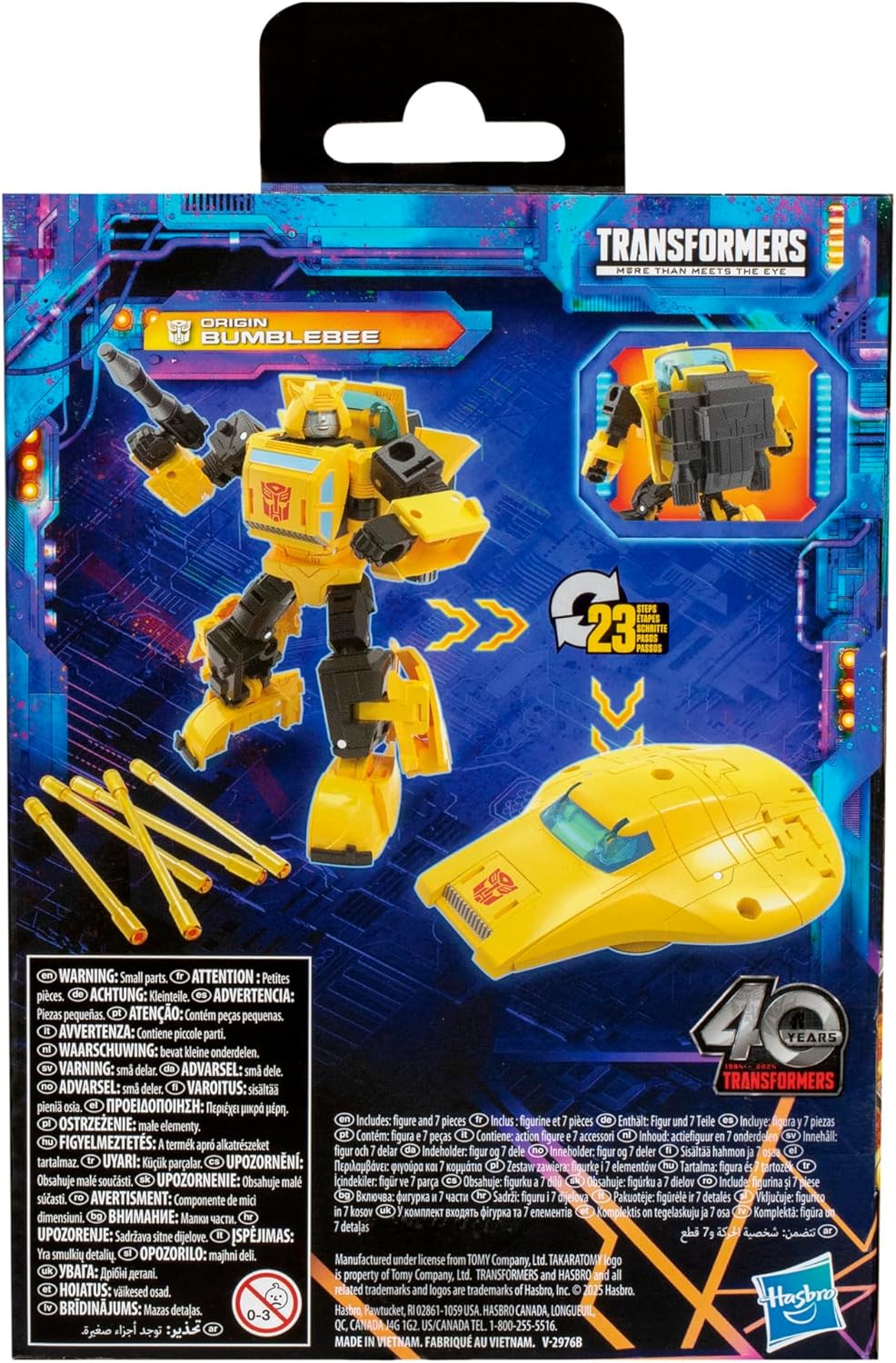
Image: Visual guide for transformation steps.
5. Betjening af figuren
5.1 Artikulation og posering
The Origin Bumblebee figure features articulated head, arms, and legs, allowing for a wide range of dynamic action poses. Gently move the joints to achieve desired stances. Avoid forcing joints beyond their natural range of motion to prevent damage.

Image: Origin Bumblebee in a dynamic action pose.
5.2 Tilbehørsmontering
The figure comes with a blaster and five energy conductor accessories. These accessories can be attached to the figure in robot mode. Locate the designated ports on the figure's hands and other areas to securely fit the accessories.
- Blaster: Insert the blaster into Bumblebee's hand port.
- Energy Conductors: These can be attached to various ports on the figure, particularly in robot mode, to simulate energy effects or additional weaponry.

Image: Origin Bumblebee with energy conductor accessories.
6. Vedligeholdelse og pleje
- Rensning: Tør figuren af med en blød, tør klud for at fjerne støv. Ved genstridigt snavs, tør den let.amp En klud kan bruges, men undgå skrappe kemikalier eller slibende rengøringsmidler.
- Opbevaring: Opbevar figuren et køligt, tørt sted væk fra direkte sollys og ekstreme temperaturer for at forhindre materialenedbrydning eller misfarvning.
- Håndtering: Always handle the figure by its main body parts. Avoid excessive force on small or thin components, especially during transformation.
7. Fejlfinding
| Problem | Mulig årsag | Løsning |
|---|---|---|
| Figure parts (e.g., leg panels) pop off during transformation. | Common during complex transformations; parts are designed to detach rather than break under stress. | Gently reattach the popped-off part. Ensure proper alignment before applying pressure. Refer to the transformation guide on the packaging for correct panel orientation. |
| Joints feel too tight or stiff. | Manufacturing tolerance or newness of the figure. | Carefully and slowly work the joint back and forth to loosen it. Do not force it. If a joint feels excessively tight, a very small amount of silicone shock oil (not petroleum-based lubricants) can be applied with a toothpick, but this is generally not recommended unless absolutely necessary. |
| Figure does not hold a pose well. | Loose joints or improper transformation. | Ensure all transformation steps are completed correctly and parts are fully tabbed in. If joints are loose, they may require minor tightening (e.g., applying a thin layer of clear nail polish to the peg, allowing it to dry, then reassembling, but this is an advanced modification). |
8. Produktspecifikationer
- Mærke: Transformere
- Modelnummer: G1292
- Figure Height: Cirka 5.5 tommer (14 cm)
- Konverteringstrin: 23 steps (Robot to Cybertronian Hovercraft)
- Anbefalet alder: 8 år og opefter
- Produktdimensioner: 14.63 x 10.5 x 6.13 tommer (emballage)
- Varens vægt: 2.6 ounce
- Udgivelsesdato: 14. januar 2025
- Fabrikant: Hasbro
9. Garanti og support
For information regarding product warranty, returns, or technical support, please refer to the official Hasbro customer service channels or the retailer from whom the product was purchased. Keep your proof of purchase for any warranty claims.
You can often find support information on the official Transformers or Hasbro websites. Look for sections like "Customer Service," "Support," or "Contact Us."
Bemærk: Specifikke garantivilkår kan variere afhængigt af region og forhandler.


