1. Introduktion
Thank you for choosing the Darmoshark TOP98 Wireless Mechanical Keyboard. This high-performance keyboard is designed for both gaming and productivity, featuring a compact 98% layout, triple-mode connectivity (2.4G wireless, Bluetooth 5.0, and USB-C wired), hot-swappable switches, and a long-lasting 4000mAh battery. This manual provides detailed instructions on setting up, operating, and maintaining your keyboard to ensure optimal performance and longevity.
2. Pakkens indhold
- Darmoshark TOP98 Wireless Mechanical Keyboard
- USB-C til USB-A-kabel
- 2.4G Wireless Receiver (dongle)
- Keycap aftrækker
- Aftrækker
- Brugervejledning (dette dokument)
3. Produktet er slutview
The Darmoshark TOP98 keyboard combines a compact design with robust features. Below are key visual references and descriptions of its components and layout.

Figur 3.1: Top-down view of the Darmoshark TOP98 keyboard, showcasing its 98-key layout and vibrant RGB backlighting. Note the integrated screen display and rotary knob in the upper right.
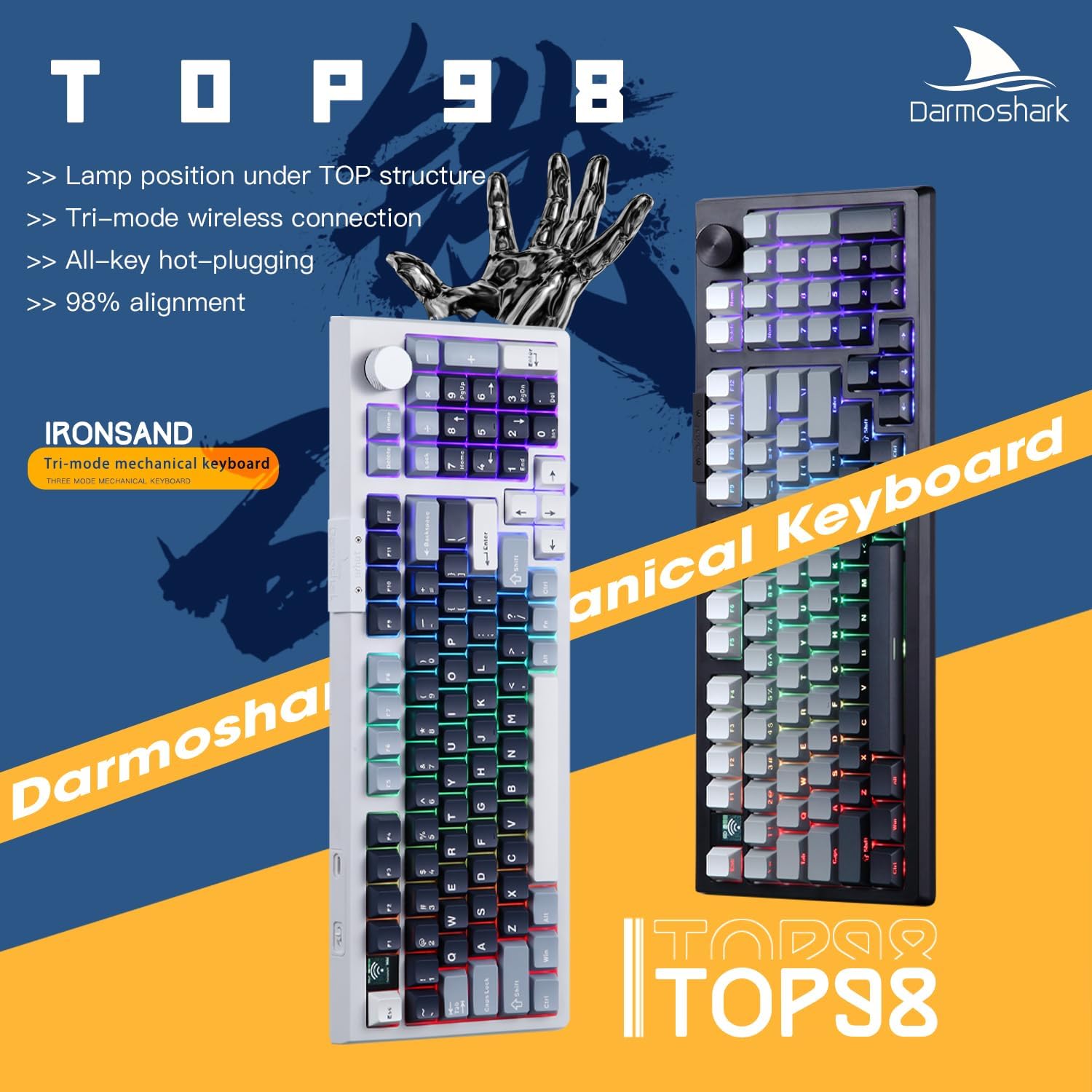
Figur 3.2: Overview highlighting the TOP98's key attributes: lamp position under TOP structure, tri-mode wireless connection, all-key hot-plugging, and 98% alignment.
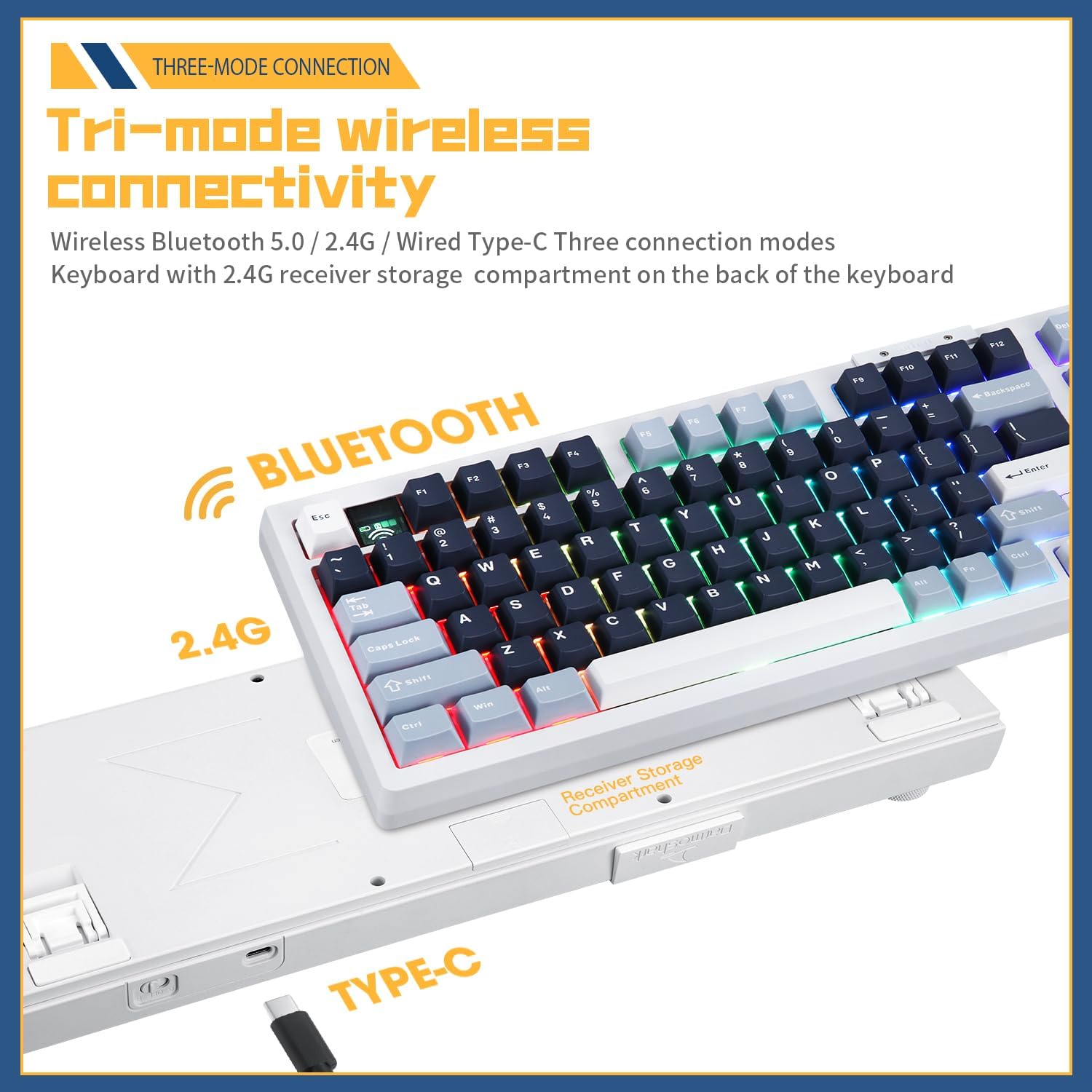
Figur 3.3: Illustration of the keyboard's versatile tri-mode connectivity, supporting Wireless Bluetooth 5.0, 2.4Ghz via dongle, and wired USB-C. The 2.4G receiver storage compartment is located on the back of the keyboard.

Figur 3.4: The 98% layout retains the essential numeric keypad while offering approximately 15% space savings compared to a full-size 104-key keyboard, providing more desk space for mouse movement.

Figur 3.5: The keyboard features full hot-swappable switch sockets, allowing users to easily replace 3-pin or 5-pin mechanical switches to customize typing feel and sound without soldering.

Figur 3.6: The TOP98 comes with PBT original height keycaps, manufactured using a two-color injection molding process. PBT material offers a comfortable touch, delicate feel, and superior wear and oil resistance compared to ABS, ensuring clear characters that resist fading.

Figur 3.7: Detailed breakdown of the Darmoshark Custom Silver Shark linear axle switch, designed for quick triggers. The diagram shows components like the POM buttons, nylon superstructure and foundation, 22mm double section spring, and shrapnel structure for reduced amplitude. A force curve graph illustrates its 35gf initial pressure, 47gf trigger pressure, 1.5mm trigger stroke, and 3.6mm total itinerary.
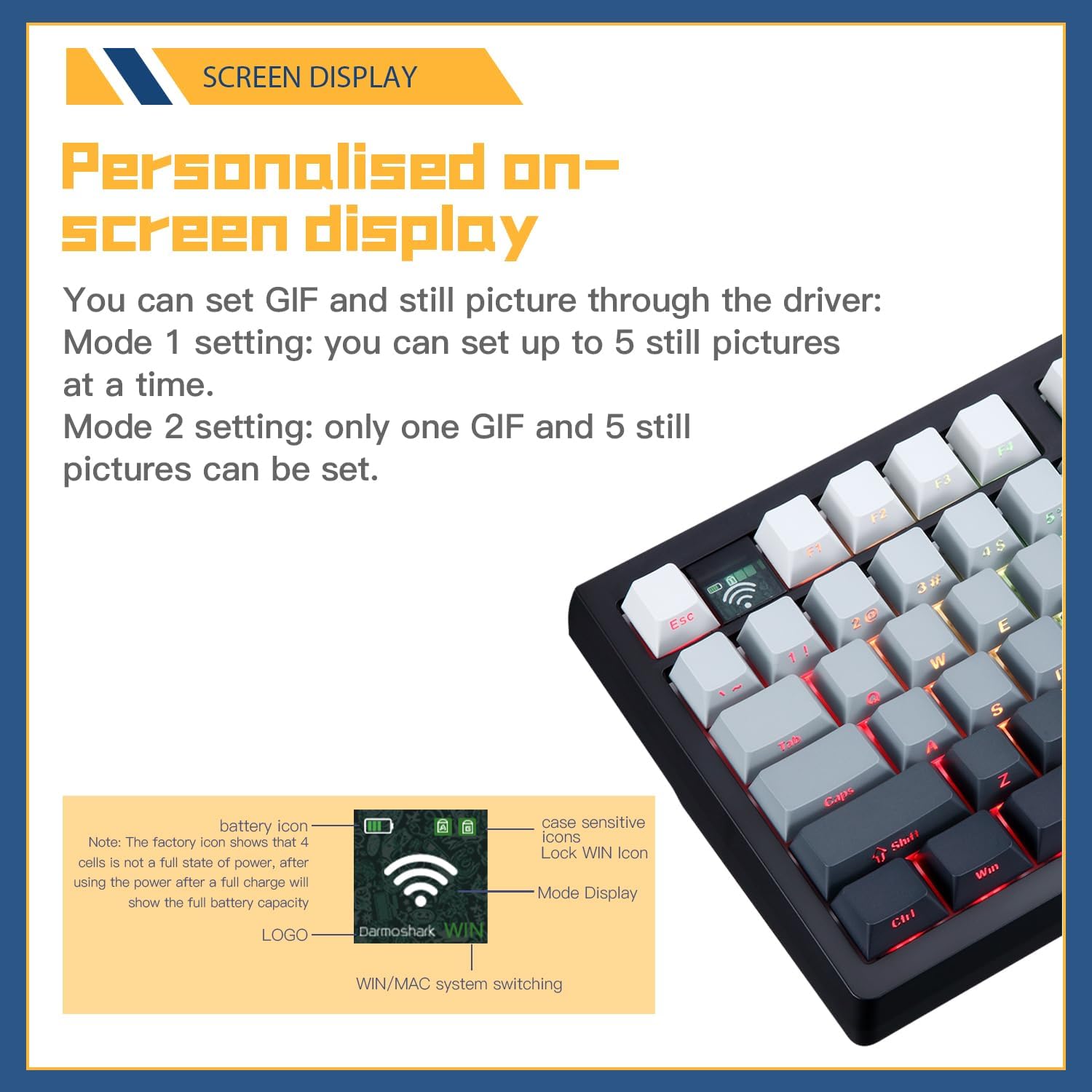
Figur 3.8: The personalized on-screen display can show battery status, connectivity icons (Wi-Fi for 2.4G, Bluetooth icon), Lock WIN icon, and current mode display. Through the driver software, users can set up to 5 still pictures in Mode 1, or one GIF and 5 still pictures in Mode 2. Note: The factory battery icon may not show full charge until after initial use and charging.

Figur 3.9: The TOP98 is equipped with a built-in 4000mAh high-capacity lithium battery. With custom hibernation technology for energy saving, it offers approximately 148 hours of continuous use (with backlight off) and about 296 hours of interval use.

Figur 3.10: The unique structural design incorporates silicone silencer pads on the top and bottom of the PCB board, along with acoustic foam. This "sandwich" design effectively eliminates cavity sound and ensures a pure, comfortable key sound.

Figur 3.11: The standalone driver software allows for extensive customization, including key remapping, macro creation, and RGB lighting effects. It functions seamlessly in both wired and wireless modes.

Figur 3.12: Dimensional drawing of the Darmoshark TOP98 keyboard, indicating its length of 392mm, width of 142.5mm, and height of 40.2mm.
4. Opsætning og tilslutning
The TOP98 offers three connection modes: 2.4G wireless, Bluetooth 5.0, and USB-C wired.
4.1. 2.4G Wireless Mode
- Locate the 2.4G wireless receiver (dongle) stored in the compartment on the back of the keyboard.
- Sæt 2.4G-modtageren i en ledig USB-port på din computer.
- Toggle the mode switch on the keyboard to the 2.4G position (usually indicated by a wireless icon).
- The keyboard should automatically connect. The screen display will show the 2.4G connection icon.
4.2. Bluetooth 5.0-tilstand
- Toggle the mode switch on the keyboard to the Bluetooth position (usually indicated by a Bluetooth icon).
- Aktiver Bluetooth på din computer eller enhed, og søg efter nye enheder.
- The keyboard will appear as "Darmoshark TOP98" or similar. Select it to pair.
- If prompted, enter the pairing code displayed on your screen using the keyboard.
- The screen display will show the Bluetooth connection icon upon successful pairing. The keyboard can store multiple Bluetooth profiles. Refer to the full software manual for switching between profiles.
4.3. USB-C Wired Mode
- Tilslut den ene ende af det medfølgende USB-C-kabel til tastaturets USB-C-port.
- Connect the other end of the USB-A cable to an available USB port on your computer.
- The keyboard will automatically switch to wired mode and begin charging. No special driver installation is typically required for basic functionality.
4.4. Opladning af tastaturet
Connect the keyboard to your computer or a USB power adapter using the USB-C cable. The screen display will indicate charging status. A full charge typically takes several hours. The 4000mAh battery provides extended usage time.
5. Betjeningsvejledning
5.1. Grundlæggende nøglefunktioner
The TOP98 features a standard 98-key layout. Most keys function as labeled. Refer to the keyboard's keycap legends for specific functions. The rotary knob typically controls volume by default (rotate) and media playback (press).
5.2. RGB-lysstyring
The keyboard features customizable RGB backlighting. Specific key combinations (often Fn + a designated key) are used to cycle through lighting modes, adjust brightness, and change colors. Consult the keyboard's quick guide or the software manual for detailed RGB control shortcuts.
5.3. Hot-Swapping Switches
The TOP98 supports hot-swapping of 3-pin and 5-pin mechanical switches. To replace a switch:
- Brug den medfølgende tastaftrækker til forsigtigt at fjerne den ønskede tast.
- Use the provided switch puller to gently grip the top and bottom clips of the switch and pull it straight up.
- Juster stifterne på den nye kontakt med hullerne på printkortet. Sørg for, at stifterne er lige.
- Tryk forsigtigt den nye kontakt på plads, indtil den klikker sikkert. Tving den ikke.
- Udskift tastaturdækslet.
5.4. Softwaretilpasning
For advanced customization, download the official Darmoshark TOP98 driver software from the manufacturer's webwebsted. Softwaren giver dig mulighed for at:
- Remap keys and create macros.
- Customize RGB lighting effects, colors, and brightness.
- Configure the integrated screen display with custom images or GIFs.
- Adjust polling rates and other performance settings.
Ensure your keyboard is connected via USB-C or 2.4G wireless for optimal software functionality.
6. Vedligeholdelse
- Rensning: Use a soft, dry cloth to wipe down the keyboard. For deeper cleaning, remove keycaps using the provided puller and use compressed air to clear debris from between switches. Avoid using harsh chemicals or abrasive materials.
- Batteripleje: To prolong battery life, avoid fully discharging the keyboard frequently. Store in a cool, dry place when not in use for extended periods.
- Opbevaring: When storing the keyboard, especially for long periods, ensure it is turned off to conserve battery.
7. Fejlfinding
| Problem | Mulig løsning |
|---|---|
| Keyboard not connecting in 2.4G/Bluetooth mode. |
|
| Keys not responding or double-typing. |
|
| RGB-belysningen virker ikke eller sidder fast. |
|
| Software not detecting keyboard. |
|
8. Specifikationer
| Feature | Detalje |
|---|---|
| Model | TOP98 |
| Layout | 98-key (98%) |
| Forbindelse | Triple Mode: 2.4G Wireless, Bluetooth 5.0, USB-C Wired |
| Afbrydere | Hot-swappable (compatible with 3-pin/5-pin mechanical switches) |
| tasterne | PBT Original Height, Two-color Injection Moulding |
| Batterikapacitet | 4000mAh Lithium Ion |
| Baggrundsbelysning | Full RGB |
| Dimensioner (L x B x H) | 392 mm x 142.5 mm x 40.2 mm (ca. 15.4 x 5.6 x 1.6 tommer) |
| Varens vægt | 2.5 pund |
| Kompatible enheder | PC |
| Fabrikant | Darmoshaj |
| Dato først tilgængelig | 9. juli 2024 |
9. Garanti og support
Darmoshark products come with a standard manufacturer's warranty. For specific warranty terms and conditions, please refer to the warranty card included with your product or visit the official Darmoshark website. If you encounter any issues or require technical assistance, please contact Darmoshark customer support through their official channels or the retailer from whom you purchased the product. Please have your model number (TOP98) and purchase details ready when contacting support.


