1. Introduktion
The ARROWMAX SGS PRO Smart Mini Electric Engraving and Polishing Pen is a versatile tool designed for precision work on various materials. It is suitable for refreshing, customizing, and creating intricate designs on plastic, wood, stone, steel, aluminum, gold, glass, ceramics, jade, and other crystals/minerals. This tool is ideal for craftwork, including miniatures, jewelry, prototypes, sculptures, and detailed art or design projects.
Key features include a diamond-tipped engraving head for precise designs, a magnetic USB charging system for convenience, and a smart motion system that adjusts speed based on the tool's angle. The device also offers optional app customization for precise speed and direction control.
2. Pakkens indhold
Bekræft, at alle nedenstående varer er inkluderet i din pakke:
- 1 x SGS PRO Electric Engraving and Polishing Pen
- 30 x graveringsbits
- 12 x poleringsbits
- 1 x Opbevaringspose
- 1 x USB ladekabel
- 1 x Brugermanual (dette dokument)

Figure 2.1: Complete set of ARROWMAX SGS PRO included items.
3. Produktet er slutview
Familiarize yourself with the components of the SGS PRO engraving pen:
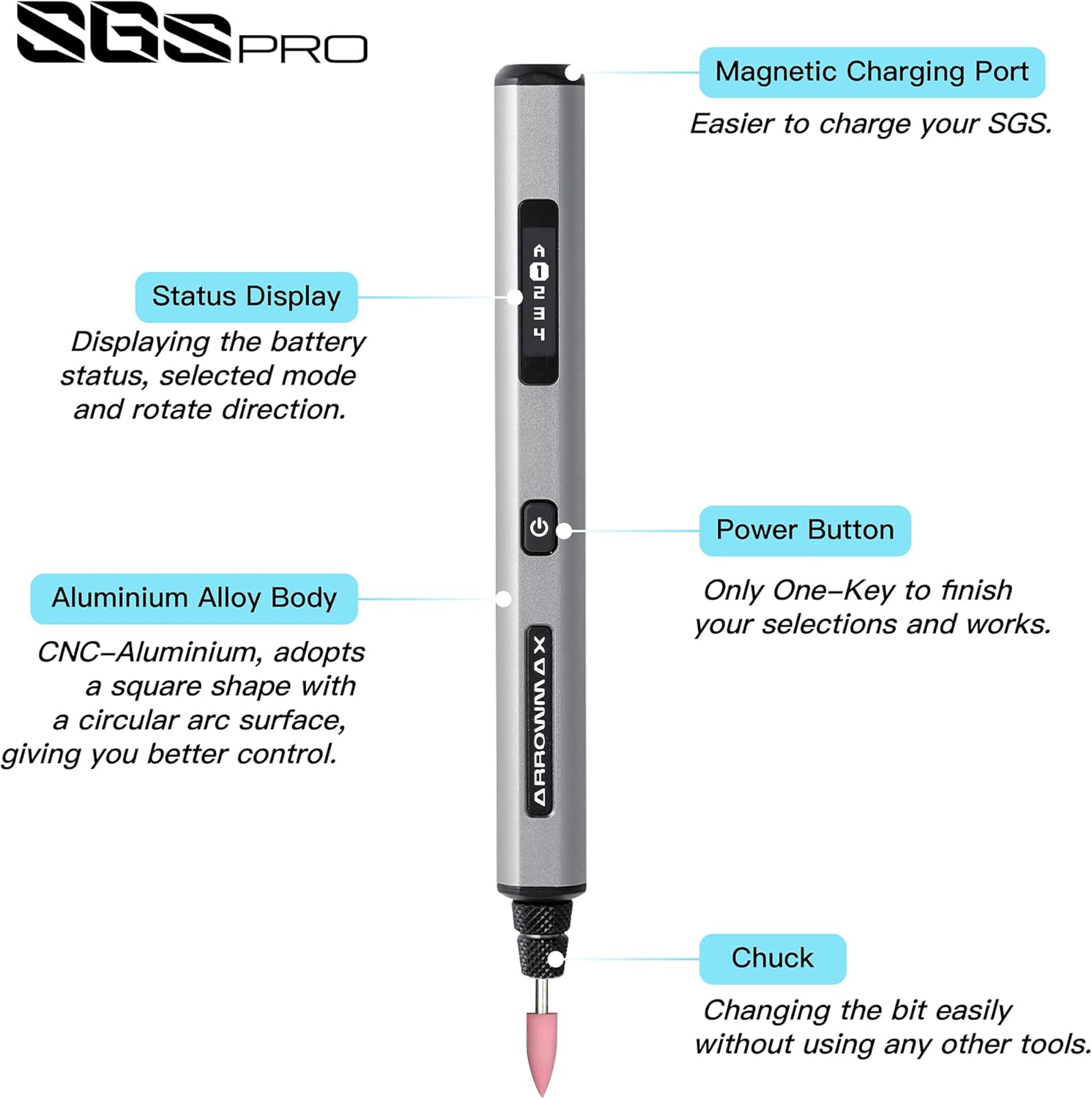
Figure 3.1: SGS PRO Component Diagram.
- Magnetisk ladeport: Located at the top, this port allows for convenient magnetic USB charging.
- Statusvisning: An OLED screen that shows battery status, selected mode, and rotation direction.
- Aluminiumlegeringskrop: The main body of the pen, designed for durability and comfortable grip.
- Power knap: Used to power the device on/off and to cycle through modes or confirm selections.
- chuck: The mechanism at the tip where engraving and polishing bits are inserted and secured.
4. Opsætning
4.1 Opladning af enheden
Before first use, fully charge the SGS PRO pen. The device features a 4V rechargeable battery that provides approximately 90 minutes of operation on a full charge.
- Connect the provided USB charging cable to the magnetic charging port on the top of the pen.
- Tilslut den anden ende af USB-kablet til en kompatibel USB-strømkilde (f.eks. en computers USB-port eller en USB-vægadapter).
- The Status Display will indicate the charging progress. Once fully charged, the display will show a full battery icon.

Figure 4.1: Charging the SGS PRO pen.
4.2 Installing Engraving/Polishing Bits
The SGS PRO comes with 30 engraving bits and 12 polishing bits. Select the appropriate bit for your task.
- Sørg for, at enheden er slukket.
- Gently insert the shaft of the desired engraving or polishing bit into the chuck at the tip of the pen.
- Push the bit firmly until it is securely seated. The chuck is designed for easy bit changes without additional tools.
- To remove a bit, gently pull it straight out from the chuck.

Figur 4.2: Udvalg af graverings- og poleringsbor.
5. Betjeningsvejledning
5.1 Powering On/Off and Basic Operation
- To power on the device, press and hold the Power Button until the Status Display illuminates.
- The display will show the current speed mode and rotation direction.
- Press the Power Button briefly to cycle through the preset speed modes.
- To power off, press and hold the Power Button until the display turns off.
5.2 Smart Motion System
The SGS PRO features a smart motion system that automatically adjusts the tool's speed based on the angle of the twist. This allows for precise and consistent engraving and polishing results, adapting to your hand movements during operation.
5.3 App Customization (Optional)
For advanced control, the ARROWMAX smartphone app (available for Android and iOS) allows precise customization of speed and direction. The app allows for speeds up to 30,000 RPM, with adjustments in 500 RPM increments.
- Download the "Arrowmax" app from your device's app store.
- Ensure Bluetooth is enabled on your smartphone and the SGS PRO pen is powered on.
- Open the app and follow the on-screen instructions to pair with your SGS PRO device.
- Within the app, you can precisely adjust the speed and switch between forward and reverse rotation directions for each mode.

Figure 5.1: ARROWMAX App Interface for customization.
5.4 Materialekompatibilitet og anvendelser
The SGS PRO is designed for use on a wide range of materials, including but not limited to:
- Plast
- Træ
- Sten
- Stål
- Aluminium
- Gold and other metals
- Glas
- Keramik
- Crystals and minerals (e.g., jade)
Almindelige applikationer inkluderer:
- Engraving and carving intricate designs
- Polishing surfaces
- Grinding and shaping
- Model making and prototyping
- Customizing personal items

Figur 5.2: Eksamples of material customization.

Figure 5.3: SGS PRO features in use.
6. Vedligeholdelse
Proper maintenance ensures the longevity and optimal performance of your SGS PRO pen.
- Rensning: After each use, gently wipe the pen body with a soft, dry cloth to remove dust and debris. Use a small brush to clean around the chuck area, ensuring no material residue accumulates. Do not use harsh chemicals or abrasive cleaners.
- Bitpleje: Inspect engraving and polishing bits regularly for wear and tear. Replace dull or damaged bits to maintain precision and prevent damage to the workpiece or the tool. Store bits in their designated slots within the aluminum case to prevent loss and damage.
- Opbevaring: When not in use, store the SGS PRO pen and its accessories in the provided aluminum case in a cool, dry place, away from direct sunlight and extreme temperatures.
- Opladning: Avoid overcharging the battery. Disconnect the charger once the battery is full. If storing for extended periods, charge the battery to approximately 50% to prolong its lifespan.
7. Fejlfinding
If you encounter issues with your SGS PRO pen, refer to the following common problems and solutions:
| Problem | Mulig årsag | Løsning |
|---|---|---|
| Enheden tænder ikke. | Batteriet er afladet. | Oplad enheden helt ved hjælp af det medfølgende USB-kabel. |
| Enheden oplades ikke. | Problem med opladningskabel eller strømkilde. | Ensure the USB cable is securely connected. Try a different USB port or power adapter. Verify the magnetic connection is clean and secure. |
| Bitten er løs eller falder ud. | Bit not inserted correctly or chuck is worn. | Ensure the bit is pushed firmly into the chuck until it is secure. If the problem persists, contact customer support. |
| Inconsistent speed or performance. | Low battery, incorrect mode, or app connection issue. | Charge the battery. Check the Status Display for the current mode. If using the app, ensure a stable Bluetooth connection. |
| Appen kan ikke oprette forbindelse til enheden. | Bluetooth er slukket, enheden er slukket, eller der er et problem med appen. | Ensure Bluetooth is enabled on your phone and the SGS PRO is powered on. Restart the app and/or the device. |
| Device does not rotate in reverse. | Direction setting not activated. | Use the ARROWMAX app to select the reverse rotation direction. |
8. Specifikationer
| Feature | Detalje |
|---|---|
| Modelnummer | AM-199213 |
| Mærke | ARROWMAX |
| Voltage | 4 volt |
| Strømkilde | Batteridrevet |
| Batteritype | 1 Lithium Polymer batteri (medfølger) |
| Driftstid | Cirka 90 minutter (efter fuld opladning) |
| Anbefalede anvendelser | Engraving, Polishing |
| Særlige funktioner | Rechargeable, Smart Motion System, App Customization (Optional) |
| Varens vægt | 13.4 ounce |
| Pakkedimensioner | 8.82 x 3.11 x 1.26 tommer |
| Fabrikant | Freemax Technology Company Limited (IMPORT) |
| Dato først tilgængelig | 4. juli 2024 |
9. Sikkerhedsoplysninger
Please read and understand all safety warnings and instructions before operating the SGS PRO pen to prevent electric shock, fire, and serious injury.
- Always wear appropriate personal protective equipment (PPE), such as safety glasses, to protect your eyes from flying debris.
- Ensure your work area is well-lit and clean. Cluttered or dark areas invite accidents.
- Hold børn og omkringstående væk, mens du betjener værktøjet. Distraktioner kan få dig til at miste kontrollen.
- Brug ikke elværktøj i eksplosive atmosfærer, såsom i nærheden af brændbare væsker, gasser eller støv.
- Undgå utilsigtet start. Sørg for, at kontakten er i slukket position, før du tilslutter batteriet, løfter eller bærer værktøjet.
- Tving ikke værktøjet. Brug det rigtige værktøj til din applikation. Det korrekte værktøj vil gøre arbejdet bedre og mere sikkert til den hastighed, som det er designet til.
- Frakobl batteripakken fra værktøjet, før du foretager justeringer, skifter tilbehør eller opbevarer elværktøj.
- Opbevar inaktivt elværktøj utilgængeligt for børn, og lad ikke personer, der ikke er bekendt med elværktøjet eller disse instruktioner, betjene elværktøjet.
- Vedligehold elværktøj og tilbehør. Kontroller for fejljustering eller fastklæbning af bevægelige dele, brud på dele og enhver anden tilstand, der kan påvirke elværktøjets funktion. Hvis det er beskadiget, skal elværktøjet repareres før brug.
- Brug elværktøjet, tilbehøret og værktøjsbits osv. i overensstemmelse med denne vejledning, under hensyntagen til arbejdsforholdene og det arbejde, der skal udføres. Brug af elværktøjet til andre operationer end dem, der er beregnet til, kan resultere i en farlig situation.
- Udsæt ikke værktøjet for regn eller våde forhold. Vand, der trænger ind i et elværktøj, øger risikoen for elektrisk stød.
- Only use the charger specified by the manufacturer. A charger that is suitable for one type of battery pack may create a risk of fire when used with another battery pack.
- Brug kun elværktøj med specielt beregnede batteripakker. Brug af andre batteripakker kan skabe risiko for skader og brand.
10. Garanti og support
The ARROWMAX SGS PRO Electric Engraving and Polishing Pen is manufactured by Freemax Technology Company Limited (IMPORT).
For product support, warranty inquiries, or technical assistance, please contact the manufacturer directly using the information below:
- Fabrikant: Freemax Technology Company Limited (IMPORT)
- Adresse: Room 1203, 12F, Wah Shing Centre, 11-13 Shing Yip Street, Kwun Tong, Hong Kong
- Webwebsted: arrowmax-rc.com
- E-mail: info@arrowmax-rc.com
- Telefon: +852 3590 9790
Gem venligst din købsbevis i tilfælde af garantikrav.
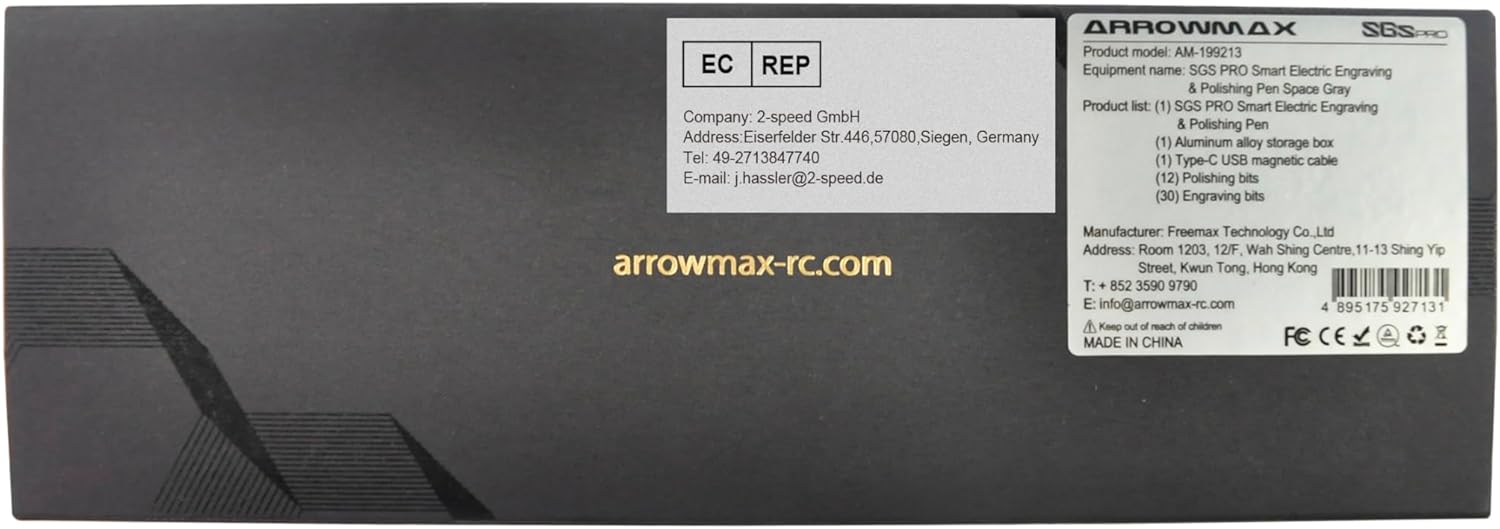
Figure 10.1: Manufacturer and contact information from product packaging.


